
TCL 32S21
Contents
TCL 32-Inch Class HD LED Android Smart TV 3-Series User Manual
Model: 32S21
Brand: TCL
Product Overview
About Your TCL Smart TV
This TCL 32-Inch Class HD LED Android Smart TV 3-Series (Model 32S21) is designed to provide a comprehensive entertainment experience. It features a 720p HD display, integrated Android TV operating system, and built-in Chromecast. This product is part of the Amazon Renewed program, meaning it has been professionally inspected and tested to work and look like new. It offers access to popular streaming services and includes a wall mount for convenient installation.
Key Features
- Built-in Wall Mount: The TV's rear panel includes necessary screw holes for an industry-standard VESA 400x400 mount, simplifying installation. Note: TV stands are not included, a wall mount is provided.
- HD (720p) Resolution: Delivers excellent detail, color, and contrast for an immersive viewing experience.
- Smart TV with Streaming Services: Enjoy instant access to a wide selection of apps from top streaming services such as Netflix, YouTube, Disney+, and Prime Video directly on your TV.
- Compatible Voice Assistant: Works with Google Assistant, allowing you to control your TV, play movies, TV shows, and more using voice commands.
- 2 HDMI Inputs: Connect all your favorite devices through the two HDMI inputs (one with ARC support) to enjoy various content sources.
Package Contents
Please check the box for the following items:
- TCL 32-Inch Class HD LED Android Smart TV
- Wall Mount

Image: The TCL 32-Inch Smart TV displayed alongside the included wall mount bracket, illustrating the complete package.
Setup and Installation
Wall Mount Installation
Your TCL Smart TV is designed for wall mounting. The rear panel features standard VESA mounting holes (400x400) for easy attachment of the included wall mount. Ensure you use appropriate screws and follow the wall mount's instructions for secure installation. It is recommended to have two people for safe mounting.

Image: Rear view of the TCL Smart TV, highlighting the central square pattern of VESA mounting holes for wall bracket attachment.
Connecting Your Devices
Locate the input ports on the side or back of your TV. Connect your power cable to an electrical outlet. Use HDMI cables to connect external devices such as Blu-ray players, game consoles, or cable boxes to the HDMI inputs. One HDMI port supports Audio Return Channel (ARC) for simplified audio connections to compatible sound systems.

Image: Side profile of the TCL Smart TV, clearly showing the various input and output ports available for connecting external devices.
Operating Your Smart TV
Initial Setup
After connecting power, press the power button on the TV or remote. Follow the on-screen prompts to select your language, connect to your Wi-Fi network, and sign in with your Google account. This will enable access to the Google Play Store and other smart features.
Navigating the Android TV Interface
The Android TV home screen provides easy access to your favorite apps, live TV, and recommended content. Use the directional buttons on your remote to navigate through menus and select items. The home screen is customizable, allowing you to arrange apps and channels to your preference.

Image: The TCL Smart TV screen showcasing the vibrant Android TV interface, with various streaming application icons and content recommendations.
Using Voice Assistant
Your TV is compatible with Google Assistant. To use it, press the Google Assistant button on your remote (if available) or say "Hey Google" if the feature is enabled. You can then issue commands to search for content, control playback, get information, and manage smart home devices.
Streaming Services
Access pre-installed streaming apps like Netflix, YouTube, Disney+, and Prime Video directly from the home screen. Ensure your TV is connected to the internet for optimal streaming performance. You may need subscriptions for certain services.
Maintenance and Care
To ensure the longevity and optimal performance of your TCL Smart TV, follow these maintenance guidelines:
- Cleaning the Screen: Gently wipe the screen with a soft, dry, lint-free cloth. For stubborn marks, slightly dampen the cloth with water or a screen-specific cleaning solution. Avoid harsh chemicals or abrasive materials.
- Cleaning the Cabinet: Use a soft, dry cloth to clean the TV cabinet. Do not use liquid or spray cleaners directly on the TV.
- Ventilation: Ensure adequate ventilation around the TV. Do not block ventilation openings. Allow sufficient space around the TV for air circulation to prevent overheating.
- Power Cord: Regularly check the power cord for any damage. If damaged, discontinue use and contact customer support.
- Storage: If storing the TV for an extended period, disconnect it from power and store it in a cool, dry place, protected from dust.
Troubleshooting
If you encounter issues with your TV, refer to the following common problems and solutions:
- No Power:
- Check if the power cord is securely plugged into the TV and the electrical outlet.
- Verify the outlet is working by plugging in another device.
- Try pressing the power button on the TV itself, not just the remote.
- No Picture, But Sound:
- Ensure the correct input source is selected (e.g., HDMI 1, TV).
- Check cable connections between the TV and external devices.
- Try restarting the TV and the connected device.
- No Sound, But Picture:
- Check the volume level and ensure the TV is not muted.
- Verify audio cable connections if using external speakers.
- If using HDMI (ARC), ensure ARC is enabled on both the TV and the audio device.
- Network Connection Issues:
- Restart your Wi-Fi router and modem.
- Go to the TV's network settings and re-enter your Wi-Fi password.
- Ensure the TV is within range of your Wi-Fi router.
- Remote Control Not Working:
- Replace the batteries in the remote control.
- Ensure there are no obstructions between the remote and the TV's IR sensor.
For persistent issues, please refer to the Warranty and Support section for contact information.
Product Specifications
| Feature | Specification |
|---|---|
| Brand Name | TCL |
| Model Number | 32S21 |
| Screen Size | 32 Inches |
| Display Technology | LED |
| Resolution | 720p |
| Operating System | Android |
| Connectivity Technology | HDMI |
| HDMI Inputs | 2 (1 ARC) |
| Supported Internet Services | Netflix, Amazon Instant Video, YouTube |
| Mounting Type | Wall Mount |
| Speaker Type | Built-in |
| Item Weight | 8.2 pounds |
| Package Dimensions | 28.8 x 18.9 x 7.1 inches |
| Date First Available | June 7, 2022 |
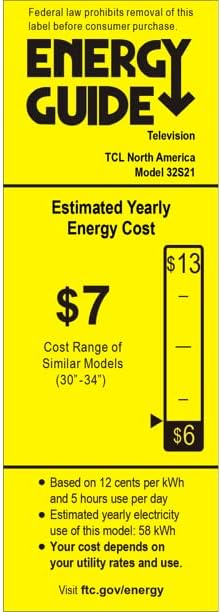
Image: Energy Guide label for the TCL Model 32S21 television, indicating an estimated yearly energy cost of $7 based on 12 cents per kWh and 5 hours per day usage.
Important Safety Information
Please read and follow all safety instructions to prevent injury or damage to your TV:
- Do not expose the TV to rain or moisture.
- Do not place the TV near heat sources such as radiators, heat registers, stoves, or other apparatus (including amplifiers) that produce heat.
- Protect the power cord from being walked on or pinched, particularly at plugs, convenience receptacles, and the point where they exit from the apparatus.
- Only use attachments/accessories specified by the manufacturer.
- Unplug this apparatus during lightning storms or when unused for long periods of time.
- Refer all servicing to qualified service personnel. Servicing is required when the apparatus has been damaged in any way, such as power-supply cord or plug is damaged, liquid has been spilled or objects have fallen into the apparatus, the apparatus has been exposed to rain or moisture, does not operate normally, or has been dropped.
Warranty and Support
As an Amazon Renewed product, your TCL 32-Inch Smart TV is backed by the Amazon Renewed Guarantee. This means the product has been professionally inspected and tested by Amazon-qualified suppliers to work and look like new. If you are not satisfied with your purchase, renewed products are eligible for replacement or refund under the Amazon Renewed Guarantee.
For support, troubleshooting, or to inquire about the Amazon Renewed Guarantee, please visit the Amazon Renewed store page or contact Amazon customer service directly.
For more information on Amazon Renewed products, please visit: Amazon Renewed
Documents and downloads
Ask a question about this manual
Ask about setup, troubleshooting, compatibility, parts, safety, or missing instructions. Manuals+ will review the question and use this page’s manual context to help answer it.