
Zunate KX-T2035CID
Zunate KX-T2035CID Corded Desk Phone User Manual
Model: KX-T2035CID
Introduction
Thank you for purchasing the Zunate KX-T2035CID Corded Desk Phone. This manual provides essential information for setting up, operating, and maintaining your new telephone. Please read these instructions carefully before use and retain them for future reference.
Important Safety Instructions
To reduce the risk of fire, electric shock, or injury, always follow basic safety precautions when using this product.
- Do not use this product near water, such as a bathtub, washbowl, kitchen sink, or laundry tub, in a wet basement, or near a swimming pool.
- Avoid using the telephone during an electrical storm. There may be a remote risk of electric shock from lightning.
- Do not use the telephone to report a gas leak in the vicinity of the leak.
- Use only the power cord and telephone line cord provided with the unit.
- Do not disassemble the unit. Refer all servicing to qualified service personnel.
- Keep the unit away from heat sources and direct sunlight.
Package Contents
Verify that all items listed below are included in your package:
- Zunate KX-T2035CID Telephone Base Unit
- Handset
- Coiled Handset Cord
- Telephone Line Cord
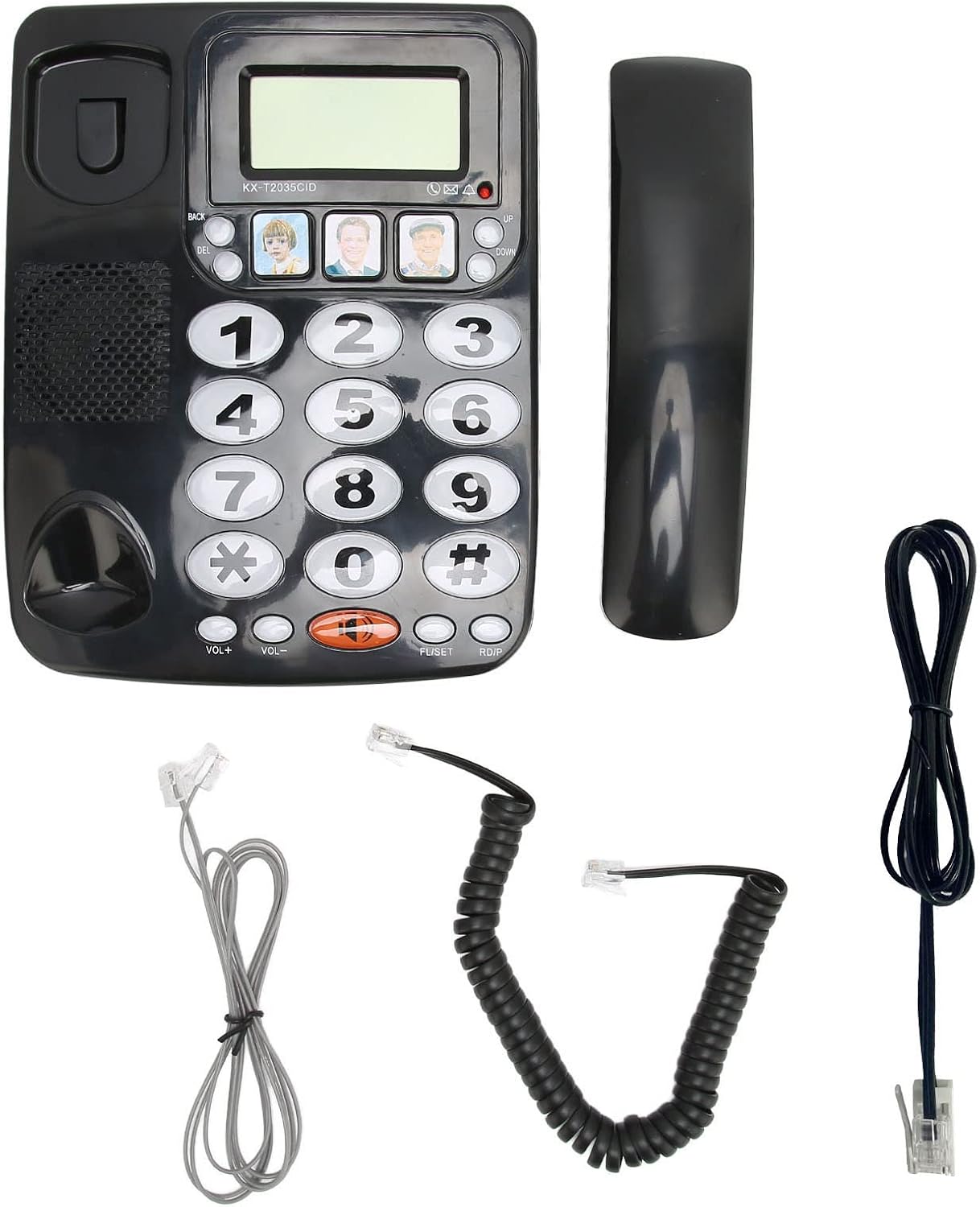
Image: All components included in the package.
Product Overview
Familiarize yourself with the main parts of your Zunate KX-T2035CID telephone.

Image: Front view of the telephone unit.
- Display Screen: Shows caller ID information, time, and other call details.
- Numeric Keypad: Large, easy-to-read buttons for dialing numbers.
- Memory Buttons (M1, M2, M3): Three dedicated buttons for speed dialing frequently called numbers.
- VOL+ / VOL- Buttons: Adjust handset and speaker volume.
- MUTE Button: Mutes your microphone during a call.
- REDIAL Button: Dials the last number called.
- FLASH Button: Used for call waiting or transferring calls (if supported by your phone service).
- Speakerphone Button (Speaker icon): Activates or deactivates the speakerphone.

Image: Rear view showing connection ports.
- Handset Port: Connects the coiled cord from the handset to the base unit.
- Line Port: Connects the telephone line cord from the base unit to the wall jack.
Setup
Follow these steps to set up your Zunate KX-T2035CID telephone:
- Connect the Handset:
Plug one end of the coiled handset cord into the handset and the other end into the handset port on the left side of the telephone base unit.
- Connect the Telephone Line:
Plug one end of the telephone line cord into the "LINE" port on the back of the telephone base unit. Plug the other end into your telephone wall jack.
- Placement:
Place the telephone on a flat, stable surface, such as a desk or table. Ensure it is not near any heat sources or in direct sunlight.
Your telephone is now ready for use.
Operating Instructions
Making a Call
- Lift the handset or press the Speakerphone button.
- Listen for a dial tone.
- Dial the desired telephone number using the numeric keypad.
- To end the call, replace the handset or press the Speakerphone button again.
Answering a Call
- When the phone rings, lift the handset or press the Speakerphone button.
- To end the call, replace the handset or press the Speakerphone button again.
Redialing the Last Number
- Lift the handset or press the Speakerphone button.
- Press the REDIAL button. The phone will automatically dial the last number called.
Using the Mute Function
- During a call, press the MUTE button to temporarily disable your microphone. The other party will not hear you.
- Press the MUTE button again to resume the conversation.
Adjusting Volume
- During a call, press VOL+ to increase the listening volume.
- Press VOL- to decrease the listening volume.
Programming Memory Buttons (M1, M2, M3)
The phone features three direct memory buttons for quick dialing.
- Lift the handset.
- Press the SET button (usually located near the memory buttons).
- Dial the phone number you wish to store (up to 16 digits).
- Press the desired memory button (M1, M2, or M3) to save the number.
- Replace the handset.
To use a Memory Button: Lift the handset and press the desired memory button (M1, M2, or M3). The phone will automatically dial the stored number.

Image: Detail of the large buttons and memory keys.
Key Features
- Large Buttons: Easy to see and press, ideal for users with visual impairments or dexterity challenges.
- Clear Sound: Designed for clear audio quality during calls.
- Redial Function: Quickly redial the last outgoing number.
- Mute Function: Temporarily silence your microphone during a call.
- Adjustable Volume: Control handset and speakerphone volume for comfortable listening.
- Caller ID: Displays incoming caller information (requires subscription to Caller ID service from your telephone provider).
- Three One-Touch Memory Buttons: Store and dial frequently used numbers with a single press.
Maintenance
To ensure the longevity and proper functioning of your telephone:
- Cleaning: Wipe the telephone surface with a soft, damp cloth. Do not use abrasive cleaners or solvents.
- Avoid Liquids: Keep the telephone away from liquids. If liquid spills on the unit, disconnect it immediately and contact qualified service personnel.
- Storage: If storing the phone for an extended period, keep it in a cool, dry place away from direct sunlight.
Troubleshooting
If you experience issues with your telephone, try the following solutions:
| Problem | Solution |
|---|---|
| No dial tone. |
|
| Cannot hear the other party. |
|
| Other party cannot hear me. |
|
| Caller ID is not displayed. |
|
Specifications
| Feature | Detail |
|---|---|
| Brand | Zunate |
| Model | KX-T2035CID |
| Phone Type | Corded |
| Material | Acrylonitrile Butadiene Styrene (ABS) |
| Power Source | Corded Electric |
| Dialer Type | Single Keypad |
| Answering System Type | Digital (Note: This refers to Caller ID functionality, not an integrated answering machine) |
| Caller ID | Yes |
Warranty and Support
Zunate products are designed for reliability and performance. For information regarding warranty coverage, technical support, or service inquiries, please refer to the warranty card included with your purchase or contact your retailer. Please have your model number (KX-T2035CID) and purchase date available when contacting support.
Ask a question about this manual
Ask about setup, troubleshooting, compatibility, parts, safety, or missing instructions. Manuals+ will review the question and use this page’s manual context to help answer it.