
Introduction
This manual provides detailed instructions for the RIZIZI A12 Wireless Sport Earbuds. Please read this manual thoroughly before using your earbuds to ensure proper operation and to maximize your listening experience.
What's in the Box
- RIZIZI A12 Wireless Earbuds
- Wireless Charging Case
- USB-C Charging Cable
- 3 Different Sizes of Ear Tips (S/M/L)
Product Overview
The RIZIZI A12 Wireless Sport Earbuds are designed for active lifestyles, featuring secure over-ear earhooks, an LED digital display on the charging case, and intuitive physical controls.

Image: RIZIZI A12 Wireless Sport Earbuds in their charging case, displaying battery levels.
Key Components:
- Earbuds: Equipped with over-ear earhooks for a secure fit during physical activity. Each earbud has physical buttons for control and a built-in noise-canceling microphone for clear calls.
- Charging Case: Features an LED digital display to show the charging case's power percentage and the individual charge levels of the earbuds. Supports both wireless and USB-C charging.

Image: Detailed diagram illustrating the charging pins, earhook, earplug, multi-function buttons, and LED digital display on the RIZIZI A12 earbuds and charging case.
Setup
1. Charging the Earbuds and Case
The charging case features an LED display that shows the power percentage of the case and the charge levels of each earbud. This allows for easy monitoring of battery status.

Image: The charging case with its LED digital display showing the battery percentage of the case and the charging process of the individual earbuds.
The RIZIZI A12 earbuds and case support two charging methods:
- USB-C Charging: Connect the provided USB-C cable to the charging port on the case and to a power source.
- Wireless Charging: Place the charging case on a compatible wireless charging pad (wireless charger not included).

Image: The RIZIZI A12 charging case demonstrating both USB-C cable charging and wireless charging capabilities.
A full charge provides approximately 8 hours of playtime for the earbuds, with the charging case offering an additional 4 full recharges, totaling up to 40 hours of playtime.
2. Selecting Ear Tips and Achieving a Secure Fit
For optimal sound quality and comfort, choose the ear tips that best fit your ears. The earbuds come with three different sizes (S/M/L).
- Choose the best suitable earplugs and attach them to the earbuds.
- Put the earhook over your ear and insert the ear tip into your ear canal, giving it a slight twist for a snug fit.
- Adjust the earhook to make it securely and comfortably stay around your ear.

Image: Step-by-step guide on how to select ear tips, position the earhook, and insert the earbud for a secure and comfortable fit.
The over-ear earhooks ensure a secure fit, making them suitable for sports and workouts. The IPX5 sweatproof design provides protection against moisture.
3. Pairing with Your Device
The RIZIZI A12 earbuds feature one-step pairing for convenience.
- Remove both earbuds from the charging case. They will automatically enter pairing mode.
- On your device (smartphone, tablet, laptop), open the Bluetooth settings.
- Search for available devices and select "A12" from the list to connect.
Once paired, the earbuds will automatically connect to the last paired device when removed from the case.

Image: Visual representation of the one-step pairing process, showing earbuds removed from the case and the "A12" model appearing in a device's Bluetooth settings.
The earbuds are compatible with iOS, Android, and most Bluetooth-enabled devices.
Operating Instructions
1. Basic Controls
The RIZIZI A12 earbuds feature physical buttons for precise control over your audio and calls, preventing accidental touches during activities.
| Function | Action |
|---|---|
| Answer/End a Call | Click Once (either earbud) |
| Reject Incoming Call | Long Press 1s (either earbud) |
| Voice Assistant (Siri, Google Assistant, etc.) | Quick Double Click (either earbud) |
| Play/Pause Song | Click Once (either earbud) |
| Volume - | Click "-" button on Left earbud |
| Volume + | Click "+" button on Right earbud |
| Next Song | Long Press 1s "+" button on Right earbud |
| Previous Song | Long Press 1s "-" button on Left earbud |
2. Sound Quality and Modes
The earbuds deliver stereo sound quality with deep bass for an immersive audio experience.

Image: A person wearing RIZIZI A12 earbuds during a workout, highlighting the loud stereo volume and deep bass.
The RIZIZI A12 earbuds support multiple listening modes:
- Left or Right Mono Mode: Use a single earbud independently for calls or audio while remaining aware of your surroundings.
- Share Mode: Share one earbud with another person to enjoy audio together.
- Twin Stereo Mode: Use both earbuds for a full stereo experience, providing noise isolation.
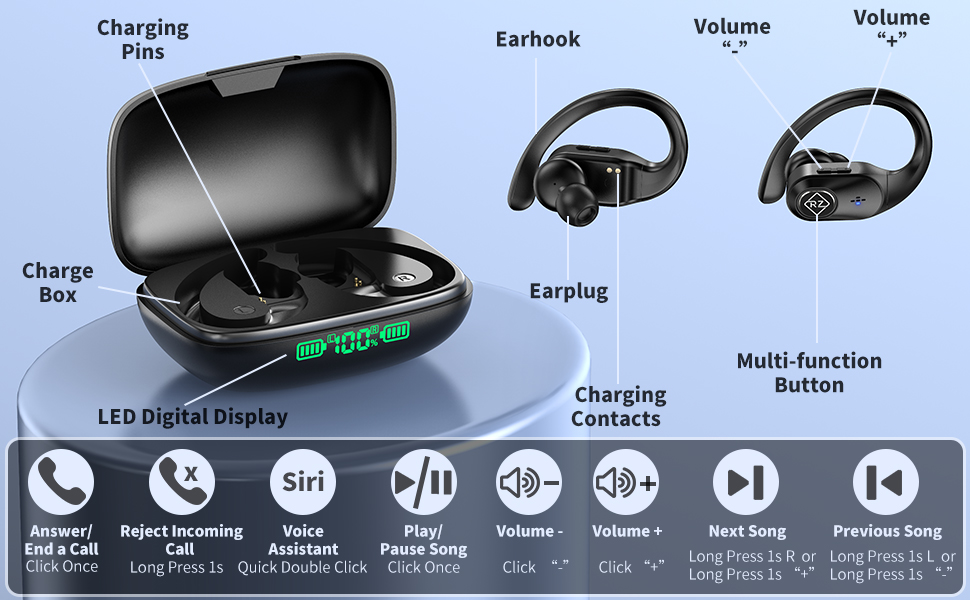
Image: Three scenarios illustrating the use of RIZIZI A12 earbuds in Left or Right Mono Mode, Share Mode, and Twin Stereo Mode.
3. Official Product Video Overview
Video: An official overview of the RIZIZI A12 Wireless Sport Earbuds, highlighting key features and design. This video is provided by Amazon Videos (Seller).
Maintenance
To ensure the longevity and optimal performance of your RIZIZI A12 Wireless Sport Earbuds, follow these maintenance guidelines:
- Cleaning: Regularly wipe the charging ports of both earbuds and the charging pins of the charging case with alcohol. Allow to dry completely before placing the earbuds back into the case. This prevents issues caused by sweat or debris.
- Storage: When not in use, store the earbuds in their charging case to protect them from dust, moisture, and physical damage.
- Temperature: Avoid exposing the earbuds and charging case to extreme temperatures (hot or cold) or direct sunlight for prolonged periods.
Troubleshooting
If you encounter any issues with your RIZIZI A12 Wireless Sport Earbuds, please refer to the following common solutions:
| Problem | Solution |
|---|---|
| Earbuds not pairing/connecting |
|
| Only one earbud working |
|
| Low volume or poor sound quality |
|
| Charging case not charging |
|
Specifications
| Feature | Detail |
|---|---|
| Model Name | A12 |
| Brand | RIZIZI |
| Connectivity Technology | Bluetooth |
| Bluetooth Version | 5.0 |
| Bluetooth Range | 10 Meters |
| Earbud Battery Life | Up to 8 hours per charge |
| Total Playtime (with case) | Up to 40 hours |
| Charging Time | Approximately 2 hours |
| Charging Type | USB-C, Wireless Charging |
| Water Resistance | IPX5 Sweatproof |
| Microphone | Built-in Noise Canceling Mic |
| Control Method | Physical Buttons (Volume, Track, Call, Voice Assistant) |
| Ear Placement | Over Ear |
| Form Factor | In Ear |
| Material | Plastic |
| Compatible Devices | iOS, Android, Laptops, most Bluetooth devices |
Warranty and Support
For warranty information and customer support, please refer to the contact details provided on the product packaging or visit the official RIZIZI website. Keep your purchase receipt as proof of purchase for any warranty claims.
