
Introduction
This manual provides essential instructions for the safe installation, operation, and maintenance of your Jupiter Zphyr 5-Blade BLDC Ceiling Fan. Please read this manual thoroughly before installation and use, and retain it for future reference.
The Jupiter Zphyr fan features a Brushless Direct Current (BLDC) motor, designed for high energy efficiency and quiet operation. It includes a remote control for convenient operation and advanced features.
Safety Information
- Professional Installation Recommended: Installation should be performed by a qualified electrician in accordance with local electrical codes.
- Disconnect Power: Always ensure the main power supply is disconnected before attempting any installation, maintenance, or cleaning.
- Remove Regulator: It is crucial to remove or disconnect any existing fan regulator before installing this BLDC fan. Failure to do so may damage the fan's motor.
- Secure Mounting: Ensure the fan is securely mounted to a ceiling joist or a structure capable of supporting its weight.
- Blade Clearance: Maintain adequate clearance between the fan blades and any obstructions.
- Indoor Use Only: This fan is designed for indoor use only.
- Voltage: Operate the fan only within the specified voltage range (230 Volts AC).

Important: Disconnect the regulator before installation to prevent damage.
Package Contents
Verify that all components are present before beginning installation:
- Motor Assembly
- 5 Blades
- Down Rod
- Clamp Assembly
- Remote Control

Image: Jupiter Zphyr 5-Blade BLDC Ceiling Fan with its remote control.
Setup and Installation
For detailed installation steps, refer to the separate installation guide provided with your fan. The following is a general overview:
- Prepare for Installation: Turn off power at the circuit breaker. Ensure the existing fan regulator is removed or bypassed.
- Mount the Bracket: Securely attach the mounting bracket to the ceiling junction box or a suitable support structure.
- Assemble Down Rod and Motor: Insert the down rod through the canopy and connect it to the motor assembly.
- Wire the Fan: Connect the fan's electrical wires to the household wiring according to the wiring diagram in the detailed installation guide. Ensure all connections are secure.
- Attach Blades: Securely attach the five blades to the motor housing.
- Final Check: Double-check all connections and ensure the fan is securely mounted before restoring power.

Image: An illustration of the Jupiter BLDC Ceiling Fan components, highlighting its energy efficiency and inverter compatibility.
Operating Instructions
Remote Control Functions
The Jupiter Zphyr fan is operated using the included smart remote control. Ensure the remote has working batteries.

Image: The smart remote control for the Jupiter Zphyr fan, detailing its various functions.
- On/Off: Press the power button to turn the fan on or off.
- LED: Toggles the integrated LED light on or off.
- Speed Control: Buttons labeled 1-5 (or similar) adjust the fan speed.
- Boost Speed: Activates maximum fan speed for rapid cooling.
- Sleep Mode: Gradually reduces fan speed by 10 RPM every hour for comfortable sleep.
- Timer Mode: Set the fan to automatically switch off after 2, 4, 6, or 8 hours.
- Reverse Rotation (REV): Changes the direction of blade rotation. Useful for different seasons.
Bi-Directional Rotation
The fan offers bi-directional rotation for year-round comfort:
- Summer Mode (Counter-clockwise): Pushes air downwards, creating a cooling breeze.
- Winter Mode (Clockwise): Draws cool air up, circulating warm air near the ceiling downwards, helping to distribute heat more evenly.
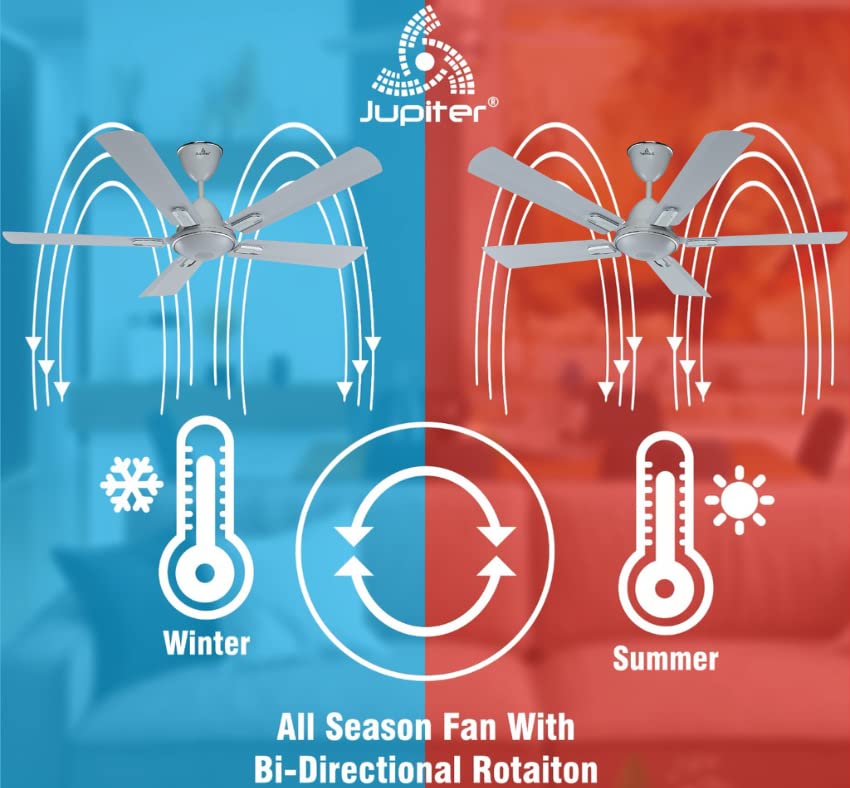
Image: Illustration demonstrating the fan's bi-directional rotation for effective air circulation in both winter and summer.
Jupiter Fan Controller App (for Android with IR Blaster)
For Android phones equipped with an IR Blaster, the Jupiter Fan Controller App can be used to manage the fan. The app functions identically to the physical remote control, allowing you to:
- Switch the fan ON/OFF.
- Adjust fan speed.
- Set a timer and switch ON Sleep mode.
- Switch the LED light ON/OFF.
- Activate Boost Mode.

Image: A smartphone displaying the Jupiter Fan Controller App interface, compatible with Android phones featuring an IR Blaster.
Energy Efficiency and Performance
The Jupiter Zphyr fan is designed with a Super Energy Efficient BLDC Motor, offering significant power savings and consistent performance.
- BLDC Motor: Consumes significantly less power compared to traditional induction fans.
- Inverter Stabilization Technology: Maintains consistent speed even during low input voltage or power fluctuations, and runs longer on inverter batteries.
- High Air Delivery: Provides air delivery comparable to standard ceiling fans while consuming less energy.
- LED Indication: The fan's LED can also serve as a subtle night lamp.

Image: The BEE 5-star energy rating label for the Jupiter Zphyr fan, indicating high energy efficiency.
Power Savings Comparison
The image below illustrates the potential energy savings of the Jupiter 5 BLDC Fan compared to other fan types, based on specific usage and electricity cost assumptions:

Image: A comparative table showing wattage consumption, warranty, air delivery, units consumed, electricity cost, and savings for Jupiter 5 BLDC Fan, BEE 1 Star Rated Fan, and Regular Fan.
Note: Calculations are based on 15 hours usage per day, 365 days a year, and electricity charges of ₹7 per unit. Savings are calculated against a regular fan.
Maintenance
- Cleaning: Regularly clean the fan blades and motor housing with a soft, damp cloth. Do not use abrasive cleaners or solvents. Ensure power is off before cleaning.
- Blade Balance: If the fan wobbles, check that all blades are securely attached and balanced.
- No Lubrication Required: The BLDC motor is designed for maintenance-free operation and does not require lubrication.
Troubleshooting
| Problem | Possible Cause | Solution |
|---|---|---|
| Fan does not start | No power supply; Remote control batteries low/dead; Incorrect wiring; Existing regulator not removed. | Check power supply; Replace remote batteries; Verify wiring connections (consult electrician); Ensure regulator is removed. |
| Remote control not working | Batteries low/dead; Obstruction between remote and fan; Remote out of range. | Replace batteries; Ensure clear line of sight; Operate within 20ft distance. |
| Fan wobbles | Loose blades; Unbalanced blades; Loose mounting. | Tighten blade screws; Check blade balance; Ensure mounting bracket is secure. |
| Fan makes unusual noise | Loose screws; Internal component issue. | Check and tighten all screws; If noise persists, contact customer service. |
Specifications
| Feature | Detail |
|---|---|
| Brand | Jupiter |
| Model | Zphyr |
| Electric Fan Design | Ceiling Fan |
| Colour | White |
| Power Source | Corded Electric |
| Product Dimensions | 45D x 30W x 20H Centimeters |
| Special Features | Automatic Shut-Off, High Velocity, Remote Controlled, Reverse Rotation |
| Recommended Uses | Indoor Use Only |
| Noise Level | 60 Decibels |
| Wattage | 35 Watts |
| Number of Blades | 5 |
| Blade Length | 1200 Millimetres |
| Voltage | 230 Volts (AC) |
| Item Weight | 4.5 Kilograms |
| Control Method | Remote |
| Specification Met | CE |
| Country of Origin | India |
Warranty and Support
The Jupiter Zphyr fan comes with a 3-Year Limited Warranty. For warranty claims, the product must be returned to the manufacturer's plant at Hyderabad, with all freight charges paid by the customer.
For queries, returns, or technical support, please contact:
- Customer Service Number: +91-9440285167
- Email ID: support@jupiterfans.com
- Website: www.jupiterfans.com
Please register your warranty on the official website: www.jupiterfans.com