
YONGYAO LB-208
YONGYAO 4-in-1 Portable Vertical Steam Iron User Manual
Model: LB-208
Brand: YONGYAO
1. Product Overview
The YONGYAO 4-in-1 Portable Vertical Steam Iron is a versatile and powerful garment care device designed for both home and travel use. With 1200W of power and rapid 15-second heating, it efficiently removes wrinkles from various fabrics. Its innovative design allows for both vertical steaming and horizontal dry ironing, offering flexibility for all your garment care needs. The compact and lightweight design, along with a 180-degree foldable handle, ensures easy handling, storage, and portability.

Image: The YONGYAO 4-in-1 Portable Vertical Steam Iron shown with its base, measuring cup, and storage bag.
2. Safety Instructions
- Always unplug the appliance from the power outlet when filling with water, emptying, or when not in use.
- Do not touch the hot soleplate or steam nozzle when the iron is in use to avoid burns.
- Keep the iron out of reach of children and pets.
- Use only clean tap water. Do not add perfumes, vinegar, starch, or other chemicals to the water tank, as this may cause damage or blockages.
- Ensure the voltage indicated on the appliance corresponds to your local mains voltage before connecting.
- Do not immerse the iron, power cord, or plug in water or other liquids.
- Do not operate the iron with a damaged cord or plug, or if the iron has been dropped or damaged.
- Always place the iron on a stable, heat-resistant surface when not in use.
- Allow the iron to cool down completely before storing.
3. Package Contents
Please check the package contents upon unboxing:
- YONGYAO Portable Vertical Steam Iron (Model LB-208)
- Heat-resistant Base
- Measuring Cup
- Storage Bag
- User Manual (This document)
4. Setup and Preparation
4.1 Filling the Water Tank
- Ensure the iron is unplugged from the power outlet.
- Open the water tank cap.
- Use the provided measuring cup to fill the water tank with clean tap water. The tank capacity is 100ml. Do not overfill.
- Close the water tank cap securely.

Image: A hand pouring water from the measuring cup into the iron's water tank.
4.2 Handle Adjustment
The iron features a 180-degree rotatable handle for comfortable use and compact storage.
- To adjust the handle, gently rotate it to the desired position (upright for vertical steaming, folded for horizontal ironing or storage).

Image: The iron's handle shown in both its extended and folded positions, illustrating its 180-degree rotation for convenience and storage.
5. Operating Instructions
5.1 Powering On and Temperature Selection
- Plug the iron into a suitable power outlet. The LED display will illuminate.
- Press the "Power" button to turn on the iron.
- Press the "Function" button to cycle through the 6 available temperature settings (110°C, 120°C, 130°C, 140°C, 160°C, 180°C). Select the appropriate temperature for your fabric type (refer to Section 6).
- Wait for the iron to heat up. The red indicator light will flash during heating and become steady when the selected temperature is reached (approximately 15 seconds).

Image: The iron's control panel with LED display showing temperature and fabric types, and buttons for power and function. Instructions indicate to touch "Function" to choose temperature and double-click for steam.
5.2 Vertical Steaming
- Hang the garment on a hanger.
- Hold the iron upright, ensuring the handle is in the vertical position.
- Once the iron has reached the desired temperature (red light is steady), double-click the steam trigger button located on the handle to release continuous steam.
- Move the iron slowly over the fabric, allowing the steam to penetrate and relax the fibers.
- The iron can provide continuous steam for up to 8 minutes on a full tank.

Image: The steam iron in vertical mode, emitting powerful steam to remove wrinkles from a hanging shirt.
5.3 Horizontal Dry Ironing
- Place the garment on a flat, heat-resistant surface.
- Adjust the iron's handle to the folded position for horizontal use.
- Select the appropriate temperature for your fabric.
- Glide the iron's soleplate over the fabric to smooth out wrinkles.
- For stubborn wrinkles, you may use the steam function by double-clicking the trigger while ironing horizontally.

Image: A visual representation of the iron's 2-in-1 capability, demonstrating its use as a dry iron (horizontal) and a steam iron (vertical).
5.4 Powering Off
- After use, press and hold the "Power" button to turn off the iron.
- Unplug the iron from the power outlet.
- Allow the iron to cool down completely before emptying any remaining water and storing.
6. Temperature Settings and Fabric Guide
The YONGYAO steam iron offers 6 temperature levels, suitable for various fabric types. Refer to the table below and the iron's LED display for recommended settings:
| Level | Temperature | Recommended Fabric |
|---|---|---|
| 1 | 110°C | Silk |
| 2 | 120°C | Fiber |
| 3 | 130°C | Blend |
| 4 | 140°C | Cotton |
| 5 | 160°C | Linen |
| 6 | 180°C | Woolen |
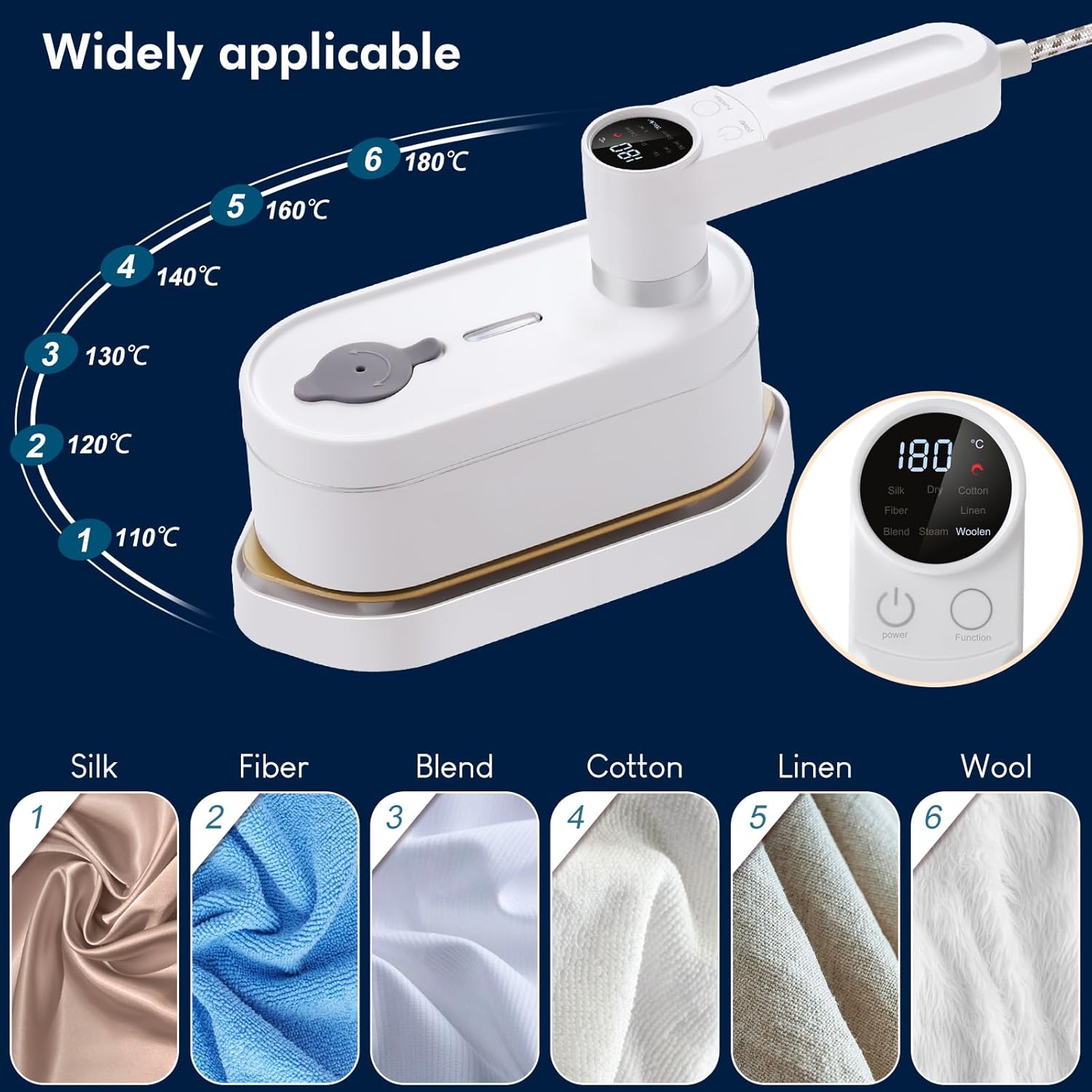
Image: A visual guide illustrating the six temperature settings and the fabric types they are suitable for, including silk, fiber, blend, cotton, linen, and woolen.
7. Maintenance
7.1 Self-Cleaning Function
The iron is equipped with a self-cleaning function to prevent scale buildup and maintain optimal performance. It is recommended to use this function regularly, especially if you notice steam with stains or blocked pores.
- Ensure the water tank is filled with clean water.
- Plug in the iron and turn it on. Select the highest temperature setting (180°C).
- Once the iron reaches the temperature, hold it over a sink or basin.
- Press and hold the self-cleaning button (refer to the manual's diagram if available, or assume it's the steam trigger if not specified). Water and steam will be expelled, flushing out mineral deposits.
- Continue until the water tank is empty.
- Unplug the iron and allow it to cool completely.

Image: A hand pressing a button on the iron's control panel, illustrating the activation of the self-cleaning function.
7.2 Cleaning the Exterior
- Ensure the iron is unplugged and completely cool.
- Wipe the exterior surfaces with a soft, damp cloth. Do not use abrasive cleaners or solvents.
- For the soleplate, if necessary, wipe with a damp cloth. Do not use abrasive pads or metallic scourers.
8. Troubleshooting
| Problem | Possible Cause | Solution |
|---|---|---|
| Iron does not heat up. | Not plugged in; Power button not pressed; Power outlet malfunction. | Ensure iron is securely plugged in; Press the Power button; Try a different power outlet. |
| No steam or weak steam. | Water tank empty; Not heated to selected temperature; Steam holes blocked; Steam trigger not activated correctly. | Fill water tank; Wait for red light to become steady; Perform self-cleaning; Double-click the steam trigger firmly. |
| Water leaking from soleplate. | Temperature too low for steam; Overfilled water tank; Mineral buildup. | Ensure iron is at correct temperature for steaming; Do not overfill; Perform self-cleaning. |
| Iron leaves stains on fabric. | Mineral buildup in water tank/steam holes. | Perform self-cleaning function. Use clean tap water. |
9. Specifications
| Brand: | YONGYAO |
| Model: | LB-208 |
| Power: | 1200W |
| Voltage: | 230V |
| Water Tank Capacity: | 100ml |
| Heating Time: | Approx. 15 seconds |
| Continuous Steaming Time: | Approx. 8 minutes |
| Dimensions: | 36 x 13 x 10.2 cm (unfolded); 18L x 7.8W x 10.5H cm (folded, approximate) |
| Weight: | 625g (1.38 lbs) |
| Material: | ABS |
| Special Features: | 180-degree foldable handle, Compact size, Self-cleaning function, 6 temperature levels, Automatic shut-off. |

Image: The iron's dimensions are displayed, highlighting its compact and portable nature for travel and storage.
10. Warranty and Support
For warranty information and customer support, please refer to the purchase documentation or contact YONGYAO customer service through the retailer where the product was purchased. Keep your proof of purchase for any warranty claims.
For further assistance or inquiries, please visit the official YONGYAO store on Amazon: YONGYAO Store.
Ask a question about this manual
Ask about setup, troubleshooting, compatibility, parts, safety, or missing instructions. Manuals+ will review the question and use this page’s manual context to help answer it.