
1. Introduction
The Sensyne 12-inch Ring Light with 67-inch Selfie Stick Tripod is designed to provide versatile lighting and stable support for various content creation needs. This device features adjustable brightness and color temperature settings, a flexible tripod stand that converts into a selfie stick, a universal phone holder, and a wireless remote control. It is suitable for applications such as online meetings, photography, daily lighting, and live streaming.

Image: The Sensyne Ring Light being used for online meetings, photography, daily lighting, and live streaming.
2. What's in the Box
Verify that all components are present in the package:
- 1 x 12-inch Ring Light
- 1 x 67-inch Tripod Stand (convertible to Selfie Stick)
- 1 x Phone Holder
- 1 x Wireless Remote Shutter
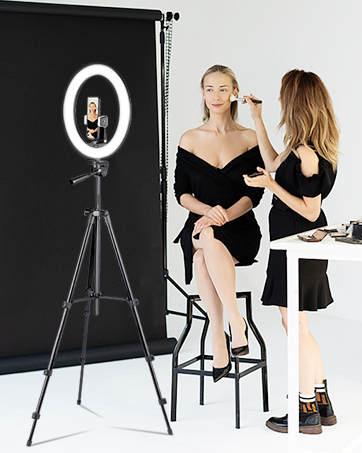
Image: All included components of the Sensyne Ring Light kit.
3. Setup Instructions
3.1 Assembling the Tripod and Ring Light
- Unfold the tripod legs to create a stable base.
- Extend the tripod stand to the desired height. Secure the sections by twisting the locking mechanisms. The stand can extend from 17 to 67 inches.
- Attach the 12-inch ring light to the top of the tripod stand. Ensure it is securely fastened.
- Mount the phone holder onto the ring light or tripod head.
- Insert your smartphone into the phone holder. The holder accommodates devices from 2.3 to 5.3 inches wide.

Image: Illustration of the adjustable height and rotation capabilities of the Sensyne Ring Light and Tripod.
3.2 Powering the Ring Light
Connect the ring light's USB cable to a compatible USB power source (e.g., a USB wall adapter, power bank, or computer USB port). The ring light requires a 5V/2A power input for optimal performance.

Image: USB charging options and wide device compatibility for the Sensyne Ring Light.
3.3 Pairing the Wireless Remote Shutter
- Ensure the remote shutter has a working battery.
- Turn on the remote shutter. An indicator light will typically flash.
- On your smartphone, go to Bluetooth settings and search for available devices.
- Select "Sensyne" or a similar name from the list to pair. The indicator light on the remote will stop flashing once paired.
- The remote is compatible with both iOS and Android devices.

Image: Instructions for pairing the Bluetooth remote shutter with a smartphone.
4. Operating Instructions
4.1 Ring Light Controls
The ring light features an integrated touch-control pad for adjustments:
- Power Button: Press to turn the light On or Off.
- Brightness Adjustment: Use the '+' and '-' buttons to increase or decrease the brightness across 10 levels.
- Color Temperature Adjustment: Use the mode button (often indicated by a sun or color icon) to cycle through 5 color temperature settings (e.g., Cold White, Daylight, Natural, Warm White, Warm Yellow).

Image: Controls for adjusting brightness and color temperature on the Sensyne Ring Light.

Image: Visual representation of the 5 color temperatures and 10 brightness levels.
4.2 Tripod and Selfie Stick Usage
- Tripod Mode: Extend the legs fully and adjust the height for stable, hands-free operation.
- Selfie Stick Mode: Collapse the legs and extend the central pole for handheld use.
- Angle Adjustment: The tripod head allows for 360-degree rotation and 90-degree tilting, enabling flexible shooting angles.
4.3 Phone Holder Orientation
The phone holder can be adjusted to hold your device either vertically or horizontally, depending on your content creation needs.
4.4 Wireless Remote Shutter Usage
Once paired via Bluetooth, open your smartphone's camera app. Press the corresponding button on the remote (iOS or Android) to remotely trigger photos or start/stop video recording.
5. Maintenance
- Cleaning: Use a soft, dry cloth to clean the ring light and tripod. Avoid abrasive cleaners or solvents.
- Storage: When not in use, collapse the tripod and store all components in a dry, cool place to prevent damage.
- Handling: Handle the device with care. Avoid dropping or subjecting it to strong impacts. The product is not water resistant.
6. Troubleshooting
| Problem | Possible Cause | Solution |
|---|---|---|
| Ring light does not turn on. | No power, loose USB connection, insufficient power source. | Ensure the USB cable is securely connected. Try a different USB port or power adapter (5V/2A recommended). |
| Remote shutter does not pair. | Remote battery low/dead, Bluetooth not enabled on phone, remote not in pairing mode. | Check/replace remote battery. Ensure Bluetooth is enabled on your phone. Turn the remote off and on again to re-enter pairing mode. |
| Light intensity or color temperature cannot be adjusted. | Control buttons unresponsive. | Ensure the light is powered on. Disconnect and reconnect the USB power to reset the controls. |
| Tripod is unstable. | Legs not fully extended or locked, uneven surface. | Ensure all tripod legs are fully extended and their locking mechanisms are tightened. Place the tripod on a flat, stable surface. |
7. Specifications
| Feature | Detail |
|---|---|
| Brand | SENSYNE |
| Model Number | 12in67 |
| Ring Light Diameter | 12 inches |
| LED Beads | 240 |
| Power Output | 20W |
| Brightness Levels | 10 |
| Color Temperatures | 5 (Cold White, Daylight, Natural, Warm White, Warm Yellow) |
| Tripod Height Range | 17 - 67 inches |
| Phone Holder Width | 2.3 - 5.3 inches |
| Connectivity | USB (for light), Bluetooth (for remote) |
| Product Dimensions (L x W x H) | 12" x 12" x 67" (fully extended) |
| Item Weight | 450 g |
| Water Resistance | Not Water Resistant |
| Compatible Devices | Smartphones, iPads, GoPros, Cameras, Projectors |
8. Warranty & Support
Warranty: This product comes with a 12-month after-sales service warranty from Sensyne. Please retain your proof of purchase for warranty claims.
Support: For any assistance, questions, or issues regarding your Sensyne 12-inch Ring Light, please contact Sensyne customer support. Contact information can typically be found on the product packaging or the official Sensyne website.