
1. Introduction
Thank you for choosing the Bearhug Queen Size Electric Blanket. This manual provides essential information for the safe and efficient use of your new heated blanket. Please read all instructions carefully before use and retain this manual for future reference.
2. Important Safety Instructions
To ensure safe operation and prevent injury or damage, please adhere to the following safety guidelines:
- WARNING: Use only with the correct voltage: 120V/60Hz.
- WARNING: Avoid prolonged use on one body area to prevent burns.
- Do not use sharp objects on this product.
- Prevent wire entanglement during use and storage.
- Avoid overlapping with other heating products.
- Not suitable for individuals with limited self-care abilities.
- Always turn off and unplug the blanket when not in use.
- Do not wrap the controller in the product when in use.

This electric blanket is ETL Certified, ensuring it meets recognized safety standards, and includes Overheat Protection for your peace of mind.
3. Product Features
3.1 Soft Double-Sided Design
The blanket features a luxurious faux fur on one side and soft sherpa on the reverse, providing double comfort and warmth. It is designed to be free from deformation, shedding, pilling, and fading.

3.2 Dual Controllers & Even Warmth
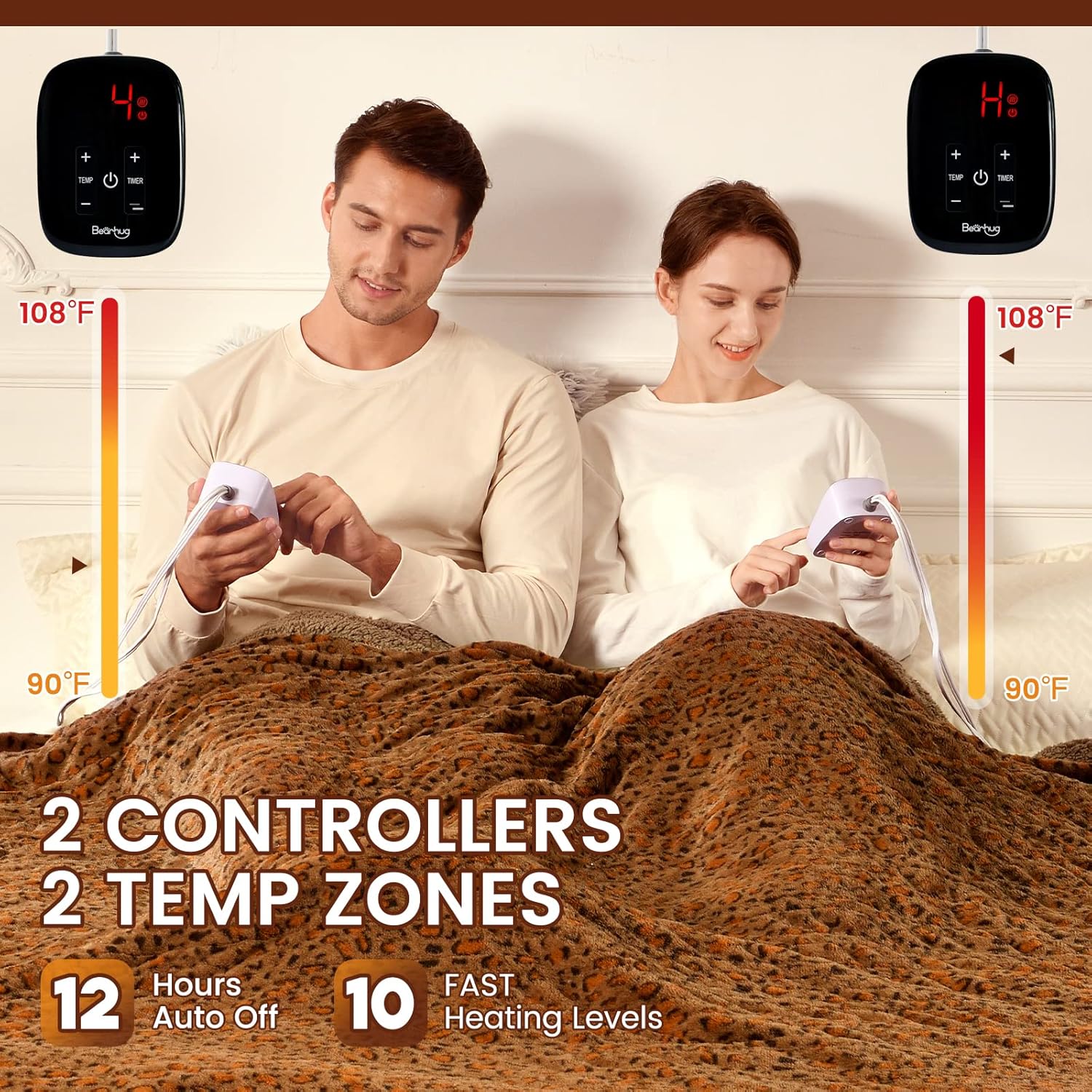
The Queen size blanket is equipped with two independent controllers, allowing for customized heating and timing for two separate zones. Built-in U-shape heating wires ensure even heat distribution.


3.3 Long Power Cord
The extra-long cord offers maximum flexibility for placement and use.
3.4 Variety of Sizes and Colors
The Bearhug Electric Blanket is available in various sizes and colors to suit different preferences and home decor.

4. Setup
- Unpack: Carefully remove the electric blanket and controllers from the packaging.
- Inspect: Check the blanket and cords for any signs of damage. Do not use if damaged.
- Position: Lay the blanket flat on your bed, ensuring the heating wires are not folded or creased.
- Connect Controllers: Locate the connection ports on the blanket. Firmly plug each controller's cord into its respective port. Ensure a secure connection.
- Plug In: Plug the power cords from the controllers into a standard 120V/60Hz electrical outlet.
5. Operating Instructions
5.1 Power On/Off
- Press the Power button (usually marked with a circle and vertical line) on each controller to turn the blanket on or off for that zone.
5.2 Adjusting Heat Levels
- Use the Temperature buttons (marked with '+' and '-') to select your desired heat level. The blanket offers 10 heating levels, ranging from 90°F to 108°F.
- Start with a lower setting and adjust as needed for comfort.
5.3 Setting the Auto-Off Timer
- Press the Timer button (usually marked with a clock icon) to cycle through the available auto-off timer settings.
- The timer can be set from 1 to 12 hours. The blanket will automatically turn off after the selected time.

5.4 Video: Bearhug Electric Heated Blanket - Warm Your Body
Video 1: An official Bearhug video demonstrating the comfort and warmth of the electric heated blanket, showcasing its features in use.
6. Maintenance
6.1 Cleaning Instructions
The Bearhug Electric Blanket is machine washable for easy care. Always detach the controllers and power cords before washing.
- Machine Wash: Use a gentle cycle with cold water.
- Do Not Bleach: Avoid using bleach or harsh chemicals.
- Do Not Dry Clean: Dry cleaning is not recommended.
- Do Not Iron: Do not iron the blanket.
- Tumble Dry: Tumble dry on low heat or line dry. Ensure the blanket is completely dry before reattaching controllers or storing.

6.2 Storage
When not in use, store the blanket in a cool, dry place. Avoid folding tightly or placing heavy objects on top, which could damage the internal wiring.
7. Troubleshooting
| Problem | Possible Cause | Solution |
|---|---|---|
| Blanket not heating | Power cord not securely plugged in; Controller not connected properly; Power outage. | Ensure all connections are firm. Check power outlet. |
| One side not heating | Controller for that side is off or disconnected. | Check the controller and its connection for the affected side. |
| Blanket turns off unexpectedly | Auto-off timer activated; Overheat protection triggered. | Check timer setting. If overheat protection is suspected, unplug and allow to cool before restarting. Ensure blanket is not bunched or covered excessively. |
| Error code on controller | Internal fault or connection issue. | Unplug the blanket from the wall and disconnect the controller. Reconnect everything securely. If the error persists, contact customer service. |
8. Specifications
| Feature | Detail |
|---|---|
| Model Name | SQB |
| Size | Queen (84"L x 90"W) |
| Material | Faux Fur, Sherpa |
| Heating Levels | 10 (90°F to 108°F) |
| Auto-Off Timer | 1-12 Hours |
| Controllers | Dual Controllers |
| Safety Certification | ETL Certified, Overheat Protection |
| Care Instructions | Machine Washable |
| Item Weight | 9.11 pounds |

9. Warranty and Support
Bearhug offers a 5-year limited warranty on this electric blanket. If you encounter any quality problems within this period, please contact our customer service team.
Our 7x24-hour online customer service is available to reply to your questions at any time. For support, please visit the official Bearhug store or contact us through your purchase platform.
Video: Bearhug Heated Blanket
Video 2: An official Bearhug video providing an overview of the heated blanket's features and benefits, emphasizing its comfort and design.