Introduction
This manual provides instructions for the safe and effective use of your Generic Non-Contact Infrared Thermometer. This device is designed for measuring body temperature and object surface temperature without physical contact. Please read this manual thoroughly before use and keep it for future reference.

Image: Front-side view of the Generic Infrared Thermometer, showing the display, control buttons, and handle.
Key Features:
- Non-contact measurement for hygiene.
- LCD display with backlight for clear readings in various lighting conditions.
- Switchable temperature units (Celsius/Fahrenheit).
- Object mode function for surface temperature measurement.
- Automatic power-off to conserve battery life.
Setup
1. Battery Installation
The thermometer requires a DC9V battery (not included). To install the battery:
- Locate the battery compartment cover, usually on the handle.
- Open the cover.
- Insert the DC9V battery, ensuring correct polarity (+/-).
- Close the battery compartment cover securely.
Note: If the thermometer will not be used for an extended period, remove the battery to prevent leakage and damage.
Operating Instructions
1. Power On/Off
Press the trigger button to power on the device. The thermometer will automatically power off after a period of inactivity to save battery.
2. Taking a Temperature Measurement
To measure temperature:
- Ensure the thermometer is powered on.
- Aim the infrared sensor at the target (forehead for body temperature, or object surface). The optimal measurement distance is between 0.4-2.5 inches (1-5 cm).
- Press and hold the trigger button. The temperature reading will appear on the LCD display within approximately 1 second.
- Release the trigger button to hold the reading.

Image: A hand holding the infrared thermometer, aiming at a baby's forehead to take a temperature reading. The display shows a temperature of 36.8 degrees Celsius.
3. Switching Measurement Modes (Body/Object)
The thermometer supports both body temperature and object surface temperature measurement. Refer to the device's specific buttons (often labeled "Mode" or with icons) to switch between these modes. The current mode is typically indicated on the LCD display.

Image: An infrared thermometer displaying 36.3 degrees Celsius, surrounded by icons illustrating its use for baby temperature, adult temperature, milk temperature, pet temperature, food measurement, and water measurement.
4. Switching Temperature Units (Celsius/Fahrenheit)
To switch between Celsius (℃) and Fahrenheit (℉):
- With the thermometer powered on, simultaneously press the "M" key and the "+" key.
- The display will change to the alternate unit. Repeat the action to switch back.
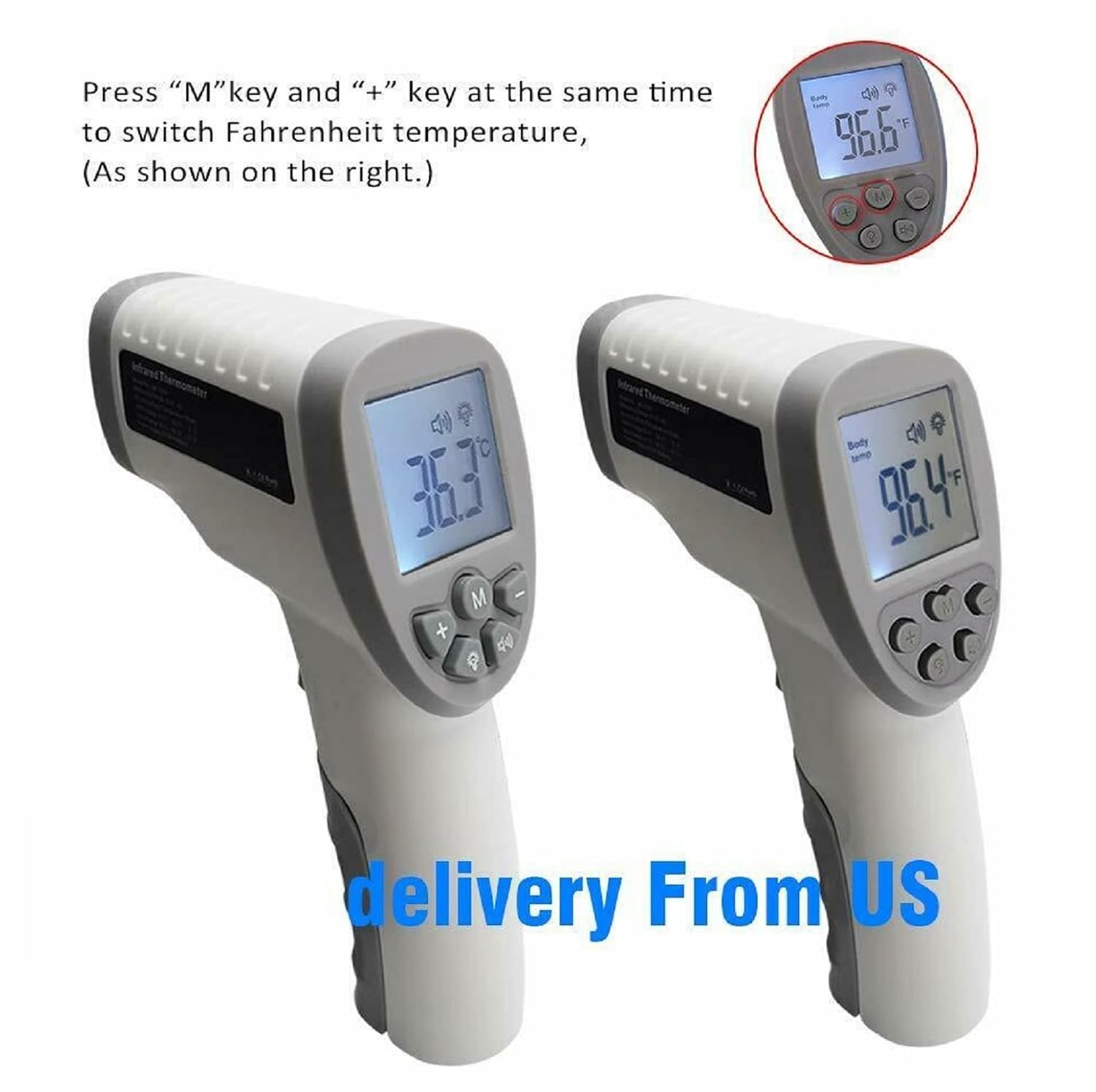
Image: Two infrared thermometers side-by-side. One displays 36.3 degrees Celsius, and the other displays 96.4 degrees Fahrenheit, illustrating the unit switching function.
5. Backlight and Mute Mode
The thermometer features an LCD backlight for visibility in low light and a mute function for silent operation. Consult the device's buttons (often indicated by light bulb or speaker icons) to toggle these features.

Image: An infrared thermometer with its LCD display illuminated, next to icons for "Mute/Unmute" and "Backlight," indicating these features.
6. Memory Recall
This thermometer can store previous temperature readings. To access memory recall, press the "M" button (Memory button). Repeated presses will cycle through stored readings. The number of stored memories is typically 32.
Maintenance
1. Cleaning
To clean the thermometer, wipe it with a soft, damp cloth. Do not immerse the device in water or use abrasive cleaners. Ensure the infrared sensor lens is clean and free of debris for accurate readings.
2. Storage
Store the thermometer in a cool, dry place away from direct sunlight and extreme temperatures. If not in use for an extended period, remove the battery.
Troubleshooting
| Problem | Possible Cause | Solution |
|---|---|---|
| Thermometer does not power on. | Battery is dead or incorrectly installed. | Check battery polarity. Replace with a new DC9V battery. |
| Inaccurate temperature readings. | Incorrect measurement distance; dirty sensor lens; environmental interference. | Ensure measurement distance is 0.4-2.5 inches. Clean the sensor lens. Avoid strong electromagnetic fields. Allow thermometer to acclimate to room temperature. |
| Display shows "Lo" or "Hi". | Temperature is outside the measurable range. | Ensure the target temperature is within the specified range (Body: 32.0℃~42.9℃). |
Specifications
| Feature | Detail |
|---|---|
| Measuring Range (Body Mode) | 32.0℃~42.9℃ (89.6℉~109.2℉) |
| Accuracy (Body Mode) | ±0.2℃ (35.0℃-42.0℃); ±0.3℃ (outside 35.0℃-42.0℃) |
| Measurement Distance | 1-5 cm (0.4-2.5 inches) |
| Power Supply | DC9V Battery |
| Display | LCD with Backlight |
| Auto Power Off | Yes |
| Memory Recall | 32 readings |
| Material | Plastic |
| Product Care | Wipe Clean |
| Model Number | 904d806c-ed01-42fa-b40f-d8514c10701d |
Warranty and Support
For warranty information or technical support, please refer to the documentation included with your purchase or contact the seller directly. Keep your purchase receipt as proof of purchase.


