
Lefant LS1 Pro
Lefant LS1 Pro Robot Vacuum Cleaner User Manual
Model: LS1 Pro

Image: The Lefant LS1 Pro robot vacuum cleaner, highlighting its compatibility with Alexa and Google Assistant.
1. Introduction
This manual provides essential information for the safe operation, maintenance, and troubleshooting of your Lefant LS1 Pro Robot Vacuum Cleaner. Please read it thoroughly before using the product and retain it for future reference.
1.1 Product Overview
The Lefant LS1 Pro is an intelligent robot vacuum cleaner designed to automate floor cleaning. It features LDS navigation for precise mapping, strong suction, and smart controls via an app or voice assistants.

Image: The Lefant LS1 Pro robot vacuum cleaner, black, shown next to a smartphone displaying its mapping and control application.
1.2 Key Features
- LDS Navigation: Precision mapping for efficient cleaning paths.
- 3200Pa Suction: Powerful cleaning for various floor types.
- Multi-floor Mapping: Stores maps for different levels of your home.
- App & Voice Control: Manage cleaning via the Lefant app, Amazon Alexa, or Google Assistant.
- Brushless Motors: Equipped with multiple brushless motors for enhanced durability and performance.
- Lithium Iron Phosphate Battery: Designed for extended lifespan and consistent power.
- Compact Design: Thin profile to clean under furniture.

Image: Visual representation of key features including stable suction, OTA online upgrades, voice reminders, and multi-floor mapping capabilities.

Image: An internal view of the Lefant LS1 Pro, highlighting its six brushless motors and a lithium iron phosphate battery designed for extended machine life.

Image: A comparison illustrating the thinner design of the Lefant LS1 Pro, allowing it to cover more areas compared to standard robot vacuums.
1.3 Package Contents
Verify that all components are present in the package:
- Lefant LS1 Pro Robot Vacuum Cleaner
- Charging Base and Power Adapter
- 520ML Dustbin
- Cleaning Brush
- User Manual
- 2 HEPA Filters
- 4 Side Brushes
2. Safety Instructions
Before using this product, please read and follow all safety instructions to prevent injury or damage.
- Do not use the robot in wet environments or near liquids.
- Keep the robot away from open flames and heat sources.
- Ensure the charging base is placed against a wall on a level surface.
- Do not allow children or pets to operate the robot.
- Remove loose cables, small objects, and fragile items from the cleaning area before operation.
- Do not use the robot to clean sharp objects, burning materials, or liquids.
- Only use the original power adapter and charging base provided.
3. Setup
3.1 Charging the Robot
- Place the charging base against a wall in an open area, ensuring no obstacles within 1 meter to the sides and 1.5 meters in front.
- Connect the power adapter to the charging base and plug it into a power outlet.
- Place the robot on the charging base. Ensure the charging contacts align. The indicator light will show charging status.
- Fully charge the robot before first use (approximately 4-5 hours).
3.2 App Connection and Initial Mapping
- Download the "Lefant" app from your mobile app store.
- Register an account and log in.
- Follow the in-app instructions to add your LS1 Pro robot vacuum. Ensure your Wi-Fi network is 2.4 GHz.
- For initial mapping, allow the robot to complete a full cleaning cycle of your home without interruption. This will create an accurate map in the app.

Image: A smartphone displaying the Lefant app interface, showing cleaning schedules, suction control, real-time map, area cleaning, and no-go zone settings.
4. Operating the Robot
4.1 Cleaning Modes
- Auto Clean: The robot automatically plans the most efficient cleaning path.
- Spot Clean: Cleans a specific area more intensely.
- Edge Clean: Cleans along walls and furniture edges.
- Scheduled Clean: Set cleaning times via the app.
4.2 LDS Navigation and Mapping
The LS1 Pro uses LDS (Laser Distance Sensor) navigation to create precise maps of your home. This allows for efficient cleaning paths and multi-floor mapping capabilities.

Image: The Lefant LS1 Pro robot vacuum emitting laser beams for navigation, illustrating its ability to detect objects up to 12 meters away.

Image: An illustration of the Lefant LS1 Pro's Freemove 3.0 and LDS Navigation Technology, showing its advanced mapping capabilities.
4.3 Virtual Walls, No-Go Zones, and Area Cleaning
Using the Lefant app, you can define virtual walls or no-go zones on your map to restrict the robot from entering certain areas. You can also select specific areas for cleaning.
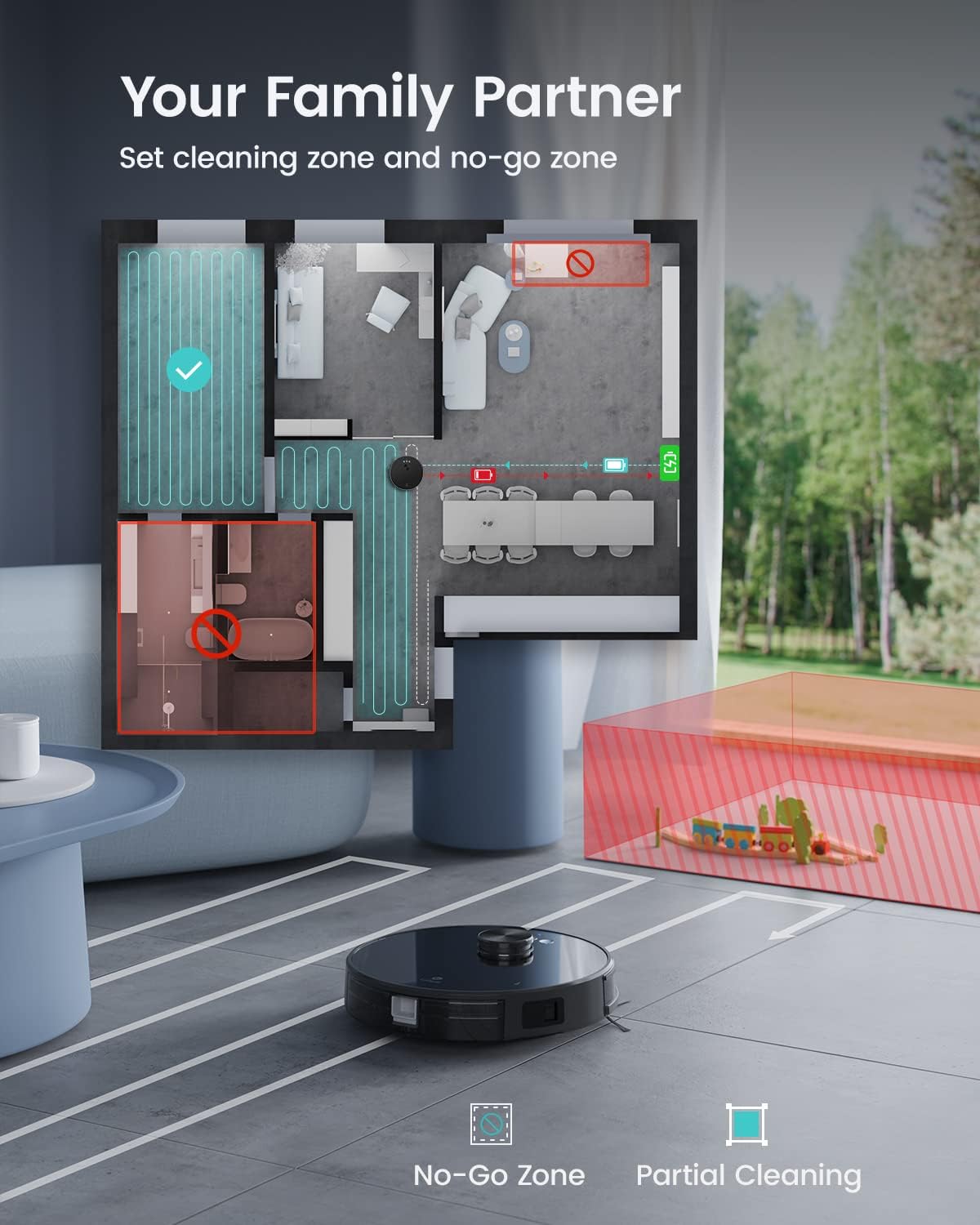
Image: A floor plan displayed on a screen, indicating a "No-Go Zone" marked in red and a "Partial Cleaning" zone marked in blue, with the robot vacuum shown below.

Image: A series of illustrations demonstrating the robot's features: virtual forbidden zones, precise positioning for cleaning, partial zone cleaning, and automatic charging with cleaning resumption.
4.4 Voice Control
The LS1 Pro is compatible with Amazon Alexa and Google Assistant. Link your Lefant account to your voice assistant app to control the robot with voice commands.
Example command: "Alexa, turn on LS1."

Image: The Lefant LS1 Pro robot vacuum next to a smart speaker, illustrating its compatibility with Alexa and Google Assistant for voice control.
5. Maintenance
Regular maintenance ensures optimal performance and extends the lifespan of your robot vacuum.
5.1 Dustbin and Filter Cleaning
- Press the dustbin release button and remove the dustbin.
- Open the dustbin cover and empty its contents into a trash bin.
- Remove the HEPA filter and primary filter. Tap them gently to remove dust. Do not wash HEPA filters with water.
- Rinse the dustbin with water if necessary, ensuring it is completely dry before reinstallation.
- Reassemble the filters and dustbin, then reinsert into the robot.
5.2 Side Brush Cleaning
Periodically check the side brushes for tangled hair or debris. Remove and clean them using the provided cleaning tool or a soft cloth. Replace worn brushes as needed.
5.3 Sensor Cleaning
Wipe the cliff sensors, wall sensors, and charging contacts with a clean, dry cloth to ensure proper function.
6. Troubleshooting
| Problem | Possible Cause | Solution |
|---|---|---|
| Robot does not turn on. | Low battery. | Place the robot on the charging base and ensure it is fully charged. |
| Robot cannot connect to Wi-Fi. | Incorrect Wi-Fi password; 5GHz network used; robot too far from router. | Verify password; ensure 2.4GHz network; move robot closer to router. |
| Robot gets stuck frequently. | Obstacles (cables, rugs, furniture). | Clear the cleaning area of obstacles. Use no-go zones for problematic areas. |
| Poor cleaning performance. | Full dustbin; dirty filters; worn brushes. | Empty dustbin; clean/replace filters; clean/replace side brushes. |
7. Specifications
- Brand: LEFANT
- Model Number: LS1 (Y79)
- Product Dimensions: 32 x 32 x 9.5 cm
- Weight: 4.34 kg
- Dustbin Capacity: 520 ml
- Power: 46 Watts
- Noise Level: 55 dB
- Battery Runtime: Up to 150 minutes (2 hours 30 minutes)
- Filter Type: HEPA Filter
- Control Type: APP Control (2.4 GHz WiFi), Alexa & Google Assistant Control, Button Control
- Surface Recommendation: Carpets, Hard Floors
- Special Features: Pet hair brush, hard floor brush, suitable for pet hair
8. Warranty and Support
For warranty information and customer support, please refer to the official Lefant website or contact their customer service directly. Keep your purchase receipt as proof of purchase.
Battery Life: The battery has an estimated lifespan of 2 years.
Related documentsLS1 Pro


Ask a question about this manual
Ask about setup, troubleshooting, compatibility, parts, safety, or missing instructions. Manuals+ will review the question and use this page’s manual context to help answer it.