
Introduction
This manual provides essential information for the safe and effective use of your Technical Precision Replacement Battery for the Braun 4515 shaver. Please read these instructions carefully before installation and retain them for future reference. This product is a replacement part and is not manufactured by Braun.
Package Contents
- 1 x Technical Precision Replacement Battery (Model: 4515 BATTERY)
Installation Instructions
Replacing the battery in electronic devices requires careful handling and basic technical knowledge. If you are unsure about any step, it is recommended to seek assistance from a qualified technician to prevent damage to your device or the new battery.
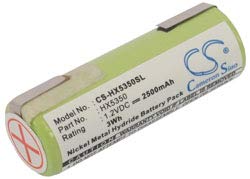
Image: Technical Precision Replacement Battery for Braun 4515. This image displays the cylindrical battery, typically used in shavers, with a blue and white label indicating its specifications.
General Steps for Battery Replacement:
- Safety First: Ensure the shaver is turned off and unplugged from any power source.
- Disassembly: Carefully open the shaver casing. This may involve removing screws or prying open clips. Refer to your shaver's original manual or online resources for specific disassembly instructions for the Braun 4515 model.
- Locate Old Battery: Identify the existing battery within the shaver. Note its orientation and how it is connected.
- Disconnect Old Battery: Gently disconnect the old battery. This may involve desoldering or unclipping connectors.
- Install New Battery: Connect the Technical Precision replacement battery, ensuring correct polarity if applicable. Secure it in place.
- Reassembly: Carefully reassemble the shaver casing, ensuring all parts fit correctly.
- Initial Charge: Fully charge the shaver with the new battery before its first use.
Warning: Improper installation can damage your device or cause personal injury. Always exercise caution and consult a professional if needed.
Operation
Once the Technical Precision replacement battery is correctly installed and fully charged, your Braun 4515 shaver should operate as intended. The battery is rechargeable, providing power for cordless operation.
- Charging: Connect your shaver to its original charger. The charging indicator (if present on your shaver) should activate.
- Usage: Use your shaver according to its original operating instructions.
- Recharge Cycle: For optimal battery life, allow the battery to fully discharge before recharging, especially during the first few cycles.
Maintenance and Care
Proper care can extend the life of your replacement battery.
- Avoid Extreme Temperatures: Do not expose the battery or the shaver to extreme heat or cold.
- Regular Charging: If the shaver is not used for an extended period, charge it periodically (e.g., every 3-6 months) to prevent deep discharge.
- Proper Disposal: When the battery reaches the end of its life, dispose of it responsibly according to local regulations for rechargeable batteries. Do not dispose of it in household waste.
Troubleshooting
If you encounter issues after installing the new battery, consider the following:
| Problem | Possible Cause | Solution |
|---|---|---|
| Shaver does not turn on after battery replacement. | Battery not properly connected; battery not charged; incorrect battery type. | Check battery connections; ensure battery is fully charged; verify correct battery model. |
| Shaver runs for a very short time after charging. | Battery not fully charged; battery defect (rare). | Ensure a full charge cycle; contact support if issue persists. |
| Shaver does not charge. | Charger issue; shaver charging port issue; battery connection issue. | Test charger with another device (if possible); inspect shaver charging port; recheck battery connections. |
Specifications
| Brand | Technical Precision |
| Model Name | 4515 BATTERY |
| Model Number | 4515 BATTERY |
| Unit Count | 1.0 Count |
| Voltage | 1 Volts |
| Reusability | Rechargeable |
| Manufacturer | Technical Precision |
| Built-In Media | Replacement Part |
| ASIN | B0B37VQSPV |
Warranty and Support
This Technical Precision Replacement Battery comes with a 1 Year Manufacturer Warranty. This warranty covers defects in materials and workmanship under normal use.
For warranty claims, technical assistance, or any questions regarding your replacement battery, please contact Technical Precision customer support. Refer to the packaging or the seller's information for specific contact details.