1. Product Overview
The Aresrora Vintage Bluetooth Speaker DW13 combines modern audio technology with a classic aesthetic. This compact and portable speaker offers wireless audio streaming, hands-free calling, and multiple input options for a versatile listening experience.

Image 1.1: Front view of the Aresrora Vintage Bluetooth Speaker in Light Blue. It features a retro design with a gold trim, three speaker grilles, a volume knob, and control buttons.
2. Package Contents
Please check the package for the following items:
- 1 x Aresrora Vintage Bluetooth Speaker (Model DW13)
- 1 x Audio Cable
- 1 x Type-C Charging Cable
- 1 x User Manual
3. Setup
3.1 Charging the Speaker
Before first use, fully charge the speaker. Connect the provided Type-C charging cable to the speaker's charging port and the other end to a USB power adapter (not included). The LED charging indicator will illuminate during charging and turn off when fully charged.
- Charging Time: Approximately 2 hours for a full charge.
- Battery Life: Up to 3 hours of playtime (varies by volume level).

Image 3.1: Illustration of the speaker's battery charging indicator, showing a battery icon filling up to indicate charging status.
3.2 Identifying Ports and Controls
Familiarize yourself with the speaker's ports and controls:

Image 3.2: A detailed diagram highlighting the speaker's components, including the PU handle, AUX input, charging port (Type-C), LED charging indicator, TF (SD) card slot, USB disk port, power ON/OFF/volume knob, LED indicator, and buttons for previous/next song and play/pause/answer/hang up.
- PU Handle: For portability.
- AUX Input: For wired audio connection.
- Charging Port (Type-C): For charging the speaker.
- LED Charging Indicator: Shows charging status.
- TF (SD) Card Slot: For playing music directly from a memory card.
- USB Disk Port: For playing music directly from a USB flash drive.
- Power ON/OFF / Volume Knob: Turns the speaker on/off and adjusts volume.
- LED Indicator: Shows operational status (e.g., Bluetooth pairing mode).
- Up Button: Short press for previous song.
- Down Button: Short press for next song.
- Middle Button: Double press for Play/Pause; during a call, press to Answer/Hang Up.
4. Operating Instructions
4.1 Power On/Off and Volume Control
- Power On: Rotate the Power ON/OFF / Volume Knob clockwise until you hear a click and the speaker powers on.
- Power Off: Rotate the Power ON/OFF / Volume Knob counter-clockwise until you hear a click and the speaker powers off.
- Adjust Volume: Rotate the Power ON/OFF / Volume Knob clockwise to increase volume and counter-clockwise to decrease volume.

Image 4.1: A hand demonstrating how to rotate the power/volume knob to adjust the speaker's volume.
4.2 Bluetooth Pairing
- Power on the speaker. The LED indicator will flash, indicating it is in pairing mode.
- Enable Bluetooth on your smartphone, tablet, or other Bluetooth-enabled device.
- Search for available Bluetooth devices and select "DW13" (or similar name) from the list.
- Once paired, the LED indicator will stop flashing and remain solid. You can now play audio wirelessly.
- The speaker uses Bluetooth 5.0 technology for a stable connection up to 32.8 feet (10 meters).
4.3 Using Other Audio Inputs
- AUX Input: Connect an audio cable from your device's headphone jack to the speaker's AUX input port. The speaker will automatically switch to AUX mode.
- TF (SD) Card: Insert a TF (microSD) card with MP3 audio files into the TF card slot. The speaker will automatically detect and play music from the card.
- USB Disk: Insert a USB flash drive with MP3 audio files into the USB disk port. The speaker will automatically detect and play music from the drive.
4.4 Hands-Free Calling
When connected via Bluetooth, the built-in microphone allows for hands-free calling:
- Answer Call: Double press the middle button.
- End Call: Double press the middle button.
5. Maintenance
- Clean the speaker with a soft, dry cloth. Do not use abrasive cleaners or solvents.
- Avoid exposing the speaker to extreme temperatures, direct sunlight, or moisture.
- Store the speaker in a cool, dry place when not in use for extended periods.
- Do not attempt to disassemble or repair the speaker yourself, as this may void the warranty.
6. Troubleshooting
If you encounter issues with your speaker, please refer to the following common solutions:
- Speaker does not power on: Ensure the battery is charged. Connect the charging cable and try again.
- Cannot pair via Bluetooth:
- Ensure the speaker is in pairing mode (LED indicator flashing).
- Make sure Bluetooth is enabled on your device and it is within 32.8 feet (10 meters) of the speaker.
- Forget the device from your phone's Bluetooth settings and try pairing again.
- Turn both the speaker and your device off and on again.
- No sound:
- Check the volume level on both the speaker and your connected device.
- Ensure the correct input mode (Bluetooth, AUX, TF card, USB) is selected.
- If using AUX, ensure the cable is fully inserted and not damaged.
- Poor sound quality:
- Move the speaker closer to your Bluetooth device to reduce interference.
- Ensure there are no obstructions between the speaker and your device.
- Try playing a different audio source to rule out file quality issues.
7. Specifications
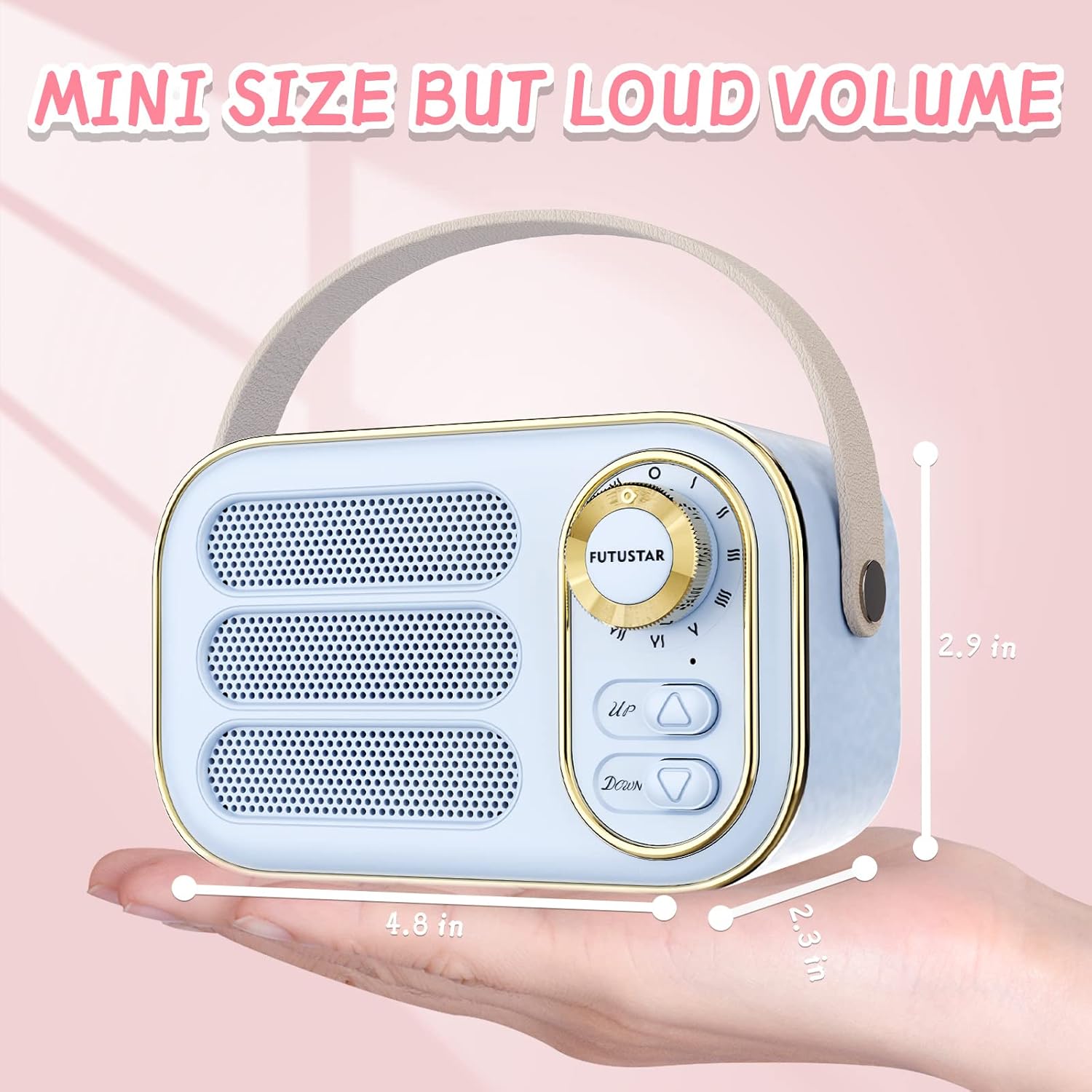
Image 7.1: The speaker held in a hand, illustrating its compact dimensions of 4.8 inches (width), 2.9 inches (height), and 2.3 inches (depth).
| Feature | Detail |
|---|---|
| Model Name | DW13 |
| Brand | Aresrora |
| Color | Light Blue |
| Product Dimensions | 3"D x 2"W x 2"H (approximately 7.6cm D x 5.1cm W x 5.1cm H) |
| Item Weight | 6 Ounces (approximately 170 grams) |
| Material | Plastic |
| Speaker Maximum Output Power | 5 Watts |
| Wireless Communication Technology | Bluetooth 5.0 |
| Bluetooth Range | 33 Feet (10 meters) |
| Battery Type | 1 Lithium Polymer battery (included) |
| Battery Capacity | 400mAh |
| Charging Time | Approximately 2 hours |
| Playtime | Up to 3 hours (varies by volume) |
| Control Method | Knob, Buttons |
| Special Features | Built-in Microphone, Retro Design |
| Included Components | Bluetooth Speaker, Audio Cable, Type-C Charging Cable, User Manual |
8. Warranty Information
This product comes with a limited warranty. Please refer to the warranty card included in your package for specific terms and conditions. The warranty covers manufacturing defects under normal use.
9. Support
For further assistance, technical support, or warranty claims, please contact Aresrora customer service through the retailer where the product was purchased or visit the official Aresrora website for contact information.


