1. Introduction
Thank you for choosing the Aresrora Vintage Bluetooth Speaker DW13. This portable speaker combines classic aesthetics with modern audio technology, offering a clear and enjoyable listening experience. This manual provides essential information for setting up, operating, maintaining, and troubleshooting your speaker to ensure optimal performance.
2. What's in the Box
- 1 x Aresrora Vintage Bluetooth Speaker DW13
- 1 x Audio Cable
- 1 x Type-C Charging Cable
- 1 x User Manual
3. Product Overview
Familiarize yourself with the components and controls of your Aresrora Vintage Bluetooth Speaker.

Figure 3.1: Front view of the Aresrora Vintage Bluetooth Speaker in light pink with gold accents and a beige handle.

Figure 3.2: Detailed diagram of speaker controls and ports.
Controls and Ports:
- Power ON/OFF/Volume Knob: Rotate to power on/off and adjust volume.
- UP Button: Press for previous song. Double press to Play/Pause or Answer/Hang Up calls.
- DOWN Button: Press for next song.
- AUX Input: Connect external audio devices using the provided audio cable.
- Charging Port (Type-C): Connect the Type-C charging cable to recharge the speaker.
- LED Charging Indicator: Indicates charging status.
- TF (SD) Card Slot: Insert a TF/SD card for direct music playback.
- USB Disk Port: Insert a USB drive for direct music playback.
- PU Handle: For easy portability.
4. Setup
4.1 Charging the Speaker
- Connect the provided Type-C charging cable to the speaker's charging port.
- Connect the other end of the cable to a USB power adapter (not included) or a computer's USB port.
- The LED Charging Indicator will illuminate during charging.
- A full charge typically takes approximately 2 hours.
4.2 Bluetooth Pairing
Follow these steps to connect your speaker to a Bluetooth-enabled device:
- Ensure the speaker is charged.
- Turn on the speaker by rotating the Power ON/OFF/Volume Knob clockwise. The speaker will enter Bluetooth pairing mode, indicated by a flashing LED.
- On your mobile device, navigate to the Bluetooth settings.
- Search for available devices and select "DW13" from the list.
- Once connected, the speaker will emit a confirmation sound, and the LED indicator will stop flashing and remain solid.
- Your speaker is now ready to play audio from your device.
Video 4.1: Demonstration of Bluetooth pairing and music playback with the Aresrora Vintage Bluetooth Speaker.
5. Operating Instructions
5.1 Power On/Off and Volume Control
- To power on, rotate the Power ON/OFF/Volume Knob clockwise until you hear a click and the LED indicator lights up.
- To power off, rotate the knob counter-clockwise until you hear a click and the LED indicator turns off.
- To adjust the volume, rotate the knob clockwise to increase and counter-clockwise to decrease.
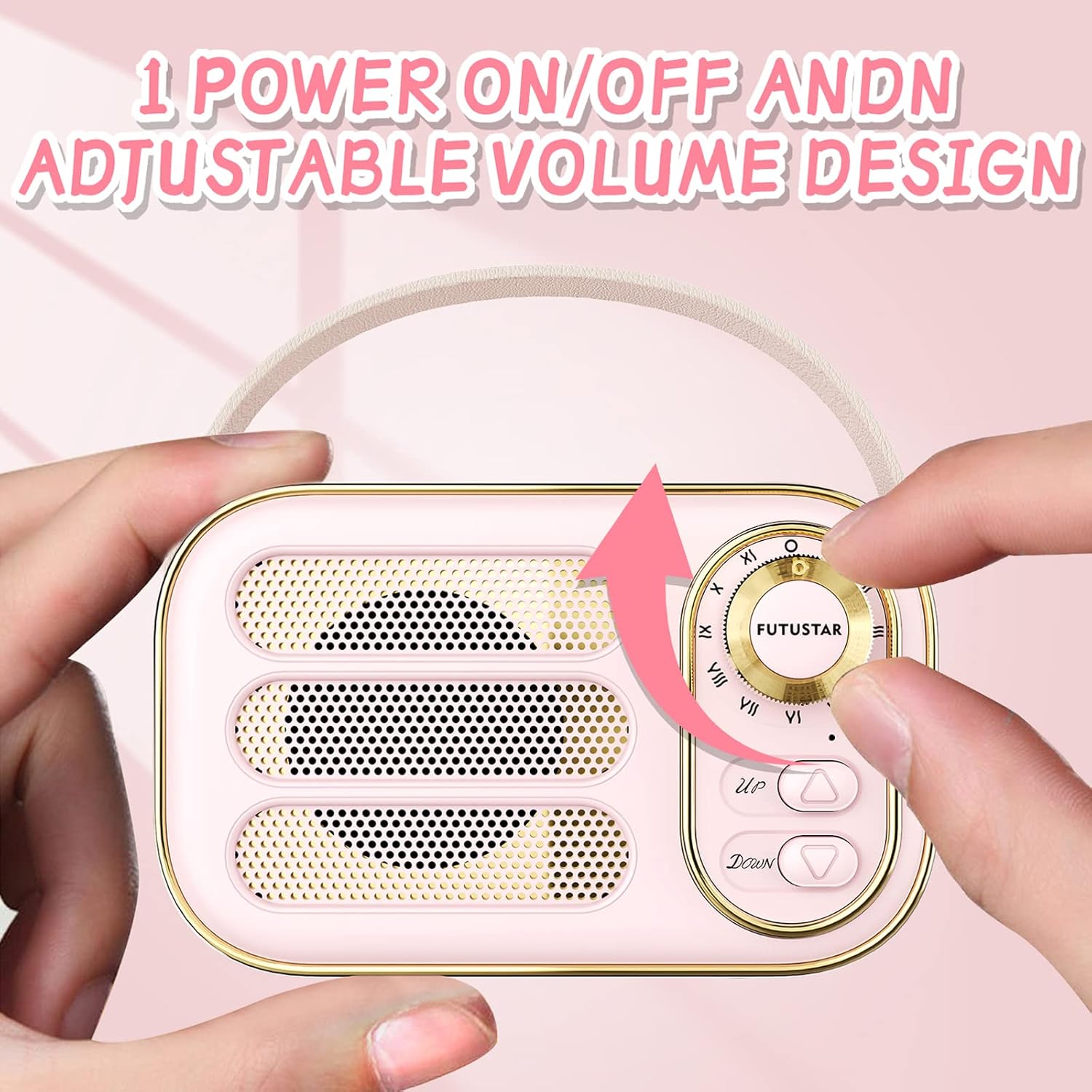
Figure 5.1: Adjusting the power and volume using the knob.
5.2 Music Playback
- Bluetooth Mode: After successful pairing, play music from your connected device.
- AUX Mode: Insert the audio cable into the AUX input port and connect to your audio source. The speaker will automatically switch to AUX mode.
- TF (SD) Card/USB Disk Mode: Insert a TF/SD card or USB disk into the respective slot. The speaker will automatically detect and play audio files.
5.3 Playback Controls
- Previous Song: Press the UP button.
- Next Song: Press the DOWN button.
- Play/Pause: Double press the UP button.
5.4 Hands-Free Calling
When connected via Bluetooth, the speaker supports hands-free calling:
- Answer Call: Double press the UP button when an incoming call rings.
- Hang Up Call: Double press the UP button during a call.
6. Maintenance
Proper care ensures the longevity of your speaker:
- Cleaning: Use a soft, dry cloth to clean the speaker's surface. Avoid abrasive cleaners or solvents.
- Storage: Store the speaker in a cool, dry place away from direct sunlight and extreme temperatures.
- Battery Care: To prolong battery life, avoid fully discharging the speaker frequently. Recharge it when the battery is low. If storing for an extended period, charge it to about 50% every few months.
- Water Resistance: This speaker is not water-resistant. Avoid exposure to liquids.
7. Troubleshooting
If you encounter issues with your speaker, refer to the following common problems and solutions:
| Problem | Possible Solution |
|---|---|
| Speaker does not power on. | Ensure the battery is charged. Connect the charging cable and try again. |
| Cannot pair via Bluetooth. | Make sure the speaker is in pairing mode (flashing LED). Ensure your device's Bluetooth is on and within range (32.8 feet). Forget previous pairings on your device and try again. |
| No sound or low volume. | Check the volume level on both the speaker and your connected device. Ensure the correct input mode (Bluetooth, AUX, TF Card, USB) is selected. |
| Sound distortion. | Reduce the volume on both the speaker and your device. Ensure the speaker is not too far from the Bluetooth source or obstructed. |
8. Specifications
Detailed technical specifications for the Aresrora Vintage Bluetooth Speaker DW13:
| Feature | Detail |
|---|---|
| Model Name | DW13 |
| Brand | Aresrora |
| Connectivity Technology | Bluetooth |
| Wireless Communication Technology | Bluetooth 5.0 |
| Bluetooth Range | Up to 32.8 Feet (10 meters) |
| Speaker Maximum Output Power | 5 Watts |
| Frequency Response | 20 KHz |
| Power Source | Battery Powered (1 Lithium Polymer battery included) |
| Battery Capacity | 400mAh (approx. 500 Amp Hours) |
| Charging Time | Approx. 2 hours |
| Playtime | Approx. 3 hours (varies by volume) |
| Product Dimensions | 3"D x 2"W x 2"H (approx. 4.8"L x 2.9"H x 2.3"D) |
| Item Weight | 6 Ounces |
| Material | Plastic |
| Special Features | Built-in Microphone, Retro Design |
| Water Resistance Level | Not Water Resistant |
9. Warranty and Support
The Aresrora Vintage Bluetooth Speaker DW13 comes with a limited warranty. For specific warranty details and support inquiries, please refer to the warranty card included in your product packaging or contact Aresrora customer service through their official channels. Keep your purchase receipt as proof of purchase for warranty claims.


