
1. Introduction
The Giro ROC Loc 5 LED Helmet Accessory Light is designed to enhance rider visibility, particularly during low-light conditions such as early mornings, dusk, or nighttime. This compact and lightweight LED light integrates seamlessly with compatible Giro helmets, providing an additional layer of safety for cyclists.
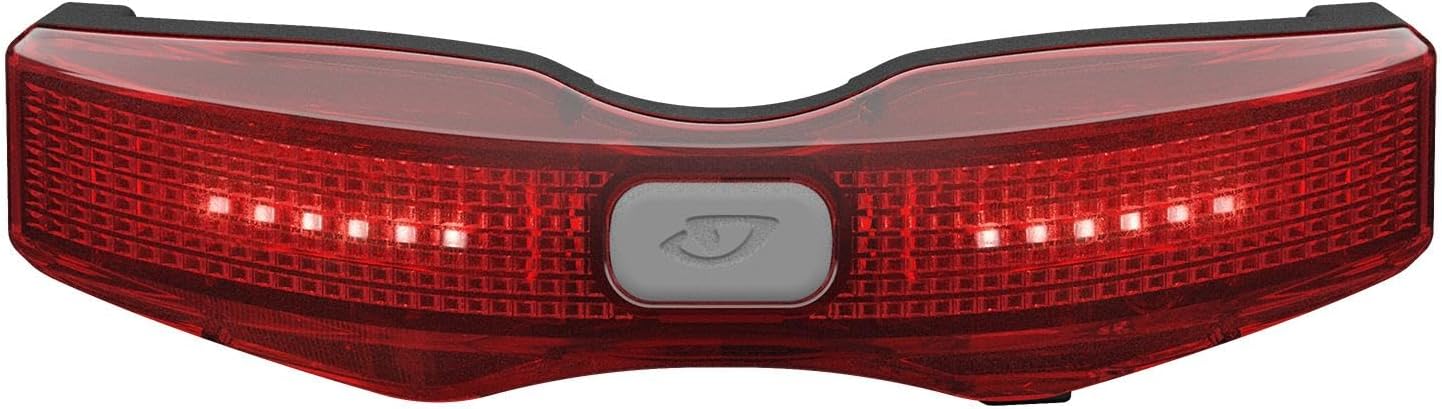
Figure 1.1: Front view of the Giro ROC Loc 5 LED Helmet Accessory Light.
2. Setup
2.1 Compatibility
This LED accessory light is compatible with Giro helmets featuring the ROC Loc 5 fitting system, manufactured from 2022 onwards. Verify your helmet's manufacturing date and retention system to ensure compatibility.
2.2 Attaching the Light
- Locate the ROC Loc 5 retention system at the rear of your compatible Giro helmet.
- Align the attachment clips on the back of the LED light with the corresponding slots on the ROC Loc 5 system.
- Gently press the light firmly into place until you hear or feel a secure click. Ensure both clips are fully engaged to prevent accidental detachment.

Figure 2.1: The LED light securely attached to a Giro Helios helmet.

Figure 2.2: The LED light attached to a Giro Source helmet, demonstrating integration.
2.3 Initial Charging
Before first use, fully charge the LED light. Refer to the 'Charging the Battery' section for detailed instructions.
3. Operating the Light
3.1 Power On/Off and Mode Selection
The light features a single button for all operations. This button is typically located on the top surface of the light.

Figure 3.1: Detail of the power/mode button.
- To Power On: Press and hold the button for approximately 1-2 seconds until the light illuminates.
- To Change Modes: Briefly press the button to cycle through available light modes (e.g., steady, flashing).
- To Power Off: Press and hold the button for approximately 1-2 seconds until the light turns off.
3.2 Charging the Battery
The light is equipped with a rechargeable battery. A Micro USB port is located on the underside of the light for charging.

Figure 3.2: Underside view showing the Micro USB charging port.
- Locate the Micro USB port cover on the light. Carefully open the cover.
- Connect a standard Micro USB cable to the light's port and the other end to a USB power source (e.g., computer, wall adapter).
- An indicator light will typically show the charging status (e.g., red for charging, green for fully charged).
- Once fully charged, disconnect the cable and ensure the port cover is securely closed to maintain water resistance.
The light can be charged while still attached to the helmet, reducing the need for frequent removal and reattachment.
4. Maintenance
4.1 Cleaning
To clean the light, wipe it with a soft, damp cloth. Avoid using harsh chemicals or abrasive materials, as these can damage the light's casing or lens. Ensure the USB port cover is closed during cleaning.
4.2 Storage
Store the light in a cool, dry place away from direct sunlight when not in use. For long-term storage, ensure the battery is partially charged (around 50%) to maintain battery health.
4.3 Battery Care
Regularly charge the battery, even if the light is not used frequently, to prevent deep discharge and prolong its lifespan. Avoid completely draining the battery before recharging.
5. Troubleshooting
- Light does not turn on: Ensure the battery is charged. Connect the light to a USB power source and check the charging indicator. If the light still does not respond, try pressing and holding the power button for a longer duration (5-10 seconds) for a potential reset.
- Light does not attach securely to helmet: Verify that your helmet is a compatible Giro model with the ROC Loc 5 fitting system from 2022 onwards. Ensure the light's clips are correctly aligned and fully engaged with the helmet's retention system. Avoid forcing the light, as this may damage the clips.
- Short battery life: Ensure the light is fully charged before use. Battery performance can be affected by extreme temperatures. If battery life significantly degrades over time, it may indicate battery wear.
- Water ingress: While the light is water-resistant (IP65 rated), ensure the Micro USB port cover is always securely closed when not charging to maintain its water resistance.
6. Specifications
| Feature | Specification |
|---|---|
| Brand | Giro |
| Model Number | GIH7141306 |
| Material | Plastic |
| Power Source | Battery Powered |
| Water Resistance Level | Water Resistant (IP65) |
| Item Weight | 0.05 Kilograms |
| Mounting Type | Helmet Mount (ROC Loc 5 System) |
| UPC | 768686478758 |
| GTIN | 768686478758 |
7. Warranty and Support
For warranty information and customer support, please refer to the official Giro website or contact their customer service department. Keep your proof of purchase for any warranty claims.
Official Giro Website: www.giro.com