
1. Introduction
Thank you for choosing the UNIWEIGH HU-50 Digital Hanging Scale. This versatile scale is designed for accurate weighing of various items, including fish, luggage, and packages, with a maximum capacity of 110lb (50kg). It features a waterproof design, a built-in tape measure, and a backlit LCD display for clear readings. Please read this manual thoroughly before use to ensure proper operation and longevity of your device.
2. Product Overview
The UNIWEIGH HU-50 scale comes equipped with several features to enhance its utility.

Image 2.1: Scale Features. This image displays the front and back of the scale, indicating the LCD backlight, unit conversion button (kg/oz/lb), TARE button, ON/OFF button, and the blue button to retract the 60-inch ruler.

Image 2.2: Display Units and Readability. The scale can display measurements in kilograms (kg), pounds (lb), and ounces (oz). The readability is 0.005kg for weights under 10kg and 0.01kg for weights over 10kg, with a maximum capacity of 50kg and a minimum weight of 0.015kg.

Image 2.3: Product Dimensions. This image illustrates the physical dimensions of both the digital hanging scale and the included lip gripper, along with a close-up of the built-in 1.5m (60-inch) tape measure.
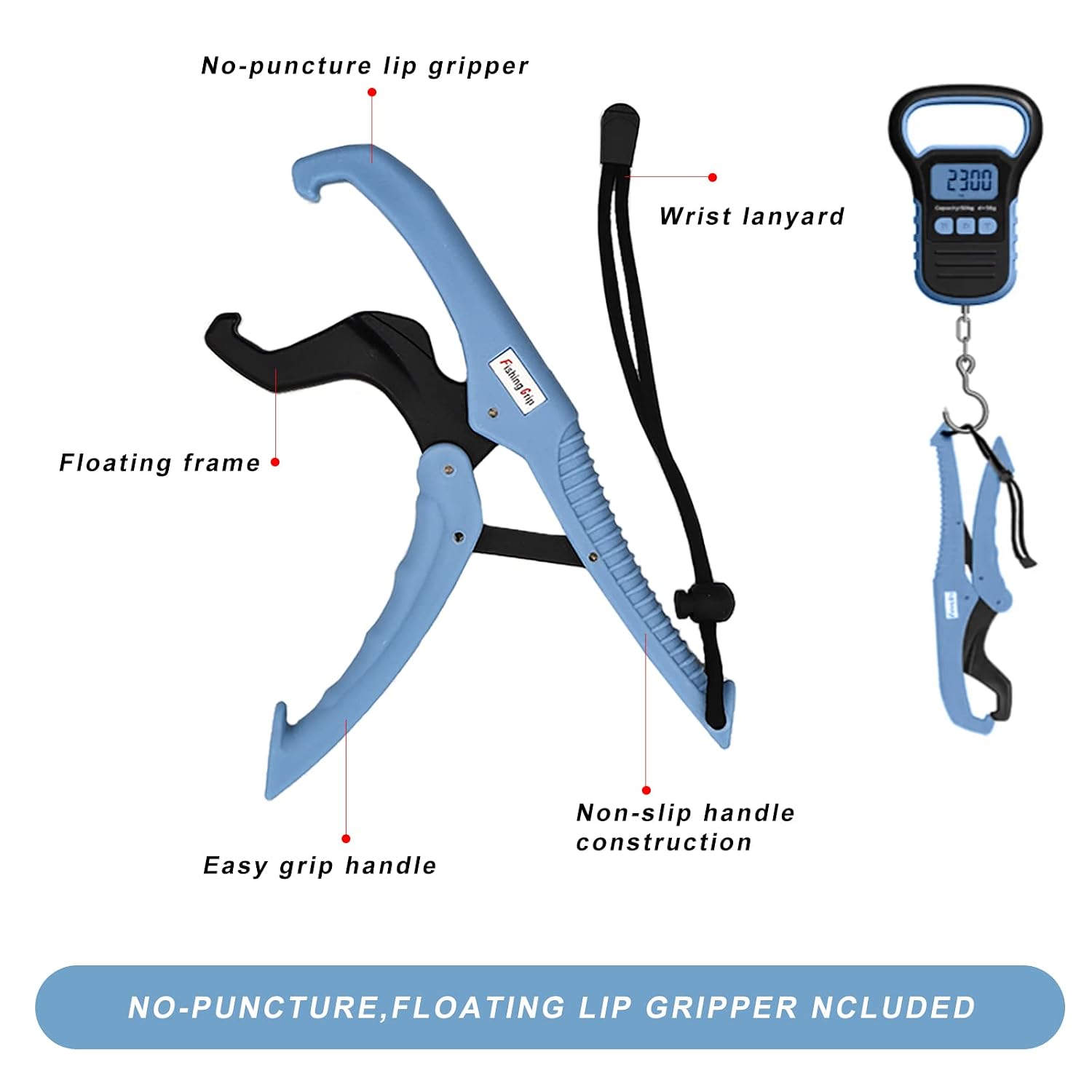
Image 2.4: Lip Gripper Features. The included lip gripper features a no-puncture design, a floating frame, an easy-grip handle, non-slip handle construction, and a wrist lanyard for secure handling.
Video 2.1: Digital Fishing Scale Overview. This video demonstrates the UNIWEIGH Digital Fishing Scale, showcasing its color options, large backlit LCD display, unit conversion (Lb/OZ/Kg), TARE function for one-click clearing, product showcase with weighing examples, tape measure design, and the fish lip clip in use.
3. Setup
- Battery Installation: The scale requires 2 AAA batteries (included). Locate the battery compartment on the back of the scale, open it, insert the batteries according to the polarity markings, and close the compartment securely.
- Attaching the Hook: Ensure the stainless steel hook is securely attached to the bottom loop of the scale.
- Initial Power On: Press the ON/OFF button to turn on the scale. The display will show "8888" and then "0.000" or "0.00" depending on the selected unit.
4. Operating Instructions
4.1 Power On/Off
- Press the ON/OFF button to turn the scale on.
- Press and hold the ON/OFF button for 3 seconds to turn the scale off. The scale also features an auto-off function to conserve battery power if inactive for a period.
4.2 Unit Conversion
- With the scale on, press the UNIT button (labeled 'M') to cycle through the available weighing units: kilograms (kg), pounds (lb), and ounces (oz).
- Select your desired unit before weighing.
4.3 Tare Function
- To weigh items in a container, first hang the empty container on the hook.
- Press the TARE button (labeled 'T'). The display will reset to zero.
- Place the items into the container. The display will show the net weight of the items.
4.4 Weighing Procedure
- Ensure the scale is powered on and displaying "0.000" (or "0.00" in lb/oz).
- Hang the item to be weighed directly onto the hook or use the lip gripper for fish.
- Hold the scale steady. The weight will be displayed on the LCD screen. The response time is approximately 2 seconds.
- The scale features an auto-display hold function, which will lock the stable weight reading on the screen.
4.5 Data Lock Function
- To turn on or turn off the data lock function, press and hold the TARE button (labeled 'T'). When data lock is active, the weight reading will be held on the display after stabilization.
4.6 Tape Measure Usage
- The scale includes a built-in 60-inch (150cm) retractable tape measure. Pull the tape measure out from the side of the scale to use it.
- To retract the tape measure, press the blue button located on the back of the scale.

Image 4.1: Scale Functions. This image illustrates the scale being used for fishing and highlights key functions such as Tare, Auto display hold, Auto OFF, Overload indicator, Low battery indicator, and Unit switch.
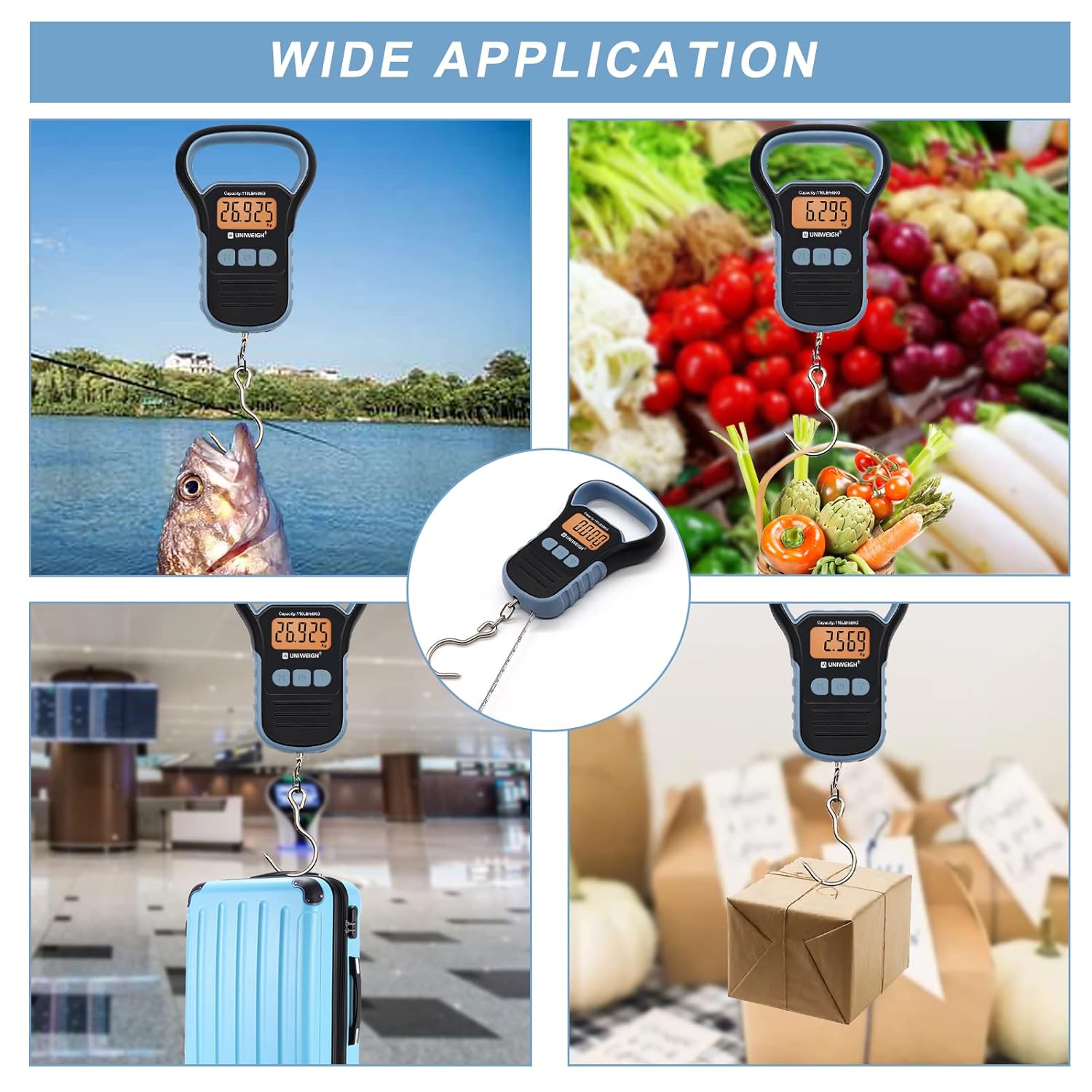
Image 4.2: Wide Application. The UNIWEIGH HU-50 scale is suitable for a variety of uses, including weighing fish, groceries, luggage, and packages.
5. Maintenance
- Cleaning: Wipe the scale with a soft, damp cloth. Do not use abrasive cleaners or immerse the scale in water, despite its waterproof rating, to prevent damage to internal components.
- Storage: Store the scale in a dry place at room temperature. Avoid extreme temperatures and high humidity.
- Battery Replacement: If the low battery indicator appears on the display, replace both AAA batteries promptly to ensure accurate readings.
6. Troubleshooting
- Inaccurate Readings: Ensure the scale is held steady and vertically. Avoid weighing in windy conditions. Check if the TARE function was used unintentionally. Recalibrate if necessary (refer to advanced settings if available, or contact support).
- Display Not Working: Check battery installation and replace batteries if needed. Ensure the scale is turned on.
- "O-Ld" or Overload Indicator: This indicates the weight exceeds the maximum capacity (110lb/50kg). Remove the item immediately to prevent damage to the sensor.
- No Response: If the scale does not respond, try removing and reinserting the batteries. If the issue persists, contact customer service.
7. Specifications
| Feature | Specification |
|---|---|
| Model | HU-50 |
| Brand | UNIWEIGH |
| Weight Limit | 110 Pounds / 50 Kilograms |
| Readout Accuracy | 0.005kg (for <10kg), 0.01kg (for >10kg) |
| Weighing Units | kg, lb, oz |
| Display Type | LCD with Backlight |
| Tape Measure Length | 60 inches (150 cm) |
| Power Source | 2 x AAA Batteries |
| Material | Acrylonitrile Butadiene Styrene (ABS), Stainless Steel |
| Item Weight | 0.35 Kilograms |
8. Warranty and Support
All UNIWEIGH products are individually tested before shipping to ensure quality. If you encounter any issues or have questions regarding your UNIWEIGH HU-50 Digital Hanging Scale, please contact our customer service for assistance. Refer to your purchase documentation for specific warranty details and contact information.
