
1. Introduction
This manual provides essential instructions for the safe and effective use of your PULADU 144349-000 Ni-MH battery. This battery is specifically designed for compatibility with various Totex Infusion Pump systems. Please read this manual thoroughly before installation and operation to ensure proper function and longevity of the battery.
2. Safety Information
Observe the following safety precautions to prevent injury or damage to the battery and connected devices:
- Do not short-circuit the battery terminals.
- Do not expose the battery to extreme temperatures (high or low), direct sunlight, or fire.
- Do not disassemble, puncture, or modify the battery.
- Use only with compatible Totex Infusion Pump models and their designated charging equipment.
- Keep the battery out of reach of children and pets.
- If the battery shows signs of damage, leakage, or overheating, discontinue use immediately and dispose of it properly.
- Dispose of used batteries according to local regulations.
3. Product Overview
The PULADU 144349-000 is a 12V, 4Ah Nickel-Metal Hydride (Ni-MH) rechargeable battery designed as a replacement or spare power source for Totex Infusion Pumps. It is compatible with models such as AS35073, Medley U80209-1R01, TC10010920, TC10010669, BK45A10U1A, and MED0016.
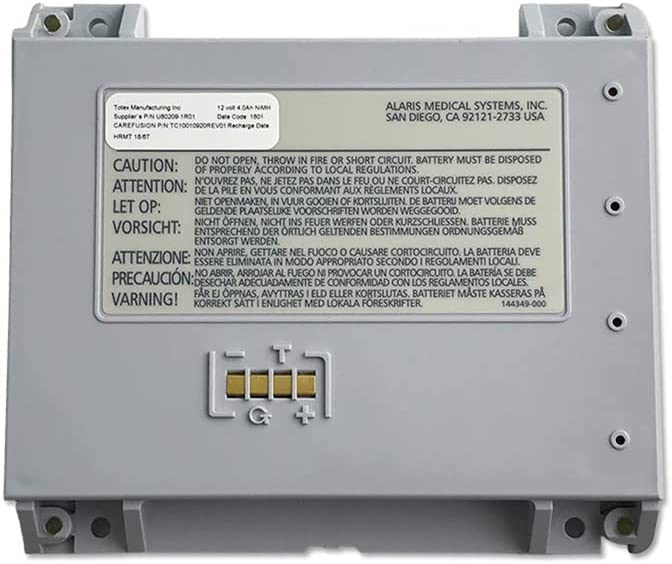
Image of the PULADU 144349-000 Ni-MH battery, showing its compact design and connectors.
4. Setup
4.1 Battery Installation
- Ensure the Totex Infusion Pump is powered off and disconnected from any external power source.
- Locate the battery compartment on your specific Totex Infusion Pump model. Refer to your pump's user manual if needed.
- Open the battery compartment cover.
- Align the PULADU battery with the compartment's terminals, ensuring correct polarity.
- Insert the battery firmly until it is securely seated and clicks into place.
- Close the battery compartment cover securely.
4.2 Initial Charging
It is recommended to fully charge the battery before its first use. Connect the infusion pump to its designated charger and allow it to charge until the pump's battery indicator shows a full charge. This process may take several hours.
5. Operating
5.1 Powering the Infusion Pump
Once the battery is installed and charged, the Totex Infusion Pump can be powered on according to its specific operating instructions. The battery provides the necessary power for portable operation.
5.2 Monitoring Battery Level
Regularly monitor the battery level indicator on your Totex Infusion Pump. Recharge the battery when the indicator shows low power to avoid interruption of pump operation.
5.3 Recharging the Battery
To recharge the battery, connect the Totex Infusion Pump to its official charger and a power outlet. The charging process will begin automatically. The battery is a rechargeable Ni-MH type, designed for multiple charge cycles.
6. Maintenance
6.1 Cleaning
Wipe the exterior of the battery with a dry, soft cloth. Do not use abrasive cleaners, solvents, or liquids directly on the battery, as this can cause damage or corrosion.
6.2 Storage
When not in use for extended periods, store the battery in a cool, dry place away from direct sunlight and extreme temperatures. For long-term storage, it is advisable to charge the battery to approximately 50% capacity to help preserve its lifespan.
6.3 Battery Life
Ni-MH batteries have a finite number of charge and discharge cycles. Over time, the battery's capacity will naturally diminish. Replace the battery when its performance significantly decreases or it no longer holds a sufficient charge for your needs.
7. Troubleshooting
If you encounter issues with your PULADU 144349-000 battery, consider the following:
- Battery Not Charging:
- Ensure the charger is properly connected to both the infusion pump and a working power outlet.
- Verify that the battery is correctly seated in the pump's compartment.
- Check if the charger itself is functional (e.g., by testing with another compatible device if possible).
- If issues persist, the battery or charger may require replacement.
- Infusion Pump Not Powering On with Battery:
- Confirm the battery is fully charged.
- Ensure the battery is correctly installed in the pump.
- If the pump operates normally when connected to AC power but not with the battery, the battery may be faulty or completely depleted.
8. Specifications
| Feature | Specification |
|---|---|
| Brand | PULADU |
| Model Number | 144349 |
| Battery Cell Composition | NiMH (Nickel-Metal Hydride) |
| Voltage | 12 Volts |
| Battery Capacity | 4 Amp Hours (4Ah) |
| Reusability | Rechargeable |
| Compatible Devices | Totex Infusion Pump (AS35073, Medley U80209-1R01, TC10010920, TC10010669, BK45A10U1A, MED0016) |
| Item Weight | 120 Grams |
| GTIN / UPC | 755346861777 |
9. Warranty and Support
9.1 Warranty Information
This product comes with a limited warranty. For specific details regarding the warranty period and coverage, please refer to the documentation provided with your purchase or contact the manufacturer directly.
9.2 Customer Support
For technical assistance, troubleshooting beyond this manual, or warranty claims, please contact PULADU customer support or the retailer from whom you purchased the battery. Have your product model number (144349) and purchase information ready when contacting support.