
Introduction
Thank you for choosing the THINKSCALE Shipping Scale TK-S1. This digital postal scale is designed for accurate weighing of packages, mail, and other items up to 86 pounds (39 kg). It features a clear LCD display, multiple weighing units, and convenient functions like Tare and Hold. Please read this manual thoroughly to ensure proper use and maintenance of your scale.
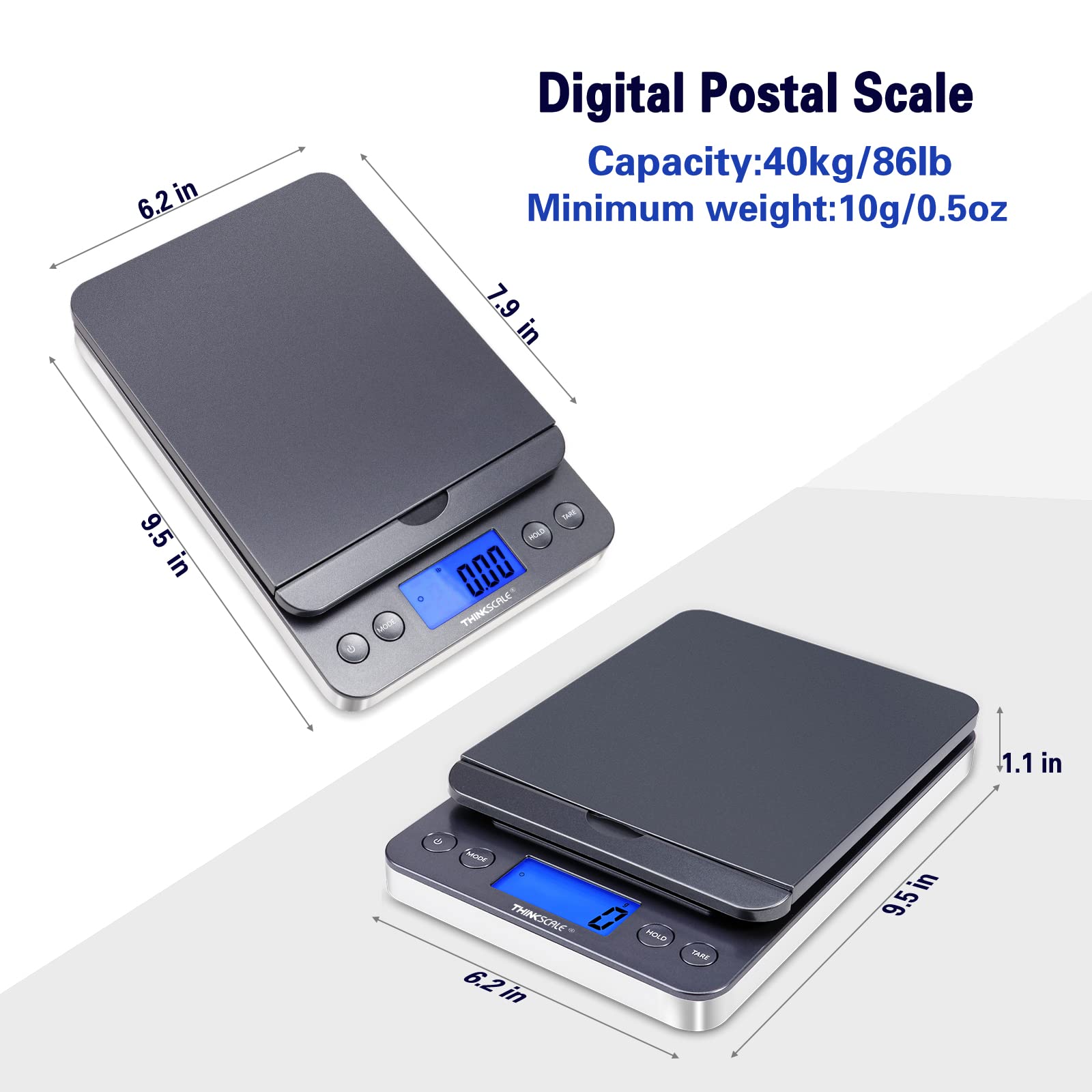
Image: The THINKSCALE Shipping Scale TK-S1 being used in an office environment, surrounded by various packages and mailing supplies, demonstrating its application for shipping tasks.
Safety Information
- Place the scale on a flat, stable, and level surface to ensure accurate readings.
- Avoid placing the scale near strong electromagnetic fields or extreme temperature changes.
- Do not overload the scale beyond its maximum capacity of 86lb (39kg).
- Keep the scale dry and clean. Do not immerse it in water.
- Use only the specified power adapter or batteries (2 AA batteries).
- Handle the scale with care to prevent damage to its internal components.
Package Contents
Verify that all items are present in your package:
- THINKSCALE Shipping Scale TK-S1
- AC Power Adapter
- USB Cable
- 2 x AA Batteries

Image: The THINKSCALE Shipping Scale TK-S1, showing the scale unit, AC power adapter, USB cable, and two AA batteries included in the package.
Product Overview
The THINKSCALE TK-S1 is a versatile digital scale designed for various weighing needs. Key features include:
- Large Capacity: Weighs up to 86lb (39kg) with a minimum measurement of 10g (0.4oz).
- Multiple Units: Measures in pounds (lb), kilograms (kg), ounces (oz), grams (g), and pounds:ounces (lb:oz).
- Fold-up Holder: A 90-degree flip-up lid on the platform to support larger or irregular items like long envelopes or tubes.
- Hold Function: Locks the weight display even after the item is removed, useful for large items that obscure the display.
- Tare Function: Resets the display to zero, allowing you to weigh contents in a container without including the container's weight.
- Backlit LCD Display: Provides clear readings in various lighting conditions.
- Dual Power Options: Operates with 2 AA batteries or the included AC adapter.
- Auto-Off: Automatically shuts off after 180 seconds of inactivity (adjustable) to conserve battery life.

Image: Diagram illustrating the dimensions of the THINKSCALE Shipping Scale TK-S1, showing a length of 9.5 inches, width of 6.2 inches, and height of 1.1 inches. It also highlights the capacity of 40kg/86lb and minimum weight of 10g/0.5oz.
Setup
1. Powering the Scale
Your THINKSCALE TK-S1 can be powered by either batteries or an AC adapter.
- Battery Installation: Open the battery compartment on the underside of the scale. Insert 2 AA batteries, ensuring correct polarity (+/-).
- AC Adapter: Plug the AC adapter into a standard wall outlet and connect the other end to the power port on the side of the scale.
2. Placement
Place the scale on a hard, flat, and stable surface. Uneven surfaces can affect accuracy.
Operating Instructions
1. Power On/Off
Press the POWER button () to turn the scale on. The display will show "8888" and then "0.0" or "0.00" when ready. Press and hold the POWER button again to turn the scale off.
2. Unit Conversion
To change the weighing unit, press the MODE button. The scale will cycle through the available units: lb, kg, oz, g, lb:oz.

Image: A visual representation of the THINKSCALE Shipping Scale's LCD display cycling through different measurement units: grams (g), kilograms (kg), pounds (lb), pounds:ounces (lb:oz), and ounces (oz).
3. Tare Function
The Tare function allows you to subtract the weight of a container, so you only weigh the contents.
- Turn on the scale and wait for it to display "0.0".
- Place an empty container on the weighing platform. The display will show the container's weight.
- Press the TARE button. The display will reset to "0.0".
- Add the items you wish to weigh into the container. The display will show only the net weight of the items.

Image: A four-panel illustration demonstrating the Tare function. 1. Turn on the scale. 2. Place an empty basket on the scale. 3. Press the Tare button to zero the display. 4. Place an item (a puppy) in the basket to get its net weight.
4. Hold Function
The Hold function is useful when weighing large items that might obscure the display. It locks the weight reading on the screen.
- Turn on the scale.
- Press the HOLD button until "HOLD" appears on the display.
- Place the item on the scale and wait for approximately 5 seconds for the weight to stabilize.
- Remove the item. The last stable weight reading will remain locked on the display. Press HOLD again to release the reading.

Image: A four-panel illustration demonstrating the Hold function. 1. Turn on the scale. 2. Press "Hold" until "Hold" appears on the screen. 3. Place an item (boxes) on the scale and wait for 5 seconds. 4. Remove the item; the reading will be locked on the display.
5. Using the Fold-up Holder
The scale features a fold-up lid that can be raised to a 90-degree angle. This holder provides support for items that need to stand upright or for irregularly shaped packages, such as long envelopes or mailing tubes, preventing them from rolling off the platform.

Image: The THINKSCALE Shipping Scale TK-S1 with its fold-up mailer holder raised to 90 degrees, supporting a large "Express Envelope" for stable weighing. An inset shows the holder being raised.
Maintenance
- Cleaning: Wipe the scale surface with a soft, damp cloth. Do not use abrasive cleaners or immerse the scale in water.
- Storage: Store the scale in a cool, dry place. If not used for an extended period, remove the batteries to prevent leakage.
- Calibration: The scale is factory-calibrated. If you suspect accuracy issues, contact customer support. Do not attempt to recalibrate it yourself.
Troubleshooting
| Problem | Possible Cause | Solution |
|---|---|---|
| Scale does not turn on. | Low or dead batteries; AC adapter not connected or faulty. | Replace batteries; ensure AC adapter is securely connected and functional. |
| Inaccurate readings. | Scale on an uneven surface; overloaded; strong vibrations; temperature changes. | Place on a flat, stable surface; do not exceed max capacity; avoid vibrations and extreme temperatures. |
| "Err" or "O-Ld" displayed. | Scale is overloaded. | Remove the item immediately to prevent damage. Ensure weight is within capacity. |
| Display is dim or flickering. | Low battery power. | Replace batteries or use the AC adapter. |
Specifications
| Feature | Detail |
|---|---|
| Brand | THINKSCALE |
| Model Number | TK-S1 |
| Maximum Capacity | 86 lb / 39 kg |
| Minimum Weight | 10 g / 0.4 oz |
| Read-out Accuracy | 10 Grams |
| Weighing Units | lb, kg, oz, g, lb:oz |
| Display Type | Backlit LCD |
| Power Source | 2 x AA Batteries or AC Adapter |
| Auto Shut-Off | 180 seconds (adjustable) |
| Product Dimensions | 24.13 x 15.75 x 2.79 cm (9.5 x 6.2 x 1.1 inches) |
| Item Weight | 11 g (0.02 lb) |
| Color | Silver |
Warranty and Support
THINKSCALE offers a 2-Year Warranty on this digital postal scale. This warranty covers manufacturing defects and ensures customer satisfaction.
For technical support, warranty claims, or any questions regarding your THINKSCALE Shipping Scale TK-S1, please contact our customer service team. Refer to the contact information provided with your product packaging or visit the official THINKSCALE website for assistance.
We are dedicated to 100% customer satisfaction.