Important Safety Instructions
Please read and save these instructions before using your humidifier. Failure to follow these instructions may result in electric shock, fire, or serious injury.
- Always place the humidifier on a firm, flat, waterproof surface at least 12 inches (30 cm) away from walls and appliances.
- Do not immerse the base unit in water or other liquids.
- Unplug the humidifier before filling, cleaning, or moving it.
- Do not operate the humidifier with a damaged cord or plug.
- Keep out of reach of children and pets.
- Use only clean, cool tap water. Distilled or demineralized water is recommended to prevent mineral buildup.
- Do not add essential oils directly into the water tank; use the designated aroma oil box.
- Ensure the foam protector is removed from the unit before first use.
Product Overview
The VIVOSUN 6L 2-in-1 Cool & Warm Mist Ultrasonic Humidifier is designed to provide optimal humidity levels in your environment. It features a large 6-liter water tank, dual mist options (cool and warm), adjustable mist levels, intelligent humidity control, a timer function, and an aromatherapy box.
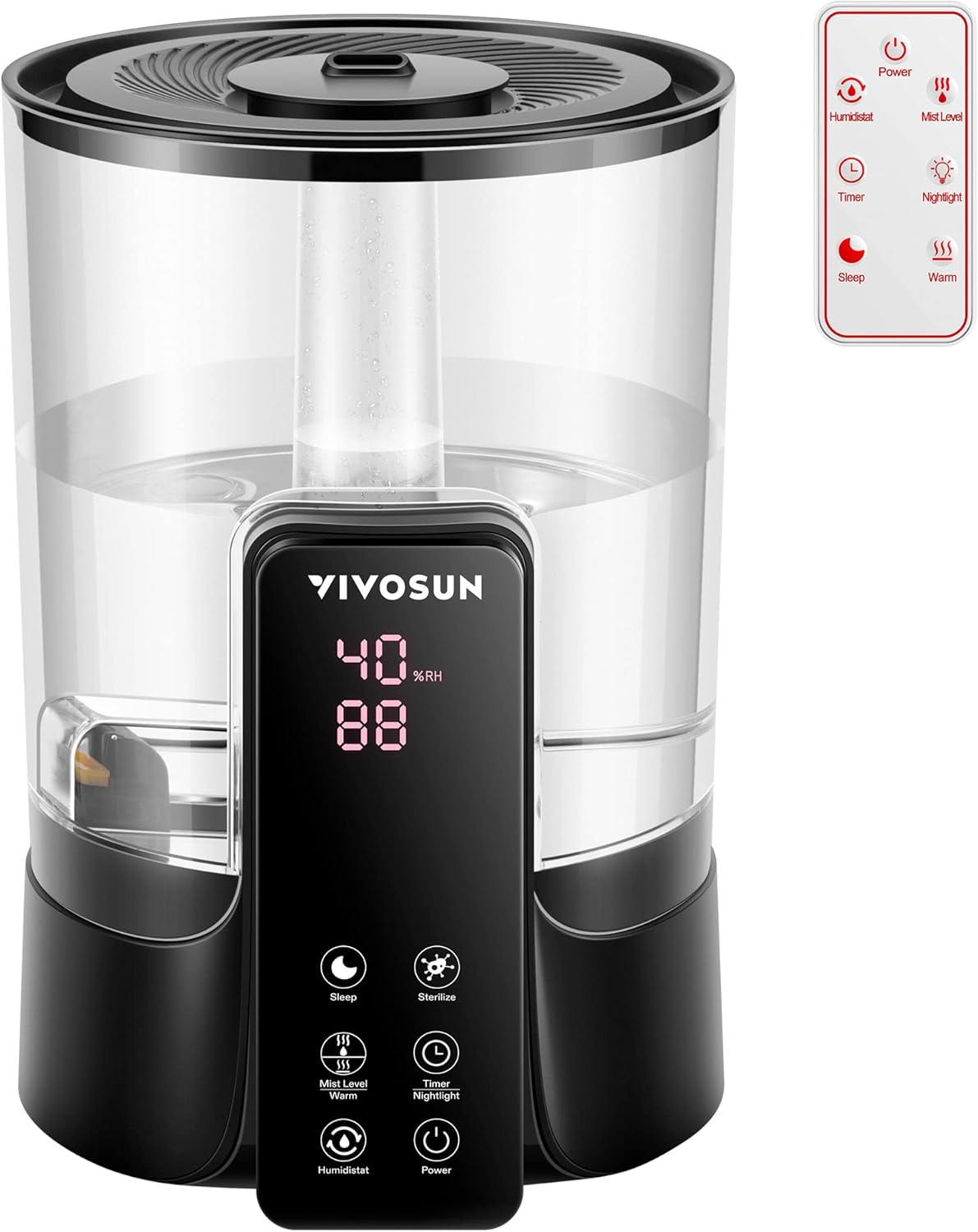
Image: The VIVOSUN 6L 2-in-1 Cool & Warm Mist Ultrasonic Humidifier, showcasing its transparent water tank, digital display, control panel, and included remote control.
Key Components
- Water Tank: 6-liter capacity for extended operation.
- Base Unit: Contains the ultrasonic atomizer, heating element, and control electronics.
- Mist Nozzle: 360° rotatable for directing mist.
- Control Panel: Digital display and touch buttons for operation.
- Remote Control: For convenient operation from a distance.
- Essential Oil Box: Separate compartment for aromatherapy.
Setup
- Unpack: Carefully remove all packaging materials and the humidifier from the box.
- Remove Foam Protector: Locate and remove any foam protectors from inside the unit, especially from the water tank and base.
- Placement: Place the humidifier on a flat, stable, and waterproof surface. Ensure it is at least 12 inches (30 cm) away from walls, furniture, and electronic devices.
- Fill Water Tank:
- Remove the top cover of the humidifier.
- Pour clean, cool tap water directly into the water tank. Do not exceed the maximum fill line.
- Replace the top cover securely.

Image: Illustration of the humidifier's top-fill design for easy water addition and a warning symbol indicating anti-dry burn protection.
- Connect Power: Plug the power cord into a standard electrical outlet. The display will illuminate briefly.
Operating Instructions
Control Panel and Remote Control
The humidifier can be operated using the touch control panel on the front of the unit or the included remote control. The remote control offers the same functions as the control panel.

Image: A detailed diagram showing the functions of the humidifier's control panel buttons and the corresponding remote control buttons, including Power, Humidistat, Mist Level, Timer, Nightlight, Sleep, Sterilize, and Warm mist.
- Power Button: Turns the humidifier ON or OFF.
- Mist Level Button: Cycles through 3 adjustable mist levels (Low, Medium, High).
- Humidistat Button: Sets the desired humidity level from 40% to 90% in 5% increments. The unit will automatically maintain this level.
- Timer Button: Sets an auto-off timer from 1 to 12 hours in 1-hour increments.
- Nightlight Button: Toggles the nightlight feature. Long press for 3 seconds to turn the nightlight on/off.
- Sleep Mode Button: Activates sleep mode for ultra-quiet operation.
- Sterilize Button: Activates the UV sterilization function.
- Warm Mist Button: Long press for 3 seconds to turn the warm mist function ON or OFF.
Mist Options and Levels
The humidifier offers both cool and warm mist options, with three adjustable mist levels to suit your preferences and room size.

Image: Visual representation of the humidifier producing both cool mist (blue icon) and warm mist (yellow icon), alongside a graphic illustrating three adjustable mist levels: Low, Medium, and High.
- Cool Mist: Standard humidification.
- Warm Mist: Provides mist heated up to 45°C (113°F) for added comfort, especially in colder environments. Activate by long-pressing the Warm Mist button.
- Mist Levels: Press the Mist Level button to cycle between Low, Medium, and High output.
Intelligent Humidification
Set your desired humidity level using the Humidistat button. The humidifier will automatically turn on and off to maintain the set humidity within a range of 40% to 90% Relative Humidity (RH).
Sleep Mode
Activate Sleep Mode for ultra-quiet operation, ensuring minimal disturbance during rest. In this mode, the display lights dim, and the mist output adjusts for optimal sleep conditions. Sterilization and nightlight functions are not affected by sleep mode.

Image: The humidifier placed on a bedside table in a dimly lit bedroom, illustrating its use in Sleep Mode. Text highlights that sterilization and nightlight are unaffected by sleep mode.
Aromatherapy Function
To use essential oils, locate the aroma oil box on the side of the humidifier. Add a few drops of your preferred essential oil onto the sponge pad inside the box. Do not add essential oils directly into the water tank.

Image: Close-up views of the humidifier's features, including the aroma oil box for essential oils, the 360-degree rotatable mist nozzle, and the UV sterilization light.
Maintenance
Regular cleaning and maintenance ensure optimal performance and prolong the lifespan of your humidifier.
Daily Maintenance
- Refilling: When the water level is low, the humidifier will indicate with a dripping alarm sound and automatically shut off (Anti-dry Burn Protection). Refill the tank as described in the Setup section.
- Water Change: Change the water in the tank daily to prevent bacterial growth.
Weekly Cleaning
- Unplug: Always unplug the humidifier before cleaning.
- Empty Water: Empty any remaining water from the tank and base unit.
- Clean Water Tank:
- Remove the top cover.
- Wipe the inside of the tank with a soft cloth and mild detergent. Rinse thoroughly with clean water.
- Clean Base Unit:
- Gently wipe the surface of the ultrasonic atomizer and the heating element with a soft brush or cloth. Do not scrub aggressively.
- If mineral deposits are present, fill the base with a 1:1 mixture of white vinegar and water. Let it soak for 20-30 minutes, then gently clean with a brush and rinse.
- Do not immerse the base unit in water.
- Clean Aroma Box: Remove the sponge pad from the aroma oil box and rinse it with water. Allow it to air dry before reinserting.
- Dry: Ensure all parts are completely dry before reassembling and storing or reusing the humidifier.

Image: Illustrations demonstrating the ease of adding water to the humidifier and the simple process of cleaning the unit.
Troubleshooting
| Problem | Possible Cause | Solution |
|---|---|---|
| No mist or low mist output |
|
|
| Water leakage |
|
|
| Unpleasant odor |
|
|
| Humidifier turns off unexpectedly |
|
|
Specifications

Image: A visual summary of the humidifier's key specifications, including dimensions and power details.
| Feature | Detail |
|---|---|
| Brand | VIVOSUN |
| Model Name | 6L Cool & Warm Mist Humidifier |
| Capacity | 6 Liters |
| Mist Type | Cool & Warm Mist (2-in-1) |
| Operation Mode | Ultrasonic |
| Applicable Area | Up to 430 sq ft |
| Mist Levels | 3 (Low, Medium, High) |
| Warm Mist Temperature | Up to 45°C (113°F) |
| Humidity Adjustment Range | 40% to 90% (5% increments) |
| Timer | 1 to 12 hours |
| Noise Level | ≤36 dB |
| Special Features | Remote Control, Timer, Essential Oil Box, Sleep Mode, UV Sterilization, Anti-dry Burn Protection |
| Product Dimensions | 8.5"D x 8.5"W x 12.7"H |
| Item Weight | 4.24 pounds |
| Material | PS + HIPS |
| Heating Power | 90W |
| Normal Power | 25W |
| Maximum Atomization | 300 mL/h |
Warranty and Support
For warranty information, technical support, or customer service inquiries, please contact VIVOSUN directly through their official website or the retailer where the product was purchased.
Please retain your proof of purchase for warranty claims.


