
ARNO VFC4 / 2720016844
ARNO Turbo Force Detachable Column Fan User Manual
Model: VFC4 / 2720016844
Brand: ARNO
Introduction
The ARNO Turbo Force Detachable Column Fan is designed to provide powerful and quiet air circulation for your home environment. Featuring 6 blades for strong airflow, side-button tilt, kid-safe aerodynamic grids, and 80-degree horizontal oscillation, this fan ensures optimal air distribution. Its Power Zone technology concentrates wind for maximum targeted performance. This manual provides essential information for the safe and efficient operation, assembly, and maintenance of your fan.
Important Safety Instructions
Please read all instructions carefully before using the fan and retain this manual for future reference. Failure to follow these instructions may result in electric shock, fire, or serious injury.
- Always ensure the fan is unplugged from the power outlet before cleaning, assembling, or disassembling.
- Do not operate the fan with a damaged cord or plug. If the cord or plug is damaged, it must be replaced by the manufacturer, its service agent, or similarly qualified persons to avoid a hazard.
- This fan is designed for indoor use only. Do not use outdoors or in wet locations.
- Do not insert fingers or any objects through the grille when the fan is operating.
- Place the fan on a stable, level surface to prevent it from tipping over.
- Keep the fan away from curtains, drapes, or any objects that may be drawn into the fan.
- Do not use the fan near water, such as bathtubs, showers, or swimming pools.
- Supervise children when the fan is in use. This appliance is not intended for use by persons (including children) with reduced physical, sensory or mental capabilities, or lack of experience and knowledge, unless they have been given supervision or instruction concerning use of the appliance by a person responsible for their safety.
- Do not attempt to repair or modify the fan yourself. All servicing should be performed by qualified service personnel.
Package Contents
Before assembly, please check that all components are present and undamaged:
- 1 x ARNO Turbo Force Fan Head Assembly
- 1 x Detachable Column/Stand Pole
- 1 x Fan Base
- 1 x Instruction Manual
- 1 x Warranty Certificate
Setup and Assembly
Follow these steps to assemble your ARNO Turbo Force Detachable Column Fan:
Step 1: Assemble the Base and Column
Place the fan base on a flat, stable surface. Insert the lower part of the detachable column into the designated slot on the fan base. Ensure it is securely seated and tightened if there is a locking mechanism (e.g., a screw or knob) on the underside of the base.
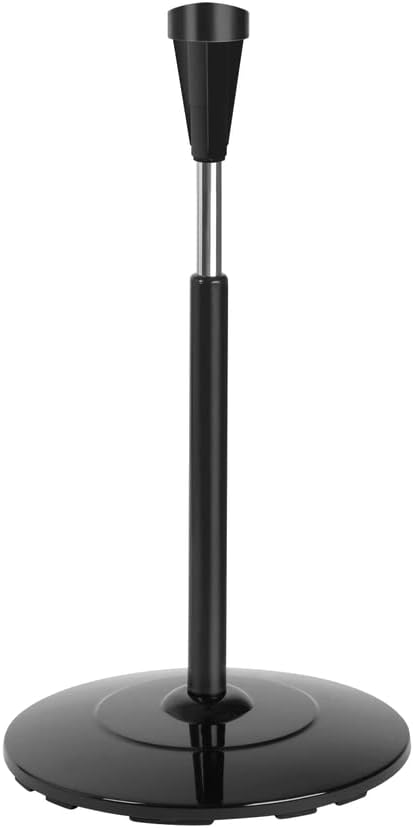
Figure 1: Fan base and lower column assembly.
Step 2: Attach the Fan Head to the Column
Carefully align the fan head assembly with the top part of the detachable column. Gently push down until it clicks into place or is firmly seated. Ensure the fan head is stable and does not wobble.

Figure 2: Attaching the fan head to the column.
Step 3: Position the Fan
Place the fully assembled fan on a firm, level surface, ensuring there is adequate space around it for optimal air circulation and to prevent obstruction of the air intake/output.

Figure 3: Fully assembled ARNO Turbo Force Fan.
Operating Instructions
Once assembled, your ARNO Turbo Force Fan is ready for use. Ensure the fan is plugged into a 220V power outlet.
Power On/Off and Speed Control
The fan features a touch control method. Locate the control panel, typically on the top or front of the fan head. Press the power button to turn the fan on. Repeatedly press the speed control button to cycle through the 3 available power levels:
- Speed 1: Low airflow, ideal for gentle circulation.
- Speed 2: Medium airflow, suitable for general cooling.
- Speed 3: High airflow, for maximum cooling and air movement.
Press the power button again to turn the fan off.
Oscillation Function
To activate the 80-degree horizontal oscillation, press the oscillation button on the control panel. The fan head will begin to rotate from side to side, distributing air across a wider area. Press the button again to stop oscillation at your desired direction.
Tilt Adjustment
The fan head can be manually tilted up or down to direct airflow. Locate the side-button tilt mechanism on the fan head. Press the button and adjust the fan head to the desired angle. Release the button to lock the tilt in place.

Figure 4: Fan head with tilt adjustment capability.
Maintenance and Cleaning
Regular cleaning will help maintain the performance and longevity of your fan. Always unplug the fan before cleaning.
- Exterior Cleaning: Use a soft, damp cloth to wipe the exterior surfaces of the fan. Do not use abrasive cleaners or solvents, as they may damage the finish.
- Grille and Blade Cleaning: The fan features kid-safe aerodynamic grids which can be carefully detached for cleaning. Refer to the specific instructions for detaching the front grille. Once detached, wipe the blades and the inside of the grille with a damp cloth to remove dust and debris. Ensure all parts are completely dry before reassembling.
- Storage: If storing the fan for an extended period, cover it to protect it from dust. Store in a cool, dry place.

Figure 5: Detachable grille for easy cleaning of blades.
Troubleshooting
If you experience issues with your fan, please consult the following table before contacting customer support:
| Problem | Possible Cause | Solution |
|---|---|---|
| Fan does not turn on. | Not plugged in; Power outlet not working; Fan damaged. | Ensure the power cord is securely plugged into a working 220V outlet. Test the outlet with another appliance. If still not working, contact customer support. |
| Weak or no airflow. | Fan speed set too low; Grille or blades are dirty; Obstruction. | Increase the fan speed setting. Unplug the fan and clean the grille and blades as per maintenance instructions. Ensure nothing is blocking the air intake or output. |
| Fan is making unusual noise. | Loose parts; Fan not on a level surface; Debris inside. | Check for any loose components and ensure the fan is on a stable, level surface. Unplug and inspect for any foreign objects or debris inside the fan head. If the noise persists, discontinue use and contact customer support. |
| Oscillation not working. | Oscillation function not activated; Internal malfunction. | Press the oscillation button to activate the function. If it still does not oscillate, contact customer support. |
Specifications
| Feature | Detail |
|---|---|
| Brand | ARNO |
| Model Name | Turbo Force |
| Item Model Number | 2720016844 |
| Electric Fan Design | Floor Fan / Column Fan |
| Color | Black |
| Power Source | Corded Electric |
| Voltage | 220 Volts |
| Wattage | 126 Watts |
| Number of Power Levels | 3 |
| Number of Blades | 6 |
| Air Flow Capacity | 1.41 Cubic Meters per Second |
| Control Method | Touch |
| Special Feature | Portable, Detachable Column, 80-degree Oscillation, Side-button Tilt, Kid-safe Grids, Power Zone Technology |
| Recommended Uses | Air Circulation (Indoor) |
| Product Dimensions (L x W x H) | 16.22 x 16.22 x 27.6 inches |
| Item Weight | 7.05 Kilograms / 15.51 pounds |
| Efficiency | A |
| Date First Available | August 13, 2022 |
Warranty and Support
Your ARNO Turbo Force Detachable Column Fan comes with a warranty certificate included in the package. Please refer to this certificate for detailed information regarding the warranty period and terms and conditions.
For technical assistance, troubleshooting beyond this manual, or warranty claims, please contact ARNO customer support. Keep your purchase receipt and warranty certificate handy when contacting support.
- Customer Support: Refer to the contact information provided on your warranty certificate or the official ARNO website.
- Online Resources: Visit the ARNO official website for FAQs, product registration, and additional support resources.
Related documentsVFC4 / 2720016844


Ask a question about this manual
Ask about setup, troubleshooting, compatibility, parts, safety, or missing instructions. Manuals+ will review the question and use this page’s manual context to help answer it.