
GRIFEMA GB1005
Contents
GRIFEMA GB1005 TV Stand Instruction Manual
Model: GB1005
Introduction
This manual provides detailed instructions for the assembly, operation, and maintenance of your GRIFEMA GB1005 TV Stand. Please read this manual thoroughly before assembly and use to ensure safe and correct operation.

Figure 1: Assembled GRIFEMA GB1005 TV Stand. This image shows the complete TV stand with its black tempered glass base, central support pillar, and TV mounting bracket.
Safety Information
Always follow these safety precautions to prevent injury or damage to your TV stand and television:
- Do not exceed the maximum weight capacity of 45 kg (99 lbs).
- Ensure your TV's VESA pattern is compatible (100x100 to 400x400mm).
- Assemble the stand on a soft, clean surface to prevent scratches.
- Ensure all screws are securely tightened before placing the TV on the stand.
- Keep children and pets away during assembly.
- Do not attempt to modify the stand.
- Place the stand on a stable, level surface.
Package Contents
Verify that all parts are present and undamaged before beginning assembly. Refer to the diagram below for identification.

Figure 2: All components included in the GB1005 package. This image displays the tempered glass base, support pillar, TV mounting bracket, various screws, washers, spacers, and tools like an Allen key and wrench.
| Part | Description | Quantity |
|---|---|---|
| (A) | Allen key wrench | x1 |
| (B) | M6 washer | x4 |
| (C) | Square Washer | x4 |
| (D) | M4x14 screws | x4 |
| (E) | M6x14 screws | x4 |
| (F) | M8x16 screws | x4 |
| (G) | M8x30 screws | x4 |
| (H) | M8x45 screws | x4 |
| (I) | M8x35 screws | x4 |
| (J) | M8x50 screws | x4 |
| (K) | 15mm / 5mm Plastic Sleeve | x8 |
| (P) | TV Mounting Bracket | x2 |
| (V) | TV plate | x1 |
| (Y) | Support Pillar | x1 |
| (O) | Tempered Glass Base | x1 |
| (W-1) | Gasket with 3 Holes | x1 |
| (W-2) | Rubber pad | x1 |
| (W-3) | Foot Pad | x4 |
| (W-4) | Wire Clip | x2 |
| (W-5) | Plastic Cover | x1 |
Setup and Assembly
Follow these steps carefully to assemble your TV stand.
Step 1: Attach Support Pillar to Glass Base
- Place the Tempered Glass Base (O) on a soft, flat surface.
- Align the Support Pillar (Y) with the holes on the glass base.
- Secure the Support Pillar (Y) to the Glass Base (O) using the appropriate screws and washers (refer to the manual's specific screw types for this step, typically larger ones). Ensure the gasket (W-1) and rubber pad (W-2) are correctly placed between the pillar and the glass for stability and protection.
- Attach the Foot Pads (W-3) to the bottom of the glass base to prevent scratching surfaces.
Step 2: Attach TV Plate to Support Pillar
- Attach the TV Plate (V) to the top of the Support Pillar (Y) using the provided screws. Ensure it is oriented correctly.
Step 3: Attach TV Mounting Brackets to TV
- Carefully place your TV face down on a soft, clean surface.
- Identify the VESA mounting holes on the back of your TV.
- Attach the two TV Mounting Brackets (P) to the back of your TV using the appropriate screws (D, E, F, G, H, I, J) and plastic sleeves (K) that fit your TV's VESA pattern. Use the correct length screws to avoid damaging your TV.
- Ensure the brackets are level and securely fastened.

Figure 3: Detailed dimensions of the GB1005 TV Stand. This diagram illustrates the overall width, height, and base dimensions, along with the adjustable height range for the TV mounting plate.
Step 4: Mount TV to Stand
- With assistance, carefully lift the TV with the attached brackets.
- Hook the TV Mounting Brackets (P) onto the TV Plate (V) on the stand.
- Secure the TV to the TV Plate (V) using the safety lock mechanism (often a screw or clip at the bottom of the brackets) to prevent accidental dislodgement.
Operating Instructions
Swivel Function
The GB1005 TV stand features a swivel function, allowing you to rotate your TV for optimal viewing angles.
- Gently rotate the TV screen left or right. The stand allows for a 35° swivel in each direction (total 70°).
- Avoid forcing the swivel beyond its limits.
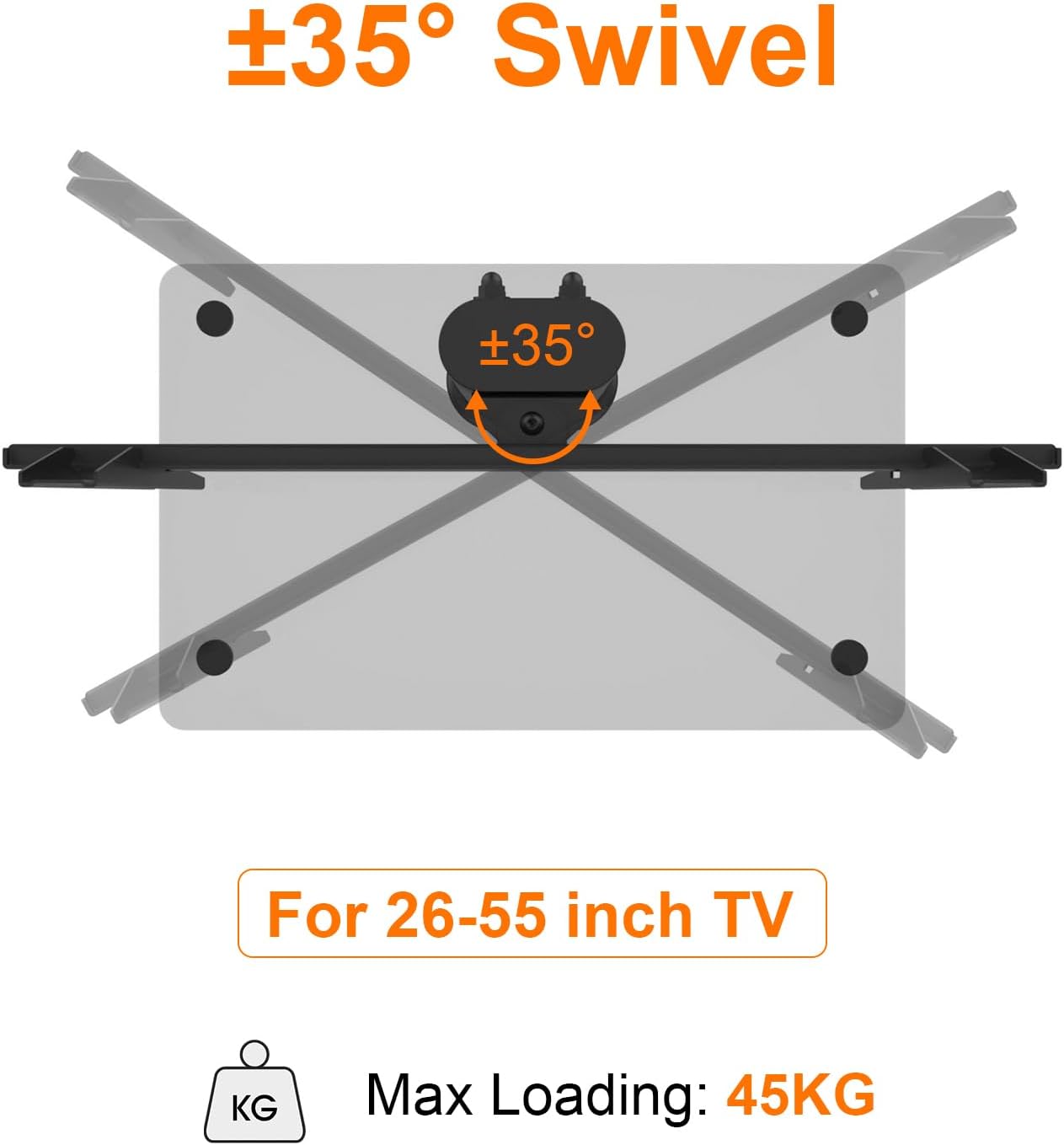
Figure 4: Illustration of the ±35° swivel capability and the maximum loading capacity of 45KG for the TV stand.
Height Adjustment
The TV mounting plate can be adjusted to 4 different height levels to suit your viewing preference.
- To adjust the height, you will need to temporarily remove the TV from the stand.
- Loosen the screws securing the TV Plate (V) to the Support Pillar (Y).
- Slide the TV Plate (V) to the desired height level (indicated by numbered holes on the pillar). Each level adjusts by 40mm, with a total height range of 505-625mm.
- Securely re-tighten the screws.
- Re-mount your TV following Step 4 of the Setup and Assembly section.

Figure 5: The four adjustable height positions on the support pillar, allowing for customization of the TV's viewing height.
Cable Management
Utilize the integrated cable management system to keep your cables tidy and organized.
- Route your TV and device cables through the designated openings in the Support Pillar (Y).
- Use the provided Wire Clips (W-4) to secure cables along the pillar, if applicable.

Figure 6: Key features of the GB1005 stand, including integrated cable management, the polished 8mm tempered glass base, and the 4 anti-slip rubber feet.
Maintenance
- Clean the glass base and metal parts with a soft, damp cloth. Avoid abrasive cleaners.
- Periodically check all screws and connections to ensure they remain tight and secure.
- Do not place hot items directly on the glass base.
Troubleshooting
- Problem: TV is not level after mounting.
- Solution: Ensure the TV Mounting Brackets (P) are attached evenly to the back of your TV. Re-check the screws securing the TV Plate (V) to the Support Pillar (Y) for tightness and proper alignment.
- Problem: Stand feels wobbly.
- Solution: Verify that all assembly screws are fully tightened. Ensure the stand is placed on a flat, stable surface. Check that the foot pads (W-3) are properly attached to the glass base.
- Problem: Cannot swivel the TV.
- Solution: Ensure no cables are obstructing the swivel mechanism. Do not force the swivel beyond its intended range (±35°).
Specifications
| Feature | Detail |
|---|---|
| Model Number | GB1005 |
| Compatible TV Sizes | 26 - 55 inches |
| Maximum Weight Capacity | 45 kg (99 lbs) |
| VESA Compatibility | 100x100, 200x100, 200x200, 300x200, 300x300, 400x200, 400x300, 400x400mm |
| Swivel Angle | ±35° |
| Height Adjustment | 4 levels, 40mm increments (range 505-625mm) |
| Base Material | 8mm Tempered Glass |
| Pillar Material | Alloy Steel |
| Product Dimensions | 17.72 x 11.42 x 3.03 inches (approximate, packaged) |
| Item Weight | 10.91 pounds |
Ask a question about this manual
Ask about setup, troubleshooting, compatibility, parts, safety, or missing instructions. Manuals+ will review the question and use this page’s manual context to help answer it.