
1. Introduction
This manual provides essential instructions for the safe and effective operation of your BIUBLE 7000A Peak Car Battery Jump Starter, Model JS004. This device is designed to jump start vehicles with up to 10L gas or 8.0L diesel engines, and also functions as a portable power bank and LED flashlight. Please read this manual thoroughly before first use and retain it for future reference.

Image 1.1: The BIUBLE 7000A Peak Car Battery Jump Starter, including the main unit, smart jumper cables, USB charging cable, and a 12V DC adapter.
2. What's in the Box
Verify that all items are present in the package:
- BIUBLE 7000A Peak Car Battery Jump Starter Unit
- Smart Jumper Cables with Clamps
- USB-A to USB-C Charging Cable
- 12V DC Car Charger Adapter
- Storage Case
- User Manual (this document)

Image 2.1: Visual representation of all components included in the product package, showing the jump starter, smart cables, charging cables, and storage case.
3. Safety Information
Read and understand all safety information before using this product. Failure to follow these instructions may result in electric shock, fire, or serious injury.
- Do not jump start a frozen battery.
- Do not use the jump starter if the cables or clamps are damaged.
- Do not connect the red and black clamps together.
- Do not immerse the unit in water.
- Do not operate in explosive atmospheres, such as in the presence of flammable liquids, gases, or dust.
- Always wear eye protection and gloves when operating the device.
- Keep out of reach of children.
- Ensure proper ventilation during use.
- This device is designed for 12V vehicles only.

Image 3.1: The jump starter features multiple intelligent protections including over-temperature, over-charge, over-discharge, over-current, reverse polarity, reverse charge, reverse connection, and short circuit protection.
4. Setup and Charging
4.1 Initial Charge
Before using the jump starter for the first time, fully charge the unit.
- Connect the USB-C charging cable to the Type-C input port on the jump starter.
- Connect the other end of the USB-C cable to a USB wall adapter (not included) or a 12V car charger adapter.
- The battery indicator lights will illuminate and flash during charging. All indicator lights will be solid when fully charged.
A full charge typically takes approximately 4 hours using a Type-C input.
4.2 Checking Battery Level
Press the power button once to check the current battery level indicated by the LED lights. Each light represents approximately 25% charge.
5. Operating Instructions
5.1 Jump Starting a Vehicle
Ensure the jump starter is at least 50% charged before attempting to jump start a vehicle.
- Turn off the vehicle's ignition and all accessories.
- Insert the plug of the smart jumper cables into the EC5 output port on the jump starter. The indicator light on the smart cable should flash green and red alternately.
- Connect the red (+) clamp to the positive (+) terminal of the vehicle's battery.
- Connect the black (-) clamp to the negative (-) terminal of the vehicle's battery.
- Once connected correctly, the indicator light on the smart cable will turn solid green. If it flashes red, check the connections for reverse polarity or short circuit.
- Start the vehicle's engine.
- Once the vehicle starts, immediately remove the smart jumper cables from the jump starter, then disconnect the black (-) clamp, followed by the red (+) clamp from the vehicle battery.

Image 5.1: Step-by-step visual guide for jump starting a vehicle: 1. Insert smart clamp plug, 2. Connect clamps to battery, 3. Start vehicle, 4. Remove cables.

Image 5.2: Illustrated instructions for jump starting: 1. Fully charge, 2. Insert EC5 port, 3. Clamp positive and negative poles, 4. Start engine.
The BIUBLE 7000A Peak Car Battery Jump Starter is compatible with a wide range of vehicles, including cars, trucks, SUVs, motorcycles, and boats, supporting up to 10L gas or 8.0L diesel engines.

Image 5.3: The jump starter is suitable for 10.0L gas and 8.0L diesel engines, covering cars, trucks, SUVs, motorcycles, and boats.
5.2 Using as a Power Bank
The jump starter features two USB output ports (one QC3.0 Quick Charge port and one 5V/2.1A port) to charge electronic devices.
- Connect your device's USB charging cable to one of the USB output ports on the jump starter.
- Press the power button once to begin charging.
- The battery indicator lights will show the remaining charge.

Image 5.4: The jump starter functions as a dual USB fast charger, capable of charging smartphones and tablets via its QC3.0 and standard USB output ports.
5.3 Using the LED Flashlight
The integrated LED flashlight has four modes: Lighting, Strobe, SOS, and Warning.
- Press and hold the power button for 3 seconds to turn on the flashlight (Lighting mode).
- Press the power button once to cycle through modes: Lighting → Strobe → SOS → Warning.
- Press and hold the power button for 3 seconds again to turn off the flashlight.

Image 5.5: The LED flashlight offers four modes: Lighting for general illumination, Strobe for signaling, SOS for emergency, and Warning for roadside alerts.
5.4 Using the 12V DC Output
The jump starter includes a 12V DC output port (10A max) for powering compatible 12V accessories.
- Connect the 12V DC car charger adapter to the 12V DC output port on the jump starter.
- Plug your 12V accessory (e.g., air pump, car vacuum cleaner, small car refrigerator) into the adapter.
- Ensure the accessory's power consumption does not exceed 10A.
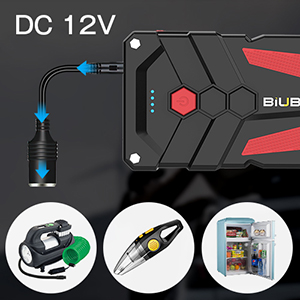
Image 5.6: The 12V DC output port can power accessories such as air pumps, car vacuum cleaners, and small car refrigerators.
6. Maintenance
6.1 Recharging
To maintain optimal performance and extend battery life, recharge the jump starter at least once every three months, even if it has not been used.
6.2 Storage
Store the jump starter in a cool, dry place away from direct sunlight and extreme temperatures. The recommended working temperature range is -4°F to 140°F (-20°C to 60°C).
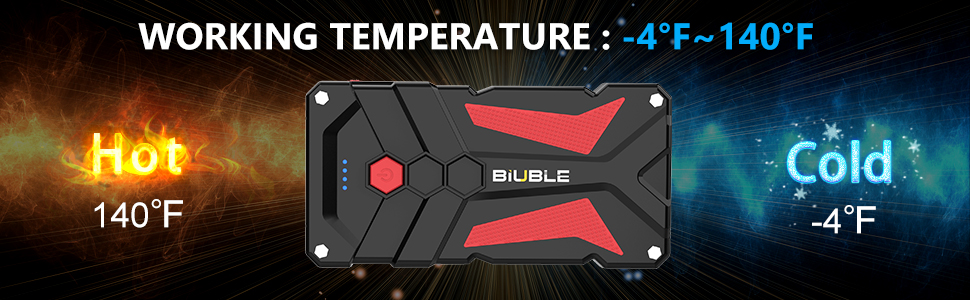
Image 6.1: The jump starter is designed to operate effectively in temperatures ranging from -4°F (-20°C) to 140°F (60°C).
6.3 Cleaning
Wipe the unit with a soft, dry cloth. Do not use harsh chemicals or abrasive materials.
7. Troubleshooting
| Problem | Possible Cause | Solution |
|---|---|---|
| Jump starter does not turn on. | Battery is fully discharged. | Charge the jump starter fully. |
| Vehicle does not start after jump. | Incorrect cable connection; Vehicle battery severely discharged; Other vehicle issues. | Check cable connections for correct polarity. Ensure jump starter is fully charged. Consult a mechanic if the issue persists. |
| Smart cable indicator flashes red. | Reverse polarity connection; Short circuit; Over-current. | Disconnect and re-connect clamps ensuring correct polarity (+ to +, - to -). Check for any short circuits. |
| USB devices not charging. | Jump starter battery low; USB cable faulty; Device not compatible. | Recharge the jump starter. Try a different USB cable. Ensure device is compatible with 5V/2.1A or QC3.0 output. |
8. Specifications
- Model: JS004
- Peak Current: 7000 Amps
- Engine Compatibility: Up to 10L Gas / 8.0L Diesel
- Battery Capacity: 26800mAh
- USB Output 1: QC3.0 (18W)
- USB Output 2: 5V/2.1A
- Type-C Input: 18W (for charging the unit)
- DC Output: 12V/10A
- Dimensions: 6.69 x 3.15 x 1.18 inches
- Item Weight: 1.76 pounds (800 Grams)
- Operating Temperature: -4°F to 140°F (-20°C to 60°C)

Image 8.1: Overview of the jump starter's features, including power button, battery indicator, EC5 output, Type-C input, USB outputs, DC 12V/10A output, and internal 26800mAh high-capacity battery.
9. Warranty and Support
For warranty information or technical support, please refer to the contact details provided with your purchase or visit the official BIUBLE website. Keep your purchase receipt as proof of purchase.
Manufacturer: BIUBLE


