
Introduction
Thank you for choosing the Carrera Beauty Classic 6-in-1 Hair Clipper. This versatile grooming device is designed for precise hair and beard trimming, offering multiple functions in one compact unit. Please read this manual carefully before first use to ensure safe and optimal operation.
Important Safety Instructions
- Warning: Not suitable for use on infants.
- Keep the device away from water. Do not use near bathtubs, showers, basins, or other vessels containing water.
- Handle the cutting blades with care to prevent skin irritation or eye injuries.
- This appliance can be used by children aged from 8 years and above and persons with reduced physical, sensory or mental capabilities or lack of experience and knowledge if they have been given supervision or instruction concerning use of the appliance in a safe way and understand the hazards involved.
- Cleaning and user maintenance shall not be made by children without supervision.
- Only use the charger supplied with the appliance.
- Do not use the appliance if the blades are damaged or broken.
- Disconnect the appliance from the power supply before cleaning.
Package Contents
Please check the package contents upon unpacking. Ensure all items listed below are present and in good condition.
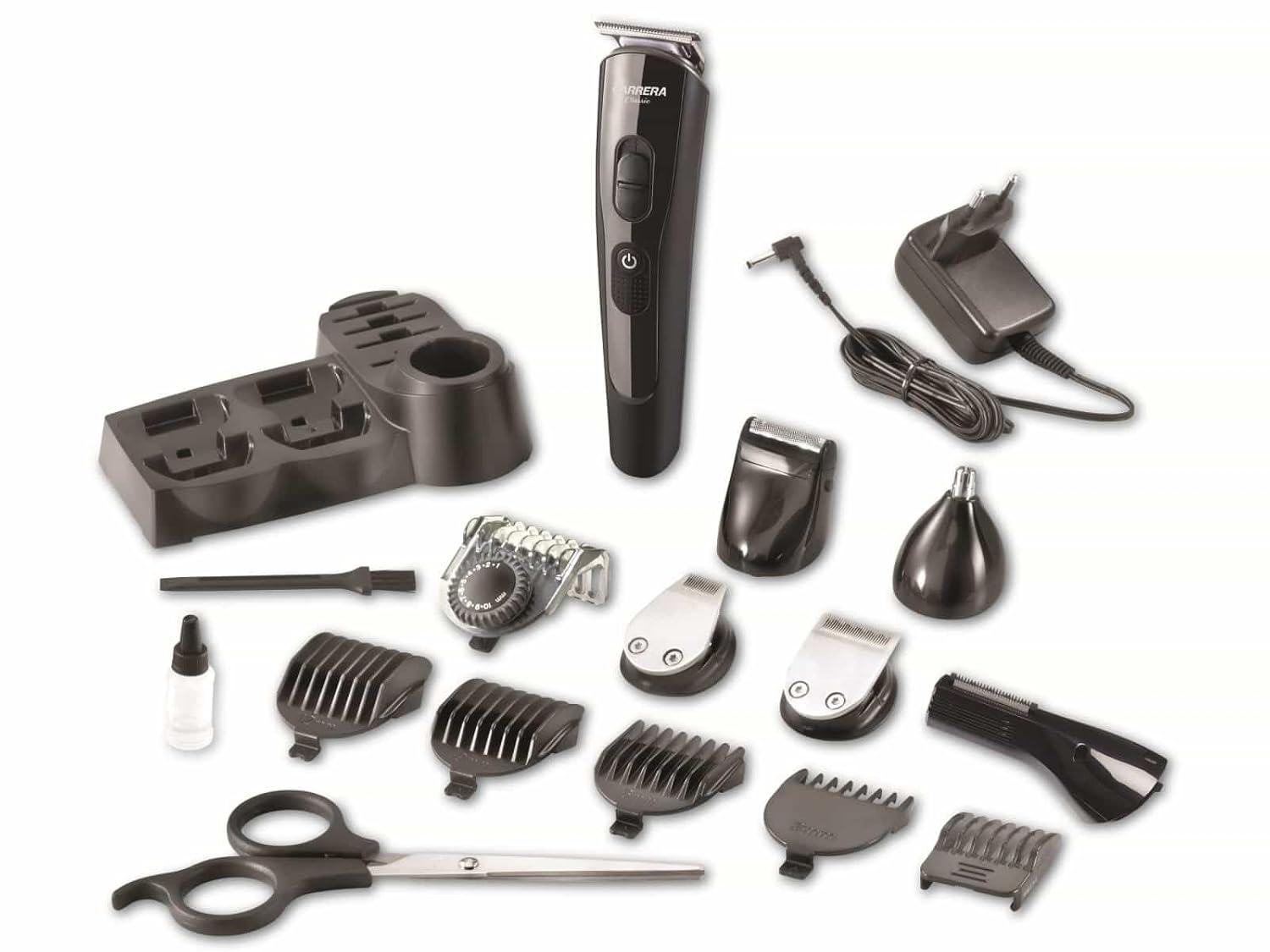
Image: Carrera Beauty Classic 6-in-1 Hair Clipper with all included accessories, including various trimmer heads, guide combs, charging stand, power adapter, cleaning brush, oil, and scissors.
- Main Hair Clipper Unit
- Precision Trimmer Head
- Wide Trimmer Head
- Shaver Head
- Nose/Ear Trimmer Head
- Adjustable Guide Comb (for hair/beard)
- Fixed Guide Combs (various lengths)
- Charging Stand
- Power Adapter
- Cleaning Brush
- Lubricating Oil
- Scissors
Product Overview
Familiarize yourself with the main components of your Carrera Beauty Classic 6-in-1 Hair Clipper.

Image: The main hair clipper unit standing in its charging base, with several interchangeable trimmer heads and an adjustable guide comb displayed alongside.
- Main Unit Body
- On/Off Button
- Power Indicator Lights (showing charge level)
- Interchangeable Trimmer Head Release Button
- Charging Port
- Charging Stand
- Various Trimmer Heads (e.g., precision, wide, shaver, nose/ear)
- Guide Combs (fixed and adjustable)
Setup
Charging the Device
- Connect the power adapter to the charging stand.
- Place the main hair clipper unit into the charging stand, ensuring it is seated correctly.
- Plug the power adapter into a suitable electrical outlet.
- The power indicator lights on the unit will illuminate to show charging status.
- For optimal battery life, allow the unit to fully charge before first use.
Attaching/Detaching Trimmer Heads
- To attach a trimmer head, align the head with the main unit and press firmly until it clicks into place.
- To detach a trimmer head, press the release button (if present) and gently pull the head away from the main unit.
Attaching/Adjusting Guide Combs
- Select the desired guide comb. For adjustable combs, slide the selector to the desired length setting.
- Snap the guide comb onto the chosen trimmer head. Ensure it is securely attached before use.
Operating Instructions
General Use
- Ensure the device is fully charged.
- Select the appropriate trimmer head and guide comb for your desired style and length.
- Press the On/Off button to start the device.
- For best results, use on clean, dry hair.
- Move the clipper against the direction of hair growth for an even cut.
- Press the On/Off button again to turn off the device.
Hair Trimming
Use the wide trimmer head with the appropriate guide comb. Start with a longer setting and gradually reduce the length if needed.
Beard Trimming
Use the precision trimmer head or wide trimmer head with an adjustable guide comb for beard shaping and trimming.
Shaving
Attach the shaver head for a close finish on smaller areas or for detailing.
Nose and Ear Hair Trimming
Use the dedicated nose/ear trimmer head. Insert gently into the nostril or ear canal and move in a circular motion.
Maintenance
Cleaning
- Turn off the device and disconnect it from the power supply.
- Remove the trimmer head.
- Use the supplied cleaning brush to remove hair clippings from the blades and the inside of the trimmer head.
- The trimmer heads may be rinsed under running water, but ensure the main unit body does not get wet. Dry thoroughly before reattaching.
- Wipe the main unit body with a damp cloth. Do not use abrasive cleaners or solvents.
Lubrication
- After cleaning, apply a few drops of the supplied lubricating oil to the blades of the trimmer heads.
- Turn on the device for a few seconds to allow the oil to distribute evenly.
- This helps maintain blade sharpness and ensures smooth operation.
Storage
Store the device and all accessories in a dry place, away from direct sunlight and extreme temperatures.
Troubleshooting
| Problem | Possible Cause | Solution |
|---|---|---|
| Device does not turn on. | Battery is low or depleted. | Charge the device fully. |
| Blades are pulling hair or cutting poorly. | Blades are dirty or not lubricated. | Clean and lubricate the blades as per maintenance instructions. |
| Device makes unusual noise. | Blades are not properly attached or lubricated. | Ensure trimmer head is securely attached. Clean and lubricate blades. |
Specifications
- Model Number: 21163907
- Brand: Carrera
- Color: Grey
- Material: Stainless Steel (Blades)
- Power Source: Battery Powered
- Special Features: USB Accessible, Self-Sharpening
- Product Dimensions (L x W x H): 50 x 50 x 28 cm
- Weight: 600 Grams
Warranty and Support
For information regarding warranty terms and conditions, please refer to the warranty card included with your product or visit the official Carrera website. For technical support or service inquiries, please contact Carrera customer service.
Website: www.carrera-beauty.com


