
Hisense AP0722CW1W
Hisense 7000-BTU Portable Air Conditioner User Manual
Model: AP0722CW1W
Brand: Hisense
Important Safety Information
Please read all instructions carefully before using this appliance and retain for future reference. Always follow basic safety precautions to reduce the risk of fire, electric shock, and injury to persons.
- Ensure the power supply matches the voltage specified on the rating label.
- Do not operate the unit with a damaged cord or plug.
- Do not insert fingers or foreign objects into the air inlet or outlet.
- Keep the unit away from flammable materials and open flames.
- Always unplug the unit before cleaning or servicing.
- This appliance is not intended for use by persons (including children) with reduced physical, sensory or mental capabilities, or lack of experience and knowledge, unless they have been given supervision or instruction concerning use of the appliance by a person responsible for their safety.
Product Overview
The Hisense AP0722CW1W Portable Air Conditioner is designed to provide efficient cooling for rooms up to 300 sq. ft. It offers multiple operating modes and convenient features for ease of use.
Key Features:
- 3-in-1 Operation: Cool, Fan, and Dehumidify modes for versatile comfort.
- Drain-Free Design: Automatically evaporates condensed moisture, eliminating the need for manual draining.
- Quiet Operation: Engineered for low noise levels, ensuring a peaceful environment.
- Easy Installation: Features a snap-assembly window kit for quick setup.
- Smart Control: Operable via included remote control and the ConnectLife smart app (Wi-Fi enabled).
Components:
- Portable Air Conditioner Unit
- Remote Control (with AAA Batteries)
- Flexible Condenser Air Hose
- Window/Product Exhaust Adapters (2)
- Washable PP Filter

Figure 1: Front view of the Hisense Portable Air Conditioner. This image shows the compact, white unit with the Hisense logo on the front.

Figure 2: Side view of the Hisense Portable Air Conditioner. The top vent is open, revealing the air outlet, and a side grille for air intake is visible.
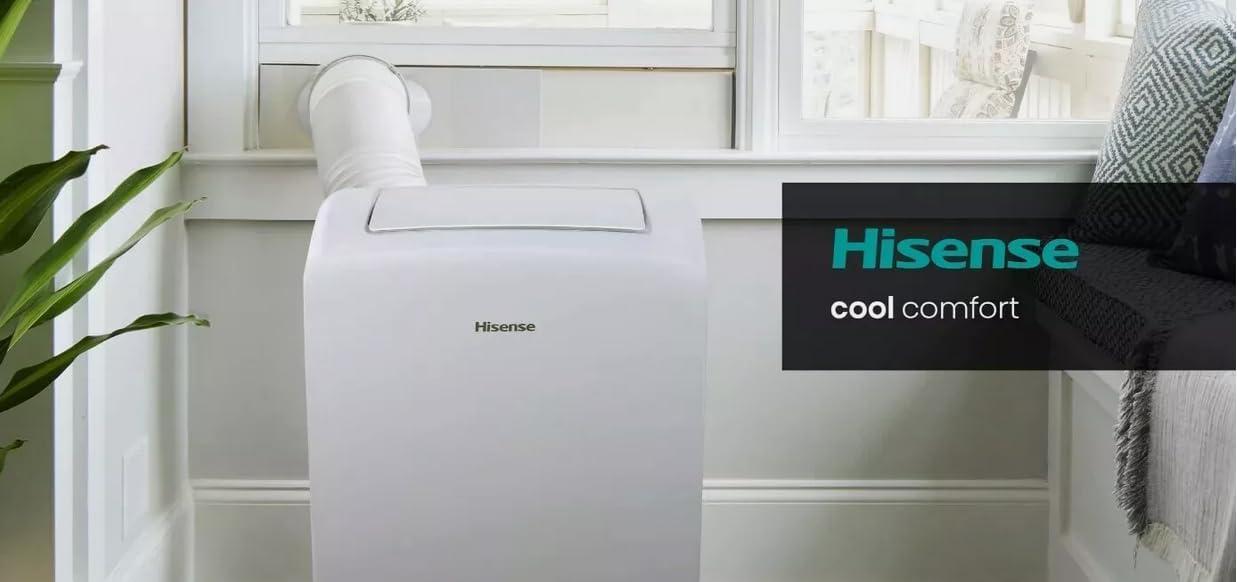
Figure 3: Hisense Portable Air Conditioner installed in a room. The unit is positioned near a window, with the exhaust hose connected to the snap-assembly window kit.
Setup and Installation
Proper installation is crucial for the efficient operation of your portable air conditioner. The unit comes with an easy-to-install snap-assembly window kit.
1. Choosing a Location:
- Place the unit on a flat, stable surface near a window.
- Ensure there is at least 20 inches (50 cm) of space around the unit for proper airflow.
- The power outlet should be easily accessible.
2. Window Kit Installation:
- Open the window and adjust the window slider kit to fit the window opening (18" to 50" wide).
- Secure the window kit in place.
- Attach one end of the flexible condenser air hose to the exhaust adapter on the back of the unit.
- Attach the other end of the hose to the window kit adapter.
- Ensure the hose is not kinked or bent sharply, as this can restrict airflow.
3. Power Connection:
- Plug the power cord into a grounded 115-Volt, 60Hz electrical outlet.
- Do not use extension cords or power strips.
Operating Instructions
Your Hisense portable air conditioner offers multiple ways to control its functions, including the control panel on the unit, the remote control, and the ConnectLife smart app.
Control Panel and Display:
The unit features an electronic control panel with LED display. Buttons typically include Power, Mode, Fan Speed, Temperature Up/Down, and Sleep.
Remote Control Operation:
The included remote control allows you to conveniently adjust settings from a distance. Ensure AAA batteries are installed correctly.
- Power Button: Turns the unit On or Off.
- Mode Button: Cycles through Cool, Fan, and Dehumidify modes.
- Temperature Buttons (∧/∨): Adjusts the desired temperature in Cool mode.
- Fan Speed Button: Selects fan speed (Low, Medium, High).
- Sleep Mode: Activates quiet operation and gradual temperature adjustment for sleeping comfort.
- Louvre Control: Adjusts the multi-directional auto louvre for optimal airflow.
ConnectLife Smart App (Wi-Fi Enabled):
For advanced control and monitoring, download the ConnectLife app on your smartphone. The app allows you to:
- Turn the unit On/Off remotely.
- Change operating modes and fan speeds.
- Set schedules and timers.
- Monitor room temperature.
- Integrate with Hey Google and Alexa for voice control.
Refer to the ConnectLife app's instructions for detailed pairing and usage information.
Maintenance
Regular maintenance ensures optimal performance and extends the lifespan of your air conditioner. Always unplug the unit before performing any maintenance.
Air Filter Cleaning:
The unit is equipped with a washable PP filter. A dirty filter can reduce cooling efficiency and airflow.
- Remove the air filter from the back or side of the unit (refer to your specific model's diagram).
- Wash the filter with warm, soapy water.
- Rinse thoroughly and allow it to air dry completely before reinserting.
- Clean the filter every two weeks or more frequently if the unit is used often or in dusty environments.
Unit Exterior Cleaning:
- Wipe the exterior of the unit with a soft, damp cloth.
- Do not use harsh chemicals, abrasives, or solvents.
Storage (Off-Season):
- Before storing, run the unit in Fan mode for a few hours to dry out any internal moisture.
- Clean the air filter and the exterior.
- Unplug the power cord and coil it neatly.
- Store the unit in a cool, dry place, preferably covered to protect from dust.
Troubleshooting
Before contacting customer service, please refer to the following troubleshooting guide for common issues.
| Problem | Possible Cause | Solution |
|---|---|---|
| Unit does not turn on. | No power, tripped circuit breaker, power cord not fully plugged in. | Check power outlet, reset circuit breaker, ensure power cord is securely plugged in. |
| Unit is running but not cooling. | Dirty air filter, exhaust hose blocked/kinked, room too large, doors/windows open. | Clean air filter, check exhaust hose for obstructions, ensure room size is within capacity, close all doors and windows. |
| Water leakage. | Unit not level, drain plug not properly sealed (if applicable). | Ensure unit is on a level surface. This model features a drain-free design, so persistent leakage may indicate a fault requiring service. |
| Noisy operation. | Unit not on a level surface, fan obstruction. | Place unit on a level surface. Check for any foreign objects near the fan. |
Specifications
| Attribute | Value |
|---|---|
| Model Number | AP0722CW1W |
| Cooling Capacity | 7000 BTU (DOE) |
| Maximum Cooling Space | 300 sq. ft. |
| Voltage/Frequency | 115V / 60Hz |
| Refrigerant | R32 |
| Noise Level (dB(A)) | 49~52 dB(A) |
| Unit Dimensions (W x H x D) | 16.93" x 27.36" x 12.80" (433 x 708 x 320 mm) |
| Net Weight | 58.4 lbs (26.5 kg) |
| Power Cord Length | 4.9 ft (1.5 m) |
| Window Kit Compatibility | 18" to 50" wide windows |
Warranty and Support
Hisense provides a comprehensive warranty for your peace of mind.
- Warranty: 2-year warranty on both parts and labor.
- Customer Support: For technical assistance, troubleshooting beyond this manual, or warranty claims, please contact Hisense customer service. Refer to the official Hisense website or your purchase documentation for contact details.
- Online Resources: Visit the Hisense Store on Amazon for additional product information and support.
Related Documents - AP0722CW1W
 |
Hisense AP0522CR1W Portable Air Conditioner User Manual Comprehensive user manual for the Hisense AP0522CR1W portable air conditioner, covering safety, installation, operation, care, and troubleshooting. Learn how to set up and use your 5000-12000 BTU air conditioner efficiently. |
 |
Hisense AP1019CW1G HiSmart™ Portable Air Conditioner | 300 Sq Ft, Wi-Fi Enabled Discover the Hisense AP1019CW1G HiSmart™ Portable Air Conditioner. This 6,500 BTU unit cools up to 300 sq ft, features Wi-Fi connectivity for smartphone control via the HiSmart App, and is compatible with Google Assistant and Alexa. Includes detailed specifications, features, and dimensions. |
 |
Hisense AP0821CR1W Portable Air Conditioner - 8,000 BTU, 350 Sq. Ft. Explore the Hisense AP0821CR1W Portable Air Conditioner, offering 8,000 BTU cooling for spaces up to 350 sq. ft. This unit provides quiet operation, multiple modes (Cool, Dehumidify, Fan), and a convenient snap-together window kit for easy installation. View detailed specifications, features, and warranty information. |
 |
Hisense AP0721CR1W Portable Air Conditioner User Manual User manual for the Hisense AP0721CR1W portable air conditioner. Covers installation, power supply, drainage, and airflow control for this 7,000 BTU cooling unit. |
 |
Hisense Portable Air Conditioner Limited Warranty and Support Information Comprehensive details on the Hisense two-year limited manufacturer's warranty for portable air conditioners, covering terms, exclusions, and customer service contact information. |
 |
Hisense Air Conditioner Use and Installation Manual This document provides comprehensive instructions for the installation, operation, care, and troubleshooting of Hisense air conditioners. It includes safety precautions, electrical requirements, and details on using the ConnectLife app. |
Ask a question about this manual
Ask about setup, troubleshooting, compatibility, parts, safety, or missing instructions. Manuals+ will review the question and use this page’s manual context to help answer it.