
1. Introduction
Thank you for choosing the EVERCROSS EV10K PRO App-Enabled Electric Scooter. This manual provides essential information for the safe operation, assembly, maintenance, and troubleshooting of your new electric scooter. Please read this manual thoroughly before your first ride to ensure optimal performance and safety.
Safety First: Always wear a helmet and appropriate safety gear when riding. Familiarize yourself with local regulations regarding electric scooter usage.
2. Product Overview
The EVERCROSS EV10K PRO is a high-performance electric scooter designed for urban commuting and recreational use. Key features include a powerful 500W brushless motor, a long-range battery, 10-inch honeycomb solid tires, and an intuitive LED digital display. It also features a dual braking system and dual shock absorption for a smooth and secure ride.
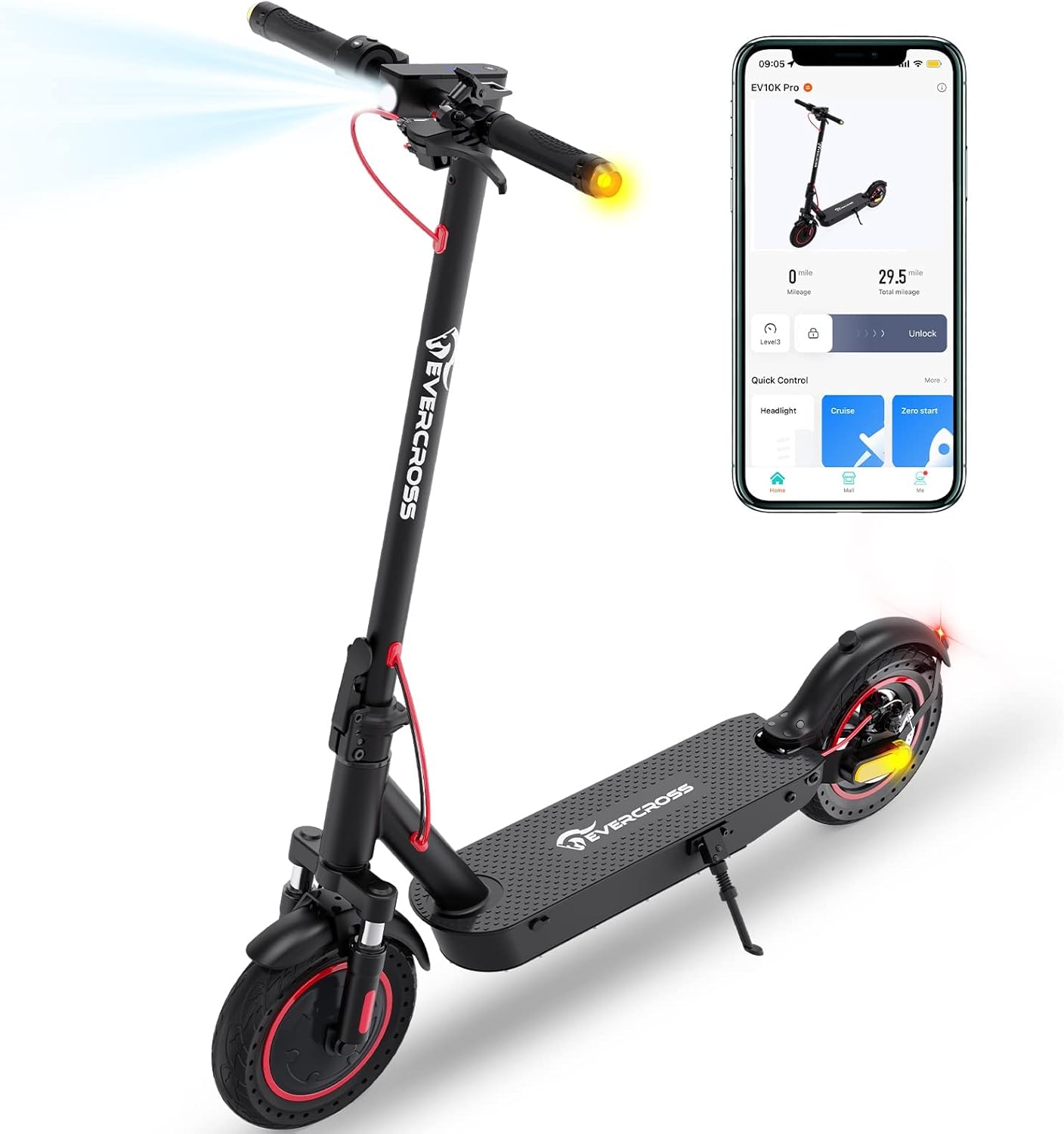
Figure 2.1: The EVERCROSS EV10K PRO Electric Scooter, showcasing its sleek design and integrated app connectivity.

Figure 2.2: Product identification label, showing model number, specifications, and certifications.
3. Setup and Assembly
The EV10K PRO comes mostly pre-assembled. Follow these steps for quick setup:
- Unfold the Scooter: Carefully lift the stem until it locks into place. Ensure the folding mechanism is securely latched.
- Attach the Handlebars: Connect the wires from the handlebar to the stem. Align the handlebar with the stem and secure it using the provided screws and tools.
- Initial Charge: Before first use, fully charge the scooter's battery. Connect the charger to the charging port and plug it into a power outlet. The indicator light on the charger will change when fully charged.
- Download the App: Search for the "EVERCROSS PRO" app on your smartphone's app store (iOS or Android). Install and open the app.
- Connect via Bluetooth: Turn on the scooter and enable Bluetooth on your phone. Follow the in-app instructions to pair your scooter with the app. This allows for features like locking/unlocking, cruise control, and monitoring speed/mileage.

Figure 3.1: The EVERCROSS PRO app interface, showing connectivity and control options.
4. Operating Instructions
4.1 Powering On/Off and Display
Press and hold the power button on the LED digital dashboard to turn the scooter on or off. The display shows current mode, speed, cruise control status, Bluetooth connection, and headlight status. A single button press can control various riding operations.

Figure 4.1: Detailed view of the LED Digital Dashboard and handlebar controls.
4.2 Speed Modes
The scooter features multiple speed modes to suit different riding conditions and preferences. You can switch between modes using the controls on the dashboard or via the EVERCROSS PRO app.
- ECO Mode: Energy-saving mode for extended range and lower speeds.
- D Mode: Standard drive mode for balanced performance.
- S Mode: Sport mode for maximum speed and acceleration.
The maximum speed of 19 MPH can be achieved by connecting to the mobile app to remove the speed limit, or by pressing the power button 6 times in a row to upgrade the top speed from 15 MPH to 19 MPH.

Figure 4.2: Illustration of the three available speed modes and their typical speeds.
4.3 Braking System
The EV10K PRO is equipped with an Electronic Brake (E-ABS) and a Disc Brake for reliable stopping power. Apply the brake lever gently to slow down, and firmly for emergency stops. Always maintain a safe braking distance.

Figure 4.3: Overview of the dual braking system for enhanced safety.
4.4 Folding and Portability
The scooter features a lightweight and foldable design for easy storage and transport. To fold, locate the folding buckle mechanism on the stem, release it, and carefully fold the stem downwards until it latches. The folded dimensions are approximately 43.3 x 20.1 x 21.3 inches, and it weighs 35.3 lbs.

Figure 4.4: The scooter's lightweight and foldable design for convenient carrying.

Figure 4.5: Dimensions of the scooter, highlighting its compact folded size.
5. Maintenance
Regular maintenance ensures the longevity and safe operation of your scooter.
- Cleaning: Wipe down the scooter with a damp cloth after use. Avoid using high-pressure water jets or harsh chemicals.
- Battery Care: Charge the battery regularly, even if not in use, to maintain its health. Avoid completely draining the battery. Store the scooter in a cool, dry place when not in use.
- Tire Inspection: The scooter uses 10-inch honeycomb solid tires, which are puncture-resistant. Regularly inspect them for wear and tear.
- Brake Check: Periodically check the responsiveness of both the electronic and disc brakes. Adjust if necessary or consult a professional.
- General Inspection: Before each ride, check all screws, bolts, and quick-release mechanisms to ensure they are tight and secure.
6. Troubleshooting
This section addresses common issues you might encounter.
| Problem | Possible Cause | Solution |
|---|---|---|
| Scooter does not power on | Low battery; Loose connections | Charge the battery fully; Check all cable connections. |
| Reduced range or speed | Low battery; Overload; Riding conditions | Ensure battery is fully charged; Do not exceed maximum weight capacity; Range and speed vary with terrain, rider weight, and temperature. |
| Throttle malfunction (e.g., stuck at max speed) | Damaged throttle unit; Loose connection | Immediately apply brakes. Avoid putting pressure on the throttle when going over bumps. Contact customer support for a replacement throttle if damaged. Repair should be done by those comfortable with electronics. |
| App connection issues | Bluetooth off; App not updated; Scooter not powered on | Ensure Bluetooth is enabled on phone; Update app to latest version; Turn scooter on before attempting to connect. |
7. Specifications
| Feature | Specification |
|---|---|
| Model Number | EV10K PRO |
| Motor Power | 500W (Brushless) |
| Max Speed | Up to 19 MPH (30.5 km/h) |
| Max Range | Up to 22 Miles (35.4 km) |
| Battery | 36V/11.4AH Lithium Ion |
| Tires | 10-inch Honeycomb Solid Tires |
| Braking System | Electronic Brake (E-ABS) + Disc Brake |
| Suspension | Dual Suspension |
| Max Load Capacity | 330 lbs (150 kg) |
| Item Weight | 35.3 lbs (16 kg) |
| Folded Dimensions | 43.3 x 20.1 x 21.3 inches (109.98 x 51.05 x 53.59 cm) |
| ISED Certification Number | 29099-EV10KPRO |
| HVIN | EV10K PRO |
| Operating Frequency Ranges | 2402MHz to 2480MHz |
Note: The above data may vary depending on riding conditions, rider weight, climate, and proper maintenance.
8. Warranty and Support
Your EVERCROSS EV10K PRO Electric Scooter is covered by a return policy that allows for refund or replacement within 30 days of purchase. For any product-related inquiries, technical support, or warranty claims, please contact the seller directly.
- Seller: EVERCROSS Direct
- Manufacturer: ZHEJIANG KUANTU INDUSTRY AND TRADE CO.,LTD
Please retain your proof of purchase for warranty purposes.


