
1. Safety Information
Please read all instructions carefully before installing components into the KEDIERS P7 PC case. Failure to follow safety guidelines may result in damage to the product or personal injury.
- Electrical Safety: Always disconnect the power supply from the wall outlet before installing or removing any components.
- Static Discharge: Wear an anti-static wrist strap or frequently touch a grounded metal object to prevent electrostatic discharge (ESD) damage to sensitive components.
- Tempered Glass: Handle tempered glass panels with care. They are durable but can shatter if subjected to sharp impacts or excessive force. Avoid placing the case on uneven surfaces.
- Ventilation: Ensure adequate airflow around the case to prevent overheating. Do not block ventilation openings.
2. Package Contents
Verify that all items are present in the package:
- KEDIERS P7 Mid Tower PC Case (x1)
- Pre-installed 120mm PWM ARGB Fans (x6)
- Accessory Box (containing screws, cable ties, and other small parts)
- User Manual (this document)

Figure 2.1: Included components with the KEDIERS P7 PC Case.
3. Product Overview
3.1 Key Features
- Pre-installed PWM ARGB Fans: Six 120mm fans provide efficient cooling and customizable lighting.
- Full-View Tempered Glass: Three 4mm thick tempered glass panels offer a clear view of internal components.
- Walnut Wood Panels: Decorative printed wood grain panels enhance the aesthetic.
- Optimized Airflow: Designed with multiple cooling channels for effective heat dissipation.
- Extensive Compatibility: Supports ATX, Micro-ATX, and Mini-ITX motherboards, 360mm radiators, and large GPUs.
- Advanced I/O Panel: Includes Type-C, USB 3.0, USB 2.0, and HD Audio ports.
3.2 I/O Panel
The front I/O panel provides convenient access to essential ports and controls.
- 1 x Type-C Port
- 1 x USB 3.0 Port
- 2 x USB 2.0 Ports
- 1 x HD Audio Jack
- Power Button
- Restart Button
Note: USB ports are primarily for data transfer and are not recommended for power charging, as most motherboards USB ports support a maximum voltage of 5V.

Figure 3.1: Front I/O Panel Layout.
3.3 Cooling System
The KEDIERS P7 case is designed for optimal thermal performance with multiple cooling channels and support for various fan and radiator configurations.

Figure 3.2: Multiple Cooling Channels for enhanced airflow.

Figure 3.3: Powerful Cooling Capacity Support.
3.4 Aesthetic Design
The case features printed walnut wood grain panels and a column-free structure with tempered glass for a modern and elegant appearance.

Figure 3.4: Printed Walnut Wood Grain Decorative Panels.

Figure 3.5: Column-Free Structure with Full View Tempered Glass.
4. Setup Guide
4.1 Preparing the Case
Before installing components, ensure the case is placed on a stable, flat surface. Remove the tempered glass side panels for easier access.

Figure 4.1: Tempered Glass Side Panel Removal Instructions.
4.2 Component Installation Guidelines
The KEDIERS P7 offers generous space for various PC components. Adhere to the maximum dimensions for optimal fit and airflow.
- Motherboard Support: ATX, Micro-ATX, Mini-ITX
- CPU Cooler Height: Maximum 165mm
- GPU Length: Maximum 400mm
- Power Supply Unit (PSU) Length: Maximum 200mm (ATX type)

Figure 4.2: Component Clearance Diagram.
4.3 Drive Installation
The case includes dedicated trays for storage devices.
- Supports 2 x 2.5" SSDs
- Supports 2 x 3.5" HDDs

Figure 4.3: Drive Mounting Locations.

Figure 4.4: Large Back Space for Cable Management and Drive Installation.
5. Operating Instructions
5.1 ARGB Fan Control
The pre-installed PWM ARGB fans can be controlled via compatible motherboard software. Connect the fans to a +5V ARGB motherboard header for synchronized lighting effects.

Figure 5.1: 120mm PWM ARGB Fan Specifications and Features.
5.2 Video Demonstration
Watch this video for a visual overview of the KEDIERS P7 PC Case.
Video 5.1: KEDIERS P7 PC Case Overview. This video showcases the design and features of the PC case.
6. Maintenance
6.1 Cleaning Dust Filters
The KEDIERS P7 case is equipped with magnetic dust filters to prevent dust buildup. Regularly clean these filters to maintain optimal airflow and cooling performance.
- Gently remove the magnetic dust filters from the case.
- Use a soft brush or compressed air to remove accumulated dust.
- Reattach the filters to their respective positions.
6.2 Cleaning Tempered Glass Panels
Use a microfiber cloth and a non-abrasive glass cleaner to clean the tempered glass panels. Avoid harsh chemicals that may damage the glass or coatings.
7. Troubleshooting
7.1 ARGB Fan Lighting Issues
If the ARGB fan lighting is not functioning correctly:
- Check Motherboard Compatibility: Ensure your motherboard has a 5V 3-pin ARGB interface. Case fans support motherboards with this type of interface.
- RGB Converter: If your motherboard only has a 12V 4-pin RGB interface, you may need to purchase a compatible RGB converter (not included).
- Cable Connections: Verify that all ARGB cables are securely connected to the correct headers on the motherboard or controller.
- Software Configuration: Ensure the lighting control software for your motherboard is properly installed and configured.
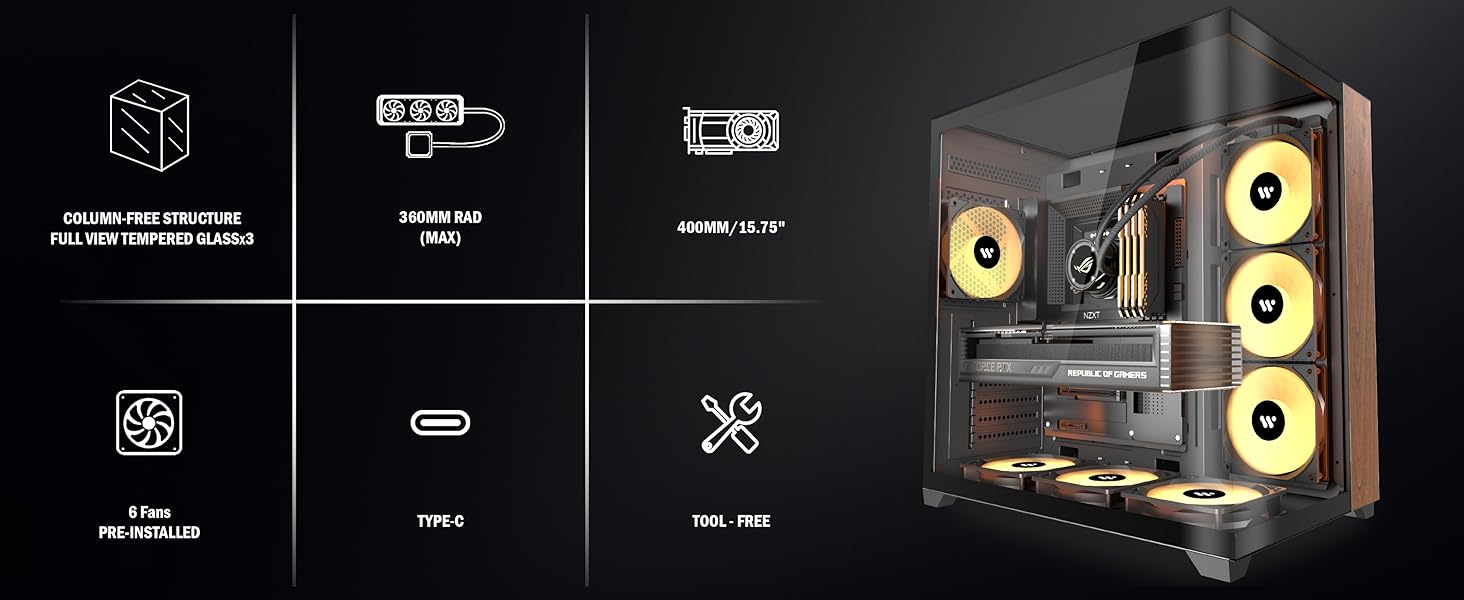
Figure 7.1: ARGB Fan Connection Guide.
7.2 General System Instability
If your system experiences unexpected shutdowns or performance issues, check the following:
- Component Seating: Ensure all components (motherboard, GPU, RAM, etc.) are properly seated in their slots.
- Power Connections: Verify all power cables from the PSU are securely connected to the motherboard and other components.
- Thermal Performance: Monitor CPU and GPU temperatures. Ensure fans are spinning and radiators are clear of obstructions.
8. Specifications
| Feature | Specification |
|---|---|
| Model Name | P7 |
| Case Type | Mid Tower |
| Motherboard Compatibility | ATX, Micro ATX, Mini ITX |
| Dimensions (L x W x H) | 16.54 x 11.02 x 17.13 inches (420 x 280 x 435 mm) |
| Item Weight | 15.4 pounds (7 Kilograms) |
| Material | Metal, Tempered Glass |
| Pre-installed Fans | 6 x 120mm PWM ARGB Fans |
| Radiator Support | Up to 360mm (Side, Bottom) |
| CPU Cooler Height Limit | 165mm |
| GPU Length Limit | 400mm |
| PSU Length Limit | 200mm |
| I/O Ports | 1x Type-C, 1x USB 3.0, 2x USB 2.0, 1x HD Audio, Power, Reset |
| Drive Bays | 2x 2.5" SSD, 2x 3.5" HDD |
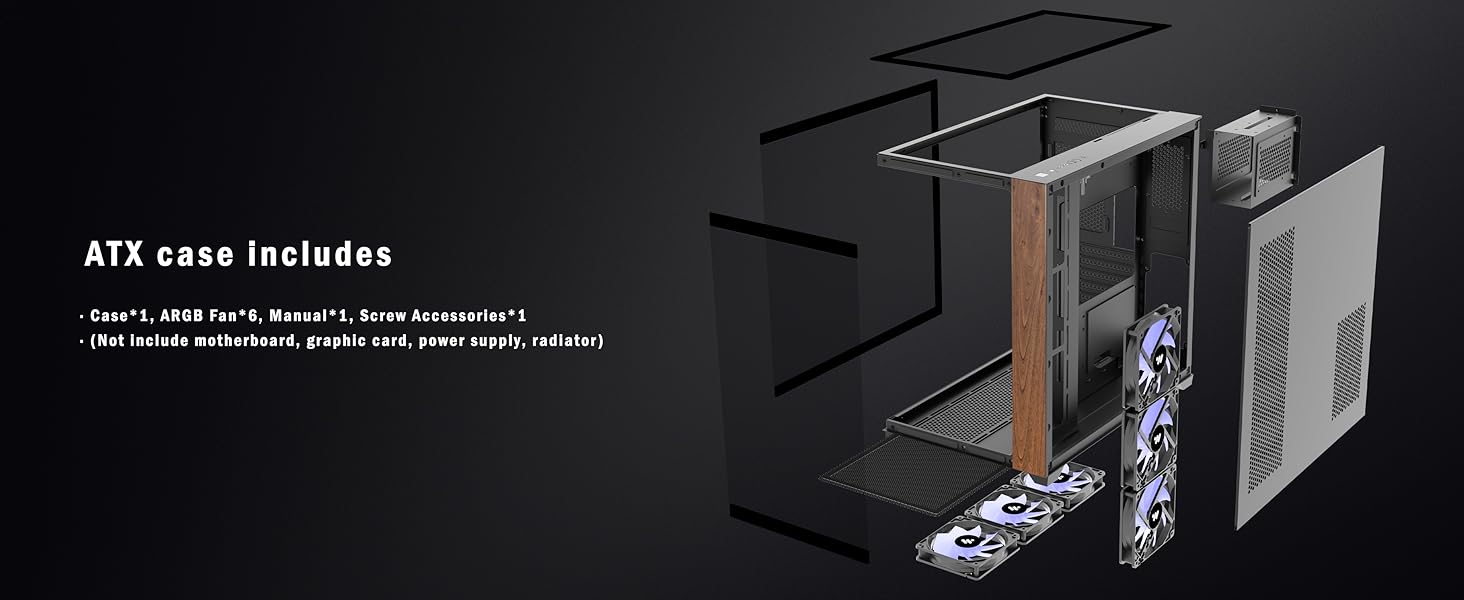
Figure 8.1: KEDIERS P7 Case Dimensions.
9. Warranty and Support
For warranty information, technical support, or any questions regarding your KEDIERS P7 PC case, please refer to the official KEDIERS website or contact KEDIERS customer service directly.
Manufacturer: KEDIERS
Seller: KEDIERS-PC-SHOP
You can visit the KEDIERS Store for more information: KEDIERS Store


