
1. Product Overview
The Juylux TL010 is a versatile device combining a night light, Bluetooth speaker, alarm clock, and white noise machine. It features smart touch control for light adjustments and a clear LED display for time and settings.
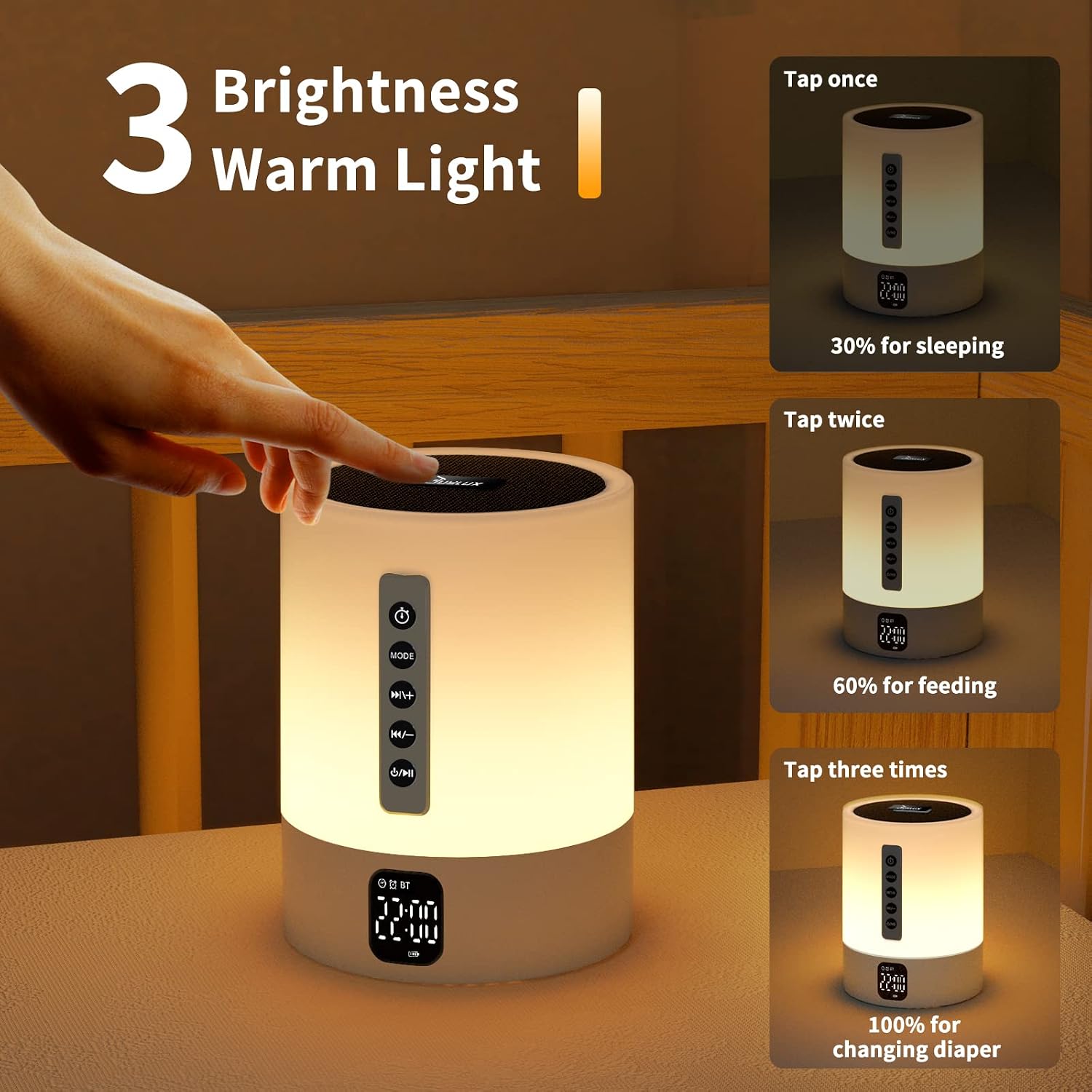
Image: The Juylux TL010 device, showcasing its cylindrical design and front panel controls.
2. Package Contents
- Juylux TL010 Night Light Bluetooth Speaker
- USB Charging Cable
- User Manual
- Remote Control (if included with your model)
3. Setup
3.1 Initial Charging
- Connect the provided USB charging cable to the charging port on the device.
- Plug the other end into a standard USB power adapter (not included) or a computer USB port.
- The charging indicator will illuminate. Allow approximately 3-4 hours for a full charge before first use.
3.2 Power On/Off
- To power on, press and hold the Power button (⏻) located on the front panel until the display illuminates.
- To power off, press and hold the Power button (⏻) again until the display turns off.
4. Operating Instructions
4.1 Night Light Functions

Image: The device demonstrating touch control on the speaker mesh for light adjustments and various RGB color options.
Warm Light Brightness Adjustment
- Tap the metal speaker mesh on the top of the device to cycle through 3 levels of warm white light brightness: 30% (for sleeping), 60% (for feeding), and 100% (for changing diapers).
RGB Color Changing Mode
- Press the Light Mode button (MODE) to switch between warm white light and RGB color changing modes.
- In RGB mode, tap the speaker mesh to cycle through various static colors or activate a dynamic color-changing sequence.
4.2 Bluetooth Speaker Functions
Bluetooth Pairing
- Ensure the device is powered on.
- Press the Mode button (MODE) until you hear a voice prompt indicating Bluetooth mode. The Bluetooth indicator will flash.
- On your smartphone or other Bluetooth-enabled device, search for "TL010" in the Bluetooth settings.
- Select "TL010" to pair. A voice prompt will confirm successful pairing.
Music Playback
- Use the Play/Pause button (▶/‖) to start or pause music playback.
- Press the Previous Track button (⏮) to go to the previous song.
- Press the Next Track button (⏭) to go to the next song.
- Press and hold the Previous Track button (⏮) to decrease volume.
- Press and hold the Next Track button (⏭) to increase volume.
4.3 Alarm Clock Functions

Image: The device displaying its timer and alarm clock features, including a fading light for sleep and a wake-up light with white sound.
Setting the Time
- Press the Clock button (⏰) once to enter time setting mode. The hour digits will flash.
- Use the Previous Track (⏮) and Next Track (⏭) buttons to adjust the hour.
- Press the Clock button (⏰) again to set the minutes. The minute digits will flash.
- Use the Previous Track (⏮) and Next Track (⏭) buttons to adjust the minutes.
- Press the Clock button (⏰) a third time to confirm and exit time setting.
Setting the Alarm
- Press the Alarm button (🔔) once to enter alarm setting mode. The alarm hour digits will flash.
- Use the Previous Track (⏮) and Next Track (⏭) buttons to adjust the alarm hour.
- Press the Alarm button (🔔) again to set the alarm minutes. The alarm minute digits will flash.
- Use the Previous Track (⏮) and Next Track (⏭) buttons to adjust the alarm minutes.
- Press the Alarm button (🔔) a third time to confirm and exit alarm setting.
- To enable/disable the alarm, press the Alarm button (🔔) briefly outside of setting mode. An alarm icon will appear/disappear on the display.
Snooze Function
- When the alarm sounds, tap the speaker mesh or press any button (except Power) to activate snooze. The alarm will sound again after 5 minutes.
- To turn off the alarm completely, press the Power button (⏻).
4.4 White Noise Machine

Image: The device shown in a nursery setting, highlighting its 10 soothing sounds feature for sleep assistance.
- Press the White Noise button (♫) to cycle through 10 built-in soothing sounds (e.g., nature sounds, lullabies).
- Use the Volume Up/Down buttons (long press ⏮ or ⏭) to adjust the volume of the white noise.
4.5 Sleep Timer
- Press the Timer button (⏱) to set an auto-off timer for the light and/or white noise. Available options are 15, 30, or 60 minutes.
- The device will automatically turn off after the selected duration.
4.6 Remote Control (If Applicable)

Image: A diagram of the remote control for the Juylux TL010, showing buttons for light, timing, clock, alarm, and various white noise options.
If your package includes a remote control, it provides convenient access to all functions from a distance. Refer to the diagram above for button identification:
- Power Button: Turn the device on/off.
- Bluetooth Button: Switch to Bluetooth mode.
- Light Buttons: Control warm light brightness (3 levels) and RGB colors.
- Timing Button: Set sleep timer (15/30/60 mins).
- Clock Button: Set current time.
- Alarm Button: Set and activate/deactivate alarm.
- White Noise Help Button: Activate white noise mode.
- White Noise Selection: Individual buttons for different white noise sounds.
- Volume Buttons: Adjust volume for music and white noise.
- Track Buttons: Skip tracks in music mode.
5. Maintenance
5.1 Cleaning
- Ensure the device is powered off and unplugged before cleaning.
- Wipe the exterior with a soft, dry, or slightly damp cloth.
- Do not use abrasive cleaners, solvents, or harsh chemicals.
- Avoid getting moisture into any openings.
5.2 Battery Care
- To prolong battery life, fully charge the device before first use.
- Recharge the device when the battery low indicator appears or when performance diminishes.
- If storing the device for an extended period, charge it every 3 months to maintain battery health.
6. Troubleshooting
| Problem | Possible Cause | Solution |
|---|---|---|
| Device does not power on. | Low battery. | Charge the device for at least 30 minutes. |
| Bluetooth not connecting. | Device not in pairing mode; Bluetooth disabled on phone; device too far. | Ensure device is in Bluetooth mode (flashing indicator). Enable Bluetooth on your phone. Move device closer to phone (within 10 meters). |
| Light is not responding to touch. | Incorrect mode; dirty sensor. | Ensure device is in light mode. Clean the speaker mesh area. |
| Alarm does not sound. | Alarm not enabled; volume too low. | Check if the alarm icon is displayed. Increase the device volume. |
7. Specifications
| Feature | Detail |
|---|---|
| Model Number | TL010 |
| Brand | Juylux |
| Connectivity Technology | Bluetooth |
| Light Type | LED Night Light, Table Lamp |
| Light Features | 3-level Warm Light, 48 RGB Color Changing |
| Control Method | Touch, Buttons, Remote Control (if included) |
| Power Source | Battery Powered (2000mAh) |
| Material | Polypropylene |
| Color | White |
| Working Time (Light) | Up to 8 hours (Night Mode Light) |
| Working Time (Music) | Up to 6 hours |
| GTIN/UPC | 768481572415 |
8. Warranty and Support
This product comes with a standard manufacturer's warranty. For specific warranty details, please refer to the documentation provided with your purchase or contact Juylux customer support.
For technical assistance, troubleshooting not covered in this manual, or warranty claims, please contact Juylux customer service through the retailer where the product was purchased or visit the official Juylux website for contact information.