
Introduction
This manual provides instructions for the proper installation, usage, and maintenance of your GRV S1 Fitness Tracker Replacement Strap. Please read this guide carefully to ensure optimal performance and longevity of your product.
Product Overview
The GRV S1 Fitness Tracker Replacement Strap is designed to provide a comfortable and secure fit for your S1 fitness tracker. It is made from durable, skin-friendly materials suitable for various activities.

Image: The GRV S1 Fitness Tracker Replacement Strap, shown in green, featuring its secure buckle design.
Key Features:
- Compatibility: Designed specifically for the S1 fitness tracker, ensuring a perfect fit.
- Material: Constructed from high-quality, skin-friendly silicone rubber.
- Durability: Waterproof and suitable for high-intensity sports such as mountaineering, outdoor exercises, swimming, cycling, and long-distance running.
- Adjustable Fit: Straps accommodate wrist sizes from 5.9 to 8.7 inches (150mm to 220mm).
- Secure Fastening: Features a finely crafted stainless steel buckle and a strap holder to manage excess length.

Image: A close-up view demonstrating the flexibility and soft texture of the silicone strap material.
Setup and Installation
Follow these steps to replace the strap on your GRV S1 Fitness Tracker:
- Remove the old strap: Gently pull the existing strap away from the fitness tracker module. It should detach with a slight pull.
- Insert the new strap: Align the new strap with the slot on the fitness tracker module. Push the strap firmly into the slot until you hear or feel a click, indicating it is securely in place.
- Verify attachment: Lightly tug on the strap to ensure it is properly attached and will not accidentally detach during use.

Image: Step-by-step visual guide for attaching the replacement strap to the fitness tracker module.
Operating and Usage
To wear your GRV S1 Fitness Tracker with the replacement strap:
- Wrap the strap around your wrist.
- Insert the pin of the buckle into one of the adjustment holes that provides a comfortable and secure fit.
- Slide the excess strap through the strap holder to keep it neatly in place.
Ensure the strap is not too tight to avoid discomfort, but secure enough that the fitness tracker does not move freely on your wrist, which could affect sensor accuracy.

Image: Illustration detailing the minimum and maximum adjustable wrist circumference for the strap.
Maintenance
To keep your GRV S1 Fitness Tracker Replacement Strap in good condition:
- Cleaning: Wipe the strap regularly with a soft, damp cloth. For deeper cleaning, use mild soap and water, then rinse thoroughly and dry completely before reattaching to your fitness tracker.
- Avoid Harsh Chemicals: Do not use abrasive cleaners, solvents, or strong detergents, as these can damage the silicone material.
- Storage: Store the strap in a cool, dry place away from direct sunlight when not in use.
Troubleshooting
- Strap does not attach securely: Ensure the strap is aligned correctly with the tracker module and pushed firmly until it clicks into place. Check for any debris in the slot.
- Discomfort or skin irritation: Ensure the strap is not worn too tightly. Clean the strap regularly to prevent buildup of sweat or dirt. If irritation persists, discontinue use and consult a healthcare professional.
- Strap appears damaged: If the strap shows signs of significant wear, tears, or damage, it is recommended to replace it to prevent accidental detachment of your fitness tracker.
Specifications
| Brand | GRV |
| Compatible Devices | Fitness Tracker S1 |
| Strap Width | 18 mm |
| Adjustable Wrist Size | 5.9 to 8.7 inches (150mm to 220mm) |
| Material | High-quality Silicone Rubber, Stainless Steel Buckle |
| Item Weight | 20 g |
| Color | Green (as per product listing, other colors may be available) |
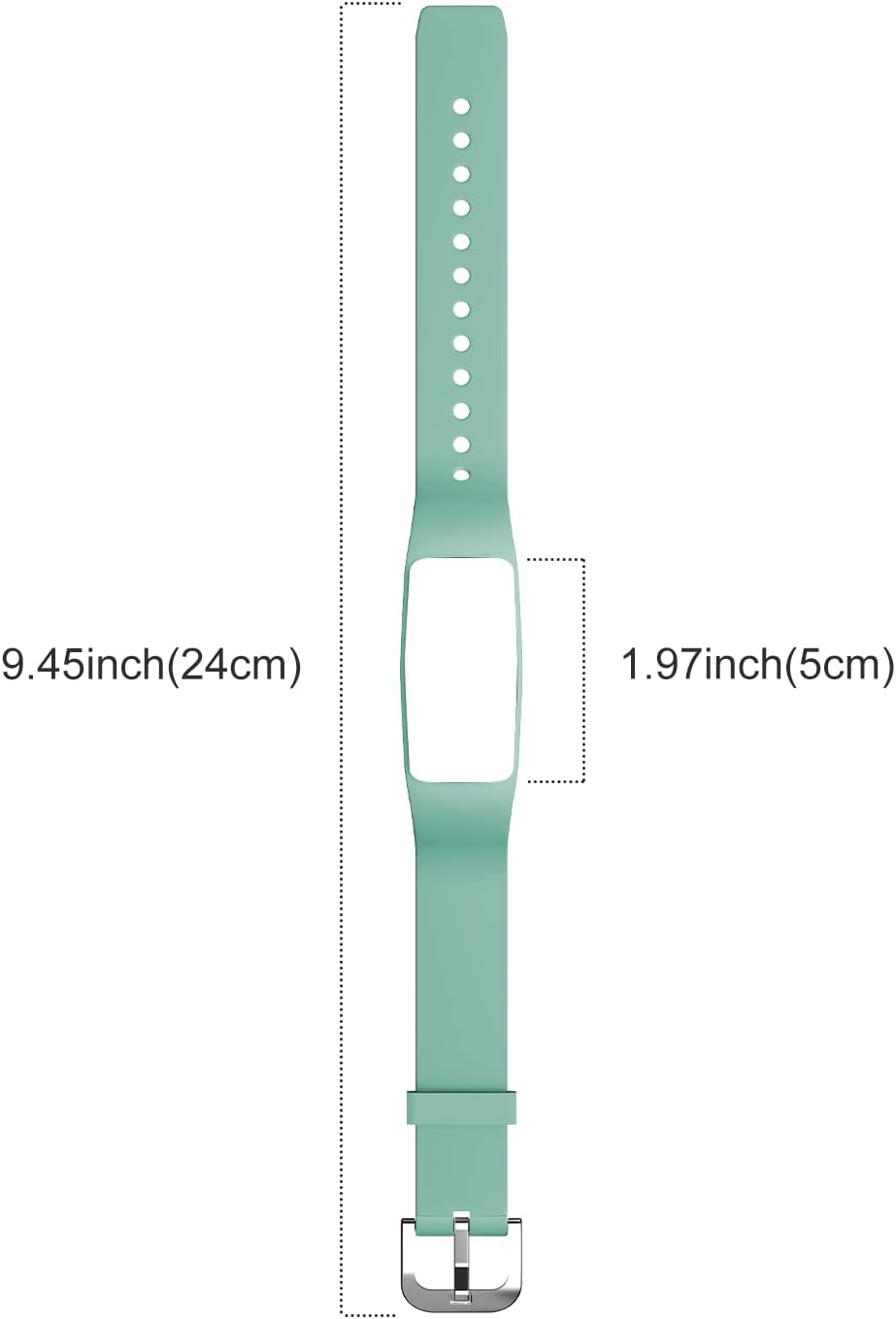
Image: Detailed dimensions of the replacement strap, including total length and tracker slot size.
Warranty and Support
For information regarding warranty coverage or product support, please refer to the documentation included with your original fitness tracker or contact GRV customer service through the retailer where the product was purchased.


