
1. Introduction
1.1 Product Overview
The Lexibook Frozen Educational Tablet is an interactive, bilingual learning device designed for young children aged 3 years and up. It features activities focused on letters, numbers, words, and music, available in both English and Polish. This tablet promotes early learning through interactive questions and answers, encouraging children to explore and learn independently.
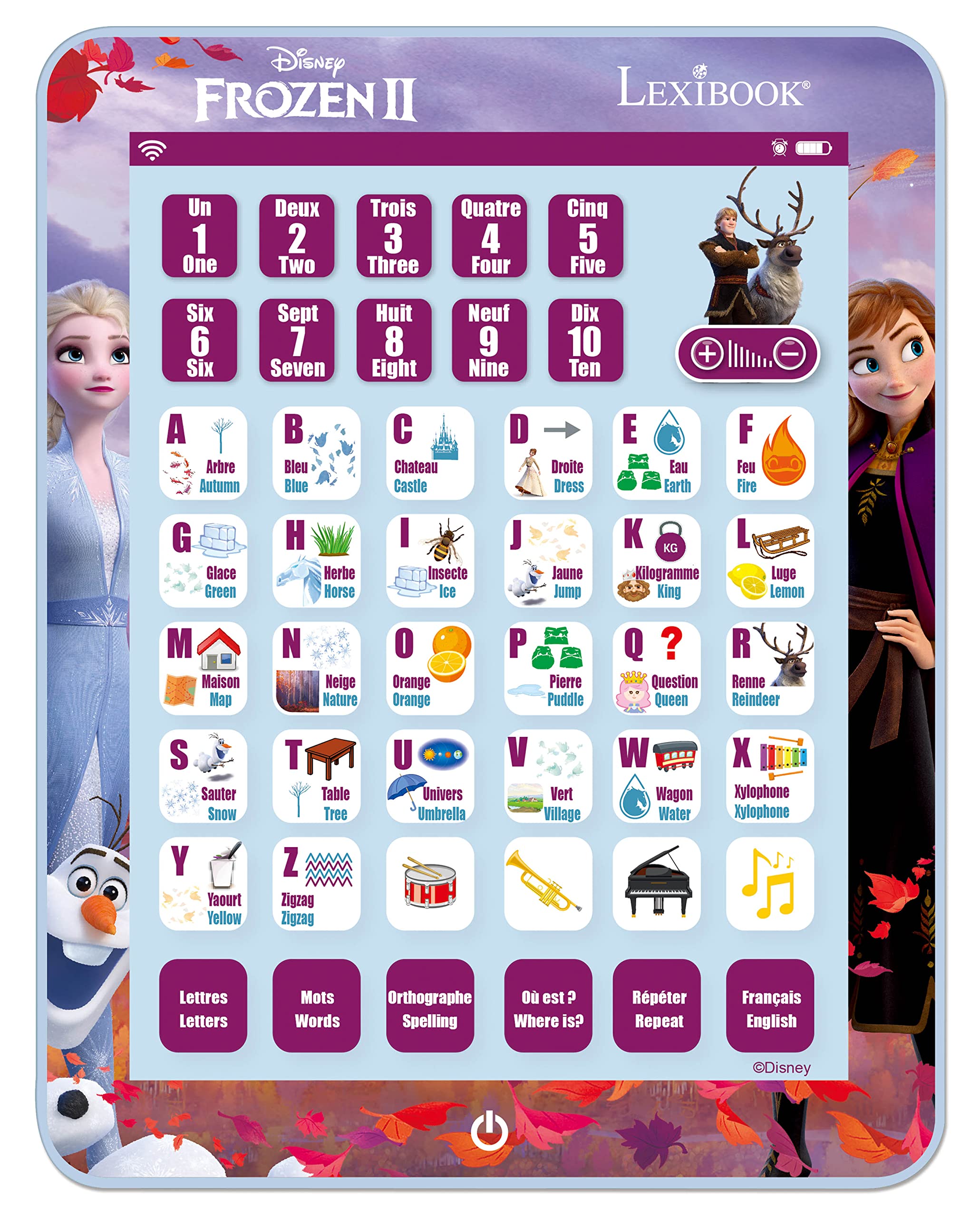
Image: Front view of the Lexibook Frozen Educational Tablet, featuring characters from Disney's Frozen and a layout of letters, numbers, and interactive buttons.
2. Setup
2.1 Unpacking
Carefully remove the tablet from its packaging. Ensure all components are present. The package should contain one Lexibook Frozen Educational Tablet.

Image: The Lexibook Frozen Educational Tablet in its retail packaging, highlighting its bilingual (French/English) features.
2.2 Battery Installation
The tablet requires 3 AAA batteries (not included). Follow these steps to install them:
- Locate the battery compartment on the back of the tablet.
- Using a small screwdriver, open the battery compartment cover.
- Insert 3 AAA batteries, ensuring correct polarity (+/-) as indicated inside the compartment.
- Replace the battery compartment cover and secure it with the screw.
Warning: Do not mix old and new batteries. Do not mix alkaline, standard (carbon-zinc), or rechargeable (nickel-cadmium) batteries. Remove batteries if the device is not used for an extended period to prevent leakage.
3. Operating Instructions
3.1 Power On/Off
Press the power button, typically located at the bottom center of the tablet, to turn the device on or off.
3.2 Language Selection
The tablet supports English and Polish. Look for a language selection button or setting, often labeled "English/Polski" or similar, to switch between the available languages.
3.3 Interactive Modes
The tablet offers various interactive learning modes to engage children:
- Letters and Numbers: Press any letter or number button, and the tablet will pronounce the corresponding letter, number, or an associated word.
- Words: Explore a vocabulary of words associated with the images displayed on the tablet.
- Music: Engage with musical activities and sounds to develop auditory skills.
- Quiz Mode: This mode promotes learning through interactive questions and answers. To activate, press the quiz button, then find the matching image or answer and select it.

Image: A child lying down and actively engaging with the Lexibook Frozen Educational Tablet, pressing buttons to learn.

Image: Another child lying on their stomach, pointing at the Lexibook Frozen Educational Tablet, indicating interaction with the learning content.
4. Maintenance
4.1 Cleaning
To clean the tablet, gently wipe it with a soft, dry cloth. Do not use abrasive cleaners, chemical solvents, or harsh detergents, as these can damage the device's surface or internal components. Avoid getting moisture into any openings.
4.2 Storage
Store the tablet in a cool, dry place away from direct sunlight, high humidity, and extreme temperatures. If the device will not be used for an extended period, remove the batteries to prevent potential leakage and damage.
5. Troubleshooting
If you encounter any issues with your Lexibook Frozen Educational Tablet, please refer to the table below for common problems and their solutions:
| Problem | Possible Cause | Solution |
|---|---|---|
| Tablet does not turn on. | Batteries are dead or incorrectly installed. | Replace batteries with new ones, ensuring correct polarity (+/-). |
| No sound or low sound. | Volume is too low or muted; batteries are low. | Adjust the volume using the dedicated buttons. Replace batteries if sound remains low. |
| Tablet is unresponsive. | Temporary software glitch; low batteries. | Turn the tablet off and on again. Replace batteries if the issue persists. |
6. Specifications
- Brand: Lexibook
- Model Number: JCPAD002FZi17
- Educational Objective: Number recognition, musical skills
- Theme: Frozen
- Color: Blue, Red, Green (or combination)
- Recommended Age: 3 years and up
- Batteries Required: 3 x AAA (not included)
- Product Weight: 230 Grams
- Item Dimensions: 10 x 10 x 10 mm
- Material: Plastic
- Languages: English, Polish
- Country of Origin: China
7. Warranty and Support
For detailed warranty information and customer support, please refer to the documentation included with your product at the time of purchase. You can also visit the official Lexibook website or contact Lexibook customer service directly for assistance with product issues, technical support, or general inquiries.
Lexibook Official Website: www.lexibook.com
Please retain your proof of purchase for any warranty claims.


