
1. Introduction
Thank you for choosing the Havit H763D Wired Gaming Headset. This manual provides detailed instructions for setting up, operating, and maintaining your headset to ensure optimal performance and longevity. Please read this manual thoroughly before using the product.
2. Product Overview
The Havit H763D is a wired gaming headset designed for clear audio and communication. It features 40mm speakers for immersive sound and an omnidirectional microphone for effective voice transmission.
Key Features:
- 40mm high-fidelity speakers for clear audio.
- Omnidirectional microphone for effective communication.
- Adjustable headband for comfortable wear.
- Durable construction with comfortable ear cushions.
- Wired connectivity via two 3.5mm jacks.
Components:
- Headset with integrated cable
- Omnidirectional microphone (fixed or adjustable, depending on model variant)
- Two 3.5mm audio jacks (one for audio output, one for microphone input)

Figure 2.1: Front-left view of the Havit H763D Gaming Headset with the microphone in the extended position. Note the blue accents and padded earcups.
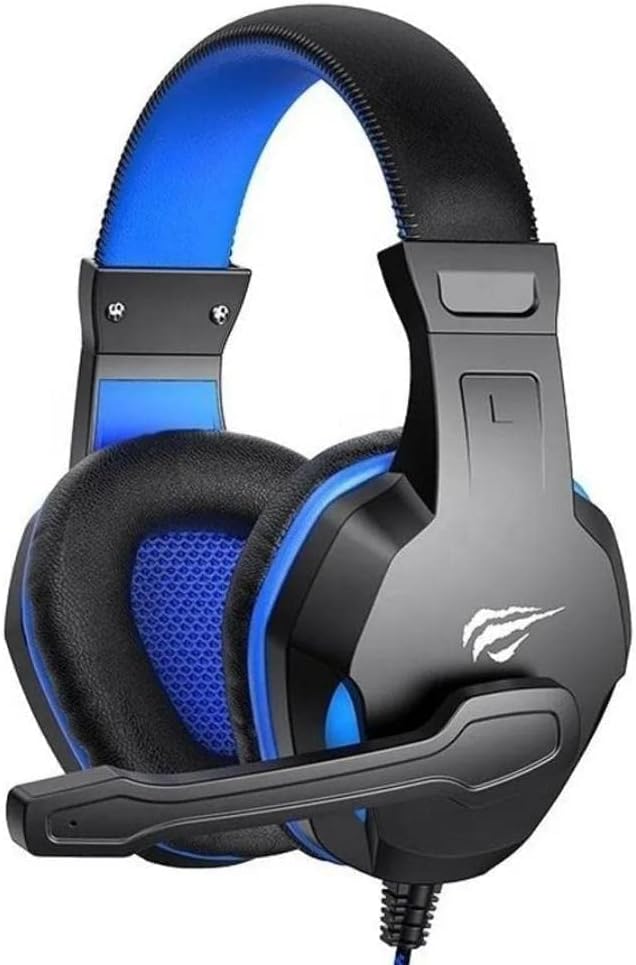
Figure 2.2: Front-right view of the Havit H763D Gaming Headset, showing the microphone extended and the overall design from the right side.

Figure 2.3: Front view of the Havit H763D Gaming Headset with the microphone in the retracted or upright position, highlighting the earcups and headband.

Figure 2.4: Side view of the Havit H763D Gaming Headset, showing the profile of the earcup and the microphone in its upright position.

Figure 2.5: Top view of the Havit H763D Gaming Headset, illustrating the adjustable headband and the overall structure from above.
3. Setup Instructions
- Connect Audio Jack: Locate the 3.5mm audio jack (often green or with a headphone icon) on your computer or gaming console. Insert the headset's audio jack (usually green or with a headphone icon) into this port.
- Connect Microphone Jack: Locate the 3.5mm microphone jack (often pink or with a microphone icon) on your computer or gaming console. Insert the headset's microphone jack (usually pink or with a microphone icon) into this port.
- Adjust Headband: Gently extend or retract the headband slides on both sides of the headset until the earcups rest comfortably over your ears.
- Position Microphone: Adjust the flexible microphone arm to position the microphone approximately 2-3 cm (1 inch) from your mouth for optimal voice pickup.
- System Audio Settings:
- Windows: Go to Control Panel > Sound > Playback Devices and set the headset as the default playback device. Then go to Recording Devices and set the headset microphone as the default recording device.
- Mac: Go to System Preferences > Sound > Output and select the headset. Then go to Input and select the headset microphone.
- Consoles: Refer to your console's audio settings menu to ensure the headset is selected for both audio output and microphone input.
4. Operating Instructions
- Volume Control: Adjust the volume using the volume controls on your connected device (computer, console, or mobile device). The Havit H763D does not feature inline volume controls.
- Microphone Usage: Ensure the microphone is positioned correctly for clear communication. If the microphone is not in use, it can be moved to an upright position.
- Comfortable Wear: For extended use, ensure the headset is adjusted to fit comfortably. The padded earcups and adjustable headband are designed to minimize pressure.
5. Maintenance
- Cleaning: Use a soft, dry cloth to wipe down the headset. For earcups, a slightly damp cloth with mild soap can be used, but ensure no liquid enters the speaker grilles. Do not use harsh chemicals or abrasive cleaners.
- Storage: Store the headset in a cool, dry place away from direct sunlight and extreme temperatures. Avoid tangling the cable by coiling it loosely.
- Cable Care: Do not pull on the cable to disconnect the headset. Always grasp the plug firmly. Avoid bending or twisting the cable excessively.
6. Troubleshooting
| Problem | Possible Cause | Solution |
|---|---|---|
| No sound from headset |
|
|
| Microphone not working |
|
|
| Sound quality is poor or distorted |
|
|
7. Specifications
| Feature | Detail |
|---|---|
| Model Number | H763D |
| Connectivity Technology | Wired |
| Headphones Form Factor | Over Ear |
| Speaker Size | 40mm |
| Microphone Type | Omnidirectional |
| Headphones Jack | Two 3.5 mm Jacks (Audio & Mic) |
| Sensitivity | 99 dB |
| Material | Polycarbonate (PC) |
| Product Dimensions | 15 x 10 x 8 cm |
| Weight | 500 g |
8. Warranty and Support
For warranty information and customer support, please refer to the documentation included with your purchase or contact the retailer where the product was acquired. Keep your proof of purchase for any warranty claims.


