
1. Product Overview
The Shark ION W1 Cordless Handheld Vacuum Onboard Accessory Storage Caddy is a genuine OEM replacement part designed to enhance the functionality of your Shark handheld vacuum. This caddy provides a discreet and convenient way to store your favorite vacuum accessories directly on the charging dock.
It is removable from the dock, allowing for flexible placement and organization of your cleaning tools. Using genuine Shark parts ensures optimal performance and maintains your product's warranty.
Key Features:
- Genuine Shark OEM replacement part (Part Number: 15FIWV200).
- Discreetly stores vacuum accessories.
- Removable design for convenience.
- Ensures best performance and protects warranty when used with compatible Shark models.
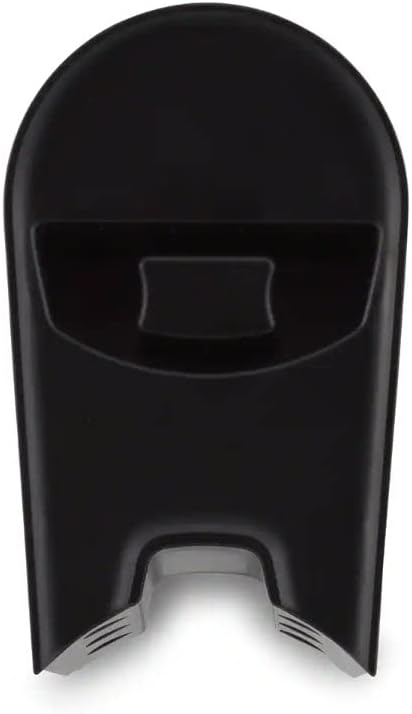
Figure 1: The Shark ION W1 Cordless Handheld Vacuum Onboard Accessory Storage Caddy. This image shows the black, sleek caddy designed to hold vacuum accessories, with a slot for attachment to the vacuum's charging dock.
2. Setup and Installation
This accessory caddy is designed for easy integration with compatible Shark ION W1 Cordless Handheld Vacuum models. Before installation, ensure your vacuum model number matches one of the compatible models listed in the specifications.
Installation Steps:
- Identify the accessory storage slot on your Shark ION W1 Cordless Handheld Vacuum's charging dock.
- Align the base of the accessory caddy with the designated slot on the charging dock.
- Gently slide the caddy into place until it clicks securely. Ensure it is firmly attached and does not wobble.
- Once installed, you can place your preferred Shark vacuum accessories into the caddy's compartments for convenient storage.
Note: The caddy is designed to be removable. To remove, gently pull it away from the charging dock.
3. Operating Instructions
The accessory storage caddy is a passive storage unit. Its operation involves simply placing and retrieving your vacuum accessories.
Using the Caddy:
- After installing the caddy onto the charging dock, insert your desired Shark vacuum accessories (e.g., crevice tool, dusting brush) into the available slots.
- Ensure accessories are placed securely to prevent them from falling out.
- When an accessory is needed, simply remove it from the caddy.
- Return accessories to the caddy after use to keep them organized and readily accessible.
4. Maintenance
Regular cleaning of your accessory storage caddy will help maintain its appearance and hygiene.
Cleaning the Caddy:
- Remove all accessories from the caddy.
- If desired, detach the caddy from the charging dock for easier cleaning.
- Wipe the caddy with a soft, damp cloth. A mild detergent can be used if necessary.
- Do not use abrasive cleaners or solvents, as these may damage the surface.
- Allow the caddy to air dry completely before reattaching it to the dock or storing accessories.
5. Troubleshooting
If you encounter any issues with your accessory storage caddy, refer to the following common solutions:
| Problem | Possible Cause | Solution |
|---|---|---|
| Caddy does not fit onto the dock. | Incorrect model number or improper alignment. | Verify your Shark vacuum model number against the compatible models (WV200, WV201, 205, WV220). Ensure the caddy is aligned correctly with the dock's slot. |
| Accessories do not fit into the caddy. | Accessories are not designed for this caddy or are being inserted incorrectly. | Ensure you are using standard Shark ION W1 accessories. Try reorienting the accessory. |
| Caddy feels loose on the dock. | Not fully engaged or damaged slot/caddy. | Push firmly until you hear a click. Inspect the caddy and dock slot for any visible damage. If damaged, replacement may be necessary. |
6. Specifications
| Attribute | Detail |
|---|---|
| Brand | Shark |
| Part Number | 15FIWV200 |
| Compatible Model Numbers | WV200, WV201, 205, WV220 |
| Color | Black |
| Item Weight | 0.96 ounces |
| Package Dimensions | 5 x 3 x 1 inches |
| Form Factor | Handheld (Accessory for) |
| Material | Plastic |
7. Warranty and Support
Using genuine Shark OEM replacement parts, such as this accessory storage caddy, is crucial for ensuring the best performance of your Shark vacuum and protecting its warranty. Non-genuine parts may void your product's warranty and could lead to suboptimal performance.
Customer Support:
For further assistance, warranty information, or to purchase additional genuine Shark parts, please visit the official Shark website or contact their customer service department.
- Official Website: www.sharkclean.com
- Customer Service: Refer to the contact information provided in your original Shark vacuum manual or on the official website.
Always refer to your original Shark ION W1 Cordless Handheld Vacuum manual for comprehensive warranty details and specific care instructions.