
Introduction
This manual provides essential information for the safe and proper use of your Dickie Toys Police Bot 35cm Transforming Vehicle. Please read these instructions carefully before use and retain them for future reference.
The Dickie Toys Police Bot is a transforming vehicle designed for children aged 3 years and older. It features a free-wheel function, lights, and sounds. The vehicle can accommodate a 1:64 scale die-cast car in its compartment. It includes two metal police cars and a detachable drone with a shooting function.
Safety Warnings
WARNING: Contains a toy. Adult supervision is recommended during play.
- Not suitable for children under 36 months due to small parts which may present a choking hazard.
- Do not aim the drone's projectiles at eyes or face.
- Ensure all components are securely attached before play.
- Keep away from heat sources and open flames.
Package Contents
- 1x Dickie Toys Police Bot 35cm Transforming Vehicle
- 2x Die-cast Police Cars (1:64 scale)
- 1x Detachable Drone
- 2x AAA Batteries (pre-installed or included separately)
Setup
1. Battery Installation
The Police Bot requires 2 AAA batteries for its light and sound functions. These are typically included. If replacement is needed:
- Locate the battery compartment on the underside of the vehicle.
- Using a screwdriver, open the battery compartment cover.
- Insert 2 new AAA batteries, ensuring correct polarity (+/-).
- Replace the cover and secure it with the screw.
Note: Always use new batteries of the same type. Do not mix old and new batteries or different types of batteries.
2. Attaching the Drone
The drone can be attached to the top of the Police Bot. Align the drone with the designated slot on the vehicle's roof and press gently until it clicks into place.

Figure 1: Police Bot with detachable drone and car compartment.
This image illustrates the Police Bot with its rear compartment open, revealing a small police car. The detachable drone is shown above the vehicle, indicating its ability to be removed and reattached.
Operating Instructions
1. Free-Wheel Function
The Police Bot features a free-wheel mechanism, allowing it to be pushed manually across surfaces. Simply push the vehicle forward or backward to make it move.
2. Transformation
The Police Bot can transform between its vehicle and robot modes. To transform:
- Gently pull the front and rear sections of the vehicle apart.
- Adjust the central body to extend the robot legs.
- Ensure all parts are securely locked in their transformed positions.

Figure 2: Transformation of the Police Bot from vehicle to robot mode.
This image displays the Police Bot in both its compact vehicle form and its upright, transformed robot configuration, highlighting its dual functionality.
3. Lights and Sounds
Press the designated button(s) on the vehicle to activate its lights and sounds. These functions are designed to synchronize with other vehicles in the Dickie Toys Team Function range for enhanced play.
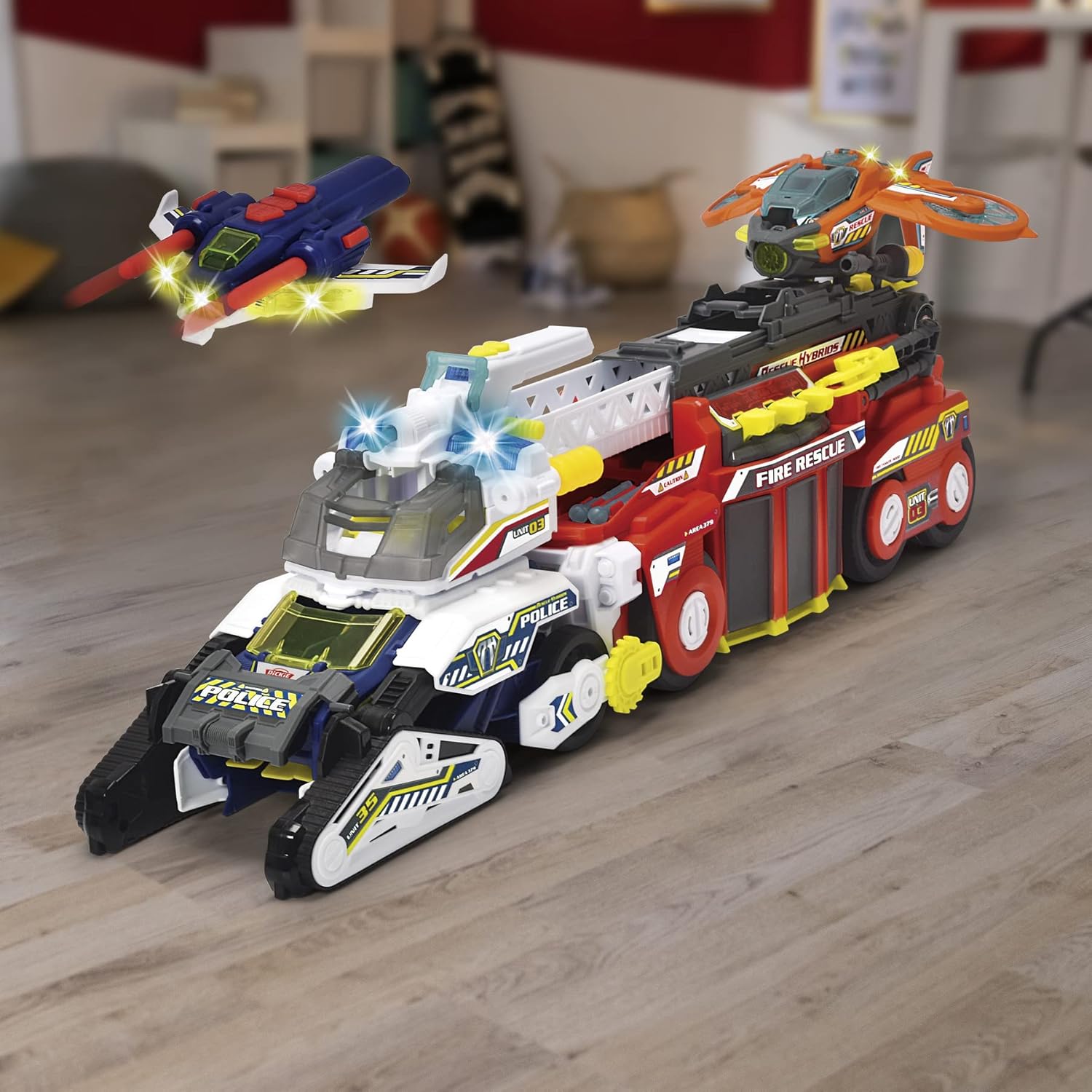
Figure 3: Police Bot demonstrating Team Function synchronization with another vehicle.
This image shows the Police Bot in vehicle mode positioned next to a Dickie Toys Fire Rescue vehicle, illustrating how different vehicles in the range can interact and synchronize their features.
4. Drone Shooting Function
The detachable drone is equipped with a shooting mechanism. To activate, press the button located on the drone. Ensure the drone is aimed safely and not at people or animals.

Figure 4: Police Bot in vehicle mode, demonstrating the shooting function of the attached drone.
This image shows the Police Bot in its vehicle form with the drone mounted on top, emphasizing the drone's projectile firing capability.
5. Car Compartment
The Police Bot features a compartment designed to hold a 1:64 scale die-cast car. Open the rear hatch of the vehicle to place or retrieve the included police cars.

Figure 5: Child interacting with the Police Bot and included die-cast cars.
This image depicts a child playing with the Police Bot in its robot configuration, with the two small police cars visible on the floor, illustrating typical play scenarios.
Maintenance
- Cleaning: Wipe the vehicle with a damp cloth. Do not immerse in water.
- Storage: Store in a cool, dry place away from direct sunlight.
- Battery Care: Remove batteries if the toy will not be used for an extended period to prevent leakage.
Troubleshooting
| Problem | Possible Cause | Solution |
|---|---|---|
| Lights/Sounds not working | Dead or incorrectly installed batteries. | Check battery polarity. Replace with new AAA batteries. |
| Drone shooting function not working | Drone not securely attached or mechanism jammed. | Ensure drone is firmly attached. Check for obstructions in the firing mechanism. |
| Vehicle not transforming smoothly | Obstruction or misalignment of parts. | Gently check for any foreign objects or misaligned components. Do not force transformation. |
Specifications
- Model: Police Bot 203794001
- Brand: Dickie Toys
- Dimensions (L x W x H): 28 x 18 x 27 cm (approx. 11.02 x 7.09 x 10.63 inches)
- Weight: 1.19 kg (approx. 2.62 lbs)
- Material: Plastic
- Power Source: 2 x AAA Batteries (included)
- Recommended Age: 3+ years (36 months and up)
- Special Features: Free-wheel function, Lights, Sounds, Transforming capability, Detachable drone with shooting function, Car compartment for 1:64 scale die-cast cars.
Warranty and Support
For warranty information or technical support, please refer to the contact details provided on the product packaging or visit the official Dickie Toys website. Keep your purchase receipt as proof of purchase.
For more information, you may also visit: Dickie Toys Product Information