
Introduction
Welcome to the Caline CP-508 Wonderland Ambient Modulated Digital Reverb Guitar Effects Pedal. This manual provides essential information for the proper setup, operation, and maintenance of your new pedal, ensuring optimal performance and longevity.
Safety Information
- Use only a 9V DC, center-negative power adapter with a minimum of 500mA current. Incorrect power supply may damage the pedal.
- Do not expose the pedal to water or excessive moisture.
- Avoid extreme temperatures.
- Do not attempt to disassemble or modify the pedal. Refer all servicing to qualified personnel.

Features
- Ideal for Shoegaze, Ambient, Prog Rock, or creating ambient swells and pads.
- MIX Knob: Controls the blend of the effect with your clean tone.
- DECAY Knob: Adjusts the overall reverb time.
- SHIMMER Knob: Adds harmonic shimmering overtones to the reverb.
- Durable aluminum alloy casing.
- Compact dimensions: 11.2 x 6.4 x 3.4 cm.
- Lightweight: 270g.
Package Contents
- Caline CP-508 Wonderland Ambient Modulated Digital Reverb Guitar Effects Pedal
- Instruction Manual (this document)

Controls and Connections
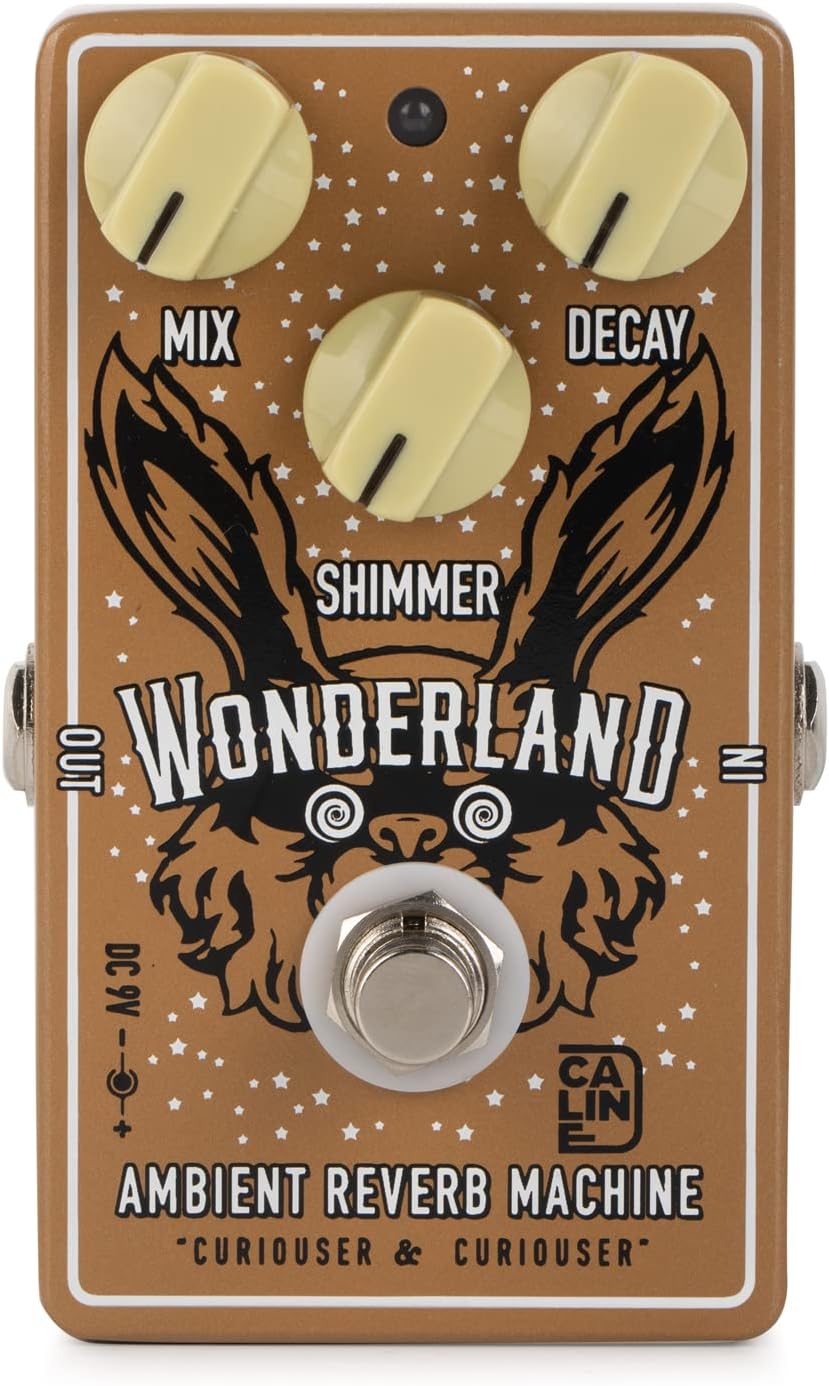
Control Knobs
- MIX Knob: Adjusts the balance between your dry guitar signal and the reverb effect. Turn clockwise to increase the effect level.
- DECAY Knob: Controls the length of the reverb tail. Clockwise rotation increases the decay time.
- SHIMMER Knob: Adds a harmonic overtone effect to the reverb, creating a shimmering texture. Turn clockwise to increase the shimmer intensity.
Connections

- INPUT Jack: Connect your guitar or the output of a preceding effects pedal here.
- OUTPUT Jack: Connect this to your amplifier's input or the input of the next effects pedal in your chain.
- DC 9V Input: Connect a 9V DC, center-negative power adapter (not included).

Setup
- Ensure your amplifier is turned off and all volume levels are set to minimum.
- Connect your guitar to the pedal's INPUT jack using a standard 1/4-inch instrument cable.
- Connect the pedal's OUTPUT jack to your amplifier's input (or the next pedal in your chain) using another 1/4-inch instrument cable.
- Connect a 9V DC, center-negative power adapter (not included) to the DC 9V input on the pedal.
- Turn on your amplifier and adjust volume to a suitable level.
- Press the footswitch to engage the effect. The LED indicator will illuminate when the effect is active.
Operating the Pedal
The Caline CP-508 Wonderland pedal offers a versatile range of ambient reverb sounds. Experiment with the three control knobs to achieve your desired tone.
Basic Operation
- Start with all knobs at the 12 o'clock position.
- Engage the pedal by pressing the footswitch.
- Adjust the DECAY knob to set the reverb length.
- Use the MIX knob to blend the reverb with your dry signal.
- Introduce SHIMMER to add ethereal harmonic textures.
Tone Examples
- Subtle Ambient Reverb: Set DECAY to 1 o'clock, MIX to 11 o'clock, and SHIMMER to 9 o'clock.
- Lush Shimmer Pad: Set DECAY to 3 o'clock, MIX to 2 o'clock, and SHIMMER to 3 o'clock.
- Long Ethereal Trails: Max out DECAY, set MIX to 1 o'clock, and SHIMMER to 12 o'clock.
Maintenance
- Clean the pedal regularly with a soft, dry cloth.
- Avoid using abrasive cleaners or solvents.
- Store the pedal in a dry, cool environment when not in use.
- Disconnect power when not in use for extended periods.
Troubleshooting
| Problem | Possible Cause | Solution |
|---|---|---|
| No Sound | Incorrect power supply. | Ensure a 9V DC, center-negative adapter is used. |
| No Sound | Incorrect cable connections. | Verify all instrument cables are securely connected to the correct input/output jacks. |
| Weak/Distorted Sound | Low power. | Check power adapter specifications and ensure it provides sufficient current (500mA minimum). |
| Effect Not Engaging | Footswitch issue. | Press the footswitch firmly. If the LED does not light up, check power and connections. |
Specifications
- Model: CP-508 (Wonderland Ambient Reverb Machine)
- Brand: Caline
- Material: Aluminum Alloy Casing
- Dimensions: 11.2 x 6.4 x 3.4 cm (4.41 x 2.52 x 1.34 inches)
- Weight: 270g (8.8 ounces)
- Power Requirement: 9V DC, Center Negative (500mA minimum)
- Input/Output: 1/4-inch Mono Audio Jack
- Effect Type: Ambient Modulated Digital Reverb
Warranty and Support
Caline products are designed for reliability and performance. For warranty information or technical support, please refer to the official Caline website or contact your local dealer.
Visit the official Caline Store: Caline Store on Amazon
