
1. Introduction
Thank you for choosing the RadioShack Pocket AM/FM Digital Alarm Clock Radio. This compact and versatile device is perfect for on-the-go listening, offering clear reception and convenient alarm features. Please read this manual carefully to ensure proper use and to get the most out of your new radio.

Figure 1: Front view of the RadioShack Pocket AM/FM Digital Alarm Clock Radio, showing the digital display, control buttons, speaker grille, and extended antenna.
2. Key Features
- Compact and Portable Design: Easily fits in your pocket, backpack, or bag for travel and daily use.
- Retractable Antenna: Ensures optimal signal reception.
- Digital Signal Processing: Provides clear, crisp audio without static or interruptions.
- 3.5mm Headphone Jack: For private and efficient listening.
- Alarm Function: Set alarms to keep track of your schedule.
- 20 Station Memory: Store your favorite AM and FM radio stations for quick access.
- Digital Display: Clear display for frequency and time.

Figure 2: The radio shown alongside a pair of headphones, highlighting its 3.5mm audio output.
3. Setup
3.1 Battery Installation
- Locate the battery compartment cover on the back of the radio.
- Slide or lift the cover to open the compartment.
- Insert two (2) AAA batteries (not included), ensuring the correct polarity (+/-) as indicated inside the compartment.
- Close the battery compartment cover securely.
3.2 Initial Power On
Once batteries are installed, press the Power button to turn on the radio. The digital display will illuminate.
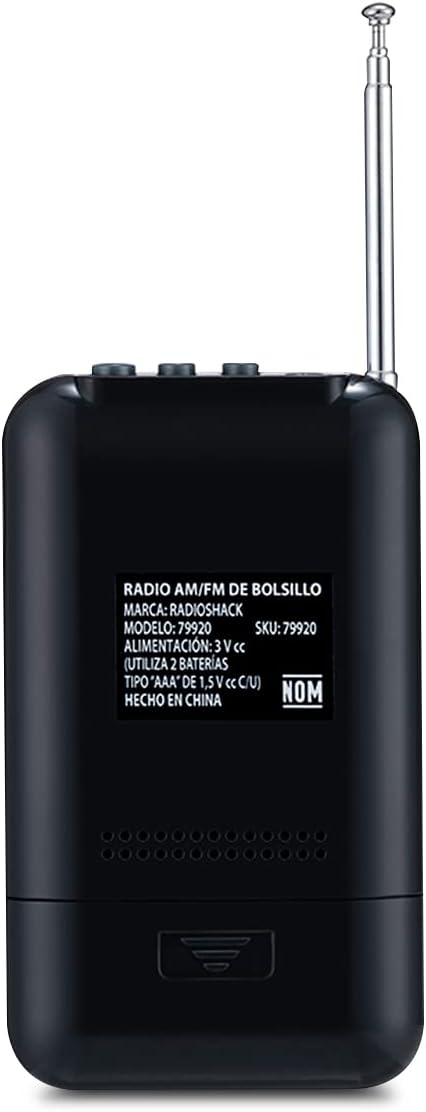
Figure 3: Back view of the radio, showing the battery compartment and product information label.
4. Operating Instructions
4.1 Tuning Radio Stations
- Press the Band button to switch between AM and FM bands.
- Use the Tuning Up (▲) or Tuning Down (▼) buttons to manually tune to your desired frequency.
- For automatic scanning, press and hold the Tuning Up or Tuning Down button until the radio finds the next clear station.
4.2 Storing and Recalling Stations
- Tune to the desired station.
- Press the Set button to enter memory mode. The display will show a flashing preset number.
- Use the Tuning Up or Tuning Down buttons to select the desired preset number (1-20).
- Press Set again to confirm and save the station.
- To recall a stored station, press the Func button repeatedly to cycle through your saved presets.
4.3 Setting the Alarm
- With the radio off, press and hold the Set button until the time display flashes.
- Use the Tuning Up or Tuning Down buttons to adjust the hour, then press Set to confirm.
- Repeat the process for minutes.
- After setting the time, the alarm time will flash. Adjust the alarm hour and minutes similarly.
- Press Set to activate the alarm. An alarm icon will appear on the display.
- To deactivate the alarm, press the Set button when the radio is off until the alarm icon disappears.
4.4 Using Headphones
Insert a 3.5mm audio jack from your headphones into the headphone port located on the top of the radio. The internal speaker will automatically mute, and audio will be routed to your headphones.
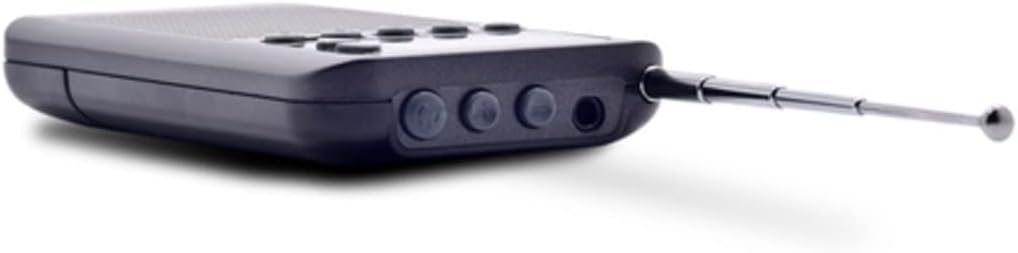
Figure 4: Top view of the radio, illustrating the headphone jack and other top-mounted controls.
5. Maintenance
- Cleaning: Wipe the radio with a soft, dry cloth. Do not use liquid cleaners or abrasive materials.
- Battery Care: Remove batteries if the radio will not be used for an extended period to prevent leakage.
- Storage: Store the radio in a cool, dry place away from direct sunlight and extreme temperatures.
- Water Exposure: This radio is not waterproof. Avoid exposure to water or high humidity.
6. Troubleshooting
| Problem | Possible Cause | Solution |
|---|---|---|
| Radio does not turn on. | Batteries are dead or incorrectly installed. | Replace batteries with new AAA batteries, ensuring correct polarity. |
| Poor radio reception. | Antenna not extended; weak signal area; interference. | Fully extend the antenna. Try moving to a different location. Avoid strong electromagnetic fields. |
| No sound from speaker. | Headphones are plugged in; volume is too low. | Unplug headphones. Increase volume using the volume buttons. |
| Alarm does not sound. | Alarm not activated; alarm volume too low. | Ensure alarm icon is visible on display. Check volume settings. |
7. Specifications
| Feature | Specification |
|---|---|
| Brand | RadioShack |
| Model | R-9388 |
| Tuner Technology | AM and FM |
| Supported Radio Bands | AM, FM |
| Display Type | Digital |
| Power Source | Battery Powered (2 x AAA, not included) |
| Special Features | Alarm |
| Compatible Devices | Headphones |
| Connectivity Technology | Auxiliary (3.5mm jack) |
| Product Dimensions | 8 x 3.81 x 11.5 cm (3.15 x 1.5 x 4.53 inches) |
| Weight | 80 g (2.82 ounces) |
| Color | Black |

Figure 5: Product dimensions of the RadioShack Pocket AM/FM Digital Alarm Clock Radio.
8. Warranty and Support
RadioShack products are designed for reliability and performance. For warranty information or technical support, please refer to the warranty card included with your purchase or visit the official RadioShack website for contact details.
Online Support: www.radioshack.com