
Introduction
This manual provides essential information for the setup, operation, and maintenance of your Ravensburger Gravitrax POWER Starter Set Switch. This interactive track system allows you to build dynamic ball circuits using both traditional GraviTrax components and new electronic POWER elements that communicate wirelessly.

Figure 1: Gravitrax POWER Starter Set Switch packaging.
What's Included
The Gravitrax POWER Starter Set Switch includes 150 pieces designed to create intricate marble runs. Please verify all components are present before beginning assembly.
- 1 Remote Control
- 1 Connected Switch
- 3 Finisher Blocks
- 45 Tiles (including turns)
- 54 Thick and Thin Building Blocks
- 6 Plates
- 6 Balls
- 1 Finish Marker
- 27 Rails (curved and retarder)
- 2 Switches (non-POWER)
- 1 Flip
- 1 Ball & Spinner
- 1 User Guide
- 1 Notebook with Assembly Plans
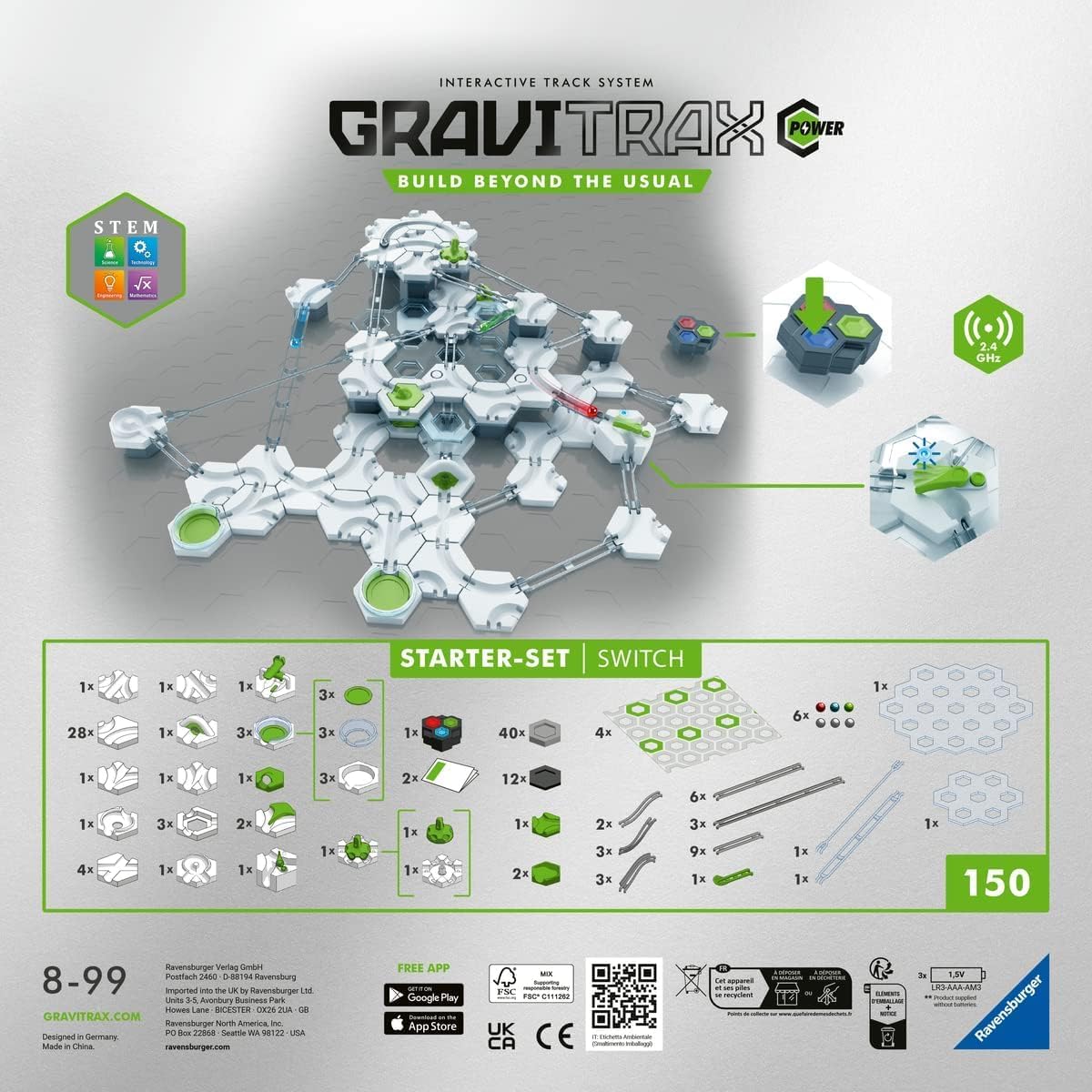
Figure 2: Overview of included components and battery requirements for electronic parts.

Figure 3: All components of the Gravitrax POWER Starter Set Switch.
Setup
1. Battery Installation
The electronic POWER blocks (Remote Control and Switch) require batteries for operation.
- The Remote Control and Switch each require 2x 1.5V LR03-AAA-AM4 batteries (not included).
- Locate the battery compartment on each electronic block.
- Using a small screwdriver, open the battery compartment cover.
- Insert the batteries, ensuring correct polarity (+/-).
- Close the battery compartment cover and secure it with the screw.
2. Initial Assembly
Refer to the included User Guide and Assembly Plan Book for detailed step-by-step instructions on building your first GraviTrax POWER circuit. The plans provide guidance on how to connect the various track pieces, height blocks, and action elements.
- Begin by placing the base plates on a flat, stable surface.
- Connect the hexagonal building blocks and tracks according to the assembly plans or your own design.
- Integrate the POWER blocks (Remote Control, Switch, Trigger) into your circuit.

Figure 4: Example of a Gravitrax POWER circuit with electronic elements.
Operating Instructions
1. Basic Circuit Operation
Once your circuit is assembled, place a ball at the starting point. Gravity will propel the ball through the tracks and action elements. Observe the ball's movement and how different elements affect its speed and direction.
2. Using POWER Electronic Blocks
The POWER blocks introduce electronic interaction to your GraviTrax circuits. They communicate wirelessly (2.4 GHz) to create dynamic and remote-controlled actions.
- Remote Control: This block allows you to trigger actions in other POWER blocks from a distance. Press the buttons on the remote to send signals.
- Switch: The POWER Switch changes the direction of the ball's path when it receives a signal, either from the Remote Control or a Trigger block.
- Trigger: This block detects the passage of a ball and emits a signal. This signal can then activate other POWER blocks, such as the Switch, to create automated sequences.
Experiment with placing these blocks strategically to create complex and interactive marble runs.

Figure 5: Gravitrax POWER in use, demonstrating interactive play.
3. Compatibility
All GraviTrax products are designed to be compatible with each other. You can expand your Starter Set Switch with additional GraviTrax expansion sets and elements to create larger and more complex circuits.
Maintenance
1. Cleaning
To clean your GraviTrax components, wipe them with a soft, damp cloth. Do not use harsh chemicals or abrasive cleaners, as these may damage the plastic or electronic components. Ensure electronic parts are dry before use.
2. Storage
Store all GraviTrax components in a dry place, away from direct sunlight and extreme temperatures. Keeping the pieces in their original box or a designated storage container will help prevent loss and damage.
3. Battery Replacement
When the electronic POWER blocks show reduced functionality or stop responding, it is likely time to replace the batteries. Follow the battery installation steps outlined in the "Setup" section. Always dispose of used batteries responsibly according to local regulations.
Troubleshooting
- Balls get stuck:
- Check track connections for proper alignment.
- Ensure sufficient height difference between track sections to maintain momentum.
- Verify that no foreign objects are obstructing the track.
- Electronic POWER blocks not responding:
- Check if batteries are correctly installed and not depleted. Replace if necessary.
- Ensure the blocks are within range of each other for wireless communication.
- Verify that the POWER blocks are switched on (if applicable).
- General issues:
- Disassemble and reassemble the problematic section to ensure all pieces are correctly fitted.
- Refer to the included Assembly Plan Book for verified circuit designs.
Specifications
| Feature | Detail |
|---|---|
| Model Number | 27274 (GTIN: 04005556272747) |
| Brand | Ravensburger |
| Material | Plastic, Metal |
| Dimensions (L x W x H) | 33.8 cm x 33.8 cm x 11 cm (13.3 x 13.3 x 4.3 inches) |
| Item Weight | 2238 Grams |
| Number of Pieces | 150 |
| Recommended Age | 8 years and up |
| Electronic Components | Remote Control, Switch, Trigger (all POWER blocks) |
| Battery Requirement | 2x 1.5V LR03-AAA-AM4 for each POWER electronic block (not included) |
| Wireless Communication | 2.4 GHz |

Figure 6: Product dimensions as shown on packaging.
Warranty Information
Specific warranty details for the Ravensburger Gravitrax POWER Starter Set Switch are not provided within this manual. For information regarding product warranty, please refer to the official Ravensburger website or contact their customer support directly.
Support and Contact
Should you encounter any issues or have questions not covered in this manual, please visit the official Ravensburger website for further assistance, FAQs, and contact information.
Official Website: www.ravensburger.com
You can also find additional resources and community creations on the GraviTrax app, available for download:
