
ARENTI Arenti 2K Indoor Security Camera (Model B0B297K923)
Arenti 2K Indoor Security Camera User Manual
Model: B0B297K923
1. Product Overview
The Arenti 2K Indoor Security Camera is designed to provide comprehensive surveillance for your home, offering advanced features such as 2K resolution video, pan/tilt functionality for 360-degree coverage, enhanced night vision, two-way audio communication, and intelligent motion and noise detection. It is compatible with popular smart home platforms like Amazon Alexa and Google Assistant, allowing for convenient voice control and integration.

Image: The Arenti 2K Indoor Security Camera, a white dome-shaped device, shown next to a smartphone displaying a live feed of a dog, illustrating its primary use for pet monitoring and home security.
2. Package Contents
Please verify that all items listed below are included in your package. If any items are missing or damaged, please contact customer support.

Image: A visual representation of the product packaging and its contents, including the camera unit, USB cable, power adapter, mounting bracket, screws, and a quick start guide.
- Arenti 2K Indoor Security Camera (1X)
- USB Cable (1X)
- Power Adapter (1X)
- Mounting Bracket (1X)
- Screws (3X)
- Quick Start Guide (1X)
3. Setup Guide
Follow these steps to set up your Arenti 2K Indoor Security Camera and connect it to your home Wi-Fi network.
3.1 Initial Placement
The camera can be placed on a flat surface or mounted to a wall. Choose a location that provides the desired viewing angle and is within range of your 2.4GHz Wi-Fi network.

Image: Examples of camera placement in different indoor environments, such as a living room, nursery, and kitchen, demonstrating its versatility for monitoring various areas of the home.
3.2 Powering On
- Connect the USB cable to the camera's power port.
- Plug the power adapter into a standard electrical outlet.
- The camera will power on, and its indicator light will begin to flash, indicating it is ready for setup.
3.3 App Installation and Pairing
- Download the free Arenti mobile app from the Google Play Store or Apple App Store.
- Open the Arenti app and create an account or log in.
- Follow the in-app instructions to add your new camera. This typically involves scanning a QR code on the camera or entering a device ID, and then connecting the camera to your 2.4GHz Wi-Fi network.
- Once successfully paired, the camera's indicator light will turn solid, and you will be able to view the live feed.
4. Operating Instructions
This section details the various functions and features of your Arenti 2K Indoor Security Camera.
4.1 Pan, Tilt, and Digital Zoom
The camera offers extensive coverage with 355° horizontal pan and 60° vertical tilt capabilities, providing a complete 360° view of your space. You can control the camera's movement directly from the Arenti app. The 8X digital zoom allows you to enlarge the video feed to see finer details.
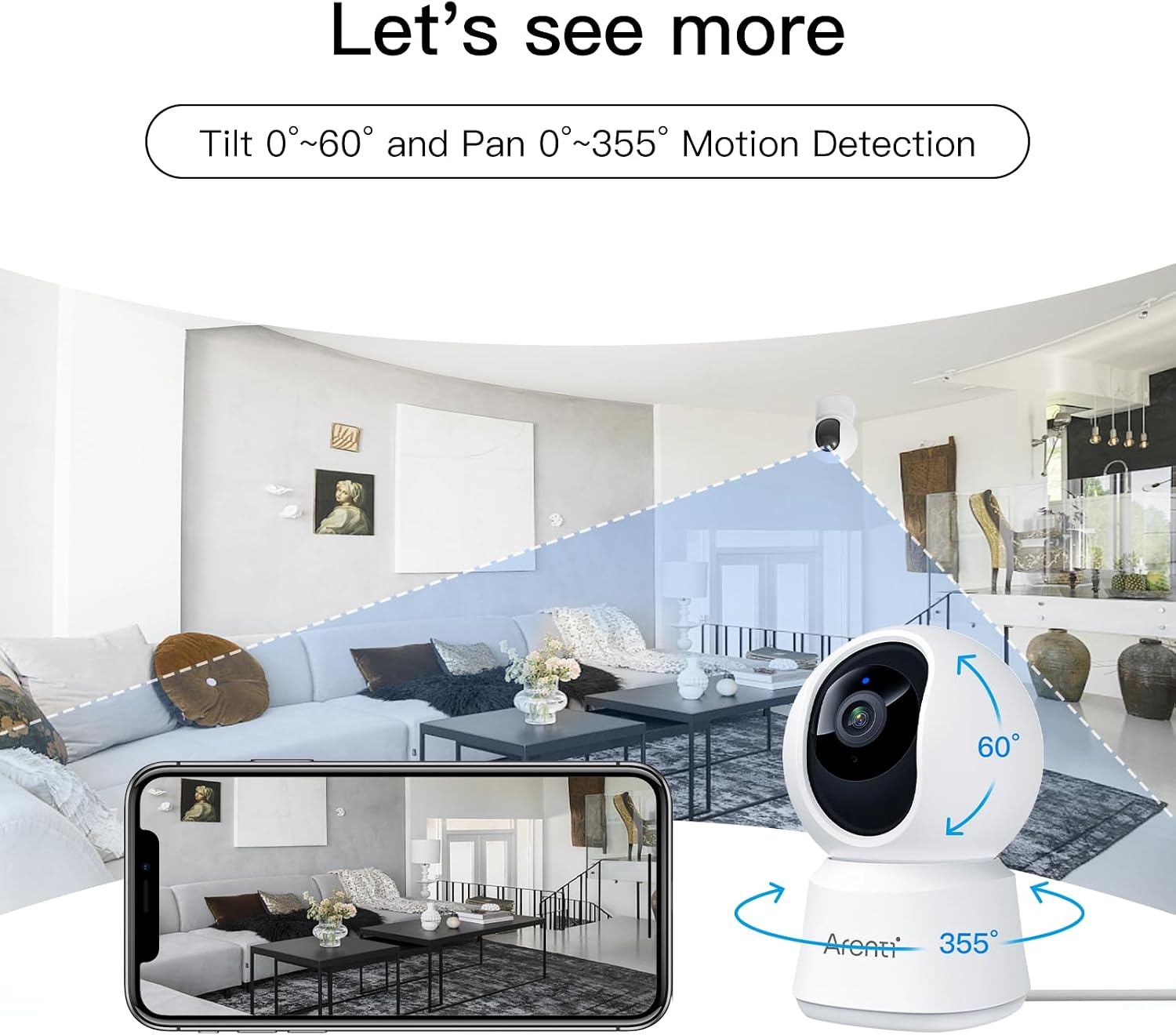
Image: An illustration demonstrating the camera's pan (355°) and tilt (60°) rotation capabilities, highlighting its ability to cover a wide area within a room.
4.2 Two-Way Audio
Equipped with a built-in microphone and speaker, the camera enables clear two-way communication. You can speak through the camera to interact with pets or family members, and hear their responses, all via the Arenti mobile app.

Image: A golden retriever on a couch with speech bubbles indicating two-way audio, showing how the camera facilitates communication between the user and their pet.
4.3 Enhanced Night Vision
The camera features enhanced IR night vision, allowing you to monitor your space clearly even in complete darkness, up to a distance of 32 feet (10 meters). This ensures continuous surveillance day and night.

Image: A smartphone screen displaying a clear black-and-white night vision view of a cat, while a person sleeps in the background, illustrating the camera's low-light capabilities.
4.4 Motion and Noise Detection with Instant Alerts
The camera is equipped with adjustable motion and noise detection capabilities. When activity or sound is detected, the camera can automatically track the motion and send instant alerts to your mobile phone. Sensitivity levels can be customized within the app.

Image: Two puppies on a bed, with motion detection boxes overlaid, and a smartphone displaying an Arenti alert notification, demonstrating the camera's ability to detect and notify users of activity.
4.5 Privacy Mode
To protect your privacy, the camera features a privacy mode. When activated, the camera can be automatically turned off when it detects that your mobile phone is connected to the same Wi-Fi network, ensuring your personal moments remain private.
4.6 Smart Home Integration
The Arenti camera supports integration with Amazon Alexa Echo Show and Google Assistant Chromecast TVs. This allows you to use voice commands to view the camera's live feed on compatible smart displays.
4.7 Recording and Playback
The camera supports local storage via a Micro SD card (up to 128GB, sold separately) for continuous recording or event-triggered recording. You can also access cloud storage options (subscription may be required). Recorded footage can be easily reviewed and played back through the Arenti app.

Image: The Arenti app interface demonstrating event recording and playback features, with a timeline for reviewing footage and thumbnails of captured moments featuring various pets.
4.8 Sharing with Loved Ones
The Arenti app allows you to securely share access to your camera's live feed and recorded events with family and friends, enabling multiple users to monitor the same space.

Image: A visual representation of the camera's sharing feature, showing the camera at the center connected to multiple individuals using their smartphones, illustrating multi-user access.
5. Maintenance
Proper maintenance ensures the longevity and optimal performance of your Arenti camera.
- Cleaning: Use a soft, dry cloth to clean the camera lens and body. Avoid using harsh chemicals or abrasive cleaners, as they may damage the surface or lens.
- Placement: Ensure the camera is placed in a stable location to prevent accidental falls. Avoid placing it in direct sunlight or near heat sources, which can affect performance and lifespan.
- Software Updates: Regularly check the Arenti app for firmware updates. Keeping your camera's software up-to-date ensures you have the latest features and security enhancements.
6. Troubleshooting
If you encounter issues with your Arenti 2K Indoor Security Camera, refer to the following common problems and solutions.
| Problem | Possible Cause | Solution |
|---|---|---|
| Camera offline/Cannot connect to Wi-Fi | Incorrect Wi-Fi password; Camera too far from router; Router issues; Only 5GHz Wi-Fi available. | Ensure correct 2.4GHz Wi-Fi password. Move camera closer to router. Restart router. Ensure your Wi-Fi is 2.4GHz. |
| Poor video quality | Weak Wi-Fi signal; Lens obstruction; App settings. | Improve Wi-Fi signal strength. Clean the camera lens. Adjust video quality settings in the Arenti app (e.g., from SD to HD/2K). |
| Motion/Noise detection not working | Detection settings disabled or too low sensitivity; Activity zones not set correctly. | Enable motion/noise detection in app settings. Increase sensitivity. Define or adjust activity zones. |
| Two-way audio issues | Microphone/speaker muted in app; Volume too low; Network latency. | Check audio settings in the Arenti app. Adjust volume levels. Ensure stable internet connection. |
| Camera not responding | Power issue; Software glitch. | Unplug the camera, wait 10 seconds, then plug it back in. If issue persists, perform a factory reset (refer to quick start guide for reset button location). |
7. Product Specifications
| Feature | Detail |
|---|---|
| Model | B0B297K923 |
| Video Capture Resolution | 2K |
| Connectivity Technology | Wired (Power), Wi-Fi (Data) |
| Wireless Communication Technology | Wi-Fi (2.4GHz) |
| Pan/Tilt Range | 355° Horizontal, 60° Vertical |
| Night Vision Range | Up to 32 feet (10 meters) |
| Audio | Two-Way Audio (Built-in Mic & Speaker) |
| Storage Options | Micro SD Card (up to 128GB, not included), Cloud Storage (optional) |
| Compatible Devices | Smartphone (iOS/Android) |
| Controller Type | Amazon Alexa, Google Assistant |
| Power Source | Corded Electric (5 Volts) |
| Indoor/Outdoor Usage | Indoor Only |
| Item Weight | 13.3 ounces |
| Dimensions | 6.65 x 5.43 x 3.23 inches (Package) |
8. Warranty and Support
For warranty information and technical support, please refer to the contact details provided in your product packaging or visit the official Arenti website. Customer service is available to assist with any questions or issues you may encounter.
Online Resources:
- Arenti Official Website: www.arenti.com (Please check the website for the most up-to-date support information and contact methods.)
Related documentsArenti 2K Indoor Security Camera (Model B0B297K923)


Ask a question about this manual
Ask about setup, troubleshooting, compatibility, parts, safety, or missing instructions. Manuals+ will review the question and use this page’s manual context to help answer it.