
1. Introduction
Thank you for choosing BESTTEN Decorator Wall Light Switches and Receptacle Outlets. This manual provides essential information for the safe and proper installation, operation, and maintenance of your new electrical devices. Please read this manual thoroughly before installation and retain it for future reference.
2. Safety Information
Always follow basic safety precautions when installing or working with electrical devices to reduce the risk of fire, electric shock, and injury to persons.
- TURN OFF POWER: Always turn off power at the circuit breaker or fuse box before installing or servicing any electrical device. Failure to do so can result in serious injury or death.
- QUALIFIED ELECTRICIAN: If you are unsure about any part of these instructions, consult a qualified electrician.
- WIRING: Ensure all wiring connections are secure and comply with local electrical codes.
- DRY LOCATION: Install devices in dry indoor locations only.
- COMPATIBILITY: Ensure the device's voltage and current ratings match your electrical system.
3. Package Contents
Your package includes the following items:
- BESTTEN Single Pole Decorator Wall Light Switches (Quantity as per pack)
- BESTTEN 20 Amp Decorator Receptacle Outlets (Quantity as per pack)
- Matching Decorative Wallplates
- Mounting Screws

Figure 3.1: Contents of the BESTTEN Switch and Outlet Pack.
4. Product Features
These BESTTEN decorator devices are designed for durability and ease of installation, offering reliable performance for your home or office electrical needs.
4.1 Single Pole Decorator Wall Light Switch Features
- Thermoplastic construction for long lifespan and impact resistance.
- Rating: 15A 120-277V.
- Smooth paddle action for reliable operation.
- Quick push-in and side wiring options available.
- Terminal screws accept up to 12AWG wire.
- Quick push-in wiring accepts 14AWG solid copper wire only.
- Full-rated current capacity with LED, tungsten, fluorescent, or resistive loads.
- Motor capacity is 80% of switch rating.
- UL certified for safety and quality.

Figure 4.1: Key Features of the Decorator Light Switch.
4.2 20 Amp Decorator Receptacle Outlet Features
- Rating: 20A/125V/2500W.
- Polycarbonate thermoplastic construction for durability.
- Side and back wiring options for easy installation.
- Suitable for split receptacle applications.
- UL/cUL Listed.

Figure 4.2: Key Features of the Decorator Receptacle Outlet.
5. Specifications
Detailed specifications for the BESTTEN Decorator Wall Light Switch and Receptacle Outlet:
| Property | Value |
|---|---|
| Brand | BESTTEN |
| Color | White |
| Material | Plastic (Thermoplastic) |
| Compatible Devices | Outlet, Light Fixtures |
| Total Power Outlets | 10 (for the receptacle pack) |
| Switch Rating | 15A 120-277V |
| Receptacle Rating | 20A/125V/2500W |
| Certifications | UL Certified (Switch), UL/cUL Listed (Receptacle) |
5.1 Product Dimensions - Light Switch
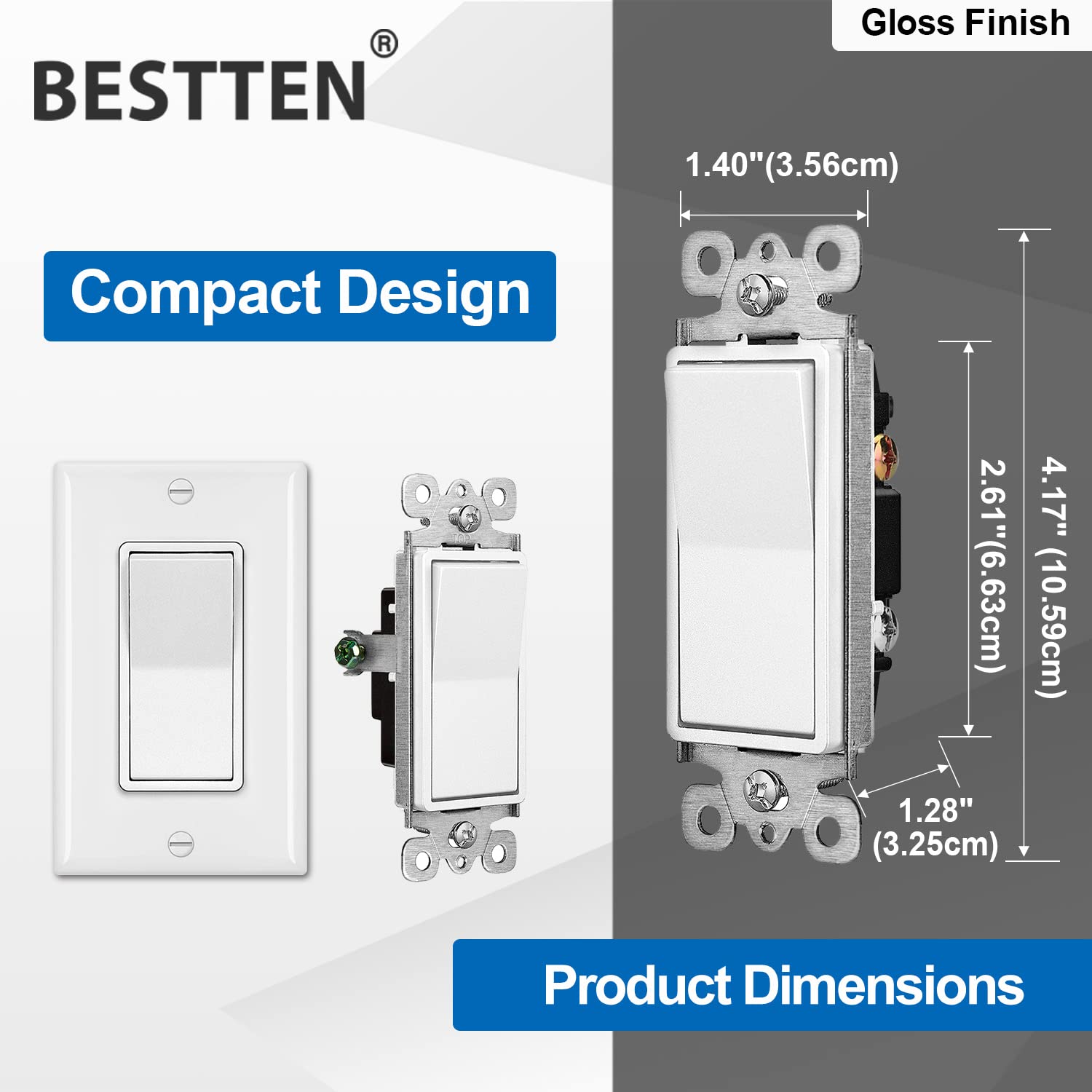
Figure 5.1: Dimensions of the Decorator Light Switch.
5.2 Product Dimensions - Receptacle Outlet

Figure 5.2: Dimensions of the Decorator Receptacle Outlet.
6. Setup and Installation
Follow these steps carefully to install your BESTTEN decorator wall light switch or receptacle outlet.
- Turn Off Power: Locate the circuit breaker or fuse that controls the power to the outlet or switch box. Turn off the power completely. Verify power is off using a voltage tester.
- Remove Old Device: Carefully remove the existing wallplate and unscrew the old switch or outlet from the electrical box. Gently pull the device out of the box.
- Identify Wires: Identify the wires connected to the old device. Typically, you will find:
- Hot/Line Wire (Black/Brass Screw): Carries power from the circuit breaker.
- Load/Light Fixture Wire (Silver Screw for Switch, Black/Brass Screw for Receptacle): Carries power to the light fixture or appliance.
- Neutral Wire (White/Silver Screw - for Receptacle only): Completes the circuit back to the power source.
- Grounding Wire (Green/Green Screw): Provides a safety path for electricity in case of a fault.
- Wire the New Device: Connect the wires to the new BESTTEN device. Both side wiring (wrapping around screws) and quick push-in wiring (for 14AWG solid copper wire only) are available. Ensure connections are tight and secure. Refer to the wiring diagrams below.
6.1 Wiring Instruction - Light Switch

Figure 6.1: Wiring Diagram for Decorator Light Switch.
6.2 Wiring Instruction - Receptacle Outlet

Figure 6.2: Wiring Diagram for Decorator Receptacle Outlet.
- Mount the Device: Carefully push the wired device back into the electrical box. Secure it with the provided mounting screws.
- Attach Wallplate: Screw the decorative wallplate onto the device.
- Restore Power: Turn the power back on at the circuit breaker or fuse box. Test the switch or outlet to ensure it functions correctly.
7. Operating Instructions
7.1 Light Switch Operation
The single pole decorator light switch operates as a simple ON/OFF control for a single light fixture or group of fixtures from one location. Press the top of the paddle to turn the light ON, and press the bottom of the paddle to turn the light OFF.
7.2 Receptacle Outlet Operation
The 20 Amp decorator receptacle outlet provides power for electrical devices. Simply insert the plug of your appliance or device into the outlet. Ensure the device's power requirements do not exceed the outlet's rating (20A/125V/2500W).
8. Maintenance
BESTTEN electrical devices are designed for long-lasting performance with minimal maintenance.
- Cleaning: To clean the surface of the switch or outlet, wipe with a soft, damp cloth. Do not use abrasive cleaners or solvents, as they may damage the finish. Ensure power is off before cleaning.
- Inspection: Periodically inspect the devices and wallplates for any signs of damage, cracks, or discoloration. If any damage is observed, turn off power and replace the device immediately.
9. Troubleshooting
If you encounter issues with your BESTTEN switch or outlet, refer to the following table for common problems and solutions.
| Problem | Possible Cause | Solution |
|---|---|---|
| Light/Device does not turn ON/OFF (Switch) | No power to the circuit; Incorrect wiring; Faulty switch. | Check circuit breaker/fuse; Verify wiring connections (refer to Section 6); Replace switch if faulty. |
| Outlet has no power | No power to the circuit; Incorrect wiring; Overloaded circuit. | Check circuit breaker/fuse; Verify wiring connections (refer to Section 6); Reduce load on circuit. |
| Device feels warm | Normal operation under load; Overloaded circuit; Loose connection. | Slight warmth is normal. If excessively hot, turn off power, check for overloaded circuit or loose wiring. Consult an electrician if unsure. |
10. Warranty Information
BESTTEN products are manufactured to high-quality standards and are backed by a limited warranty. For specific warranty terms and conditions, please refer to the warranty card included with your purchase or visit the official BESTTEN website. This warranty typically covers defects in materials and workmanship under normal use.
11. Customer Support
If you have any questions, require technical assistance, or need to report an issue with your BESTTEN product, please contact our customer support team. You can typically find contact information on the BESTTEN official website or through the retailer where you purchased the product. Please have your model number (BESTTEN-ELECTRICAL-OUTLET-10PACK) and purchase details ready when contacting support.