
GALAYOU G2 (3MP-2P)
GALAYOU 2K Indoor Surveillance Camera User Manual
Model: G2 (3MP-2P)
1. Introduction
Welcome to the GALAYOU 2K Indoor Surveillance Camera user manual. This guide provides comprehensive instructions to help you set up, operate, maintain, and troubleshoot your new security camera. Please read this manual carefully before use to ensure proper functionality and to maximize your experience with the GALAYOU G2 camera.

Image: GALAYOU G2 Indoor Surveillance Cameras and smartphone interface.
2. Product Overview
2.1 Key Features
- 2K Resolution & 360° Coverage: Enjoy crystal-clear 2K UHD live streaming with a 355° horizontal pan and 50° vertical tilt for a complete view of your home.
- AI Human Detection & Intelligent Tracking: Advanced AI detects human motion, automatically tracks subjects, and sends instant alerts to your phone.
- Siren Function: Deter intruders with an integrated siren that can be triggered upon detection.
- Enhanced Night Vision: Equipped with 4 IR 940nm lights for clear visibility up to 32 feet in low-light conditions.
- Two-Way Audio: Communicate with family or pets from anywhere using the built-in microphone and speaker.
- Flexible Storage Options: Supports local storage via SD card (up to 128GB, not included) for 24/7 continuous recording, and a 30-day free trial of cloud storage for alert videos.
- Multi-Device Viewing & Sharing: Add multiple cameras to the app and view up to 4 live feeds simultaneously. Share access with up to 3 family members.
- Smart Home Compatibility: Works seamlessly with Alexa and Google Home for voice control and integration into your smart home ecosystem.

Image: Overview of GALAYOU G2 camera features.
2.2 Package Contents
Please check the package for the following components:
- GALAYOU G2 Camera (x2)
- Power Cable (x2)
- Power Adapter (x2)
- Mounting Template (x2)
- Base Bracket (x2)
- Quick Installation Guide (x1)
3. Setup Guide
Follow these steps to quickly set up your GALAYOU G2 camera:
- Download the App: Install the "Wansview Cloud" application from your smartphone's app store (available for iOS and Android).
- Register an Account: Open the Wansview Cloud app and register a new user account.
- Power On & Connect to Wi-Fi: Plug in your GALAYOU G2 camera using the provided power adapter. Ensure your smartphone is connected to a 2.4GHz Wi-Fi network (5GHz Wi-Fi is not supported).
- Add Device: Follow the in-app instructions to add your camera and complete the Wi-Fi configuration. This typically involves scanning a QR code displayed on your phone with the camera lens.

Image: Quick Installation Guide steps via the Wansview Cloud app.
3.1 Mounting Options
The GALAYOU G2 camera can be mounted on a table, ceiling, or wall. Use the included base bracket and mounting template for secure installation. Ensure the camera is placed within range of your 2.4GHz Wi-Fi network.
4. Operating Instructions
4.1 Live View and Pan/Tilt Control
Once connected, open the Wansview Cloud app to access the live video feed. Use the on-screen controls to pan the camera horizontally (355°) and tilt vertically (50°) to view different areas of your room.
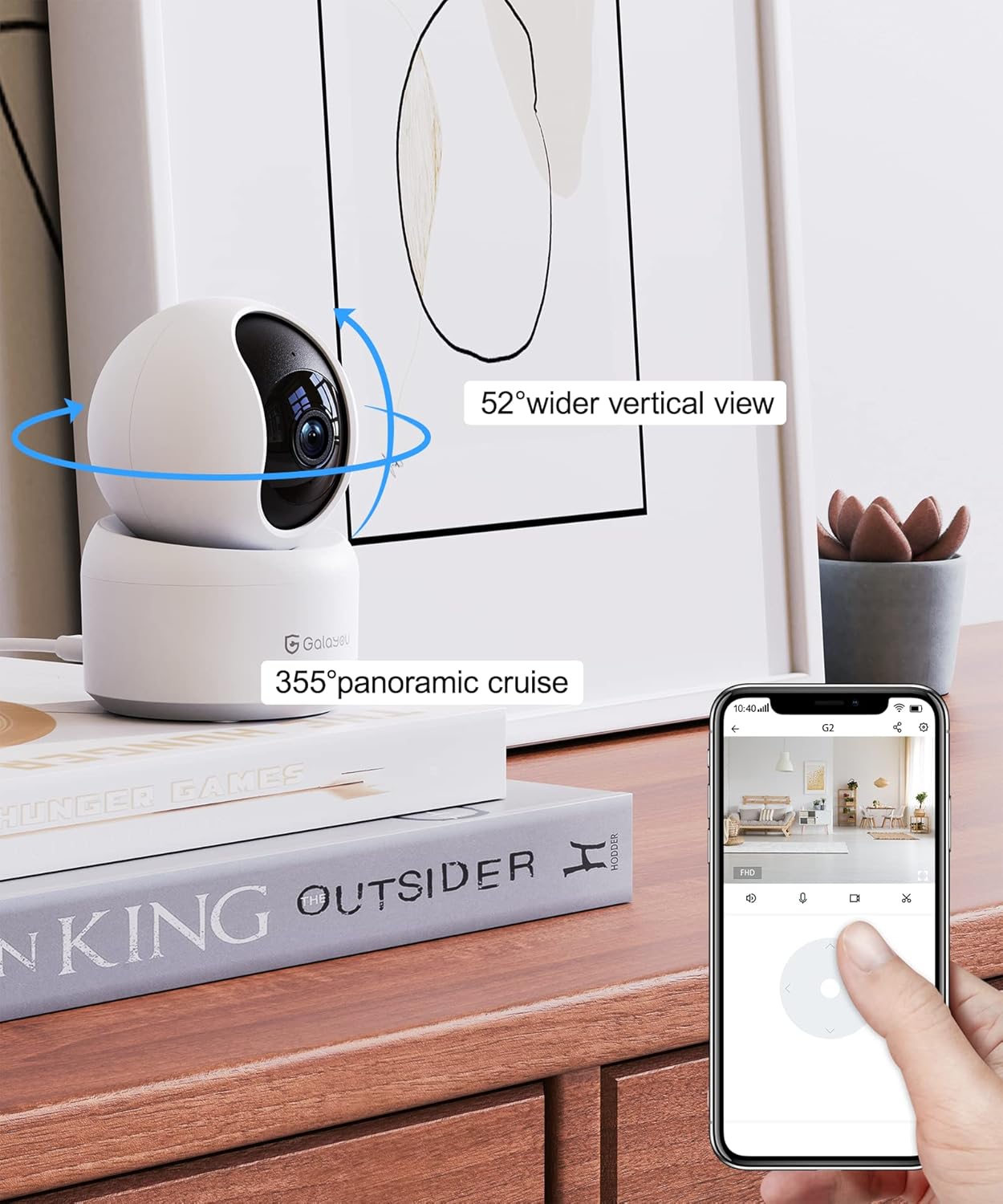
Image: Live view and pan/tilt control via the Wansview Cloud app.
4.2 Motion Detection and Alerts
The camera features advanced AI human detection and intelligent tracking. When motion is detected, the camera will automatically track the subject and send instant push notifications to your phone. You can also configure the siren function to activate upon detection.

Image: Motion tracking and alert notification example.
4.3 Two-Way Audio
Utilize the two-way audio feature to speak through the camera's speaker and listen through its microphone. This is ideal for communicating with family members, pets, or deterring unwanted visitors.

Image: Enhanced night vision and two-way audio functionality.
4.4 Recording and Storage
The GALAYOU G2 supports continuous 24/7 recording to a local SD card (not included). Event-based recordings triggered by motion detection can be saved to the cloud with a 30-day free trial. Ensure the SD card is inserted correctly into the camera's slot.

Image: Encrypted cloud storage and SD card storage options.
4.5 Smart Home Integration
The camera is compatible with Amazon Alexa and Google Home. You can use voice commands to view the live feed on compatible smart displays. For example, "Alexa, show me the living room camera."

Image: Integration with Alexa and Google Assistant.
4.6 Multi-Camera View and Sharing
The Wansview Cloud app allows you to manage multiple GALAYOU cameras and view up to four live feeds simultaneously on one screen. You can also easily share camera access with family members through the app.

Image: Multi-device viewing and sharing capabilities.
5. Maintenance
To ensure optimal performance and longevity of your GALAYOU G2 camera, follow these maintenance guidelines:
- Cleaning: Gently wipe the camera lens and body with a soft, dry cloth. Avoid using harsh chemicals or abrasive materials that could scratch the lens or damage the finish.
- Wi-Fi Connection: Ensure your Wi-Fi router is functioning correctly and the camera maintains a strong, stable connection. Weak signals can affect video quality and connectivity.
- Firmware Updates: Regularly check the Wansview Cloud app for available firmware updates. Updates often include performance improvements, new features, and security enhancements.
- SD Card Management: If using an SD card for storage, periodically check its status via the app. Consider formatting the card every few months to maintain optimal recording performance.
6. Troubleshooting
If you encounter issues with your GALAYOU G2 camera, refer to the following common problems and solutions:
| Problem | Possible Cause | Solution |
|---|---|---|
| Camera offline/Cannot connect to Wi-Fi | Incorrect Wi-Fi password; Camera too far from router; Only 5GHz Wi-Fi available; Router issues. | Double-check Wi-Fi password. Move camera closer to router. Ensure you are connecting to a 2.4GHz Wi-Fi network. Restart your router and camera. |
| Poor video quality | Weak Wi-Fi signal; Dirty lens; Insufficient lighting for night vision. | Improve Wi-Fi signal strength. Clean the camera lens. Ensure adequate lighting or verify night vision is active. |
| Motion detection not working or too sensitive | Detection sensitivity settings; Object size/distance; Environmental factors. | Adjust motion detection sensitivity in the app. Ensure camera view is clear of obstructions. Avoid placing camera where constant motion (e.g., tree branches) triggers false alarms. |
| Two-way audio issues | Microphone/speaker blocked; App permissions; Volume settings. | Ensure nothing is obstructing the microphone or speaker. Check app permissions for microphone access. Adjust volume settings in the app and on your phone. |
| SD card not recording | SD card full/corrupted; Incorrect format; Card not inserted properly. | Format the SD card via the app. Ensure the card is inserted correctly. Try a different SD card if issues persist. |
For more detailed troubleshooting or persistent issues, please refer to the "Help" or "FAQ" section within the Wansview Cloud app or contact GALAYOU customer support.
7. Specifications
| Feature | Detail |
|---|---|
| Brand | GALAYOU |
| Model Name | G2 |
| Style | 3MP-2P |
| Color | White |
| Material | Metal |
| Item Dimensions (L x W x H) | 7.2 x 7.2 x 11 cm |
| Weight | 600 Grams |
| Video Recording Resolution | 3 MP (2K UHD) |
| Viewing Angle | 360 degrees (355° horizontal, 50° vertical) |
| Night Vision Range | 7 Meters (approx. 23 feet) |
| Wireless Communication Technology | Wi-Fi 2.4G (5G not supported) |
| Power Source | AC Power |
| Voltage | 5 Volts |
| Power | 5 Watts |
| Installation Type | Tabletop / Ceiling / Wall Mount |
| Indoor/Outdoor Use | Indoor |
| Water Resistance Level | Not waterproof |
| Compatible Devices | Computer, Laptop, Smartphone, Tablet |
| Controller Type | IOS, Android, Alexa, Google Assistant, Wansview Cloud App |
| Recommended Uses | Indoor Security, Pet Monitoring, Baby Monitoring |
8. Warranty and Support
GALAYOU is committed to providing high-quality products and excellent customer service. While specific warranty details are not provided in this manual, please refer to the product packaging or the official GALAYOU website for warranty information.
For technical support, troubleshooting assistance, or any inquiries regarding your GALAYOU G2 camera, please contact GALAYOU customer support through the Wansview Cloud app or their official support channels. Many users have reported positive experiences with their responsive and helpful customer service team.
Your product may also be verified by Transparency, ensuring authenticity. Each item possesses a unique code that is verified before shipment.
Related documentsG2 (3MP-2P)


Ask a question about this manual
Ask about setup, troubleshooting, compatibility, parts, safety, or missing instructions. Manuals+ will review the question and use this page’s manual context to help answer it.