1. Product Overview
The DOVEET S5021 Large LCD Digital Wall Clock is designed for clear visibility and comprehensive environmental monitoring. It features a large display for time, date, indoor/outdoor temperature, and humidity. The atomic clock function ensures accurate timekeeping with automatic daylight saving time adjustments. It is suitable for various indoor environments and offers flexible mounting options.

Figure 1: The DOVEET S5021 Digital Wall Clock and its accompanying wireless outdoor sensor.
2. Package Contents
- 1 x DOVEET S5021 Digital Wall Clock
- 1 x Wireless Outdoor Sensor
- 1 x Paper Ruler for Mounting
- 1 x User Manual (this document)
Note: 3 x AA batteries for the clock and 2 x AAA batteries for the outdoor sensor are not included and must be purchased separately.
3. Setup
3.1 Battery Installation
- Open the battery compartment on the back of the main clock unit.
- Insert 3 x AA batteries, ensuring correct polarity (+/-).
- Open the battery compartment on the back of the wireless outdoor sensor.
- Insert 2 x AAA batteries, ensuring correct polarity (+/-).
- Close both battery compartments securely.

Figure 2: Rear view of the clock showing the battery compartment and the wireless sensor with its battery compartment. The clock requires 3 AA batteries and the sensor requires 2 AAA batteries.
3.2 Initial Setup and Atomic Time Synchronization
Upon battery installation, the clock will automatically attempt to synchronize with the atomic time signal (RCC). This process may take several minutes. Ensure the clock is placed in an area with good signal reception, away from electronic interference.
- The atomic clock will receive the RCC signal and automatically switch to Daylight Saving Time (DST).
- You can select one of 4 time zones: EST, CST, MST, PST.

Figure 3: Overview of the clock's display elements and the function of the buttons located on the back of the unit.

Figure 4: Detailed illustration of the setting method using the buttons on the back of the clock.
3.3 Outdoor Sensor Pairing
The clock will automatically attempt to pair with the outdoor sensor once both units have batteries installed. Ensure the sensor is within range (up to 328 feet in open areas without interference).
- The clock supports up to 3 sensors simultaneously. Only one sensor is included in the package.
- To manually pair, press the "CHANNEL" button on the back of the clock.

Figure 5: The wireless outdoor sensor can transmit data up to 328 feet in an open area without interference.
4. Operating Instructions
4.1 Display Information
The large LCD display provides the following information:
- Current Time (with AM/PM indicator)
- Date (Month/Day) and Day of the Week
- Indoor Temperature and Humidity
- Outdoor Temperature and Humidity
- Atomic Clock Reception Icon
- Alarm Indicators (Alarm 1, Alarm 2)
- Low Power Indicator

Figure 6: The clock's clear display shows time, date, and temperature readings, suitable for various indoor environments.
4.2 Setting Time and Date Manually (if needed)
While the atomic clock function typically handles time setting, manual adjustment is possible:
- Press and hold the "SET" button on the back of the clock to enter setting mode.
- Use the "UP/TIME ZONE" and "DOWN/°C/°F/WAVE" buttons to adjust values.
- Press "SET" again to confirm and move to the next setting (e.g., Year, Month, Day, Hour, Minute, Time Zone).
4.3 Alarm Function
The clock features two independent alarms:
- To set an alarm: Press the "ALARM ON/OFF" button to select Alarm 1 or Alarm 2, then press and hold to set the time.
- To activate/deactivate an alarm: Press the "ALARM ON/OFF" button.
- To snooze: Press the "SNOOZE" button when the alarm sounds. The alarm will sound again after 5 minutes.
- To turn off alarm: Press any of the 5 buttons (excluding SNOOZE) when the alarm is sounding.

Figure 7: The clock features two alarm settings with a snooze function for convenience.
4.4 Temperature Unit Selection
Press the "DOWN/°C/°F/WAVE" button to switch between Celsius (°C) and Fahrenheit (°F) temperature display.
5. Mounting Options
The DOVEET S5021 clock offers two convenient ways to display:
- Wall Mount: Utilize the two mounting holes on the back of the clock. A paper ruler is included to assist with accurate measurement for installation.
- Tabletop Placement: A foldable stand is integrated into the back of the clock, allowing it to be placed on any flat surface.
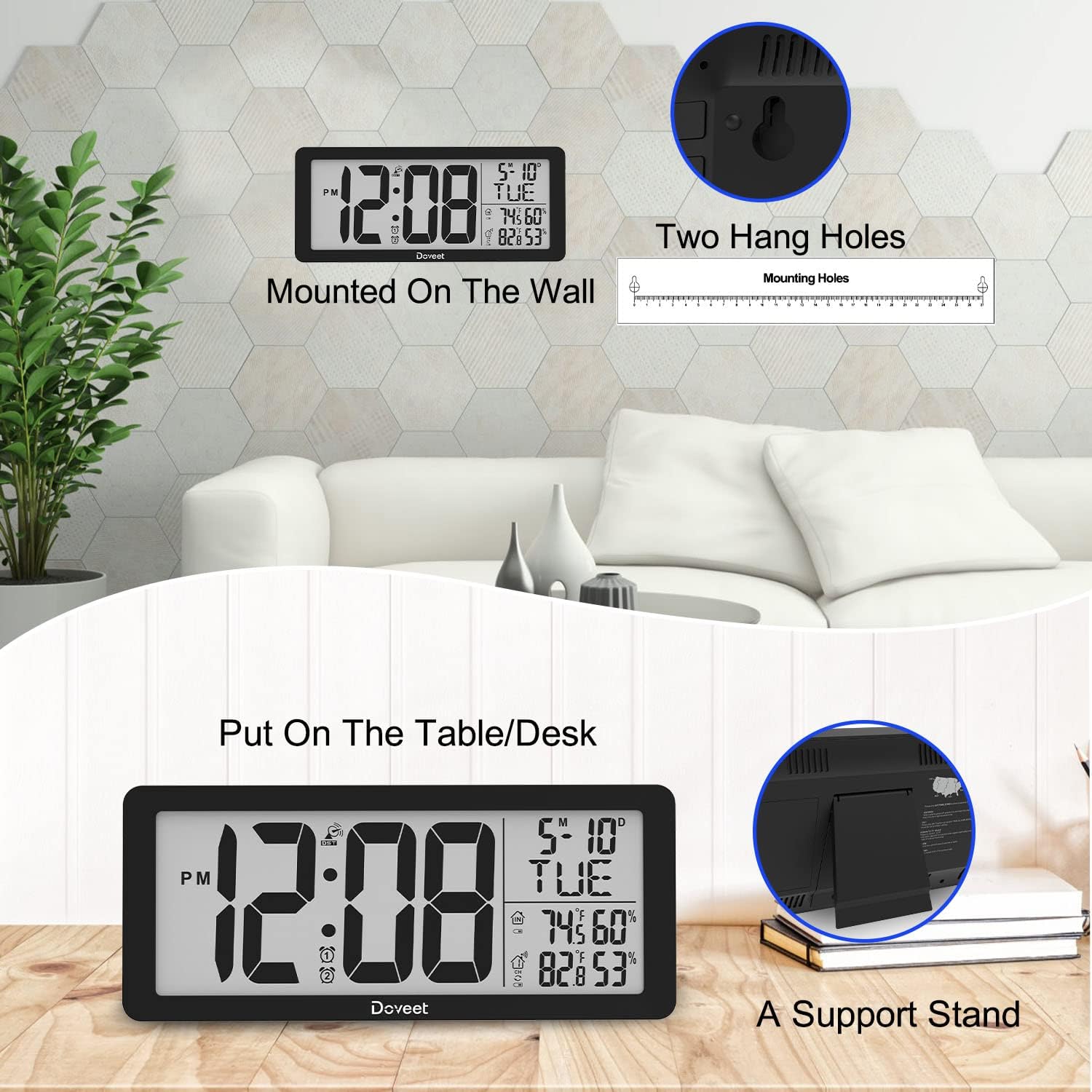
Figure 8: The clock can be easily mounted on a wall using the integrated holes or placed on a table using its foldable stand.
6. Maintenance
6.1 Battery Replacement
When the low power indicator appears on the display, replace the batteries in both the main clock unit and the outdoor sensor promptly to ensure continuous and accurate operation. Refer to Section 3.1 for battery installation instructions.
6.2 Cleaning
Wipe the clock and sensor with a soft, dry cloth. Do not use abrasive cleaners or solvents, as they may damage the display or casing.
7. Troubleshooting
| Problem | Possible Cause | Solution |
|---|---|---|
| Clock not displaying time/date. | No batteries or incorrect battery polarity. | Check and install batteries correctly (3 x AA). |
| Atomic time not synchronizing. | Poor signal reception; interference. | Move the clock to a different location, away from electronic devices. Ensure correct time zone is selected. |
| Outdoor temperature/humidity not displayed. | Sensor batteries low/dead; sensor out of range; interference. | Replace sensor batteries (2 x AAA). Move sensor closer to the main unit. Press "CHANNEL" button to re-pair. |
| Display is dim or fading. | Low batteries in the main unit. | Replace main unit batteries (3 x AA). |
8. Specifications
| Feature | Detail |
|---|---|
| Brand | DOVEET |
| Model Number | S5021 |
| Display Type | Digital LCD |
| Screen Dimensions | 14.4"W x 6.1"H |
| Time Display Size | 7.2"W x 4.1"H (numbers) |
| Power Source (Clock) | 3 x AA Batteries (not included) |
| Power Source (Sensor) | 2 x AAA Batteries (not included) |
| Special Features | Atomic Time, Auto DST, Temperature (Indoor/Outdoor), Humidity (Indoor/Outdoor), Alarm, Snooze, Calendar Display, Large Display |
| Wireless Range | Up to 328 ft (open area) |
| Material | Plastic, Acrylonitrile Butadiene Styrene |
| Mounting Type | Wall Mount, Tabletop |
| Item Weight | 1 Pound |
9. Warranty and Support
For detailed warranty information, technical support, or to purchase additional sensors, please refer to the official user manual or contact DOVEET customer service.
An electronic version of the user manual can be found here: DOVEET S5021 User Manual (PDF)


