
XTREME DIGITAL LIFESTYLE ACCESSORIES MLB7-1028-BLK
Monster 6.5ft Multicolor LED Light Strip User Manual
Model: MLB7-1028-BLK
Introduction
The Monster 6.5ft Multicolor LED Light Strip provides customizable color lighting for various spaces, including kitchens, device monitors, bedrooms, offices, and car interiors. This versatile light strip features multiple flash modes and is powered via a 6ft USB cable, offering flexible installation and operation.
Package Contents
- 6.5ft Multicolor LED Light Strip
- Remote Control
- 6ft USB Cable
Setup
Follow these steps to set up your LED Light Strip:
- Prepare the Surface: Ensure the surface where you intend to install the light strip is clean, dry, and smooth for optimal adhesion.
- Peel and Stick: Carefully peel off the adhesive backing from the light strip. Press the strip firmly onto the desired surface. The adhesive allows for secure placement in various locations.
- Connect Power: Connect the included 6ft USB cable to the light strip. For indoor use, plug the USB cable into a TV's USB port or a USB wall charger. For car interior use, connect to a USB car charger.

Image: Demonstrates the peel-and-stick installation method for the LED light strip.
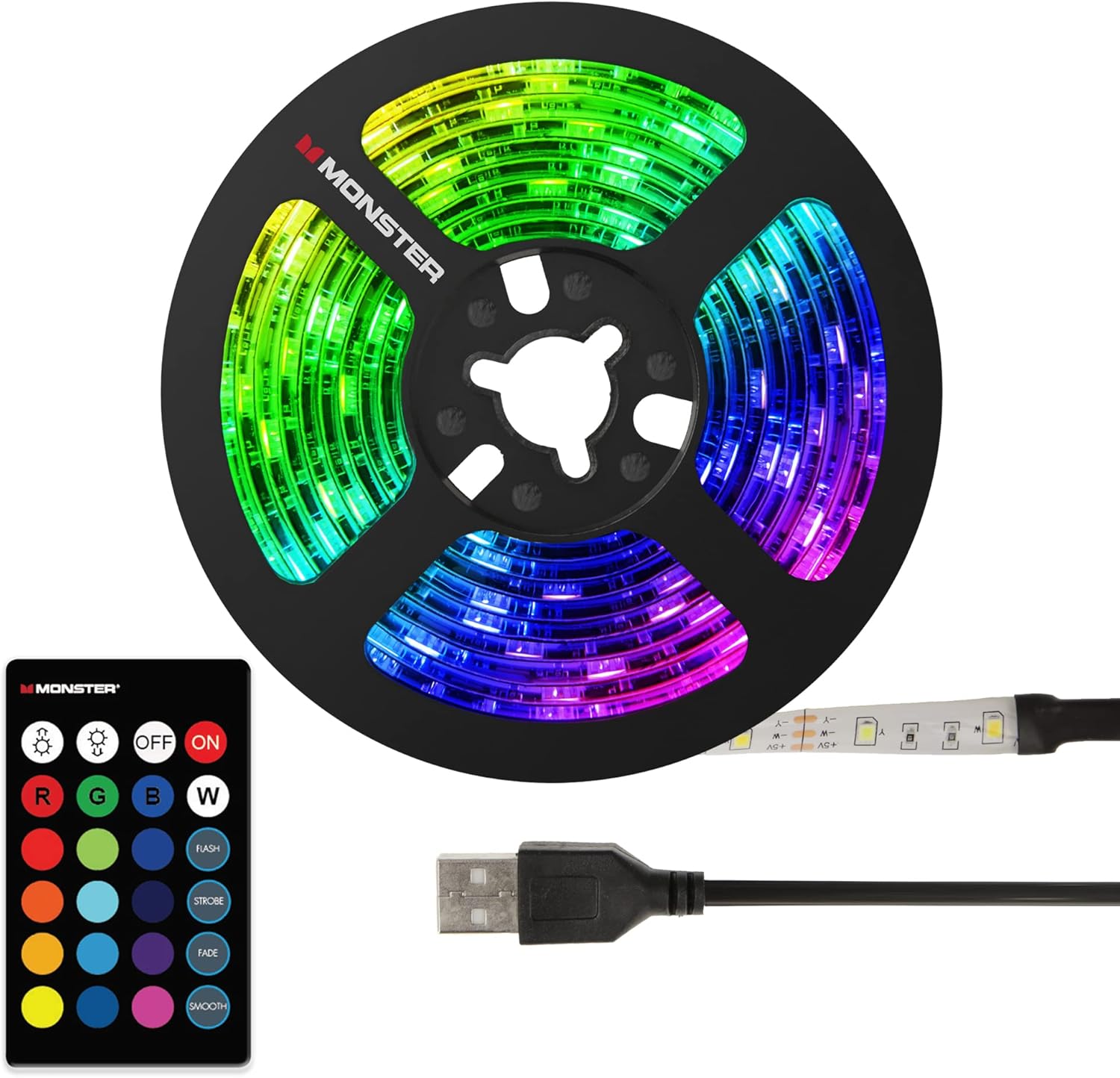
Image: The LED light strip, remote control, and USB cable, illustrating the components for power connection.
Operating Instructions
Your Monster LED Light Strip comes with a remote control for easy operation and customization of your lighting experience.
- Power On/Off: Use the ON and OFF buttons on the remote to turn the light strip on or off.
- Color Selection: The remote features multiple color buttons (R, G, B, W, and various color circles) to select your desired light color.
- Brightness Adjustment: Use the brightness control buttons (sun icons) to increase or decrease the intensity of the light.
- Flash Modes: The remote includes buttons for different flash modes such as FLASH, STROBE, FADE, and SMOOTH. These modes allow the lights to cycle through colors or patterns at various speeds.

Image: The remote control for the LED light strip, showing buttons for power, color selection, brightness, and flash modes.

Image: Examples of the LED light strip displaying multiple vibrant colors, highlighting its customizable lighting capabilities.

Image: The LED light strip installed in a car interior, demonstrating its application for ambient lighting.
Product Overview Video
Video: An official overview of Monster Smart Lighting products, demonstrating various applications and features, including color changes and smart control.
Maintenance
To ensure the longevity and optimal performance of your LED Light Strip, follow these simple maintenance guidelines:
- Cleaning: Gently wipe the light strip with a soft, dry cloth to remove dust or debris. Do not use harsh chemicals or abrasive cleaners.
- Adhesive Care: Avoid frequently repositioning the strip once installed, as this may weaken the adhesive.
- Storage: If storing the light strip, ensure it is coiled loosely and kept in a cool, dry place away from direct sunlight.
Troubleshooting
| Problem | Possible Cause | Solution |
|---|---|---|
| Light strip does not turn on. | No power, loose connection, or remote battery depleted. | Ensure the USB cable is securely connected to a powered USB port. Check if the power source is active. Replace the remote control battery if necessary. |
| Remote control is unresponsive. | Remote battery depleted or obstruction between remote and strip. | Replace the remote battery. Ensure there is a clear line of sight between the remote and the light strip's receiver. |
| Light strip is not sticking properly. | Surface is dirty, uneven, or adhesive has lost its tackiness. | Clean and dry the surface thoroughly before application. For existing installations, consider using additional adhesive clips or double-sided tape for reinforcement. |
| Colors are incorrect or inconsistent. | Faulty connection or damaged LED segment. | Check all connections. If a segment is damaged, contact customer support. |
Specifications
| Feature | Detail |
|---|---|
| Brand | XTREME DIGITAL LIFESTYLE ACCESSORIES |
| Model Number | MLB7-1028-BLK |
| Color | Multicolor |
| Length | 6.5 ft |
| Light Source Type | LED |
| Power Source | Corded Electric (USB) |
| Voltage | 12 Volts |
| Controller Type | Remote Control |
| Indoor/Outdoor Usage | Indoor |
| Special Feature | Color Changing |
| Material | Plastic |
Warranty and Support
This product is from a small business brand, XTREME DIGITAL LIFESTYLE ACCESSORIES. For any product inquiries, technical support, or warranty claims, please contact the seller directly through the platform where the purchase was made. Retain your proof of purchase for any support requests.
For general information or to explore other products, you may visit the XTREME DIGITAL LIFESTYLE ACCESSORIES Store.
Related documentsMLB7-1028-BLK


Ask a question about this manual
Ask about setup, troubleshooting, compatibility, parts, safety, or missing instructions. Manuals+ will review the question and use this page’s manual context to help answer it.