
1. Introduction
The Hape Smart Touch Drum Set (Model E12804) is an electronic musical toy designed for early musical development in children. This instrument, crafted from wood and plastic, features intelligent technology that allows children to create engaging melodies through intuitive and simple gestures. Part of the Baby Einstein range, this drum set combines the natural feel of wood with electronic magic, enabling children to play music individually or with others.
The Smart Touch Drum Set offers four musical modes: Discovery, Performance, Game, and Band. It also supports wireless connection with other "Together in Tune" instruments (such as the piano and guitar) for collaborative play. This musical toy provides a fun and well-constructed introduction to music for toddlers.

Image 1.1: A young child seated on the floor, actively engaging with the Hape Smart Touch Drum Set. The child is touching one of the drum pads, which are brightly colored and feature animal illustrations. The drum set is designed with a sturdy base and multiple touch-sensitive pads.
2. Safety Information
WARNING:
- Not suitable for children under 3 years old.
- To be used under the supervision of an adult.
- Ensure all battery compartments are securely closed.
- Do not mix old and new batteries. Do not mix alkaline, standard (carbon-zinc), or rechargeable (nickel-cadmium) batteries.
- Remove batteries if the toy is not used for an extended period.
3. Package Contents
The Hape Smart Touch Drum Set package includes:
- 1 x Hape Smart Touch Drum Set (Model E12804)
- 3 x AA LR6 Alkaline Batteries (pre-installed or included)
- Instruction Manual (this document)
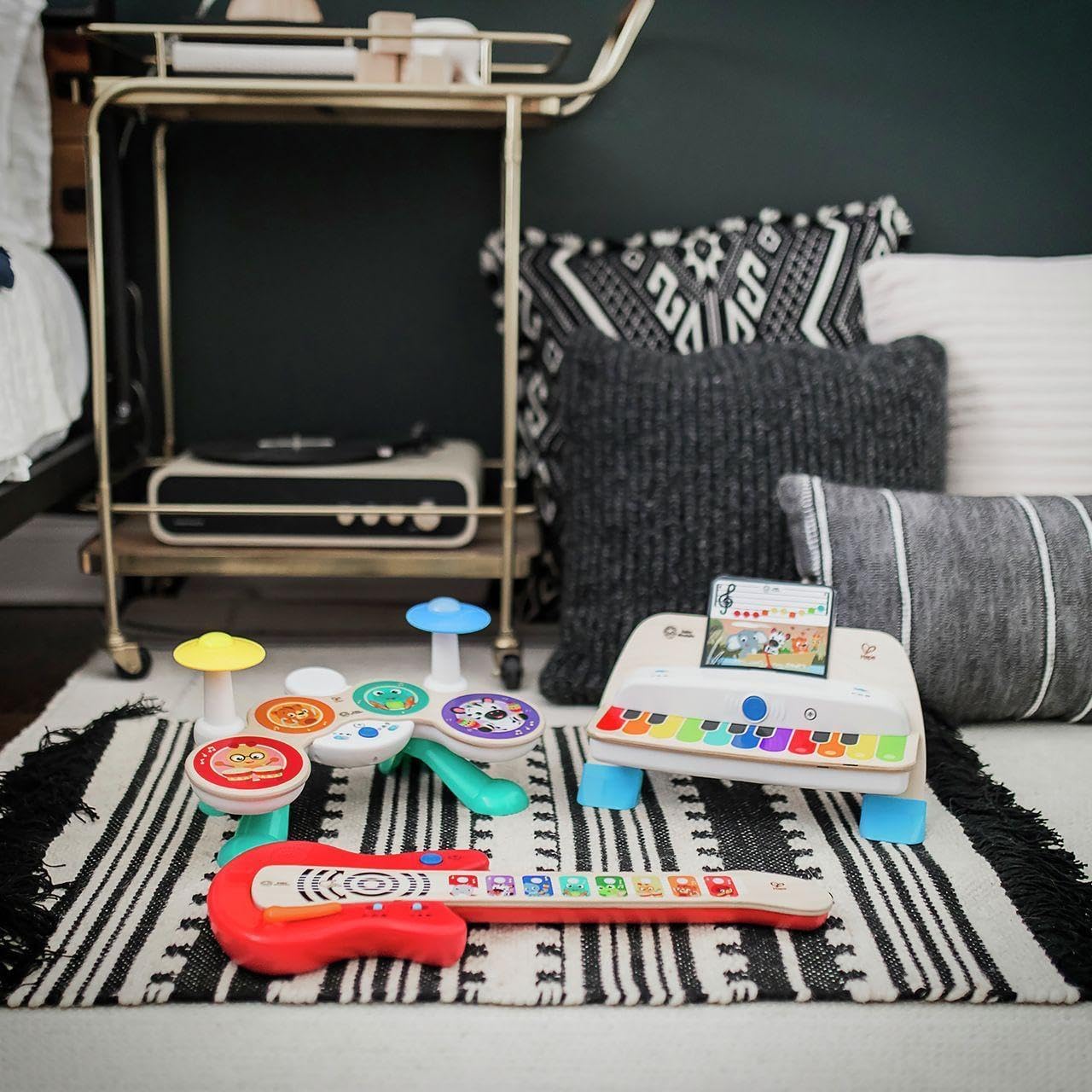
Image 3.1: The Hape Smart Touch Drum Set displayed alongside other compatible Baby Einstein "Together in Tune" instruments, such as a piano and a guitar, on a patterned rug. This image illustrates the complete set of instruments that can be connected for collaborative play.
4. Setup
4.1 Battery Installation
The Hape Smart Touch Drum Set requires 3 AA LR6 alkaline batteries. These batteries are typically included with the product. Follow these steps to install or replace batteries:
- Locate the battery compartment on the underside of the drum set.
- Using a screwdriver, loosen the screw on the battery compartment cover and remove the cover.
- Insert 3 new AA LR6 alkaline batteries, ensuring correct polarity (+/-) as indicated inside the compartment.
- Replace the battery compartment cover and tighten the screw to secure it.
Note: Always use fresh batteries for optimal performance. Dispose of used batteries responsibly.
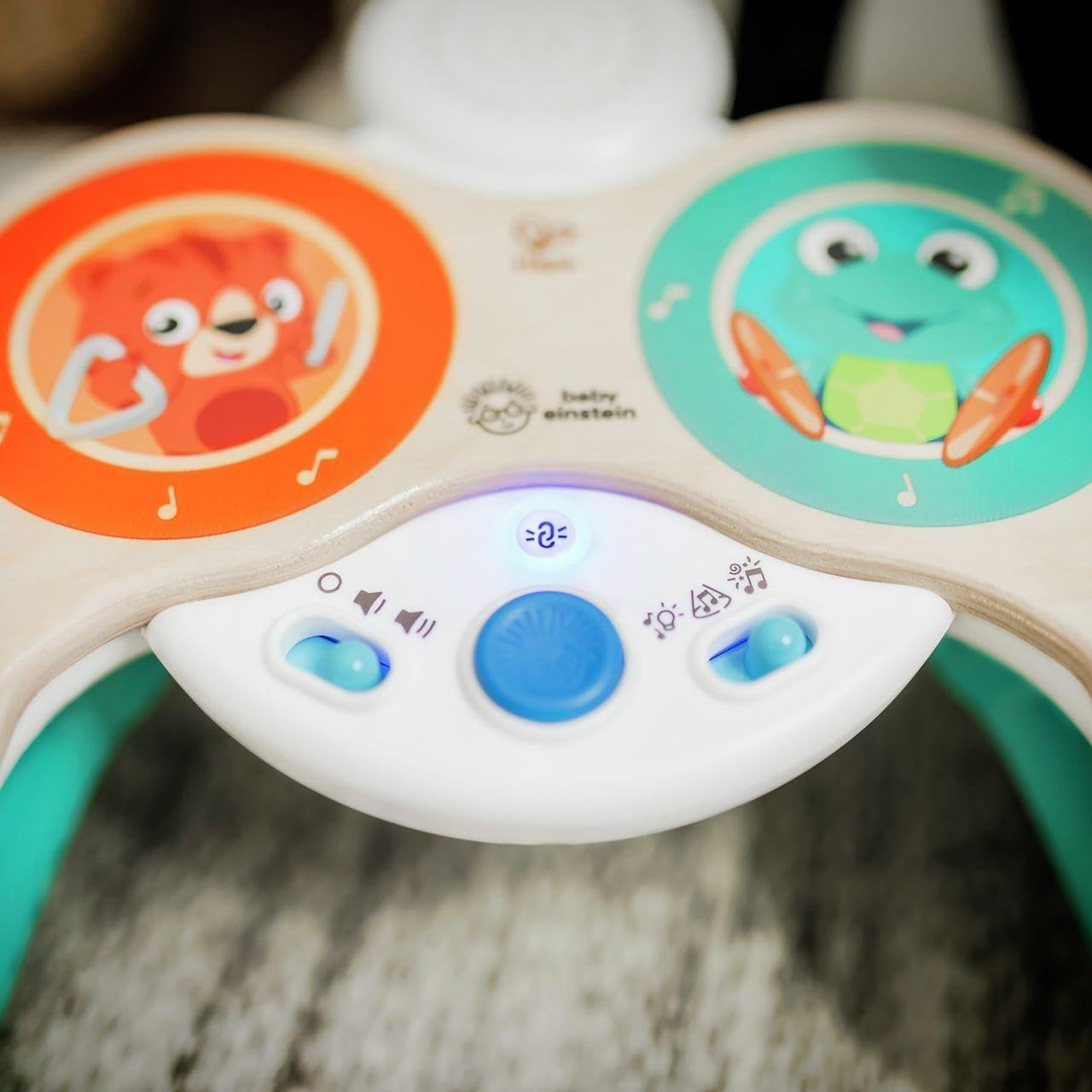
Image 4.1: A detailed view of the central control panel of the Hape Smart Touch Drum Set. The panel features buttons for power, volume control, and mode selection, along with indicator lights. This area is crucial for operating the toy's various functions.
5. Operating Instructions
5.1 Power On/Off
To turn the drum set ON, locate the power button on the central control panel and press it. To turn it OFF, press the power button again.
5.2 Volume Control
The drum set features 2 volume levels. Use the volume control switch or button on the central panel to adjust the sound output to a comfortable level.
5.3 Magic Touch Technology
The drum set utilizes Magic Touch technology, allowing children to activate sounds and melodies by simply touching the drum pads. There are no buttons to press on the pads themselves, making interaction intuitive.

Image 5.1: A child's hand gently touching one of the illuminated blue drum pads on the Hape Smart Touch Drum Set. This demonstrates the Magic Touch functionality where a simple touch activates sounds and lights.
5.4 Musical Modes
The drum set offers four distinct musical modes, selectable via the mode button on the control panel:
- Discovery Mode: Allows children to play popular tunes and create new rhythms by touching the pads.
- Performance Mode: Enables layering of musical riffs, encouraging creative expression.
- Game Mode: Adds fun sound effects and noises to the musical play.
- Band Mode: Connects with other "Together in Tune" instruments for synchronized group play.

Image 5.2: An overhead perspective of the Hape Smart Touch Drum Set, showcasing all its colorful drum pads and cymbals. Each pad is illuminated, indicating active play or a specific mode. The central control panel is also visible.
5.5 Together in Tune Feature
The Smart Touch Drum Set can wirelessly connect with other Hape Baby Einstein "Together in Tune" instruments, such as the piano and guitar. This feature allows multiple children to play together, creating a synchronized musical experience. Refer to the individual manuals of other "Together in Tune" instruments for specific connection instructions.

Image 5.3: Three children of different ages are shown playing together with various Hape Baby Einstein musical instruments. One child is at the Smart Touch Drum Set, another at a piano, and a third holds a guitar, demonstrating the "Together in Tune" collaborative play feature.
6. Maintenance
- Cleaning: Wipe the surface of the drum set with a soft, damp cloth. Do not immerse the toy in water or use harsh cleaning agents.
- Storage: Store the drum set in a cool, dry place away from direct sunlight and extreme temperatures.
- Battery Care: Remove batteries if the toy will not be used for an extended period to prevent leakage.
7. Troubleshooting
| Problem | Possible Cause | Solution |
|---|---|---|
| No sound or power |
|
|
| Intermittent sound or distorted audio |
|
|
| Magic Touch pads not responding |
|
|
8. Specifications
| Model Number | E12804 |
| Brand | Hape |
| Dimensions (L x W x H) | 38.1 x 23.5 x 20 cm (15 x 9.25 x 7.87 inches) |
| Weight | 1.16 kg (2.56 lbs) |
| Material | Wood, Plastic |
| Recommended Age | 3 years and up |
| Batteries Required | 3 x AA LR6 Alkaline (Included) |
| Educational Value | Touch, See, Hear |
| Number of Pieces | 1 (Drum Set) |
9. Warranty & Support
For warranty information and customer support, please refer to the official Hape website or contact their customer service department. Keep your purchase receipt as proof of purchase.
Hape Official Website: www.hape.com