
1. Introduction
This manual provides essential information for the proper setup, operation, and maintenance of your Lenovo ThinkStation P340 30DK005GUS Small Form Factor Workstation. Designed for professional use, this workstation combines robust performance with reliability. Please read this manual thoroughly before using your device to ensure optimal performance and longevity.
The ThinkStation P340 SFF is engineered for demanding tasks, featuring an Intel Xeon W-1250 processor, 16 GB DDR4 SDRAM, and a 512 GB SSD, all within a compact design. It operates on Windows 11 Pro for Workstations, providing a powerful and secure computing environment.
2. What's in the Box
Upon unpacking your Lenovo ThinkStation P340, verify that all components are present:
- ThinkStation P340 SFF 30DK005GUS Workstation
- Mouse
- Keyboard
- Power Cable
- Documentation (Quick Start Guide, Safety Information)
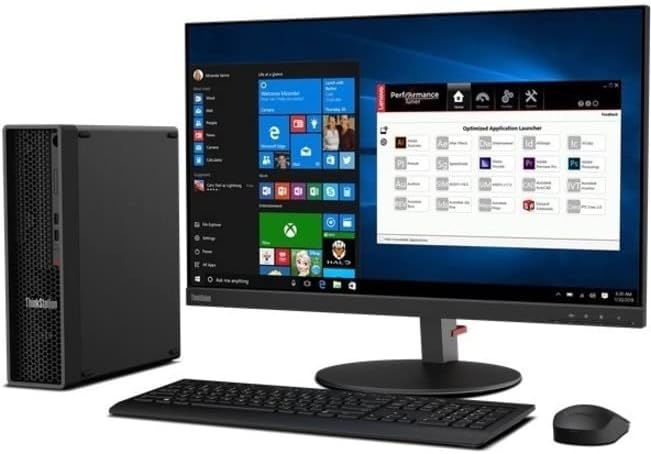
Image: The Lenovo ThinkStation P340 Small Form Factor workstation shown alongside a monitor, keyboard, and mouse, illustrating a complete desktop setup.
3. Setup Guide
Follow these steps to set up your ThinkStation P340 Workstation:
- Unpack the Workstation: Carefully remove the workstation and all accessories from the packaging.
- Connect Peripherals:
- Connect the keyboard and mouse to the available USB ports on the workstation.
- Connect your monitor(s) to the appropriate video output ports (e.g., DisplayPort, HDMI) on the workstation.
- Connect to Network: Connect an Ethernet cable from your network router or switch to the Gigabit Ethernet port on the workstation for wired internet access.
- Connect Power: Plug the power cable into the workstation's power input, then plug the other end into a grounded electrical outlet.
- Power On: Press the power button located on the front of the workstation. The system will boot up, and the operating system (Windows 11 Pro for Workstations) will load.
- Initial Setup: Follow the on-screen instructions to complete the initial Windows setup, including language, region, network settings, and user account creation.

Image: A front-angled view of the Lenovo ThinkStation P340 Small Form Factor, highlighting the front panel ports and ventilation grille.
4. Operating Instructions
4.1 Power On/Off
- To Power On: Press the power button on the front panel.
- To Shut Down: Click the Start button in Windows, then select Power > Shut down.
- To Restart: Click the Start button in Windows, then select Power > Restart.
- To Sleep: Click the Start button in Windows, then select Power > Sleep.
4.2 Windows 11 Pro for Workstations
Your ThinkStation P340 comes pre-installed with Windows 11 Pro for Workstations, offering advanced features for demanding professional environments. Familiarize yourself with the operating system's interface and functionalities for optimal productivity.
4.3 Key Features
- Processor: Intel Xeon W-1250 Hexa-core (6 Core) 3.30 GHz for high-performance computing.
- Memory: 16 GB DDR4 SDRAM for efficient multitasking.
- Storage: 512 GB SSD (Solid State Drive) for fast boot times and application loading.
- Graphics: NVIDIA T1000 with 8 GB dedicated RAM for professional graphics tasks.
- Connectivity: Gigabit Ethernet for high-speed network connections. Multiple USB ports for peripherals.

Image: An angled view of the Lenovo ThinkStation P340 Small Form Factor, positioned vertically, showcasing its compact design and front panel details.
5. Maintenance
Regular maintenance helps ensure the longevity and optimal performance of your workstation.
- Keep it Clean: Regularly clean the exterior of the workstation with a soft, dry cloth. Use compressed air to clear dust from ventilation grilles and ports to prevent overheating. Ensure the workstation is powered off and unplugged before cleaning.
- Software Updates: Keep your Windows operating system and drivers updated. This ensures security patches, performance improvements, and compatibility with new software.
- Data Backup: Regularly back up important data to an external drive or cloud storage to prevent data loss.
- Environmental Conditions: Operate the workstation in a well-ventilated area, away from direct sunlight, excessive heat, humidity, and dust.

Image: A side view of the Lenovo ThinkStation P340 Small Form Factor, illustrating its compact depth and the location of some rear ports.
6. Troubleshooting
This section addresses common issues you might encounter with your ThinkStation P340.
| Problem | Possible Cause | Solution |
|---|---|---|
| Workstation does not power on. | Power cable not connected, power outlet issue, power supply failure. | Ensure power cable is securely connected to both the workstation and a working electrical outlet. Test the outlet with another device. |
| No display on monitor. | Monitor not connected, monitor off, incorrect input source, graphics driver issue. | Verify monitor power and video cable connections. Ensure monitor is set to the correct input source. Restart the workstation. |
| System is slow or unresponsive. | Too many applications open, insufficient memory, malware, overheating. | Close unnecessary applications. Check Task Manager for resource-intensive processes. Run a malware scan. Ensure proper ventilation. |
| Peripheral (keyboard/mouse) not working. | Loose connection, faulty peripheral, driver issue. | Reconnect the peripheral to a different USB port. Test with another peripheral. Update or reinstall drivers. |
If you continue to experience issues, refer to the Lenovo support website or contact technical support.
7. Specifications
Detailed technical specifications for the Lenovo ThinkStation P340 30DK005GUS Workstation:
| Feature | Detail |
|---|---|
| Model Number | 30DK005GUS |
| Processor | Intel Xeon W-1250 Hexa-core (6 Core) 3.30 GHz |
| Operating System | Windows 11 Pro for Workstations |
| Memory (RAM) | 16 GB DDR4 SDRAM |
| Storage | 512 GB SSD (Solid State Drive) |
| Graphics Coprocessor | NVIDIA T1000 |
| Graphics Card RAM Size | 8 GB |
| Max Screen Resolution | 3840 x 2160 |
| Network Interface | Gigabit Ethernet |
| USB 2.0 Ports | 2 |
| Power Supply | 380 W |
| Item Weight | 15 pounds (approx. 6.8 kg) |
| Product Dimensions (LxWxH) | 21 x 15.5 x 7.75 inches (approx. 53.34 x 39.37 x 19.68 cm) |
| Color | Black |
8. Warranty and Support
Your Lenovo ThinkStation P340 Workstation is covered by a manufacturer's warranty. For specific warranty terms and conditions, please refer to the warranty documentation included with your product or visit the official Lenovo support website.
For technical assistance, driver downloads, or further support, please visit the Lenovo support portal:
When contacting support, please have your product's serial number and model number (30DK005GUS) readily available.