
MOMMED B0B255BM2S
MomMed Portable Pet Scale
Model: B0B255BM2S
Precision Digital Scale for Newborn Puppy to 33lb
Introduction
Thank you for choosing the MomMed Portable Pet Scale. This precision digital scale is designed to accurately measure the weight of small animals, including newborn puppies, kittens, rabbits, ferrets, snakes, and hamsters, up to a maximum of 33 pounds (15 kg). It features a hold function, tare function, and unit conversion for convenient use. This manual provides essential information for proper setup, operation, maintenance, and troubleshooting to ensure optimal performance and longevity of your scale.
Setup
1. Unboxing and Inspection
Carefully remove all components from the packaging. Inspect the scale for any signs of damage during transit. Ensure all parts are present: the scale unit and the weighing tray.
2. Battery Installation
The MomMed Pet Scale requires 2 AAA batteries (typically included). Locate the battery compartment on the underside of the scale. Open the compartment cover, insert the batteries according to the polarity indicators (+/-), and close the cover securely.

Image: Underside of the scale with battery compartment and anti-skid supports.
3. Placement of the Scale
For accurate readings, place the scale on a hard, flat, and stable surface such as a table or the floor. Avoid placing the scale on soft surfaces like carpets, rugs, or beds, as this can lead to inaccurate measurements.

Image: Correct and incorrect placement of the scale for accurate weighing.
Operating Instructions
1. Power On/Off
Press the TARE button to turn the scale on. The LED display will illuminate. To turn off the scale, press and hold the TARE button for a few seconds, or it will automatically shut off after a period of inactivity to conserve battery life.
2. Unit Conversion
Press the UNIT button to cycle through the available weighing units: ounces (oz), pounds (lb), and kilograms (kg). Select the desired unit before weighing.
3. Tare Function
The TARE function allows you to zero out the weight of a container or blanket placed on the scale before weighing your pet. This ensures only the pet's weight is measured.
- Place the empty container (e.g., a bowl, blanket) on the scale.
- Wait for the display to stabilize.
- Press the TARE button. The display will reset to zero.
- Carefully place your pet into the container. The display will now show only the net weight of your pet.
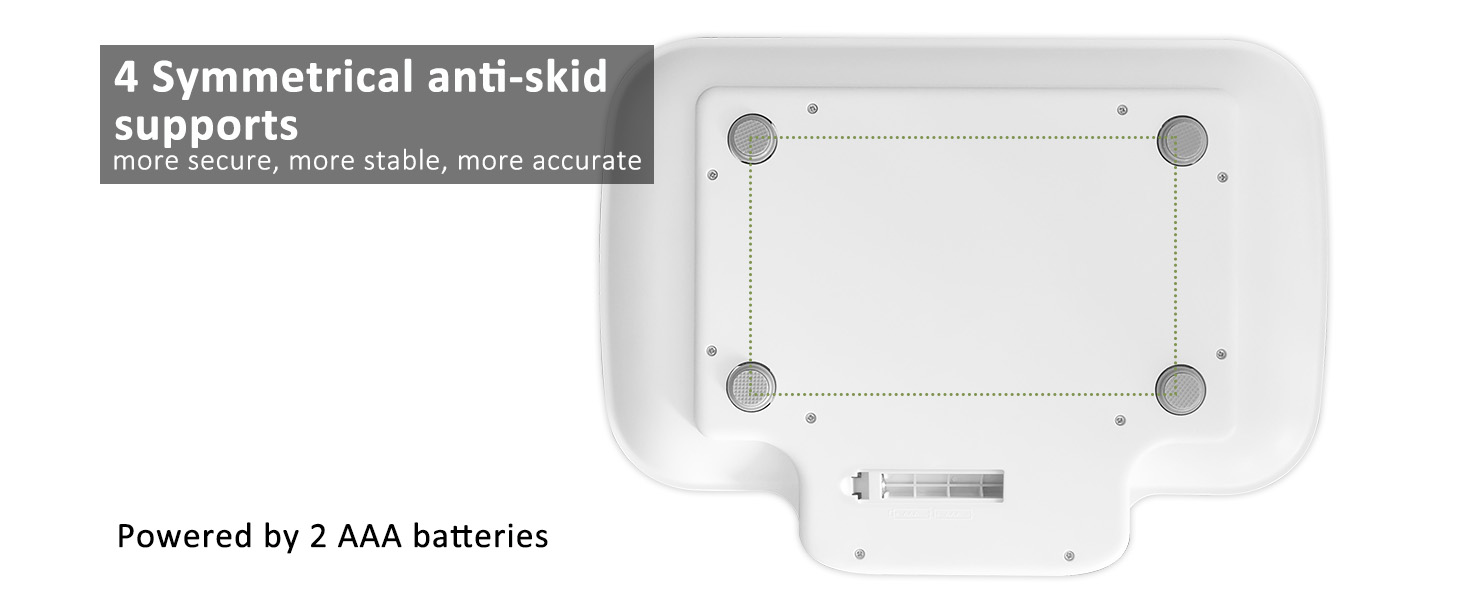
Image: Step-by-step guide for using the Tare function.
4. Hold Function
The HOLD function helps to get a stable reading even if your pet moves slightly on the scale. Press the HOLD button to activate this feature. The displayed weight will stabilize and lock, allowing you to record the measurement.
5. Important Usage Notes
- Sensitive Panel: The scale features a highly sensitive panel. Touch the buttons lightly. Pressing too hard on the buttons may cause the scale to tip over or affect accuracy.
- Weight Limit: The maximum weight capacity is 33lb (15kg). Do not exceed this limit.
- Size Compatibility: This scale is suitable for small animals with lengths less than 12.6 inches and widths less than 9.1 inches. For pets larger than the tray but under 33lb, consider placing them in a suitable container on the scale and using the tare function.

Image: A small kitten being weighed on the MomMed scale, illustrating suitable pet size.

Image: A large dog attempting to use the scale, indicating it is not suitable for large animals.
Maintenance
1. Cleaning
The weighing tray is designed for easy cleaning. Wipe the surface with a soft, damp cloth. For stubborn dirt, a mild soap solution can be used. Ensure the scale is completely dry before storage or next use. Do not immerse the scale in water or use abrasive cleaners.
2. Storage
Store the scale in a dry place at room temperature. Avoid extreme temperatures, direct sunlight, and high humidity. Keep it away from strong electromagnetic fields.
Troubleshooting
| Problem | Possible Cause | Solution |
|---|---|---|
| Inaccurate readings / Fluctuating weight |
|
|
| Scale does not turn on |
|
|
| Tare function not working correctly |
|
|
| Display shows 'Lo' |
|
|
Specifications
- Brand: MOMMED
- Model: B0B255BM2S
- Color: White
- Recommended Uses: Pets (Newborn puppies, kittens, small animals)
- Special Features: Hold Function, Tare Function, Strain Gauge
- Display Type: LED (Backlit)
- Weight Limit: 33 Pounds (15 kg)
- Readout Accuracy: ± 0.006 pounds (3 grams)
- Material: Acrylonitrile Butadiene Styrene (ABS)
- Item Weight: 1.54 pounds
- Product Dimensions (LxWxH): 13.77 x 10.23 x 1.65 inches
- Tray Dimensions (approx.): 12.6 inches (length) x 9.1 inches (width)
- Power Source: 2 x AAA Batteries
- Auto Shut-off: Yes
Warranty and Support
MomMed is committed to providing high-quality products and customer satisfaction. This product is supported by a 5-year customer service period after purchase.
For any questions, concerns, or technical assistance, please contact MomMed customer support. Refer to the product packaging or the MomMed official website for the most current contact information.
Note: No official product videos were embedded as the provided data did not include 'creator_type' information to verify 'Seller' as the creator, which is a required condition for embedding.
Related Documents - B0B255BM2S
 |
MomMed Digital Baby Scale User Manual - Accurate Infant & Toddler Weight Tracking Comprehensive user manual for the MomMed Digital Baby Scale. Learn how to use, install batteries, assemble the tray, and understand features for accurate infant and toddler weight and height tracking. Includes specifications, button functions, and troubleshooting tips. |
 |
MomMed Baby Bottle Warmer User Manual: Operation, Safety, and Cleaning Guide Comprehensive user manual for the MomMed Baby Bottle Warmer (Model BBW-9300S). Learn about operation modes, safety precautions, cleaning instructions, and troubleshooting. |
 |
MomMed Wearable Breast Pump S21 User Manual Comprehensive user manual for the MomMed Wearable Breast Pump S21, covering parts list, assembly, operation, cleaning, storage, FAQs, and product specifications in English and Spanish. |
 |
MomMed Ovulation and Pregnancy Test Strips User Manual User guide for MomMed Ovulation and Pregnancy Test Strips, detailing instructions for use, result interpretation, FAQs, and symbol explanations for accurate home fertility and pregnancy detection. |
 |
MomMed S21 Wearable Breast Pump: Installation and User Guide Comprehensive guide for the MomMed S21 wearable breast pump, covering installation, assembly, operation, cleaning, and storage of breast milk. Learn how to use your hands-free breast pump effectively. |
 |
MomMed S21 Wearable Breast Pump User Manual Comprehensive user manual for the MomMed S21 Wearable Breast Pump. Provides detailed instructions on assembly, operation modes, cleaning, maintenance, and breast milk storage. Essential guide for users of MomMed's hands-free electric breast pump. |
Ask a question about this manual
Ask about setup, troubleshooting, compatibility, parts, safety, or missing instructions. Manuals+ will review the question and use this page’s manual context to help answer it.