
NOTABRICK Vi
NOTABRICK Bluetooth Speaker User Manual
Model: Vi
Brand: NOTABRICK
Introduction
This manual provides detailed instructions for the operation and maintenance of your NOTABRICK Bluetooth Speaker. Please read this manual thoroughly before use to ensure proper functionality and to extend the product's lifespan.
The NOTABRICK Bluetooth Speaker features 30W stereo sound, RGB multi-color rhythm lights, IPX7 waterproof rating, and up to 1000 minutes of playtime. It supports wireless pairing for immersive surround sound and includes a built-in microphone for hands-free calls.
Package Contents
Verify that all items listed below are included in your package:
- NOTABRICK Bluetooth Speaker
- Premium Synthetic Leather Strap
- User Manual
- 1m Type-C Charging Cable
- 1m AUX-IN Cable

Product Overview and Controls
Familiarize yourself with the buttons and ports on your speaker:

- Power ON / OFF: Long press the power button.
- Voice Assistant: Twice press the power button.
- Volume Down / Previous Track: Short press for volume down, long press for previous track.
- Play / Pause: Short press the play/pause button.
- Phone Call Option: Short press for answer/end call, long press to reject call.
- Bluetooth Mode: Short press the Bluetooth button to switch modes.
- Volume Up / Next Track: Short press for volume up, long press for next track.
- Light Mode: Short press the light button to cycle through light modes.
- TWS Pairing: Long press the TWS button to initiate True Wireless Stereo pairing.
- Reset: Use a pin to press the reset button.
- AUX IN: 3.5mm audio input port.
- Type C Charging Port: For charging the speaker.
Setup
Charging the Speaker
Before first use, fully charge the speaker. Connect the provided Type-C charging cable to the speaker's charging port and the other end to a USB power adapter (not included). The charging indicator will show the charging status. A full charge takes approximately 4 hours.
Powering On/Off
To power on the speaker, long press the Power ON/OFF button. To power off, long press the same button again.
Operating Guidelines
Bluetooth Pairing
- Ensure the speaker is powered on and in Bluetooth pairing mode (indicated by a flashing blue light).
- On your device (smartphone, tablet, etc.), enable Bluetooth and search for available devices.
- Select "NOTABRICK Vi" from the list of devices. Once connected, the speaker will emit a confirmation sound, and the Bluetooth indicator light will become solid blue.
True Wireless Stereo (TWS) Pairing
You can pair two NOTABRICK Bluetooth Speakers for a 60W stereo surround sound experience.
- Ensure both speakers are powered on and not connected to any other Bluetooth device.
- On one speaker, long press the TWS button. It will enter TWS pairing mode.
- The two speakers will automatically connect to each other. Once connected, they will emit a confirmation sound.
- Now, connect your device to one of the speakers via Bluetooth as described in the "Bluetooth Pairing" section. Both speakers will play audio simultaneously.
Light Modes
The speaker features 7 light colors and 6 light modes. Short press the Light Mode button to cycle through the available lighting effects.

Hands-Free Calling
When a call comes in, short press the Phone Call Option button to answer. Short press again to end the call. Long press to reject an incoming call.
Voice Assistant
Twice press the Power ON/OFF button to activate your device's voice assistant (e.g., Siri).
AUX-IN Mode
Connect an audio device to the speaker's AUX IN port using the provided 3.5mm AUX-IN cable. The speaker will automatically switch to AUX mode. Use your connected device to control playback.
Maintenance
- Cleaning: Use a soft, dry cloth to clean the speaker. Do not use abrasive cleaners or solvents.
- Water Resistance: The speaker is IPX7 waterproof, meaning it can be submerged in up to 1 meter of water for 30 minutes. Ensure the charging port cover is securely closed before exposure to water. Do not expose to saltwater or other chemicals.
- Storage: Store the speaker in a cool, dry place away from direct sunlight and extreme temperatures.
- Battery Care: To preserve battery life, charge the speaker at least once every 3 months if not in regular use.
Troubleshooting
| Problem | Solution |
|---|---|
| Speaker does not power on. | Ensure the battery is charged. Connect the speaker to a power source using the Type-C cable. |
| Cannot pair via Bluetooth. | Make sure the speaker is in pairing mode (flashing blue light). Ensure Bluetooth is enabled on your device and it's within range (up to 100 feet). Forget previous pairings on your device and try again. If issues persist, reset the speaker. |
| No sound. | Check volume levels on both the speaker and your connected device. Ensure the correct input mode (Bluetooth/AUX) is selected. If using AUX, ensure the cable is fully inserted. |
| TWS pairing fails. | Ensure both speakers are not connected to any other Bluetooth device before initiating TWS pairing. Keep them close to each other during the pairing process. |
Specifications
| Feature | Detail |
|---|---|
| Model Name | Vi |
| Brand | NOTABRICK |
| Speaker Type | Outdoor |
| Connectivity Technology | Bluetooth, Auxiliary |
| Wireless Communication Technology | Bluetooth |
| Bluetooth Range | 100 Feet |
| Speaker Maximum Output Power | 30 Watts |
| Audio Output Mode | Surround, Stereo |
| Battery Life | 16 Hours (approx. 1000 minutes) |
| Battery Capacity | 3600 mAh |
| Charging Time | < 4 Hours |
| Water Resistance Level | IPX7 Waterproof |
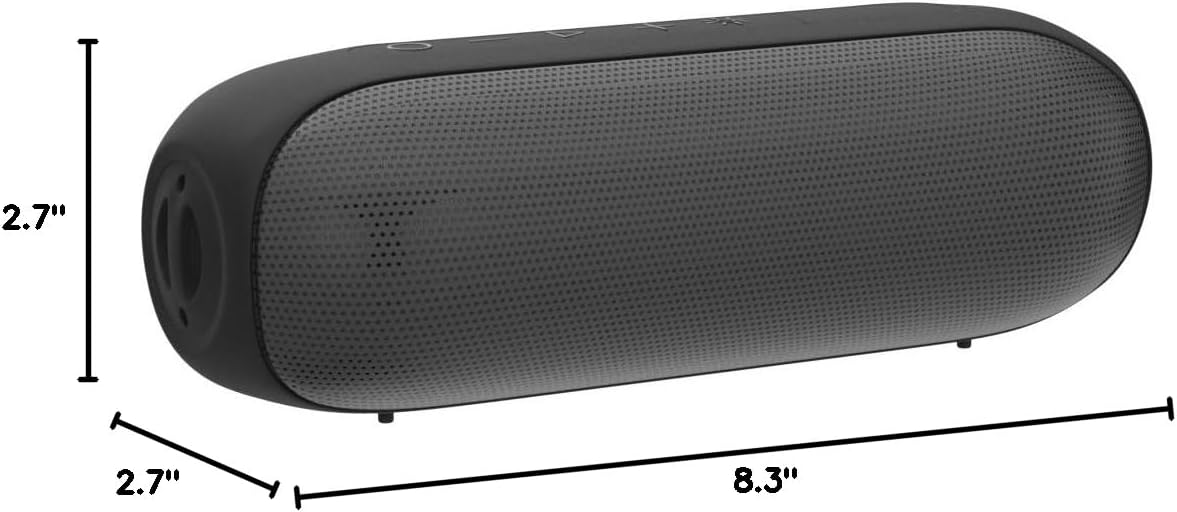
| Product Dimensions | 8.3"D x 2.7"W x 2.7"H |
| Item Weight | 1.43 pounds |
| Material | Thermoplastic Polyurethane (TPU), Acrylonitrile Butadiene Styrene (ABS) |
| Special Features | Portable, LED Light, Waterproof, Built-In Microphone, Stereo Pairing |
Warranty and Support
The NOTABRICK Bluetooth Speaker comes with a limited warranty. For detailed warranty information or technical support, please refer to the official user guide PDF or contact NOTABRICK customer service.
Related documentsVi


Ask a question about this manual
Ask about setup, troubleshooting, compatibility, parts, safety, or missing instructions. Manuals+ will review the question and use this page’s manual context to help answer it.