
Important Safety Instructions
Please read all instructions carefully before using the appliance. Retain this manual for future reference.
- Always ensure the appliance is placed on a stable, heat-resistant surface, away from flammable materials.
- Do not touch hot surfaces. Use oven mitts or gloves when handling hot items or parts.
- To protect against electrical shock, do not immerse the cord, plug, or any non-removable parts of the oven in water or other liquids.
- Close supervision is necessary when any appliance is used by or near children.
- Unplug from the outlet when not in use and before cleaning. Allow to cool before putting on or taking off parts.
- Do not operate any appliance with a damaged cord or plug, or after the appliance malfunctions or has been damaged in any manner.
- Do not use attachments not recommended by the appliance manufacturer.
- Do not place on or near a hot gas or electric burner, or in a heated oven.
- Extreme caution must be used when moving an appliance containing hot oil or other hot liquids.
- Do not cover the crumb tray or any part of the oven with metal foil. This will cause overheating of the oven.
- Do not clean with metal scouring pads. Pieces can break off the pad and touch electrical parts, creating a risk of electric shock.
- Do not store any materials, other than manufacturer's recommended accessories, in this oven when not in use.
- Do not place any of the following materials in the oven: paper, cardboard, plastic, or similar materials.
- Do not insert oversized foods or metal utensils into the oven as they may create a fire or risk of electric shock.
- Do not use the oven for purposes other than its intended use.
Product Overview
Components and Features
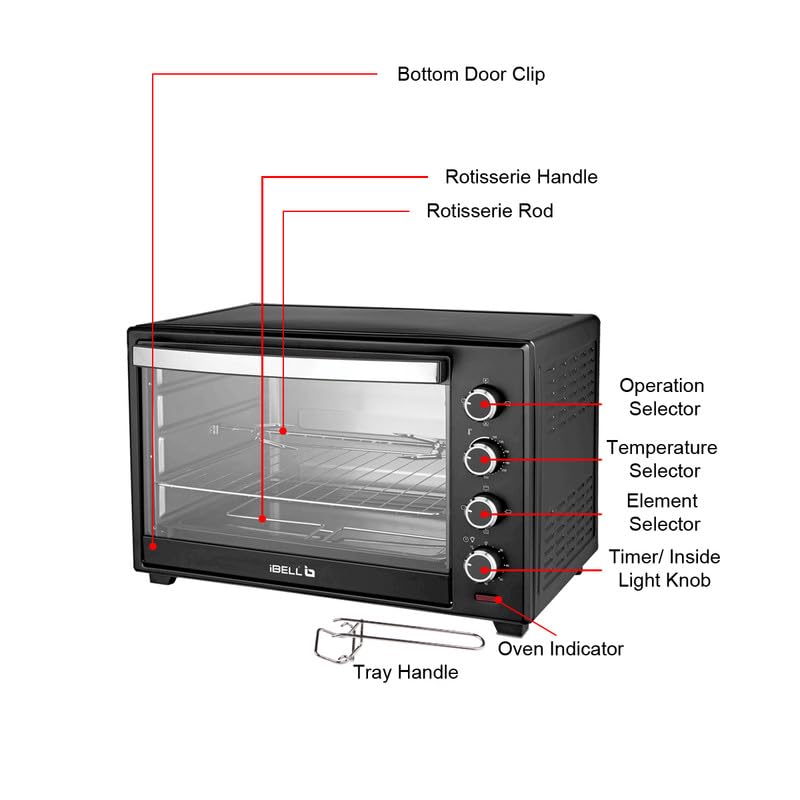
Figure 1: Labeled diagram of the IBELL EO40LGDLX Electric Oven Toaster Grill, showing key components such as the Operation Selector, Temperature Selector, Element Selector, Timer/Inside Light Knob, Oven Indicator, Rotisserie Handle, Rotisserie Rod, Bottom Door Clip, and Tray Handle.

Figure 2: Overview of the IBELL EO40LGDLX OTG highlighting its main features: Convection Fan, Rotisserie Function, 60-minute Timer, 40 Litre Capacity, and 1800W Power.
The IBELL EO40LGDLX is a versatile Electric Oven Toaster Grill (OTG) designed for various cooking needs. It features a 40-liter capacity and 1800 watts of power, ensuring efficient performance.
- Convection Fan: Circulates hot air for faster and more even cooking.
- Motorized Rotisserie: Allows for even roasting of large meats.
- Multiple Heating Options: Offers bake, grill, toast, and rotisserie functions.
- Illuminated Chamber: Provides clear visibility of food during cooking.
- 60-Minute Timer: With an auto-shutoff feature for precise cooking control.
- Temperature Control: Adjustable from 0°C to 250°C.
- Removable Crumb Tray: For easy cleaning and maintenance.
Setup and First Use
Unpacking
- Carefully remove the oven and all accessories from the packaging.
- Remove any packing materials, stickers, or labels from the oven and its accessories.
- Wash all removable parts (baking tray, wire rack, rotisserie fork, tray handle, rotisserie handle) in warm, soapy water. Rinse and dry thoroughly.
- Wipe the interior and exterior of the oven with a damp cloth.
Placement
- Place the oven on a flat, stable, heat-resistant surface.
- Ensure there is adequate ventilation around the oven (at least 10-15 cm clearance on all sides).
- Do not place the oven near curtains, walls, or other flammable materials.
- Plug the power cord into a grounded electrical outlet.
Before First Use
It is recommended to run the oven empty for approximately 15 minutes to burn off any manufacturing residues and odors.
- Set the temperature selector to 250°C.
- Set the function selector to the 'Bake' mode (top and bottom heating elements).
- Set the timer to 15 minutes.
- A slight odor or smoke may be present during this initial operation; this is normal. Ensure the area is well-ventilated.
- Once the timer rings, the oven will switch off. Allow the oven to cool completely before its first cooking use.
Operating Your IBELL OTG
Control Panel Overview
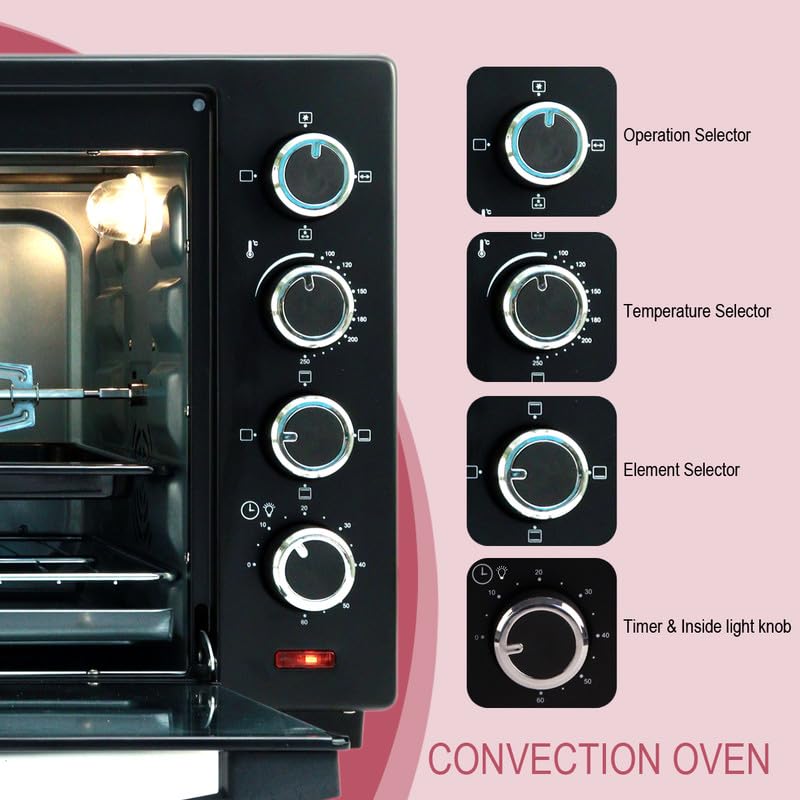
Figure 3: Detailed view of the control panel, showing the Operation Selector, Temperature Selector, Element Selector, and Timer & Inside Light Knob.
- Operation Selector (Top Knob): Controls the overall function, including convection fan and rotisserie.
- Temperature Selector (Second Knob): Adjusts the cooking temperature from 0°C to 250°C.
- Element Selector (Third Knob): Chooses which heating elements are active (top, bottom, or both).
- Timer & Inside Light Knob (Bottom Knob): Sets the cooking time up to 60 minutes and activates the interior light.
Functions
The IBELL EO40LGDLX offers multiple cooking modes:
- Bake: Typically uses both top and bottom heating elements. Ideal for cakes, cookies, and casseroles.
- Grill: Uses the top heating element for browning and crisping. Suitable for grilling vegetables, cheese toast, or finishing dishes.
- Toast: Uses both top and bottom elements for toasting bread or small items.
- Convection: Activates the convection fan to circulate hot air, ensuring faster and more even cooking. Can be combined with bake or grill functions.
- Rotisserie: Engages the motorized rotisserie spit for slow, even roasting of poultry or other meats.

Figure 4: Visual examples of dishes prepared using the oven's bake, grill, and roast functions.
Setting Temperature and Time
- Place food on the appropriate rack or tray inside the oven.
- Turn the Temperature Selector knob to the desired temperature setting.
- Turn the Element Selector knob to choose the heating elements (top, bottom, or both) suitable for your cooking method.
- Turn the Operation Selector knob to activate the convection fan or rotisserie if required.
- Turn the Timer & Inside Light Knob to set the desired cooking time (up to 60 minutes). The oven will start heating, and the indicator light will illuminate. For continuous operation, turn the timer past 60 minutes to the 'Stay On' position.
- When the set time elapses, the oven will automatically switch off, and a bell will sound. If using 'Stay On', manually turn the timer knob to 'OFF' when cooking is complete.
Using the Rotisserie
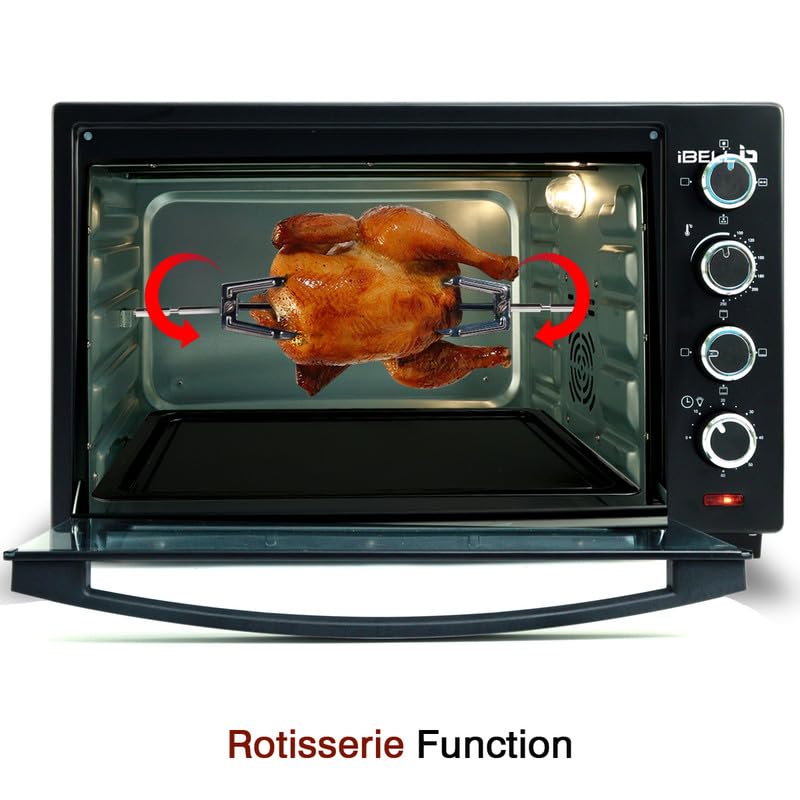
Figure 5: The motorized rotisserie function in action, evenly roasting a chicken inside the oven.
- Assemble the rotisserie spit by securing the forks onto the meat. Ensure the meat is centered and balanced on the spit.
- Insert the pointed end of the rotisserie spit into the drive socket on the right side of the oven cavity.
- Rest the square end of the spit onto the support on the left side.
- Set the Temperature Selector to the desired roasting temperature.
- Set the Element Selector to 'Top Heating Element' or 'Both Top and Bottom' as per recipe.
- Turn the Operation Selector to the rotisserie icon.
- Set the Timer & Inside Light Knob for the required cooking duration.
- To remove the hot rotisserie, use the rotisserie handle (Figure 1) to lift the spit from its supports.
Care and Maintenance
Proper care and regular maintenance will ensure the longevity and optimal performance of your IBELL OTG.
General Cleaning
- Always unplug the oven from the power outlet and allow it to cool completely before cleaning.
- Do not use abrasive cleaners, scrubbing brushes, or chemical cleaners, as these can damage the non-stick surfaces.
- Wipe the exterior of the oven with a damp cloth and mild detergent. Dry thoroughly.
- Clean the interior with a damp cloth and mild, non-abrasive cleaning solution. For stubborn stains, a paste of baking soda and water can be used.
- Wash the baking tray, wire rack, rotisserie fork, and handles in warm, soapy water. These accessories are not dishwasher safe.
- Ensure all parts are completely dry before reassembling and storing the oven.
Removable Crumb Tray
- The crumb tray is located at the bottom of the oven. Pull it out to remove crumbs and food particles.
- Clean the crumb tray regularly to prevent grease buildup and potential fire hazards.
- Wash the crumb tray in warm, soapy water, rinse, and dry thoroughly before placing it back into the oven.
Troubleshooting Guide
Refer to this table for common issues and their solutions.
| Problem | Possible Cause | Solution |
|---|---|---|
| Oven does not heat up. | Not plugged in; power outage; timer not set; temperature not set. | Ensure the oven is plugged in. Check power supply. Set the timer and temperature knobs correctly. |
| Food not cooking evenly. | Incorrect temperature/time; food placed incorrectly; convection fan not active. | Adjust temperature and time as per recipe. Ensure food is centered. Activate convection fan for even cooking. |
| Rotisserie not turning. | Rotisserie function not selected; spit not properly installed; food too heavy/unbalanced. | Ensure the Operation Selector is set to the rotisserie icon. Re-install the spit correctly. Ensure food is balanced and within weight limits. |
| Smoke or odor during operation. | First use residue; food spills; excessive grease. | Normal during first use. For subsequent uses, clean the oven and crumb tray thoroughly. Reduce grease in food. |
| Timer stops before reaching zero. | Internal timer malfunction. | If this issue persists, contact customer support for assistance. |
Technical Specifications
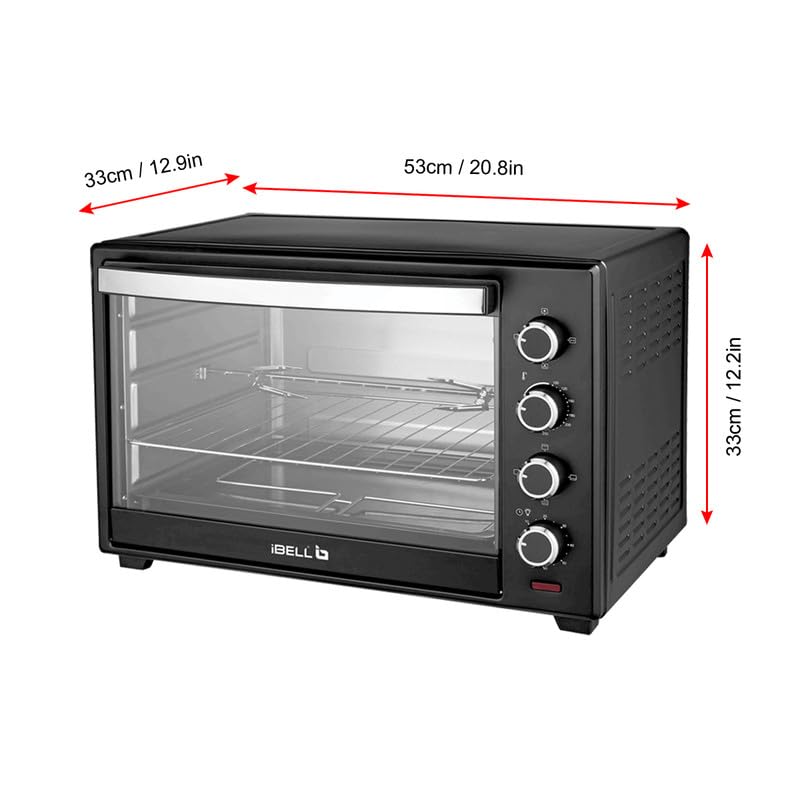
Figure 6: Product dimensions of the IBELL EO40LGDLX OTG.
| Feature | Specification |
|---|---|
| Brand | IBELL |
| Model Number | IBLEO40LGDLX |
| Capacity | 40 Litres |
| Power | 1800 Watt |
| Temperature Range | 0°C to 250°C |
| Control Type | Knob |
| Timer | 60 Minutes with Auto Shut-off and 'Stay On' function |
| Special Features | Convection, Motorized Rotisserie, Illuminated Chamber, Temperature Control |
| Product Dimensions (D x W x H) | 33D x 53W x 33H Centimeters |
| Item Weight | 9 kg 100 g |
| Included Components | 1 Electric Oven, Baking Tray, Wire Rack, Rotisserie Fork, Tray Handle, Rotisserie Handle |
| Country of Origin | India |
Warranty and Customer Support
Warranty Information
The IBELL EO40LGDLX Electric Oven Toaster Grill comes with a 1 Year standard warranty. An additional 1 Year warranty can be availed upon free registration. Registration must be completed within 30 days from the date of purchase.
Customer Support
For any warranty claims, product assistance, or technical support, please contact IBELL customer service:
- Toll-Free Number: 1800-2020-260
- Email: connect@ibellstore.com
- Manufacturer Address: Innovative Technologies, iBELL Fida's Building, Thottumugham P.O, Aluva, Kerala - 683105


