
1. Introduction
This manual provides comprehensive instructions for the installation, operation, and maintenance of your Metra 44-US13 Side/Top Mount Replacement Antenna and Metra 44-EC48 Universal Antenna Extension Cable. These products are designed to enhance or restore AM/FM radio reception in your vehicle, providing a reliable connection for your aftermarket radio system.
2. Product Components
Your package includes the following components:
- Metra 44-US13 Side/Top Mount Replacement Antenna: A durable antenna designed for AM/FM bands, featuring a 53-inch 3-section mast with spring and a 54-inch cable. It is suitable for 1-inch hole split ball applications.
- Metra 44-EC48 48-Inch Universal Antenna Extension Cable: A high-quality coaxial cable designed to extend the reach of your antenna connection, ensuring compatibility with various aftermarket radio setups. This cable includes impedance matching capacitors for optimal signal transfer.
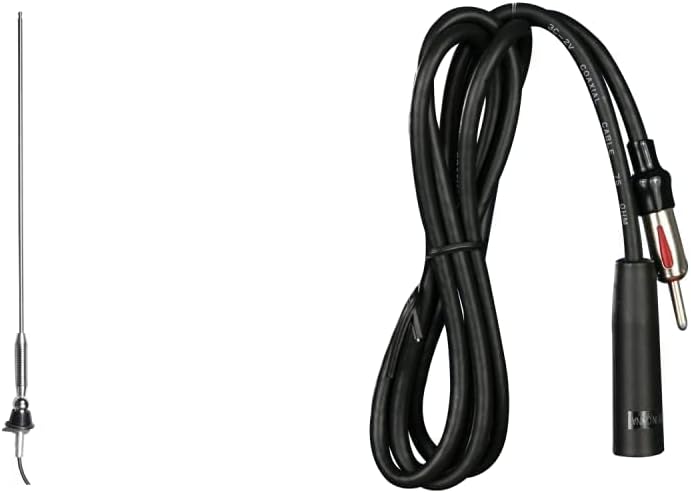
Figure 2.1: Metra 44-US13 Antenna and 44-EC48 Extension Cable. This image shows both the antenna and the extension cable, providing a complete view of the product package.

Figure 2.2: Metra 44-US13 Side/Top Mount Replacement Antenna. A close-up view of the antenna, highlighting its chrome finish and mast design.

Figure 2.3: Metra 44-EC48 48-Inch Universal Antenna Extension Cable. This image displays the black coaxial cable with its connectors, emphasizing its universal design.
3. Setup and Installation
Installation of the Metra 44-US13 antenna and 44-EC48 extension cable is designed to be straightforward, typically taking only minutes. Professional installation is recommended if you are unfamiliar with vehicle electrical systems.
3.1. Metra 44-US13 Antenna Installation
- Prepare Mounting Location: Identify a suitable side or top mount location on your vehicle. The antenna is designed for a 1-inch hole split ball application. Ensure the area is clean and free from obstructions.
- Mount the Antenna: Insert the antenna's base into the prepared hole. Secure it firmly using the provided hardware, ensuring a stable and upright position.
- Route the Antenna Cable: Carefully route the 54-inch antenna cable from the mounting location to the back of your vehicle's radio receiver. Avoid sharp bends, pinching, or routing near hot engine components or moving parts.
- Connect to Radio: Plug the antenna cable's connector into the antenna input port on your vehicle's aftermarket radio.
3.2. Metra 44-EC48 Extension Cable Installation
If the 54-inch cable of the 44-US13 antenna is not long enough to reach your radio, use the 44-EC48 extension cable.
- Connect Antenna to Extension: Connect the male end of the Metra 44-US13 antenna cable to one end of the Metra 44-EC48 extension cable. Ensure a snug and secure connection.
- Route Extension Cable: Route the 48-inch extension cable along the path of the antenna cable, ensuring it is also free from obstructions and potential damage.
- Connect to Radio: Connect the other end of the Metra 44-EC48 extension cable to the antenna input port on your vehicle's aftermarket radio. The impedance matching capacitors within the extension cable will help maintain signal quality.
Once installed, these components will enable your new aftermarket radio to receive AM/FM signals effectively.
4. Operating Instructions
The Metra 44-US13 antenna and 44-EC48 extension cable are passive components designed to receive radio signals. Their operation is integrated with your vehicle's radio system.
- AM/FM Reception: Once properly installed, the antenna will capture AM and FM radio waves.
- Radio Functionality: Turn on your vehicle's radio and select the desired AM or FM band and station. The quality of reception will depend on signal strength in your area and proper installation.
5. Maintenance
The Metra antenna and extension cable require minimal maintenance to ensure long-lasting performance.
- Regular Inspection: Periodically check the antenna mast and base for any signs of damage, corrosion, or looseness. Ensure the cable connections remain secure.
- Cleaning: Clean the antenna mast with a soft, damp cloth. Avoid abrasive cleaners or solvents that could damage the finish.
- Cable Protection: Ensure the antenna cable and extension cable are not exposed to excessive heat, sharp edges, or areas where they could be pinched or cut.
6. Troubleshooting
If you experience issues with your radio reception after installation, consider the following troubleshooting steps:
- Poor or No Reception:
- Check Connections: Ensure all antenna and extension cable connections are fully seated and secure at both the antenna base and the radio unit.
- Cable Integrity: Inspect the entire length of the antenna and extension cables for any visible damage, cuts, or severe kinks.
- Antenna Position: Verify the antenna mast is upright and not obstructed by vehicle components or external objects.
- Radio Functionality: Test your radio with a known good antenna (if possible) to rule out issues with the radio unit itself.
- Signal Strength: In some remote areas, signal strength may naturally be weak. Try tuning to different stations.
- Static or Interference:
- Grounding: Ensure the radio and antenna have proper grounding.
- Electrical Interference: Check for other electrical components in the vehicle that might be causing interference.
- Cable Shielding: The coaxial cable is shielded, but ensure it's not routed too close to high-voltage wires or ignition components.
If problems persist after following these steps, contact Metra customer support or a qualified automotive electronics technician.
7. Specifications
| Feature | Description |
|---|---|
| Product Type | Side/Top Mount Replacement Antenna & Universal Antenna Extension Cable |
| Brand | Metra |
| Antenna Model | 44-US13 |
| Extension Cable Model | 44-EC48 |
| Antenna Type | AM/FM Radio Antenna |
| Antenna Mast Length | 53 inches (3-section mast with spring) |
| Antenna Cable Length | 54 inches |
| Extension Cable Length | 48 inches |
| Mounting Type | Side/Top Mount for 1-inch hole split ball applications |
| Color | Antenna: Chrome, Cable: Black |
| Special Features | Extension cable includes Impedance Matching Capacitors |
8. Warranty and Support
For information regarding product warranty, returns, or technical support, please refer to the official Metra Electronics website or contact their customer service directly. Keep your purchase receipt as proof of purchase for any warranty claims.
Metra Electronics Contact Information:
- Website: www.metraonline.com (Please check the official website for the most current contact details.)
- Customer Service: Refer to the website for phone numbers or email support options.


