
DALY 20S72
DALY Smart BMS Li-ion 72V 20S 120A User Manual
Model: 20S72
1. Introduction
The DALY Smart Battery Management System (BMS) is designed to protect and optimize the performance of Li-ion battery packs. This 72V 20S 120A model features UART communication and a resettable Bluetooth module, ensuring efficient and safe operation for various applications including energy storage, electric vehicles, and UPS systems. This manual provides essential information for the proper installation, operation, and maintenance of your DALY Smart BMS.
2. Safety Information
Please read all safety instructions carefully before installation and operation. Failure to follow these instructions may result in electric shock, fire, or other serious injury or damage. Professional installation is highly recommended.
- Always wear appropriate personal protective equipment (PPE) when handling batteries and electrical components.
- Ensure the battery pack is completely de-energized before beginning any wiring or installation.
- Verify all connections for correct polarity and secure fastening to prevent short circuits.
- Do not expose the BMS to water, excessive heat, or corrosive environments.
- Keep the BMS cooling surface uncovered to ensure proper heat dissipation.
3. Package Contents
Verify that all items are present in your package:
- DALY Smart BMS (3.7V Li-ion, 72V 20S 120A) x 1
- Bluetooth Module x 1
- NTC Sensor x 1
- Sampling Cable (Balance Wires) x 1
- UART Cable x 1
- Instruction Manual x 1

Figure 3.1: Components included in the DALY Smart BMS package, showing the BMS unit, wiring harness, Bluetooth module, and instruction manual.
4. Product Overview
The DALY Smart BMS provides comprehensive protection for your lithium battery pack, including overcurrent, overcharge, overdischarge, short circuit, and temperature protection. Its smart features allow for real-time monitoring and parameter modification via a Bluetooth app or PC software.
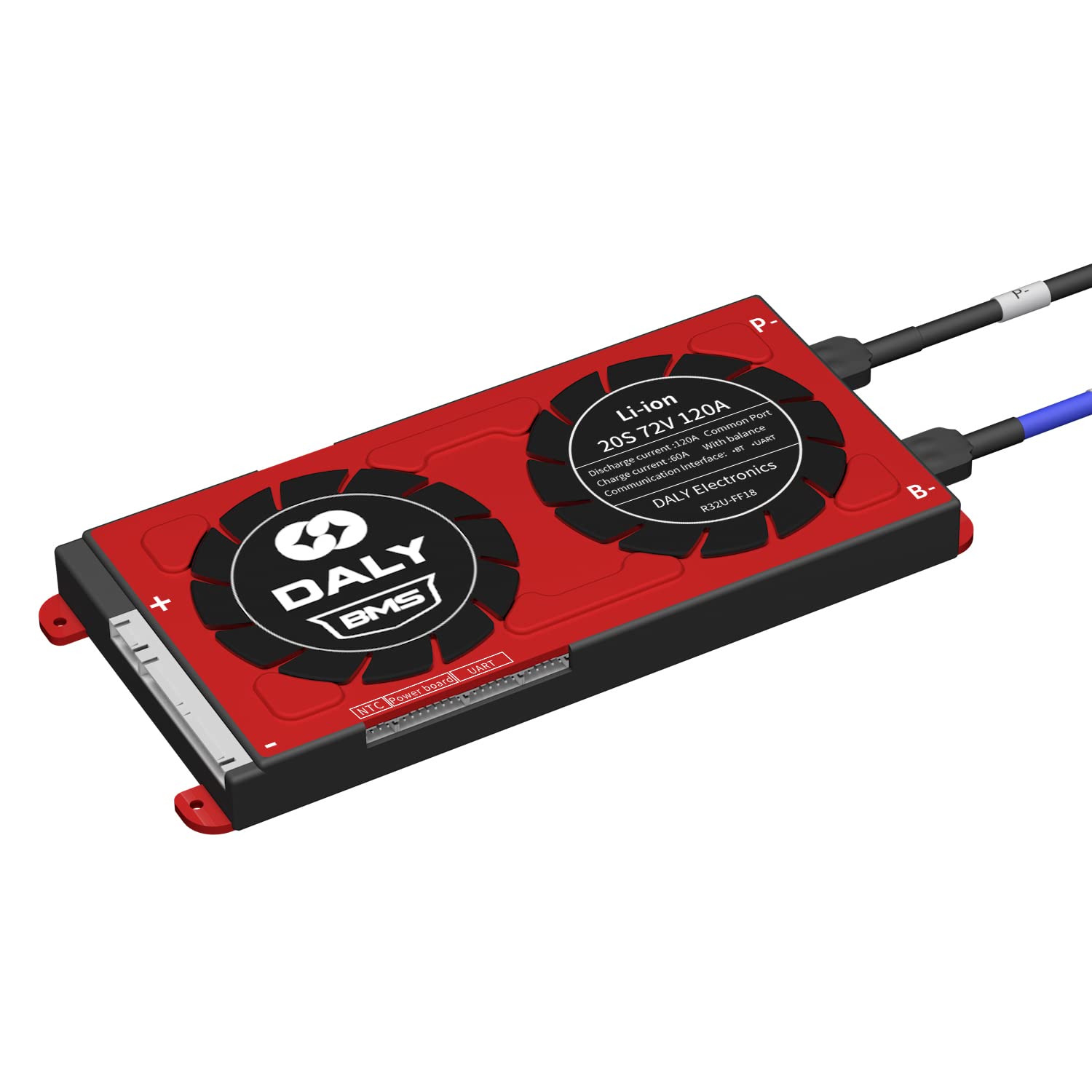
Figure 4.1: DALY Smart BMS Li-ion 72V 20S 120A with main terminals and balance port.

Figure 4.2: DALY Smart BMS with connected Bluetooth module and mobile app interface, demonstrating real-time monitoring capabilities.

Figure 4.3: UART and Bluetooth communication ports on the DALY Smart BMS, allowing connectivity to PC and mobile devices.
5. Specifications
Technical specifications for the DALY Smart BMS Li-ion 72V 20S 120A:

Figure 5.1: DALY Smart BMS technical specifications table.
| Parameter | Value |
|---|---|
| Product Type | Li-ion 20S 120A (Common Port with Balance) |
| Communication Interfaces | UART, Bluetooth |
| Discharge Current | 120A |
| Over-discharge Current | 180A |
| Charge Current | 60A |
| Overcharge Current | 180A |
| Overcharge Voltage (per string) | 4.25V ± 0.05V |
| Over-discharge Voltage (per string) | 2.7V ± 0.05V |
| Charge Voltage | S * 4.2V (where S is the number of series cells) |
| Dimensions | 95 x 212 x 20 mm |
| Output Wire Gauge / Length | 6AWG / 160 mm |
| Balance Wires Gauge / Length | 22AWG / 600 mm |
6. Setup and Installation
Careful installation is critical for the proper function and safety of the BMS. It is recommended that installation be performed by a qualified professional.
Required Tools:
- Soldering machine (suggested 662°F/350°C)
- Scissors
- Double-sided tape
- Tin wire
- Multimeter
Wiring Instructions:
- Important: Before welding the black (B-) and red (P-) main power wires to the battery pack, you must disconnect the balance wires from the BMS connection port.
- Weld the main power wires (B- and P-) to the battery pack. Ensure secure and correct polarity connections.
- Connect the balance wires (sampling cable) to each cell string of your battery pack. Use a multimeter to verify the voltage of each string connection.
- After confirming that the balance wires are welded correctly, connect the balance wires harness to the BMS connection port.
- Connect any additional accessories such as the UART cable, Bluetooth module, RS485, or CAN module to their respective ports on the BMS.
- Ensure the red cooling surface side of the BMS remains uncovered to allow for adequate heat dissipation.

Figure 6.1: Detailed wiring diagram for DALY Smart BMS, showing connections to battery pack, motor, charger, and communication modules.
7. Operating Instructions
Initial Activation:
After completing the wiring, press the activation button on the BMS board to power it on for the first time.
Smart Features (Bluetooth App / PC Software):
The DALY Smart BMS allows you to monitor battery status and modify parameters using a dedicated Bluetooth application on your smartphone or PC software.
- Bluetooth Module: Connect the Bluetooth module to the designated port on the BMS. Download the official DALY BMS app from your device's app store.
- UART Communication: Use the provided UART cable to connect the BMS to a computer for monitoring and parameter adjustment via PC software.
- Parameter Settings: The BMS comes with default protection parameters. It is crucial to set the correct battery pack capacity (AH) in the app or software. Incorrect capacity settings will lead to inaccurate remaining power percentage readings. Other parameters can also be adjusted as needed.
- Initial APP Password: The default password for the Smart board APP to change parameters is 123456. Change this password after initial setup for security.
- Resetting Bluetooth Module: If you experience connection issues with the Bluetooth module, a reset function is available. Refer to the app or PC software interface for specific instructions on how to perform a reset.
8. Maintenance
To ensure the longevity and optimal performance of your DALY Smart BMS:
- Regularly check all wiring connections for tightness and signs of corrosion.
- Keep the BMS clean and free from dust and debris.
- Ensure adequate ventilation around the BMS, especially for the cooling surface, to prevent overheating.
- Periodically monitor battery cell voltages and overall pack health using the Bluetooth app or PC software.
9. Troubleshooting
If you encounter issues with your DALY Smart BMS, consider the following troubleshooting steps:
- No Power/BMS Not Activating:
- Verify that the main power wires (B- and P-) are correctly connected and secured.
- Ensure the balance wires are properly connected to each cell and to the BMS port.
- Press the activation button on the BMS board.
- Bluetooth Connection Issues:
- Ensure the Bluetooth module is securely connected to the BMS.
- Check if the Bluetooth function is enabled on your smartphone.
- Try resetting the Bluetooth module (refer to app/software for specific steps).
- Update the DALY BMS app to the latest version. Older app versions may have compatibility issues.
- Inaccurate State of Charge (SOC) / Remaining Power:
- Verify that the battery pack's actual capacity (AH) is correctly set in the BMS app or PC software.
- BMS Not Charging/Discharging:
- Check for any active protection alarms (e.g., overcharge, overdischarge, overcurrent, temperature) displayed in the app/software. Address the cause of the alarm.
- Ensure all main power and balance wire connections are solid.
- Error Messages (e.g., "Collection Chip Err"):
- This indicates a potential issue with the cell voltage monitoring circuitry. Re-check balance wire connections. If the error persists, contact customer support.
10. Warranty and Support
DALY is committed to customer satisfaction. We offer 24-hour one-on-one customer service and lifetime technical support for your DALY Smart BMS. If you require assistance with installation, operation, or troubleshooting that is not covered in this manual, please do not hesitate to contact our support team.
For customized BMS solutions or bulk orders, please contact DALY Electronics directly.
Related documents20S72


Ask a question about this manual
Ask about setup, troubleshooting, compatibility, parts, safety, or missing instructions. Manuals+ will review the question and use this page’s manual context to help answer it.