
BOMATA T201A
BOMATA T201A Digital Instant Read Thermometer User Manual
Model: T201A | Brand: BOMATA
1. Introduction
Thank you for purchasing the BOMATA T201A Digital Instant Read Thermometer. This manual provides detailed instructions for the proper use, maintenance, and troubleshooting of your new thermometer. Please read this manual thoroughly before use to ensure optimal performance and longevity of the device.
The BOMATA T201A is designed for quick and accurate temperature measurements of food, liquids, and other substances, making it ideal for cooking, BBQ, and various household applications. Its waterproof design and long probe ensure safety and ease of use.
2. Product Overview and Features
The BOMATA T201A thermometer is packed with features to provide a reliable and user-friendly experience.
- IPX7 Waterproof Rating: The entire body of the thermometer is waterproof, allowing for easy rinsing under running water for cleaning. Note: Do not immerse in hot water or wash in a dishwasher.
- Long Probe: Equipped with a 13.7 cm (5.4 inch) food-grade 304 stainless steel probe, ensuring safety from heat and reaching deep into food or liquids.
- Large Backlit LCD Display: A 4 x 1.8 cm (1.57 x 0.7 inch) LCD screen with backlight provides clear and easy-to-read temperature readings, even in low light conditions.
- Fast Response & High Accuracy: Delivers temperature readings in 2-3 seconds with an accuracy of ±0.5 ℃ (between 0 ℃ and 100 ℃).
- Wide Measurement Range: Measures temperatures from -50 ℃ to 300 ℃ (-58 ℉ to 572 ℉).
- Multiple Functions: Features include ℃/℉ switching, HOLD function, MAX/MIN temperature display, calibration, and automatic shutdown.
- Auto-Off Function: Automatically turns off after 10 minutes of inactivity to conserve battery life.
- Magnetic Back: Built-in magnets allow for convenient storage on metallic surfaces like refrigerators.

Figure 2.1: The BOMATA T201A Digital Thermometer, showcasing its waterproof design with a water splash effect and the included probe protection tube.
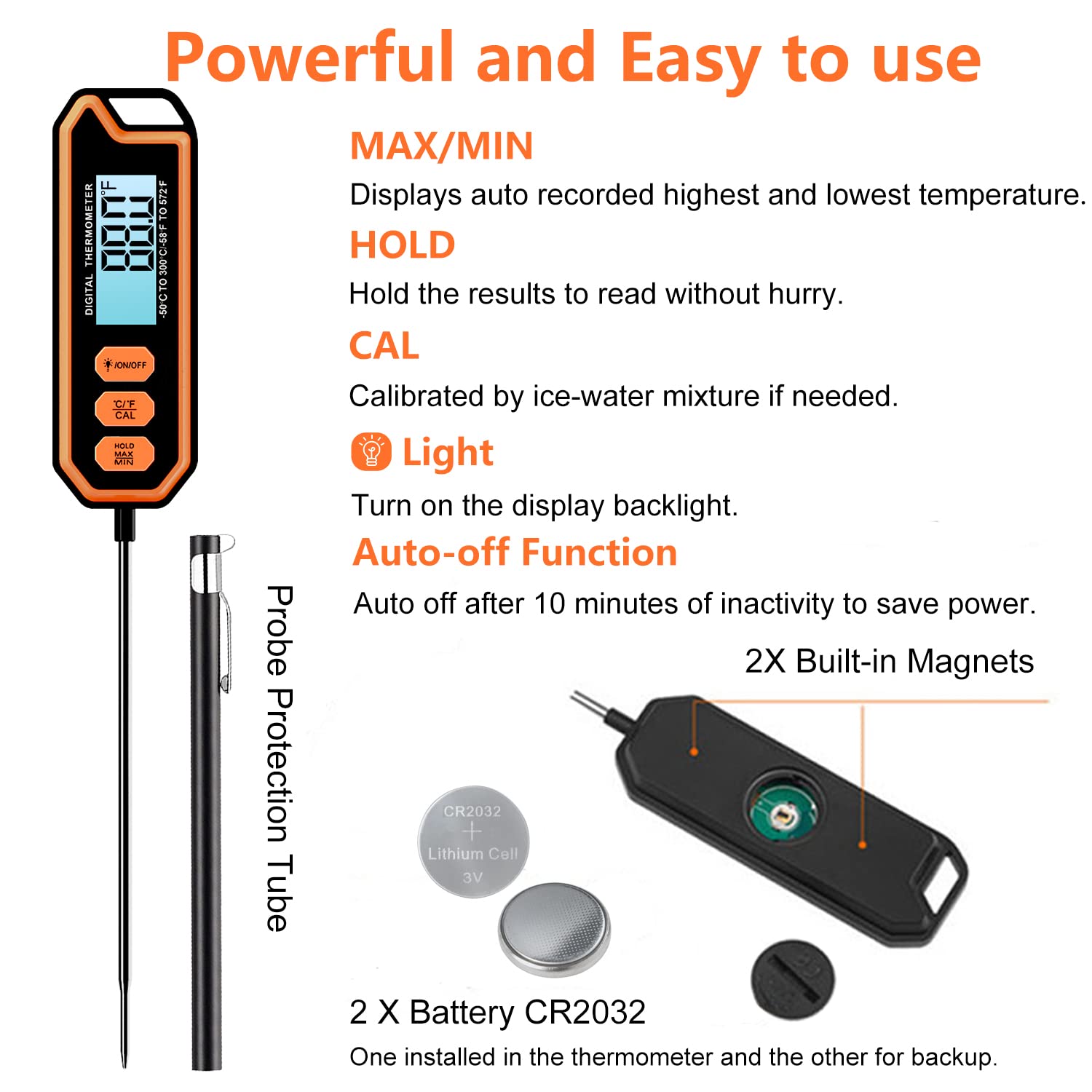
Figure 2.2: Detailed view of the thermometer's buttons (ON/OFF, C/F/CAL, HOLD/MAX/MIN), the probe protection tube, and the battery compartment with two CR2032 batteries.
3. Setup
3.1 Unpacking and Initial Inspection
Carefully remove all components from the packaging. The package should include:
- 1 x BOMATA T201A Digital Thermometer
- 1 x Probe Protection Tube
- 1 x Instruction Manual
- 2 x CR2032 Batteries (one pre-installed, one for backup)
Inspect the thermometer for any visible damage. If any components are missing or damaged, please contact customer support.
3.2 Battery Installation
Your thermometer comes with one CR2032 battery pre-installed and one spare. If the display does not turn on or is dim, you may need to replace the battery.
- Locate the battery compartment on the back of the thermometer.
- Use a small coin or screwdriver to gently twist the battery cover counter-clockwise to open it.
- Remove the old battery (if any) and insert a new CR2032 battery with the positive (+) side facing up.
- Replace the battery cover and twist clockwise to secure it.
Ensure the battery is correctly oriented to avoid damage to the device.
4. Operating Instructions
4.1 Basic Operation
- Power On/Off: Press the "ON/OFF" button to turn the thermometer on or off.
- Insert Probe: Carefully insert the stainless steel probe into the center of the food or liquid you wish to measure. Ensure the probe tip is fully submerged and not touching bones or the bottom of the pan for accurate readings.
- Read Temperature: The temperature will be displayed on the LCD screen within 2-3 seconds.
- Auto-Off: The thermometer will automatically shut off after 10 minutes of inactivity to save battery power.

Figure 4.1: The thermometer in use, measuring the temperature of food on a grill, highlighting its long probe and large LCD display.
4.2 Function Buttons
The thermometer features three main buttons for various functions:
- ℃/℉/CAL Button:
- Press once to switch between Celsius (℃) and Fahrenheit (℉) temperature units.
- Press and hold for 3 seconds to enter calibration mode (see Section 4.3 for calibration instructions).
- HOLD/MAX/MIN Button:
- Press once to "HOLD" the current temperature reading on the display. Press again to release and resume live reading.
- Press and hold for 3 seconds to cycle through MAX (highest recorded temperature) and MIN (lowest recorded temperature) readings. Press again to return to live reading.
- LIGHT/ON/OFF Button:
- Press once to turn the display backlight on or off.
- Press and hold for 3 seconds to turn the thermometer on or off (alternative to quick press).
4.3 Calibration
The thermometer is factory calibrated, but you can re-calibrate it using an ice-water mixture if you suspect inaccuracies.
- Fill a glass with crushed ice and add cold water until the glass is full. Stir the mixture and let it sit for 3-5 minutes.
- Insert the thermometer probe into the center of the ice-water mixture, ensuring the tip is fully submerged and not touching the sides or bottom of the glass.
- Wait for the reading to stabilize (it should be around 0.0℃ or 32.0℉).
- Press and hold the "℃/℉/CAL" button for 3 seconds until "CAL" appears on the display.
- The display will flash "0.0℃" or "32.0℉". If the reading is not exactly 0.0℃ or 32.0℉, the thermometer will automatically adjust to this point.
- Once calibration is complete, the display will return to normal measurement mode.

Figure 4.2: Calibrating the thermometer using an ice-water mixture to ensure accuracy.
5. Maintenance
5.1 Cleaning
Thanks to its IPX7 waterproof rating, cleaning the BOMATA T201A is simple:
- Rinse the entire thermometer under running tap water after each use.
- Use a mild soap if necessary, and wipe with a soft cloth.
- Dry thoroughly before storing.
- IMPORTANT: Do not immerse the thermometer in hot water or place it in a dishwasher, as this can damage the internal components.

Figure 5.1: The thermometer being rinsed under running water, highlighting its IPX7 waterproof capability for easy cleaning.
5.2 Storage
When not in use, store the thermometer in its protective probe tube to prevent damage to the probe. The built-in magnets allow for convenient storage on metallic surfaces.

Figure 5.2: Examples of convenient storage for the thermometer, including using its magnetic back on a refrigerator and hanging it by its loop.
6. Troubleshooting
If you encounter any issues with your BOMATA T201A thermometer, please refer to the table below for common problems and solutions.
| Problem | Possible Cause | Solution |
|---|---|---|
| Display is blank or dim. | Low or dead battery. | Replace the CR2032 battery (refer to Section 3.2). |
| Inaccurate temperature readings. | Probe not fully inserted; probe touching bone/pan; needs calibration. | Ensure probe is fully inserted into the center of the food/liquid. Avoid contact with bones or pan. Perform calibration (refer to Section 4.3). |
| Thermometer turns off too quickly. | Auto-off function activated. | This is normal behavior to save battery. The device automatically turns off after 10 minutes of inactivity. |
| Buttons are unresponsive. | Temporary software glitch; low battery. | Remove and reinsert the battery. If the issue persists, replace the battery. |
7. Specifications
Detailed technical specifications for the BOMATA T201A Digital Instant Read Thermometer:
| Feature | Detail |
|---|---|
| Model | T201A |
| Measurement Range | -50 ℃ to 300 ℃ (-58 ℉ to 572 ℉) |
| Temperature Accuracy | ±0.5 ℃ (between 0 ℃ and 100 ℃) |
| Response Time | 2-3 seconds |
| Waterproof Rating | IPX7 |
| Probe Length | 13.7 cm (5.4 inches) |
| Total Length | 26 cm (10.2 inches) |
| Probe Material | Food-grade 304 Stainless Steel |
| Display Type | Large LCD with Backlight (4 x 1.8 cm / 1.57 x 0.7 inches) |
| Power Supply | 1 x CR2032 3.0V Battery (2 included) |
| Product Net Weight | 55.8 g (0.12 lbs) |
| Dimensions (L x W x H) | 25.98 x 3.96 x 1.83 cm (10.23 x 1.56 x 0.72 inches) |
| Special Feature | Waterproof, Backlight, Calibration, Auto-Off, MAX/MIN, HOLD, Magnetic Back |
8. Warranty and Support
BOMATA is committed to creating quality products and services. The BOMATA T201A Thermometer comes with a one-year warranty from the date of purchase.
If the product does not meet your expectations or if you encounter any issues not covered in the troubleshooting section, please do not hesitate to contact BOMATA customer support for assistance, refund, or replacement.
For support, please refer to the contact information provided on the product packaging or the official BOMATA website.
Ask a question about this manual
Ask about setup, troubleshooting, compatibility, parts, safety, or missing instructions. Manuals+ will review the question and use this page’s manual context to help answer it.