
De'Longhi PAC EL112 CST WiFi
Contents
De'Longhi Pinguino PAC EL112 CST WiFi Mobile Air Conditioner User Manual
Model: PAC EL112 CST WiFi
Introduction
Thank you for choosing the De'Longhi Pinguino PAC EL112 CST WiFi Mobile Air Conditioner. This appliance is designed to provide optimal comfort in your home through efficient cooling, dehumidifying, and fan functions. Featuring MyEcoRealFeel technology, App, and voice control, this unit offers advanced convenience and energy efficiency. Please read this manual carefully before using the appliance to ensure proper operation, maintenance, and safety.
Safety Information
Always observe the following safety precautions to reduce the risk of electric shock, fire, or injury.
- Ensure the power supply voltage matches the rating label on the appliance.
- Do not operate the appliance with a damaged cord or plug.
- Keep the appliance away from heat sources and direct sunlight.
- Do not block air inlets or outlets.
- This appliance uses R290 refrigerant. Do not puncture the refrigerant circuit.
- Always unplug the appliance before cleaning or maintenance.
- Do not use the appliance in wet or damp environments.
- Keep children and pets away from the appliance during operation.
Product Overview
Familiarize yourself with the main components of your De'Longhi Pinguino PAC EL112 CST WiFi.

Figure 1: Front view of the De'Longhi Pinguino PAC EL112 CST WiFi Mobile Air Conditioner, showing its compact and modern design.

Figure 2: The mobile air conditioner positioned in a room, demonstrating its integration into a home environment.
Main Components:
- Control Panel (top and side)
- Air Outlet Grille
- Air Filter (rear)
- Exhaust Air Outlet (rear)
- Condensate Drain Plug (rear bottom)
- Castor Wheels
- Remote Control
Setup
1. Unpacking
Carefully remove the appliance from its packaging. Retain the original packaging for future storage or transport. Check for any damage during transit.
2. Placement
Place the air conditioner on a flat, stable surface. Ensure there is at least 50 cm (20 inches) of clear space around the unit for proper airflow. The unit is equipped with castor wheels for easy movement.
3. Exhaust Hose Installation
The exhaust hose is crucial for expelling hot air outside.
- Screw the exhaust hose connector onto the exhaust hose.
- Insert the other end of the exhaust hose into the exhaust air outlet on the back of the appliance.
- Extend the hose to the nearest window or opening. Ensure the hose is as straight and short as possible to maximize efficiency.
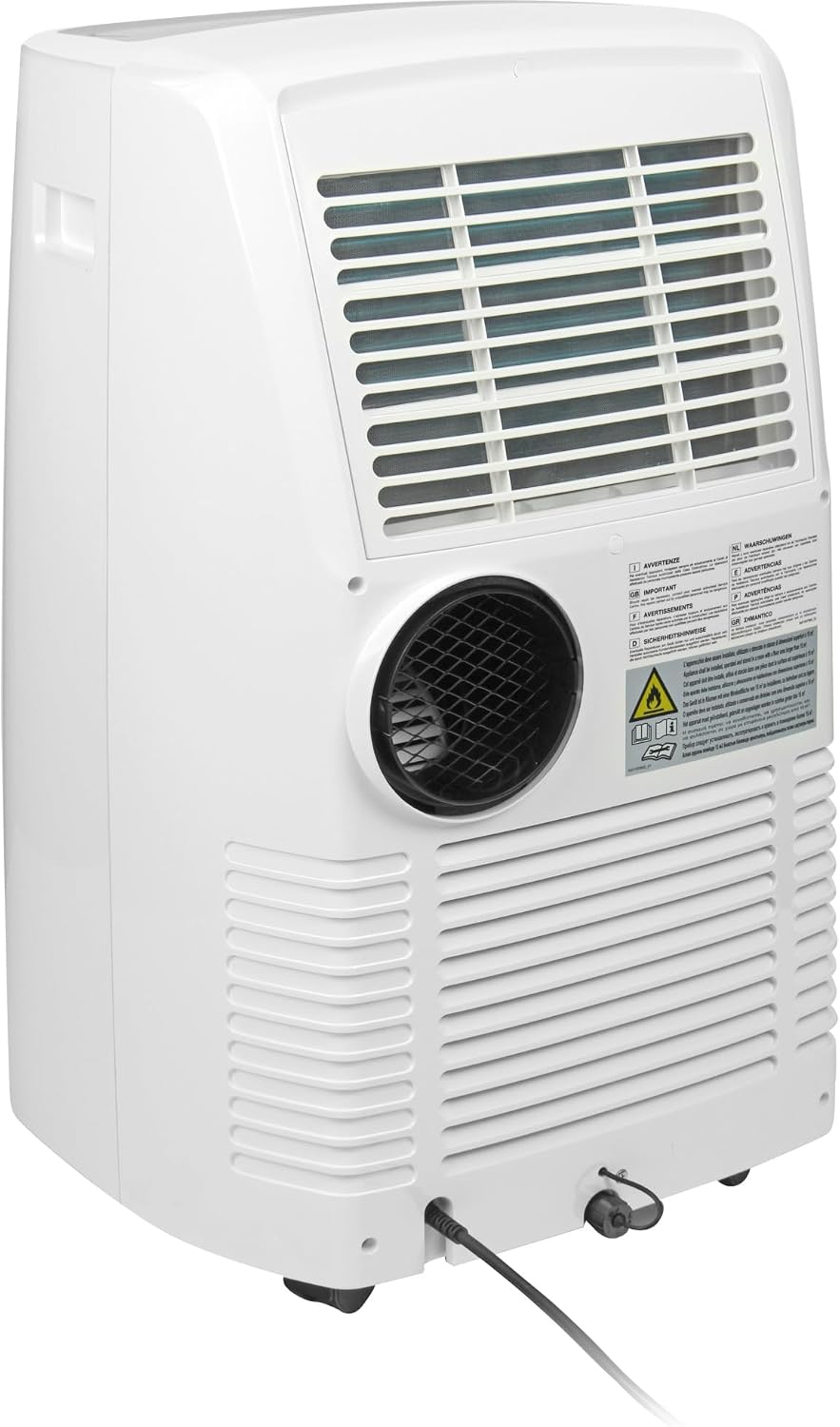
Figure 3: Rear view of the air conditioner, highlighting the exhaust air outlet for hose connection.

Figure 4: Included accessories: the flexible exhaust hose and components of the window kit.
4. Window Kit Installation
Use the provided window kit to seal the window opening and prevent hot air from re-entering the room.
- Assemble the window kit according to your window type (sliding or casement).
- Securely fit the window kit into the window opening.
- Attach the exhaust hose nozzle to the opening in the window kit.
- Ensure a tight seal to maximize cooling efficiency.
Operating Instructions
1. Control Panel
The unit features an intuitive control panel on the top and side for easy operation.

Figure 5: Top control panel with various function buttons.
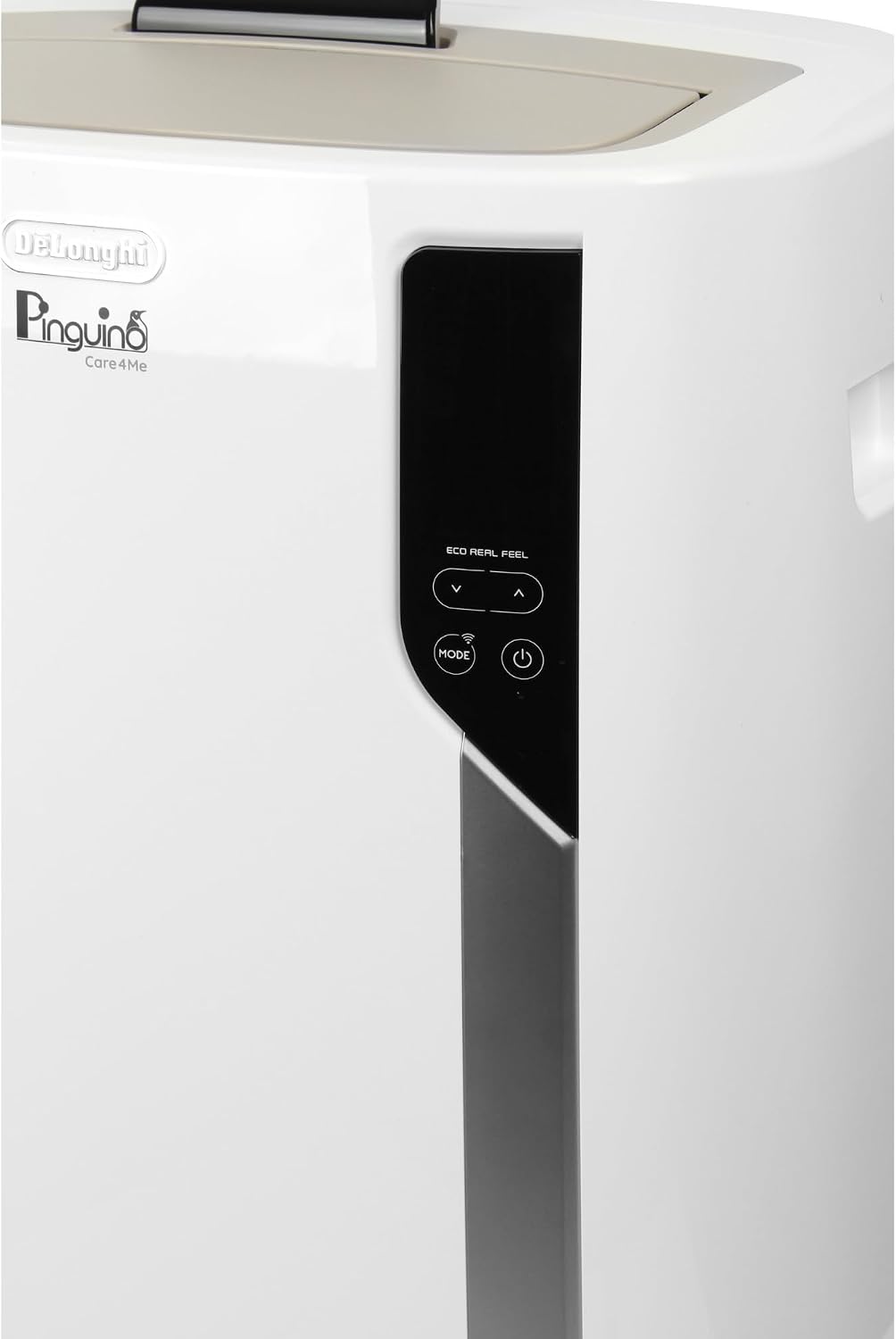
Figure 6: Side control panel, showing additional controls and display.
2. Remote Control
The included remote control allows convenient operation from a distance. Ensure batteries are correctly inserted.
3. Operating Modes
- Cooling Mode (Cool): Provides powerful cooling. Set your desired temperature using the + and - buttons.
- Dehumidifying Mode (Dry): Reduces humidity in the room without significant cooling.
- Fan Mode (Fan): Circulates air without cooling. You can select different fan speeds.
4. MyEcoRealFeel Technology
MyEcoRealFeel technology automatically adjusts operation based on your personal comfort preferences, optimizing both temperature and humidity for ideal conditions while minimizing energy consumption. This feature is accessible via the De'Longhi App.
5. Wi-Fi and App Control
Connect your Pinguino to your home Wi-Fi network to enable control via the De'Longhi App.
- Download the "De'Longhi Comfort" App from your smartphone's app store.
- Follow the in-app instructions to pair your appliance with your Wi-Fi network.
- Once connected, you can control modes, temperature, fan speed, and access MyEcoRealFeel features remotely.
6. Voice Control
The appliance supports voice control through compatible smart speaker systems. Refer to the App for detailed instructions on integrating with voice assistants.
Maintenance
Regular maintenance ensures optimal performance and extends the lifespan of your air conditioner. Always unplug the unit before performing any maintenance.
1. Cleaning the Air Filter
The air filter should be cleaned regularly (at least once every two weeks, or more often if used frequently).
- Locate the air filter on the rear of the unit.
- Remove the filter.
- Clean the filter using a vacuum cleaner or wash it gently with lukewarm water and a mild detergent.
- Allow the filter to dry completely before reinserting it.
2. Draining Condensate
The unit is designed to evaporate most of the condensate automatically. However, in high humidity conditions, the internal tank may fill up, and the unit will stop operating.
- Turn off and unplug the appliance.
- Place a shallow pan or container under the drain plug at the bottom rear of the unit.
- Remove the drain plug to allow water to flow out.
- Once drained, replace the drain plug securely.

Figure 7: Location of the condensate drain plug at the bottom rear of the unit.
3. Storage
When storing the unit for an extended period:
- Drain all condensate.
- Clean the air filter.
- Store the unit upright in a dry, cool place, preferably in its original packaging.
Troubleshooting
If you encounter issues with your appliance, refer to the table below for common problems and solutions.
| Problem | Possible Cause | Solution |
|---|---|---|
| Unit does not turn on. | No power supply; power cord not plugged in; circuit breaker tripped. | Check power connection; reset circuit breaker. |
| Unit is running but not cooling. | Air filter is dirty; exhaust hose not properly installed; room too large; windows/doors open. | Clean air filter; ensure exhaust hose is sealed; close windows/doors; consider room size. |
| Unit is noisy. | Unit not on a flat surface; air filter dirty; internal components vibrating. | Place on a flat surface; clean air filter. Note: Some operating noise is normal. |
| Water leakage. | Condensate drain plug loose or open; unit tilted. | Ensure drain plug is secure; place unit on a level surface. |
| App control not working. | Wi-Fi connection issue; incorrect pairing. | Check Wi-Fi router; re-pair the unit with the App. |
If the problem persists after trying these solutions, please contact De'Longhi customer support.
Specifications
Key technical specifications for the De'Longhi Pinguino PAC EL112 CST WiFi.
| Feature | Detail |
|---|---|
| Brand | De'Longhi |
| Model Number | PAC EL112 CST WiFi |
| Cooling Capacity | 11,000 BTU/h (2.9 kW) |
| Recommended Room Size | Up to 110 m³ |
| Energy Efficiency Class | A+ |
| Annual Energy Consumption | 3 Kilowatt-hours (per 60 minutes) |
| Noise Level | 63 dB |
| Refrigerant | R290 (Propane, GWP=3) |
| Power | 950 Watts |
| Voltage | 220 Volts |
| Dimensions (L x W x H) | 45 x 41 x 75 cm (17.7 x 16.1 x 29.5 inches) |
| Weight | 36.8 Kilograms (81.1 lbs) |
| Special Features | Wi-Fi enabled, MyEcoRealFeel Technology, App and Voice Control |
| Included Components | Remote control, exhaust hose, mounting adapter |

Figure 8: Energy label indicating A+ efficiency, 2.9 kW cooling, 3.1 EER, 63 dB noise, and 0.9 kWh/60min consumption.
Warranty and Support
De'Longhi products come with a standard manufacturer's warranty. For specific warranty terms and conditions, please refer to the warranty card included with your product or visit the official De'Longhi website.
For technical assistance, spare parts, or service inquiries, please contact De'Longhi customer support. You can find contact information on the official De'Longhi website or in the documentation provided with your appliance.
Online Resources:
Ask a question about this manual
Ask about setup, troubleshooting, compatibility, parts, safety, or missing instructions. Manuals+ will review the question and use this page’s manual context to help answer it.