
Introduction
The NineSky H2 Dehumidifier is designed to efficiently remove excess moisture from your indoor environment, creating a more comfortable and healthier living space. Utilizing semiconductor condensation technology, it can extract up to 34 ounces of water per day under optimal conditions (30℃, 80% RH). This compact and portable unit features an auto shut-off function for safety and includes a 5-color LED light for ambient illumination.
This manual provides essential information for the safe and effective operation and maintenance of your NineSky H2 Dehumidifier.
Key Features
- Efficient Dehumidification: Employs semiconductor condensation technology to remove up to 34 OZ/day of moisture.
- Auto Shut-Off Protection: Automatically turns off when the 98 OZ water tank is full, preventing overflow.
- Ultra-Quiet Operation: Operates at less than 40dB, suitable for bedrooms and quiet environments.
- 5-Color LED Light: Features customizable ambient lighting with blue (default), purple, orange, yellow, or no light options.
- Compact and Portable Design: Measures approximately 10"(L) x 6.1"(W) x 14.2"(H) with a built-in handle and cord storage for easy relocation and organization.
- Wide Coverage: Effective for areas up to 800 sq. ft., ideal for bedrooms, bathrooms, basements, and RVs.
Setup
- Unpacking: Carefully remove the dehumidifier from its packaging. Ensure all packing materials are removed.
- Placement: Place the dehumidifier on a flat, stable surface in the desired room. Ensure there is adequate space around the unit for proper air circulation (at least 10 cm from walls or furniture).
- Power Connection: Locate the power cord storage slot on the side of the unit. Unwind the power cord and plug the dehumidifier into a standard 120V AC electrical outlet.

Figure 1: NineSky H2 Dehumidifier plugged in and ready for operation.
Operating Instructions
- Power On/Off: Press the power button (⏻) located on the top of the unit to turn the dehumidifier ON or OFF. The blue indicator lights will illuminate when the unit is running.
- LED Light Control:
- To activate the light switch mode, press and hold the power button for 5 seconds. The indicator lights will blink.
- Once in light switch mode, press the power button again to cycle through the 5 available colors (Blue, Purple, Orange, Yellow) or to turn the light off.
- Auto Shut-Off: The dehumidifier is equipped with an automatic shut-off feature. When the water tank reaches its full capacity, the unit will stop operating, and a red indicator light will flash, accompanied by an audible beep. This prevents water overflow.
Video 1: Demonstrates the power on/off function, LED light color changes, and auto shut-off feature of the NineSky H2 Dehumidifier.
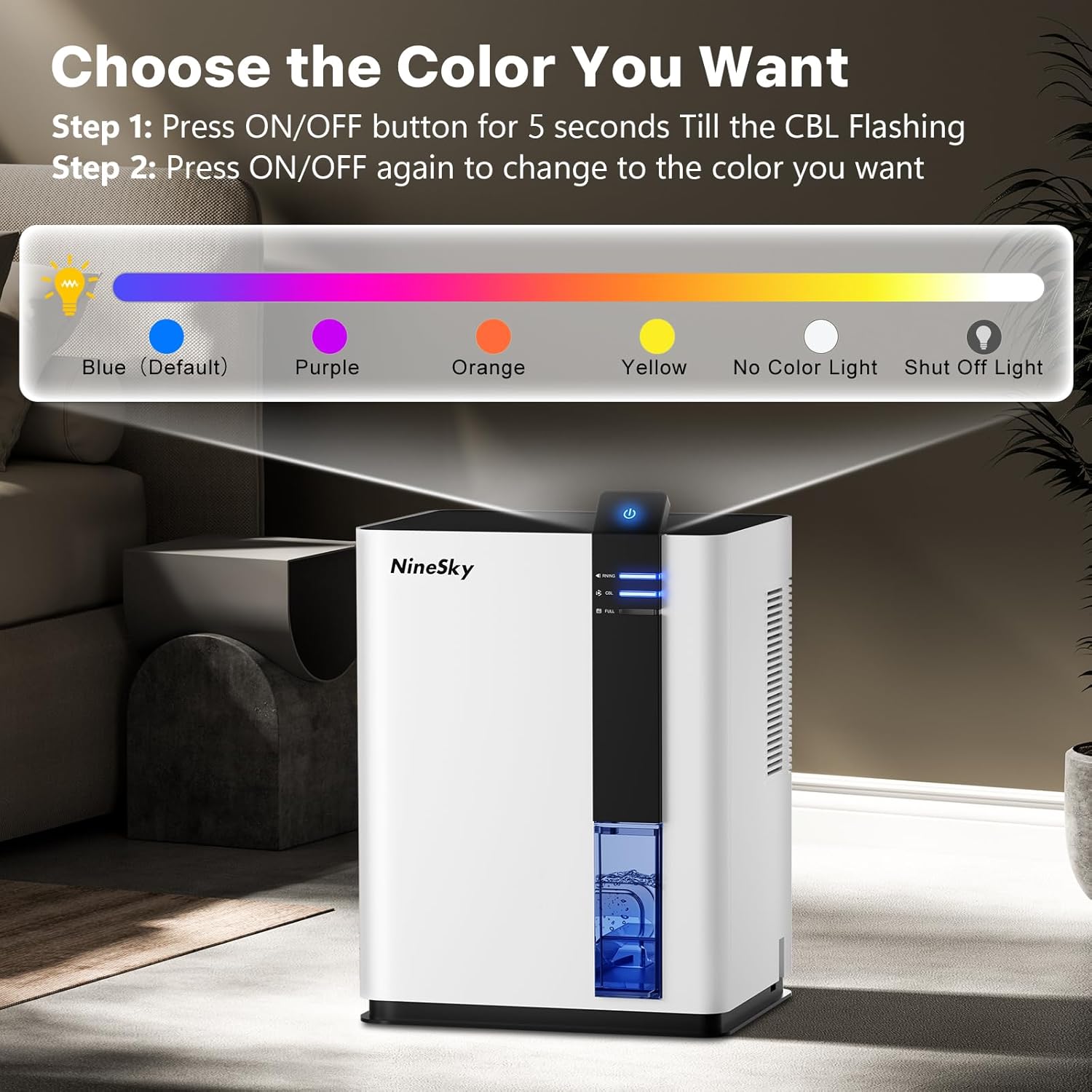
Figure 2: Instructions for changing the LED light colors on the NineSky H2 Dehumidifier.
Maintenance
- Emptying the Water Tank:
- When the water tank is full, the unit will automatically shut off.
- Turn off the dehumidifier and carefully pull out the water tank from the back of the unit.
- Open the tank lid and discard the collected water.
- Replace the tank lid securely and slide the empty water tank back into the dehumidifier until it clicks into place.
- Cleaning: Regularly wipe the exterior of the unit with a soft, damp cloth. Do not use abrasive cleaners or solvents.

Figure 3: Step-by-step guide to emptying the water tank.
Video 2: Demonstrates the process of removing, emptying, and reinserting the water tank.
Specifications
| Feature | Detail |
|---|---|
| Brand | NineSky |
| Model Name | H2 |
| Floor Area Coverage | 800 Square Feet |
| Water Tank Capacity | 98 OZ (2500 Milliliters) |
| Dehumidification Capacity | 34 OZ/day (under 30℃, 80% RH) |
| Noise Level | <40dB |
| Special Features | Automatic Shutoff, Portable, Quiet Operation, Removable Tank, 5 Colors LED Light |
| Product Dimensions | 6.1"D x 10"W x 14.2"H |
| Material | Plastic |
| Item Weight | 6.89 pounds |
Troubleshooting
If the dehumidifier is not operating as expected, please check the following:
- Unit not turning on: Ensure the power cord is securely plugged into a working electrical outlet.
- Unit not collecting water: Verify that the water tank is correctly inserted. Check the humidity level in the room; the unit may not collect water if the humidity is already low.
- Unit automatically shut off: The water tank may be full. Empty the tank and reinsert it properly.
- LED light not changing: Ensure you are pressing and holding the power button for 5 seconds to enter light switch mode before attempting to change colors.
