
Introduction
Thank you for choosing the K&F Concept K234A0+BH-28L Camera Tripod. This manual provides essential information for the safe and effective use of your new tripod. Please read it thoroughly before use and retain it for future reference.
Safety Information
- Ensure the tripod is stable on a flat surface before mounting any equipment.
- Do not exceed the maximum load capacity of 8kg. Overloading can cause damage to the tripod and attached equipment.
- Always lock all leg sections and the ball head securely before use.
- Avoid using the tripod in strong winds or unstable environments without additional stabilization (e.g., hanging weight from the hook).
- Do not expose the product to high temperatures or direct sunlight for extended periods.
- Keep the tripod away from moisture, sand, and dust. Do not immerse it in seawater.
- This product is designed for photography and videography purposes only. Do not use it as a trekking pole or for other unintended purposes.
- Handle with care to prevent accidental damage to the tripod or connected devices.
Components Overview
Familiarize yourself with the main parts of your K&F Concept K234A0+BH-28L tripod:
- Tripod Legs: 4-section adjustable legs with flip locks.
- Center Column: Extendable column for additional height, reversible for macro photography.
- Ball Head (BH-28L): 28mm ball head with 360-degree rotation, quick release plate, and spirit level.
- Quick Release Plate: With 1/4" screw for attaching cameras and other devices.
- Leg Angle Adjustment Locks: Three adjustable angles for stability on various terrains.
- Hook: Located at the bottom of the center column for hanging weights to increase stability.
- Smartphone Holder: Included accessory for mounting smartphones.
- Carry Bag: For convenient transport and storage.
- Hex Key: For minor adjustments.

Image: K&F Concept K234A0+BH-28L Tripod with a camera attached, showing its full extension and ball head. Key specifications like 4 sections, 2.3cm diameter, 163cm max height, 39cm folded height, 8kg load capacity, and 1.24kg weight are displayed.
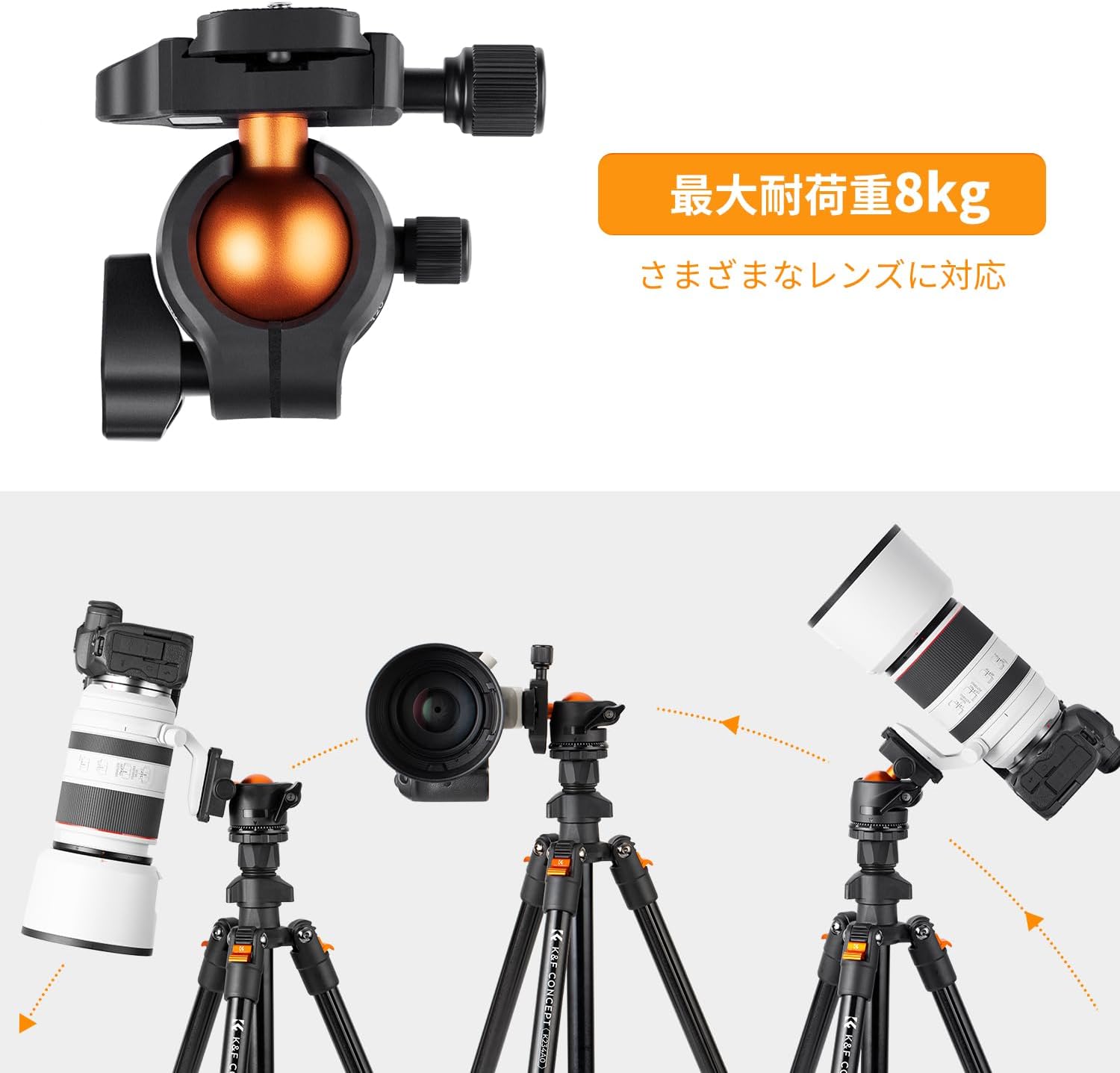
Image: Close-up view of the BH-28L ball head, highlighting its design and controls. Specifications for the ball head are shown: 8kg load capacity, 2.8cm ball diameter, 3/8" mounting screw, 8cm height, and synthetic nylon material.

Image: The complete package contents, including the tripod, carry bag, smartphone holder, and instruction manual.
Setup Instructions
1. Unfolding the Tripod
- Release the leg angle adjustment locks on each leg.
- Extend the tripod legs by pulling them outwards.
- Adjust the leg angles to your desired position and secure the leg angle adjustment locks. There are three alternative angles available for stability on various terrains.
- Extend each leg section by opening the flip locks, pulling out the section, and then closing the flip lock to secure it. Repeat for all sections on each leg.

Image: Illustration showing the tripod legs being adjusted to different angles, demonstrating the three-stage leg angle adjustment system for stability on uneven surfaces.
2. Attaching the Camera/Device
- Ensure the quick release plate is detached from the ball head. If not, loosen the quick release plate knob and slide it off.
- Attach the quick release plate to the bottom of your camera or device using the 1/4" screw. Tighten securely.
- Slide the quick release plate with your camera back onto the ball head. Ensure it clicks into place and tighten the quick release plate knob to prevent accidental detachment.
- If using a smartphone, attach the smartphone holder to the quick release plate first, then secure your smartphone in the holder.

Image: Close-up of the quick release plate with the 1/4" screw, ready for camera attachment.
Operating Instructions
1. Adjusting Height
- Leg Sections: Open the flip locks on each leg section, extend to the desired height, and close the flip locks firmly.
- Center Column: Loosen the center column locking knob, extend the center column to the desired height, and tighten the knob securely. The maximum height with the center column extended is 160cm.

Image: Visual representation of the tripod at various heights, from folded (395mm/15.55") to fully extended (1630mm/64.17"), illustrating the flexibility of height adjustment.
2. Ball Head Adjustments
- Tilting/Panning: Loosen the main knob on the ball head to adjust the camera angle freely. Tighten the knob to secure the position.
- 360-degree Panning: The ball head features a separate panning lock. Loosen this lock to rotate the camera 360 degrees horizontally for panoramic shots. Tighten to secure.

Image: A camera mounted on the tripod, demonstrating 360-degree panoramic rotation with a scale for precise adjustments. The background shows a scenic landscape.
3. Macro Photography (Inverted Center Column)
- To achieve low-angle or macro shots, the center column can be inverted.
- Remove the ball head from the top of the center column.
- Fully extend and remove the center column from the tripod base.
- Reinsert the center column upside down into the tripod base.
- Reattach the ball head to the inverted center column. This allows your camera to be positioned very close to the ground.

Image: The tripod set up with its center column inverted, allowing a camera to be positioned for macro photography of a mushroom on moss.
Maintenance
- After each use, especially in dusty or sandy environments, wipe down the tripod with a soft, dry cloth.
- If exposed to moisture, dry the tripod thoroughly before storing.
- Periodically check all screws and locking mechanisms for tightness. Tighten if necessary.
- Avoid using harsh chemicals or abrasive materials for cleaning, as this can damage the finish.
- Store the tripod in its carry bag in a cool, dry place when not in use.
Troubleshooting
| Problem | Solution |
|---|---|
| Tripod feels unstable. | Ensure all leg sections and leg angle locks are fully extended and securely fastened. Check if the center column is tightened. For added stability, hang a weight from the hook at the bottom of the center column. |
| Camera is tilting after adjustment. | Ensure the ball head's main locking knob is tightened sufficiently. Also, verify that the quick release plate is securely attached to both the camera and the ball head. |
| Leg sections are difficult to extend/retract. | Clean the leg sections to remove any dirt or sand. Apply a small amount of silicone lubricant if necessary, but avoid oil-based lubricants. |
| Quick release plate is stuck. | Ensure the quick release plate knob is fully loosened. Gently wiggle the plate while sliding it off. Do not force it. |
Specifications
| Feature | Detail |
|---|---|
| Model Name | K234A0+BH-28L |
| Brand | K&F Concept |
| Material | Aluminum Alloy |
| Leg Sections | 4 |
| Max Height (with EV) | 160 cm (63 inches) |
| Folded Height | 39 cm (15.35 inches) |
| Max Load Capacity | 8 kg (17.6 lbs) |
| Product Weight | 1.16 kg (2.56 lbs) |
| Ball Head Type | BH-28L Ball Head (28mm ball diameter) |
| Mounting Screw | 1/4" (Quick Release Plate) |
| Compatible Devices | Cameras, Smartphones |
| Included Accessories | Tripod body, carry bag, smartphone holder, instruction manual |
Warranty & Support
K&F Concept is committed to providing high-quality products and excellent customer service. If you encounter any issues or have questions regarding your tripod, please contact our customer service center.
Please refer to the official K&F Concept website or the included warranty card for specific warranty terms and conditions.
For support, visit: www.kentfaith.com