
1. Introduction
Thank you for choosing the BH Vienna Indoor Cycling Bike. This manual provides essential information for the safe assembly, operation, and maintenance of your new fitness equipment. Please read this manual thoroughly before using the bike and keep it for future reference. Proper use and maintenance will ensure optimal performance and longevity of your BH Vienna Indoor Cycling Bike.
2. Safety Information
- Consult a physician before starting any exercise program.
- Ensure all parts are correctly assembled and tightened before each use.
- Place the bike on a flat, stable surface with adequate clearance around it.
- Keep children and pets away from the equipment during operation.
- Wear appropriate exercise clothing and footwear. Avoid loose clothing that could get caught in moving parts.
- The maximum user weight for this bike is 130 kg (286 lbs). Do not exceed this limit.
- Stop exercising immediately if you feel faint, dizzy, or experience pain.
- Do not attempt to modify the equipment.
- Always use the emergency brake to stop the flywheel quickly if needed.
3. Product Overview
The BH Vienna Indoor Cycling Bike is designed for home use, offering a smooth and quiet workout experience. Key features include:
- 20 kg Flywheel: Provides a challenging and consistent pedaling experience.
- Magnetic Braking System: Ensures smooth, silent, and maintenance-free resistance.
- Poly-V Belt Drive: Offers quiet operation and requires minimal maintenance.
- Monochrome LCD Monitor: Displays time, speed/RPM, distance, ODO (odometer), calories, and pulse.
- Triathlon Handlebar: Vertically adjustable for various riding positions.
- Adjustable Seat: Horizontal and vertical adjustments for optimal comfort and posture.
- Transport Wheels: For easy relocation of the bike.
- Robust Steel Frame: Supports users up to 130 kg.

Figure 3.1: BH Vienna Indoor Cycling Bike. This image shows the complete bike with a user, highlighting its overall design and transport wheels.
4. Setup and Assembly
The BH Vienna Indoor Cycling Bike requires some assembly. Follow these general steps. Refer to the detailed assembly instructions provided in the packaging for specific diagrams and hardware.
- Unpack Components: Carefully remove all parts from the packaging and lay them out. Check against the parts list to ensure everything is present.
- Attach Stabilizers: Secure the front and rear stabilizer bars to the main frame using the provided bolts and tools. Ensure they are firmly tightened.
- Install Pedals: Attach the left and right pedals to their respective crank arms. Note that the left pedal often has a reverse thread. Tighten securely.
- Mount Seat Post and Seat: Insert the seat post into the frame and secure it at the desired height. Attach the seat to the seat post.
- Install Handlebar Post and Handlebar: Insert the handlebar post into the frame and secure it. Attach the triathlon handlebar to the post.
- Connect Monitor: Connect the monitor cables to the main unit and mount the LCD monitor onto the handlebar.
- Final Check: Double-check all bolts and connections to ensure they are tight and secure before first use.

Figure 4.1: Adjusting the handlebar. This image shows a user adjusting the vertical position of the handlebar, a key step in setting up the bike for comfortable use.
5. Operating Instructions
5.1 Adjusting Seat and Handlebars
Proper adjustment of the seat and handlebars is crucial for comfort and effective training. The BH Vienna allows for both vertical and horizontal adjustments.
- Seat Height: Loosen the adjustment knob on the vertical seat post. Raise or lower the seat until your leg has a slight bend at the knee when the pedal is at its lowest point. Tighten the knob securely. The graduated markings on the post help in recalling your preferred setting.
- Seat Horizontal Position: Loosen the adjustment knob under the seat. Slide the seat forward or backward to achieve a comfortable position relative to the handlebars. Tighten the knob securely.
- Handlebar Height: Loosen the adjustment knob on the handlebar post. Raise or lower the handlebars to a comfortable height, typically level with or slightly higher than the seat for beginners, or lower for a more aggressive cycling posture. Tighten the knob securely.

Figure 5.1: Adjusting the seat. This image shows a user adjusting the vertical position of the seat, ensuring proper leg extension during cycling.
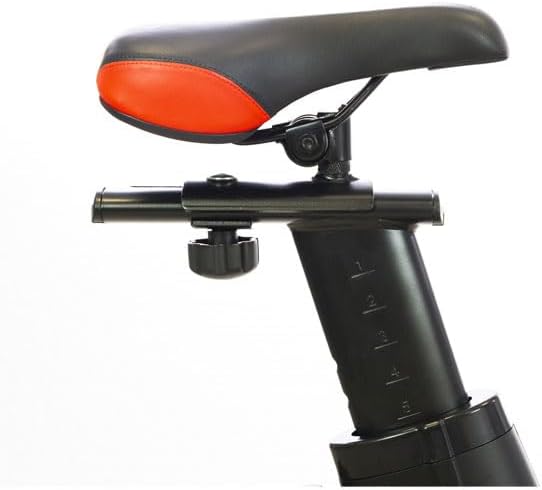
Figure 5.2: Seat adjustment mechanism. This close-up view highlights the horizontal adjustment knob and the robust design of the seat post.
5.2 Using the LCD Monitor
The monochrome LCD monitor tracks your workout data. It typically activates when you start pedaling or press a button.

Figure 5.3: LCD Monitor. This image shows the digital display mounted on the handlebars, providing real-time workout metrics.
- Functions: The monitor displays Time, Speed/RPM, Distance, ODO (total distance), Calories burned, and Pulse (if a compatible chest strap is used).
- Navigation: Use the buttons on the monitor to cycle through different display modes or reset values. Refer to the monitor's specific instructions for detailed button functions.
- Pulse Measurement: The monitor supports telemetric pulse measurement with an optional chest strap (not included). Ensure the chest strap is worn correctly for accurate readings.
5.3 Adjusting Resistance
The BH Vienna features a magnetic braking system for resistance adjustment.
- Resistance Knob: The red knob located on the frame below the handlebars controls the resistance.
- Increase Resistance: Turn the knob clockwise to increase the magnetic resistance, making pedaling harder.
- Decrease Resistance: Turn the knob counter-clockwise to decrease the magnetic resistance, making pedaling easier.
- Emergency Brake: Press the resistance knob down firmly to engage the emergency brake and quickly stop the flywheel.
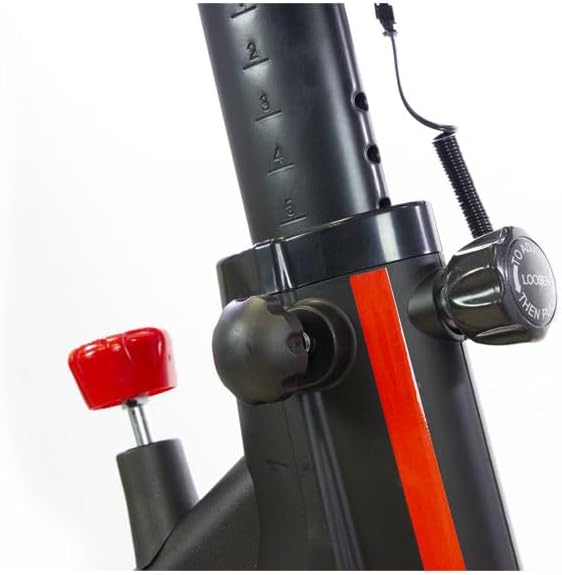
Figure 5.4: Resistance and adjustment knobs. This close-up shows the red resistance knob and the vertical adjustment knob for the handlebar post.
6. Maintenance
Regular maintenance ensures the longevity and safe operation of your BH Vienna Indoor Cycling Bike.
- Cleaning: Wipe down the bike with a damp cloth after each use to remove sweat and dust. Avoid abrasive cleaners or solvents.
- Check Connections: Periodically check all bolts, nuts, and adjustment knobs to ensure they are securely tightened. Loose connections can affect stability and safety.
- Pedals: Ensure pedals are tight. If they become loose, re-tighten them to prevent damage to the crank arms.
- Poly-V Belt: The Poly-V belt system is designed for minimal maintenance and quiet operation. No lubrication is typically required. Inspect for any signs of wear or damage.
- Seat: The seat may show signs of wear over time. If significant deterioration occurs, consider replacement for comfort and hygiene.
- Monitor Batteries: If the monitor display becomes dim or unresponsive, replace the batteries. Refer to the monitor's specific instructions for battery type and replacement procedure.
7. Troubleshooting
| Problem | Possible Cause | Solution |
|---|---|---|
| No resistance or resistance too low | Resistance knob not turned enough; magnetic brake system issue. | Turn the resistance knob clockwise to increase resistance. If the issue persists, contact customer support. |
| Monitor not displaying data or dim | Low or dead batteries; loose cable connection. | Replace monitor batteries. Check the cable connection between the monitor and the bike frame. |
| Unusual noises during operation | Loose bolts or components; worn parts. | Check and tighten all visible bolts and nuts. Inspect pedals, crank arms, and flywheel for any loose or damaged parts. |
| Seat feels unstable or deteriorates quickly | Seat post or seat clamp not tightened; material wear. | Ensure all seat adjustment knobs are fully tightened. If the seat material is worn, consider replacing the seat. |
8. Specifications
| Feature | Detail |
|---|---|
| Model | Vienna |
| Brand | BH |
| Flywheel Weight | 20 kg |
| Braking System | Magnetic |
| Drive System | Poly-V Belt |
| Monitor Display | Monochrome LCD (Time, Speed/RPM, Distance, ODO, Calories, Pulse) |
| Handlebar Type | Triathlon, Vertical Adjustment |
| Seat Adjustment | Horizontal and Vertical |
| Maximum User Weight | 130 kg |
| Dimensions (L x W x H) | 119 x 52 x 126 cm |
| Product Weight | 38.5 kg |
| Usage | Domestic use, up to 20 hours/week |
9. Warranty and Support
For warranty information and customer support, please refer to the warranty card included with your product or visit the official BH Fitness website. Keep your proof of purchase for any warranty claims.
If you encounter any issues not covered in the troubleshooting section, or require replacement parts, please contact BH customer service. Provide your model number (Vienna) and purchase date when contacting support.

